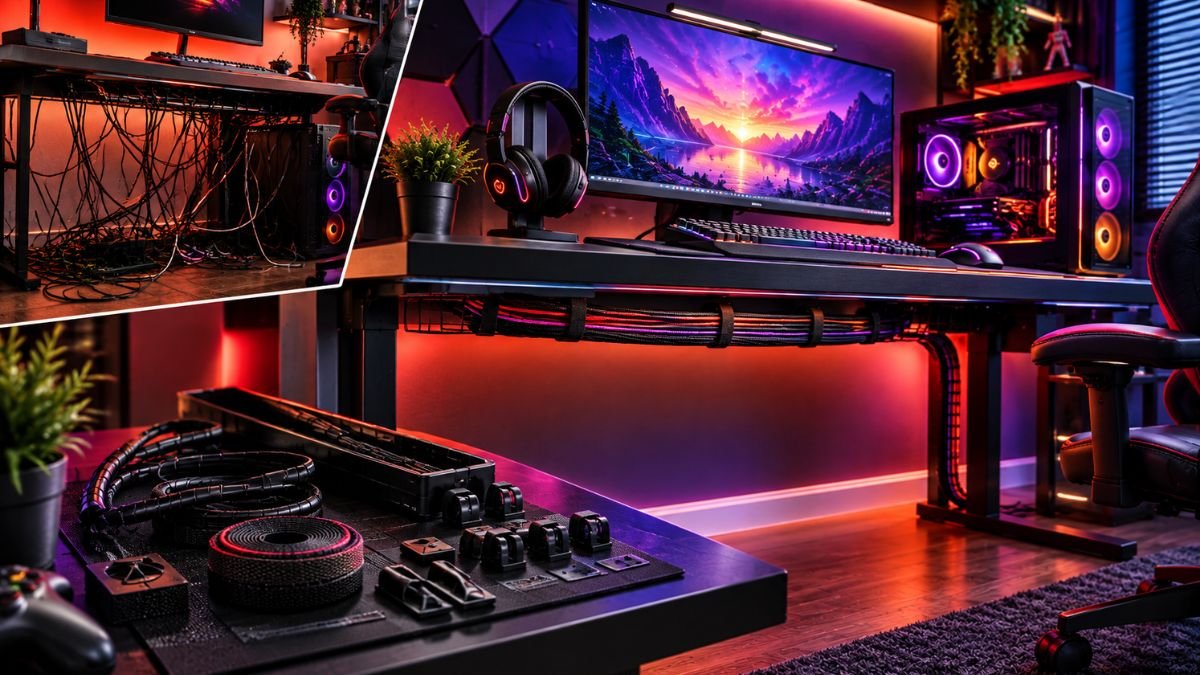
Gaming cable management is the process of organizing, routing, and securing cables in a gaming setup to create a cleaner, safer, and easier-to-maintain workspace. It involves planning cable paths, separating different cable types, and using organization methods to reduce clutter around your desk and PC.
A gaming setup can include many connected devices, including monitors, keyboards, mice, headsets, speakers, controllers, webcams, and charging accessories. Without proper organization, these cables can quickly become tangled and difficult to maintain.
A clean setup is not only about appearance. Good cable management makes it easier to upgrade hardware, troubleshoot problems, clean your workspace, and maintain a more comfortable gaming environment.
Why Is Gaming Cable Management Important?
A messy gaming desk is one of the most common problems faced by PC and console gamers. As more devices are added, the number of cables increases quickly.
Power cables, USB connections, display cables, and accessory wires often create clutter behind and under the desk. Without a system, finding the correct cable or replacing a device can become frustrating.
How Does Cable Management Improve a Gaming Setup?
Proper gaming cable management helps create a more functional workspace by:
- Reducing visible cable clutter
- Making cleaning easier
- Improving access to connections
- Preventing unnecessary cable tension
- Making future upgrades simpler
Many gamers invest time choosing hardware components, but the organization of those components also affects the overall experience.
A well-planned cable system helps every device work together while keeping the workspace practical.
Does Cable Management Affect Gaming Performance?
Gaming cable management does not directly increase FPS, improve graphics quality, or reduce input latency.
However, it can improve the usability of a gaming setup. Organized cables reduce accidental disconnections, make troubleshooting easier, and allow users to modify their setup without rebuilding the entire workspace.
Gaming cable management means creating a planned system for routing, securing, and maintaining cables so a gaming setup remains organized, accessible, and easy to upgrade.
How Should You Plan Gaming Cable Management Before Organizing Your Desk?
The biggest mistake many gamers make is trying to hide cables before understanding how their setup works.
Good cable management starts with planning where devices are positioned, which cables are needed, and how often each connection will be changed.
Before installing cable clips or trays, identify every cable connected to your gaming setup.
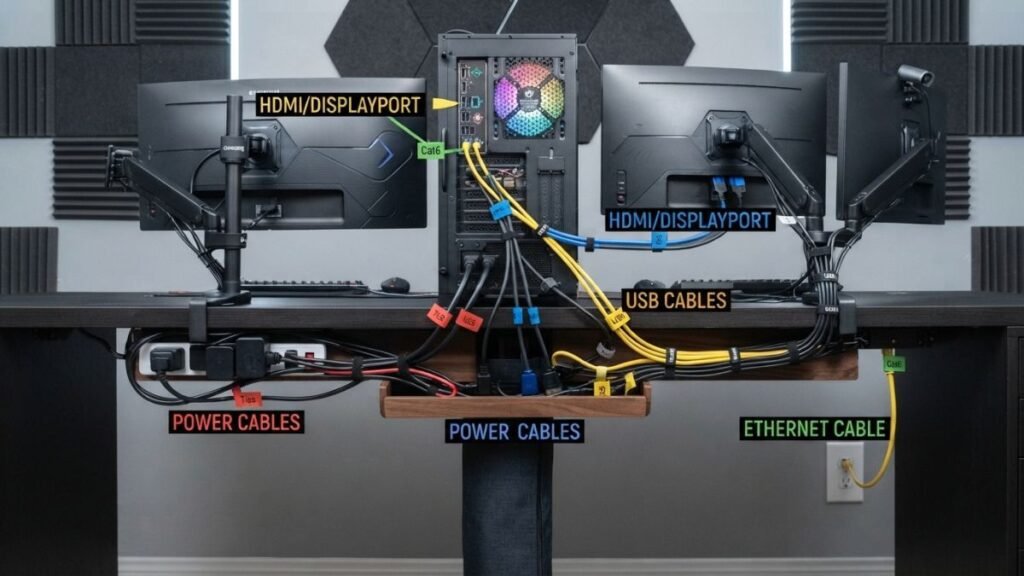
What Cables Are Commonly Found in a Gaming Setup?
| Cable Type | Common Devices | Management Consideration |
|---|---|---|
| Power cables | PC, monitors, speakers, chargers | Usually require hidden routing and easy access |
| Display cables | HDMI, DisplayPort monitors | Avoid sharp bends and unnecessary length |
| USB cables | Keyboard, mouse, webcam, controllers | Keep accessible for frequent use |
| Audio cables | Headsets, speakers, microphones | Prevent tangling with other cables |
| Network cables | Ethernet connections | Route separately for cleaner organization |
Understanding each cable’s purpose makes organization easier because not every cable should be managed the same way.
Should Power and Data Cables Be Separated?
Separating cables by their function is one of the simplest ways to create a cleaner gaming setup.
Power cables usually create the most clutter because they connect multiple devices to outlets, surge protectors, and adapters. Data cables such as USB and display connections are often changed more frequently and should remain easier to access.
A practical organization method is:
- Keep power cables grouped under the desk
- Route monitor cables together
- Keep frequently used USB cables accessible
- Avoid unnecessary cable crossings
- Leave enough flexibility for future changes
This approach creates a cleaner workspace while making upgrades and troubleshooting easier.
How Do You Measure Cable Length Before Organizing?
Cable length has a major impact on gaming cable management. Excess cable creates unnecessary loops, while cables that are too short can place stress on ports and connectors.
Before securing cables:
- Place every device in its final position.
- Connect the required cables.
- Follow the natural route each cable needs to take.
- Leave enough extra length for movement.
- Secure cables only after testing the setup.
Many cable management problems happen because users organize too early and later need to remove everything after adding a new device.
What Are the Best Gaming Cable Management Methods?
There is no single cable management solution that works for every gaming setup. The best approach depends on desk size, number of devices, and how often the setup changes.
A simple system usually combines multiple methods to keep cables organized without making future adjustments difficult.
How Can You Hide Cables Under a Gaming Desk?
The space underneath the desk is usually where most cable clutter appears.
Managing this area creates one of the biggest visual improvements in a gaming setup.
Common solutions include:
- Under-desk cable trays
- Adhesive cable clips
- Cable sleeves
- Velcro straps
- Cable boxes
- Raceway channels
Many gaming setups combine different organization methods depending on the number of accessories being used. Gaming brands such as Razer focus on complete gaming environments where desk organization and accessory placement can influence the overall setup experience.
A cable tray is useful for storing power strips and adapters, while clips help guide individual cables along specific routes.
The goal is not to remove every visible wire. The goal is to create an organized system where cables stay in predictable locations.
Are Cable Sleeves Useful for Gaming Setups?
Cable sleeves can improve the appearance of a gaming setup by combining multiple wires into a cleaner bundle.
They are especially useful for cables running between a PC tower and the desk.
However, putting too many cables into one sleeve can create problems later. If one cable needs replacement, removing a tightly packed bundle can become inconvenient.
For gaming setups that frequently receive upgrades, flexible solutions such as reusable straps are often easier to maintain.
How Do Velcro Straps Help With Cable Organization?
Velcro straps are among the most practical tools for gaming cable management because they provide organization without permanently locking cables together.
Unlike traditional cable ties, Velcro allows users to:
- Add new cables easily
- Remove unused connections
- Adjust cable length
- Reorganize devices over time
This makes them useful for gamers who regularly upgrade keyboards, monitors, storage devices, or other accessories.
How Do You Manage Cables in a PC Gaming Setup?
PC gaming setups usually contain the highest number of cables because they combine internal components, external accessories, and multiple connection types.
A desktop setup may include power cables, display connections, USB devices, audio equipment, networking cables, and additional accessories.
Without a proper system, these connections can quickly become difficult to identify.
How Should You Organize PC Cables Behind the Desk?
The area behind the desk should be treated as a dedicated cable management zone.
A practical approach is:
- Position the PC and monitor where they will stay.
- Connect only the cables currently required.
- Group cables based on their destination.
- Secure groups loosely.
- Keep important connections accessible.
Avoid creating extremely tight bundles because cables may need adjustment when cleaning or upgrading hardware.
Should You Label Gaming Setup Cables?
Cable labels are useful for complex gaming setups, especially when multiple monitors or accessories are connected.
Labels can help identify:
- Monitor power cables
- HDMI or DisplayPort connections
- USB accessories
- Audio devices
- Network cables
This small organization step can save time when troubleshooting problems or replacing hardware.
How Can You Manage PC Cables Inside the Case?
Cable management also applies inside a gaming PC.
A cleaner internal layout can help with:
- Easier hardware maintenance
- Simpler component upgrades
- Better visibility through transparent side panels
- More organized airflow paths
Modern PC cases are designed with cable organization in mind. Manufacturers such as NZXT include routing channels, cable management areas, and dedicated spaces that help builders create cleaner internal layouts.
However, internal cable management should focus on practical organization rather than simply making every cable invisible.
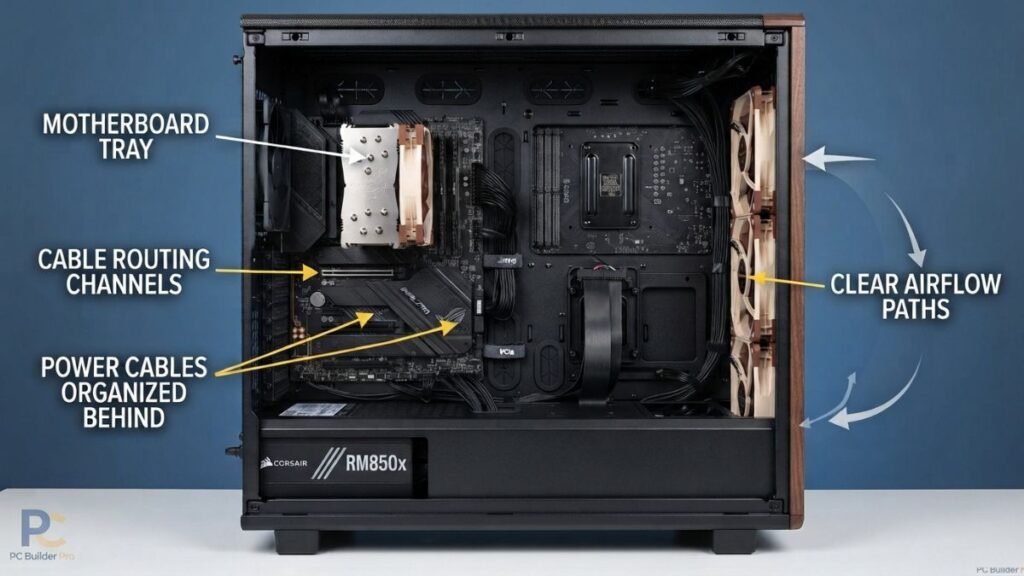
How Can You Improve PC Cable Management Inside the Case?
Internal PC cable management is not only about creating a visually appealing build. A properly organized case makes future maintenance easier and allows users to understand how components are connected.
When managing cables inside a PC case:
- Route cables behind the motherboard tray when possible
- Avoid blocking fans or airflow paths
- Keep unused cables secured
- Leave enough space for future upgrades
- Avoid sharp bends near connectors
A clean internal layout helps make hardware changes less complicated, especially when replacing storage drives, graphics cards, or cooling components.
What Are Common Gaming Cable Management Mistakes?
Many cable management problems happen because users focus only on making cables invisible instead of creating a practical system.
A good setup should remain organized even after adding new devices or changing hardware.
Why Do Gaming Cable Management Systems Become Messy Again?
Cable organization often fails because:
- New devices are added without planning
- Temporary cables become permanent
- Cables are bundled too tightly
- Power strips are placed randomly
- Old cables are not removed
Gaming setups naturally evolve. A good cable management system should be flexible enough to adapt as new accessories are added.
Should You Use Zip Ties for Gaming Cable Management?
Zip ties can be useful for certain cable management situations, but they are not always the best choice for gaming desks.
The main disadvantage is that they are difficult to remove. If you frequently change your setup, adding or removing cables becomes more time-consuming.
Zip ties are better suited for:
- Internal PC cable organization
- Permanent cable routes
- Cables that rarely change
For active gaming desks, reusable Velcro straps are often more convenient.
Why Should You Avoid Over-Bundling Cables?
Combining too many cables into one large bundle may create new problems.
Large bundles can make it harder to:
- Identify individual cables
- Replace damaged connections
- Add new accessories
- Adjust desk positioning
A clean setup should balance organization with accessibility.
How Can You Build a Long-Term Gaming Cable Management System?
A professional-looking gaming setup does not always require expensive accessories. The biggest improvements usually come from better planning and consistent organization.
What Is a Simple Gaming Cable Management Process?
Follow this step-by-step approach:
- Remove unnecessary cables
Disconnect unused devices and remove cables that are no longer needed. - Plan cable routes
Decide where each cable should travel before attaching clips or securing straps. - Group similar cables
Keep power cables, display cables, and accessory cables organized separately. - Secure cables gradually
Avoid permanent solutions until you are sure the setup works correctly. - Test your setup
Move your chair, adjust your desk, and check whether cables still have enough flexibility. - Maintain the system
Update cable organization whenever new hardware is added.
This process prevents the common cycle of repeatedly cleaning cables without solving the actual organization problem.
How Can You Improve Cable Management in a Gaming Setup With Multiple Devices?
Modern gaming setups often include more than just a PC and monitor. Many users add microphones, webcams, speakers, RGB lighting, controllers, charging docks, and external storage.
As setups become more advanced, choosing and organizing the right gaming setup accessories becomes an important part of creating a functional workspace.
Gaming peripherals from brands like Logitech G are designed for complete desktop environments where organization and accessibility are important parts of the overall experience.
As the number of accessories increases, cable management becomes more important because every additional device creates another connection to organize.
How Do You Organize a Gaming Desk With Multiple Accessories?
A useful approach is creating zones based on how often devices are used.
| Zone | Devices | Management Approach |
|---|---|---|
| Primary desk area | Keyboard, mouse, headset | Keep cables short and accessible |
| Monitor area | Display cables, webcam, speakers | Route cables behind the monitor |
| Under-desk area | Power strips, adapters, PC connections | Use trays and cable channels |
| Charging area | Controllers, mobile devices | Create a dedicated cable route |
This method prevents frequently used cables from becoming mixed with connections that rarely need adjustment.
How Do You Manage RGB Gaming Setup Cables?
RGB accessories can create additional cable challenges because many products require power connections, controllers, or USB connections.
To keep RGB setups organized:
- Route lighting cables along desk edges
- Hide controllers under the desk
- Keep power adapters accessible
- Avoid mixing RGB cables with frequently moved accessories
RGB lighting can improve the appearance of a gaming room, but poorly managed wires can reduce the clean visual effect.
How Does Cable Management Work With Standing Gaming Desks?
Standing desks create a unique challenge because the entire workspace can move between sitting and standing positions.
Adjustable desk solutions from companies such as FlexiSpot are designed around flexible workspace configurations, making proper cable routing important for maintaining movement without pulling or damaging connections.
A cable arrangement that works for a fixed desk may fail when the desk height changes. Cables need enough flexibility to move naturally without pulling against ports or creating tension.
How Do You Manage Cables on a Standing Gaming Desk?
A standing gaming desk requires flexible cable routing.
Important considerations include:
- Leave enough cable length for full desk movement
- Secure cables underneath the desk frame
- Keep cables away from moving mechanical parts
- Test the complete height range before finalizing the setup
Cable slack should be controlled but not restricted. A cable that is too tight can disconnect, damage connectors, or limit desk movement.
What Accessories Help With Standing Desk Cable Management?
Useful solutions include:
- Under-desk cable trays
- Flexible cable sleeves
- Adhesive cable clips
- Cable chains
- Mounted power strips
The goal is to create a system where cables move with the desk instead of resisting movement.
What Tools Do You Need for Gaming Cable Management?
Effective cable organization does not require dozens of accessories. Most gaming setups can be improved with a small number of practical tools.
The right gaming desk accessories can also improve workspace organization, comfort, and the overall usability of a gaming environment.
The right tools depend on the complexity of the setup and how often devices are changed.
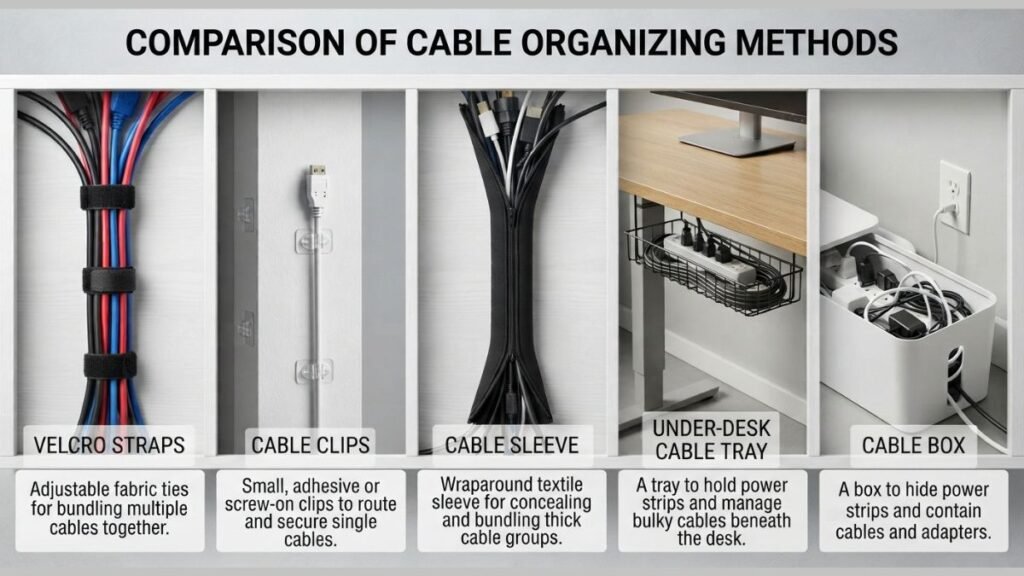
Essential Gaming Cable Management Accessories
| Tool | Purpose |
|---|---|
| Velcro straps | Reusable cable organization and adjustments |
| Cable clips | Guide individual cables along specific paths |
| Cable tray | Store power strips and adapters under the desk |
| Cable sleeve | Combine multiple wires into cleaner bundles |
| Cable labels | Identify important connections |
| Cable box | Hide power strips and excess cable |
A simple gaming desk may only need clips and Velcro straps, while larger setups with multiple monitors and accessories may benefit from additional organization methods.
Are Expensive Cable Management Products Necessary?
Not always.
Many cable management improvements come from better planning rather than expensive accessories.
A combination of:
- Correct cable routing
- Flexible organization tools
- Proper device placement
- Regular maintenance
can create a cleaner gaming setup without a large investment.
Premium accessories may improve appearance, but the organization system itself has the biggest impact.
How Do You Maintain Gaming Cable Management Over Time?
Creating an organized gaming setup is only the beginning. Cables naturally become messy again as users add new devices, replace hardware, and change their workspace.
A good cable management system should be easy to update instead of requiring a complete rebuild.
How Often Should You Reorganize Gaming Setup Cables?
There is no universal schedule. The right time depends on how frequently your setup changes.
Review your cable organization when you:
- Add a new monitor
- Replace a keyboard or mouse
- Upgrade your PC
- Add new accessories
- Move your desk
- Notice cables becoming difficult to identify
Small adjustments are usually easier than waiting until cables become heavily tangled.
How Can You Keep a Gaming Desk Organized Long-Term?
Long-term cable management depends on creating simple habits:
- Remove unused cables immediately
- Store spare cables separately
- Label important connections
- Leave room for future upgrades
- Avoid permanent solutions for frequently changed devices
- Review cable routes during cleaning
A setup that is easy to maintain will stay organized much longer than one that only looks clean immediately after installation.
What Is the Best Cable Management Setup for a Gaming Desk?
The ideal gaming cable management system depends on the setup, but most organized desks follow the same principles:
- Planned cable routes
- Hidden power management
- Accessible connections
- Separate cable paths
- Enough flexibility for upgrades
The goal is not to eliminate every visible cable. Some connections need to remain accessible because they are used regularly.
How Should a Beginner Start Gaming Cable Management?
For beginners, the easiest approach is to improve one area at a time instead of trying to reorganize the entire setup immediately.
Start with the biggest sources of clutter:
- Remove cables that are no longer used.
- Organize power connections.
- Route monitor and PC cables.
- Manage frequently used accessories.
- Make final adjustments for appearance and accessibility.
A gradual approach creates better results because it allows you to understand how your setup works before making permanent changes.
What Makes Professional Gaming Setups Look Cleaner?
Many professional-looking gaming setups follow a simple principle: consistency.
They usually have:
- Similar cable routes
- Minimal unnecessary cable slack
- Organized connection points
- Balanced desk placement
- Hidden power management
The difference between a messy and clean gaming setup is often not the number of devices. It is how those devices are connected and arranged.
Gaming Cable Management Checklist
Before considering your setup complete, review these areas:
Desk Organization
- Remove unused cables
- Identify every connected device
- Decide cable routes before securing them
- Place devices where they will actually be used
Cable Routing
- Group cables logically
- Avoid unnecessary crossing
- Leave enough movement space
- Protect cables from sharp bends
Maintenance
- Label important connections
- Review cables after hardware changes
- Store extra cables properly
- Replace damaged cables when needed
A well-managed gaming setup should remain practical, flexible, and easy to upgrade.
How Does Cable Management Complete a Gaming Setup?
A gaming setup is more than the individual components placed on a desk. The way those components connect determines how comfortable and functional the workspace becomes.
For a broader understanding of how hardware, accessories, and workspace elements work together, explore our gaming setup guide.
Gaming cable management helps create a cleaner environment by reducing clutter, improving accessibility, and making future upgrades easier.
Whether you use a simple console setup or a complete PC gaming station, organized cables create a better experience without requiring expensive changes.
The most effective approach is to build a system that matches your habits. Plan your cable routes, use flexible organization methods, and update your setup whenever new devices are added.
A clean gaming desk is not created by hiding every cable. It is created by making every connection intentional.
Frequently Asked Questions About Gaming Cable Management
What is gaming cable management?
Gaming cable management is the process of organizing and routing cables in a gaming setup to reduce clutter and create a cleaner workspace. It includes arranging power cables, USB connections, display cables, and accessory wires using tools such as cable trays, clips, sleeves, and reusable straps.
How do I organize cables under a gaming desk?
The best way to organize cables under a gaming desk is to create clear routes for different cable groups. Separate power cables from frequently used device cables, then use cable trays, clips, or Velcro straps to keep them organized. Leave enough flexibility so cables can move when devices are adjusted or replaced.
How Do You Hide Cables on a Gaming Desk?
The best way to hide cables on a gaming desk is to create organized routes underneath and behind the desk using cable trays, clips, sleeves, and reusable straps. Start by grouping similar cables together, such as power cables, display cables, and USB connections, then secure them along planned paths.
The goal is not to completely remove every visible cable but to keep wires organized, accessible, and easy to adjust when adding or replacing gaming devices. A well-managed cable system makes the setup cleaner, easier to maintain, and more comfortable for daily use.
What are the best tools for gaming cable management?
The most useful gaming cable management tools include Velcro straps, cable clips, under-desk trays, cable sleeves, cable boxes, and cable labels. The best combination depends on the number of devices in your setup and how frequently you change your hardware.
Does gaming cable management improve gaming performance?
Gaming cable management does not directly increase FPS or reduce input latency. However, it improves the usability of a gaming setup by preventing accidental disconnections, making troubleshooting easier, and creating a more comfortable workspace for long gaming sessions.
How do I manage cables for a PC gaming setup?
For a PC gaming setup, organize cables by purpose and location. Keep power cables grouped together, route monitor cables cleanly, secure USB connections near the desk, and manage excess cable length behind the desk or inside the PC case.
How often should I redo my gaming cable management?
You should review your gaming cable management whenever you add, remove, or replace hardware. Small adjustments after upgrades are usually enough to maintain an organized setup. Waiting until cables become heavily tangled usually requires more time to fix.