

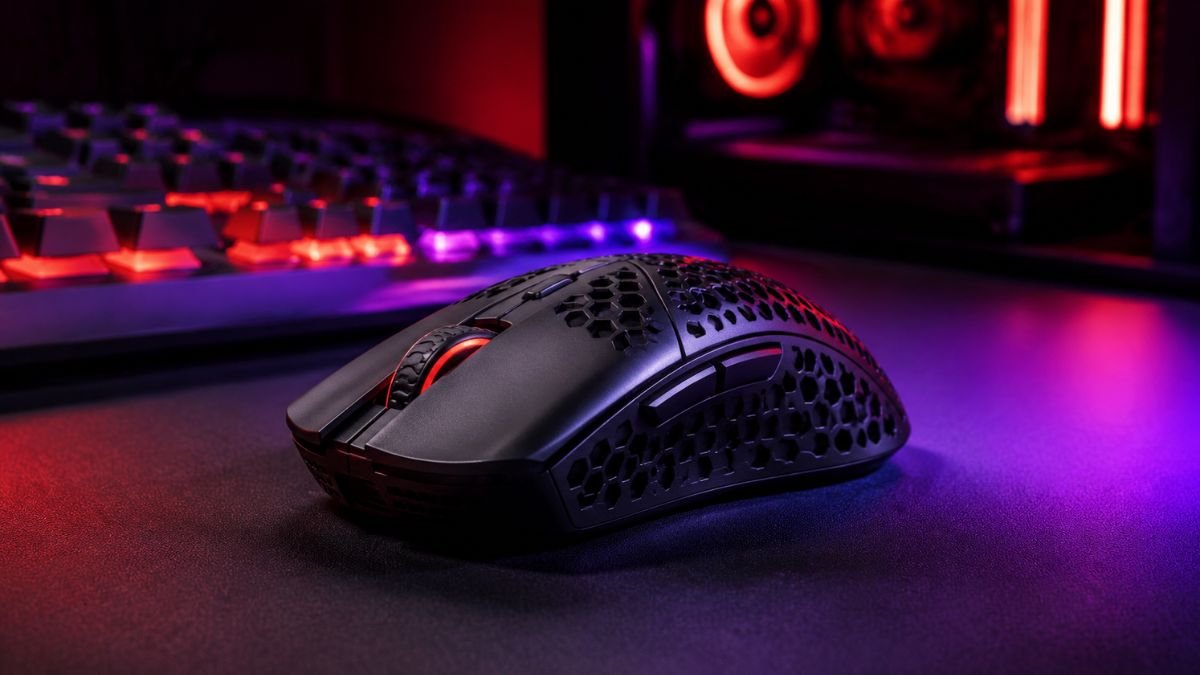
A lightweight gaming mouse is designed with a reduced body weight to make movement faster, smoother, and less tiring during gameplay.
These mice often help players who need quick aim adjustments and rapid movements, especially in competitive games. However, the ideal mouse weight depends on personal comfort, grip style, and gaming preferences.
For many PC gamers, small hardware differences can change how a game feels. Mouse sensitivity, sensor quality, shape, and weight all influence how easily players can aim, react, and control movement.
While most gaming mouse discussions focus on DPI and sensors, weight has become one of the biggest design factors in modern gaming peripherals.
A lightweight gaming mouse is built to reduce physical effort during movement while giving players faster control over their cursor. This design approach has become especially popular among competitive FPS players who rely on quick flick shots, low sensitivity settings, and large arm movements.
The popularity of lighter mice has also changed how manufacturers approach gaming hardware. Companies now experiment with materials, internal layouts, and shell designs to reduce unnecessary weight while maintaining performance.
However, lighter does not automatically mean better for every player. Some users prefer the stability and controlled movement of heavier mice, while others benefit from the speed and agility of lightweight designs.
Understanding how mouse weight affects gaming performance can help users make better decisions and recognize which design characteristics actually matter for their personal gaming style.
What Is a Lightweight Gaming Mouse?
A lightweight gaming mouse is a mouse designed to minimize overall weight while maintaining the performance features needed for gaming.
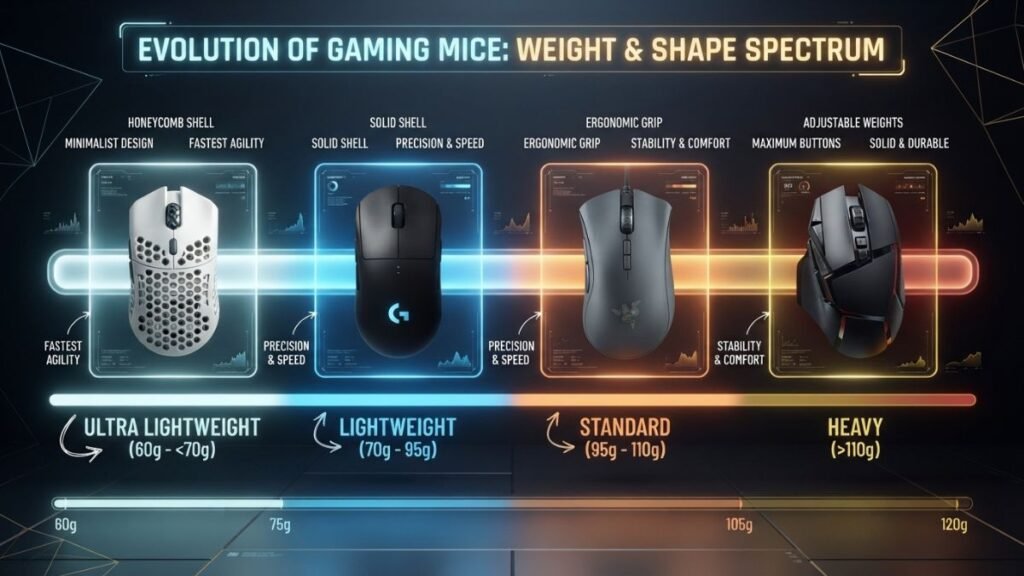
Although there is no universal industry definition, gaming mice below approximately 80 grams are commonly considered lightweight, while models below 60 grams are often described as ultra lightweight.
The reduction in weight usually comes from design choices such as smaller internal components, optimized circuit boards, lighter materials, and modified outer shells.
Unlike traditional office mice, gaming-focused lightweight models are engineered around fast movement, precise tracking, and extended gameplay comfort.
How Gaming Mouse Weight Is Measured
Mouse weight is typically measured in grams and refers to the complete device without additional accessories.
A mouse’s total weight can include:
| Component | Impact on Weight |
|---|---|
| Outer shell | Determines most of the physical structure |
| Battery | Major factor in wireless models |
| Internal electronics | Sensors and circuit components contribute to weight |
| Cable | Can affect wired mouse movement |
A difference of 20–30 grams may appear small, but it can noticeably change how a mouse feels during fast movements.
For example, moving a heavier mouse repeatedly across a large mouse pad requires more physical force compared with moving a lighter design.
Why Manufacturers Create Ultra Lightweight Gaming Mouse Designs
Modern gaming mouse manufacturers focus on reducing unnecessary weight because many competitive players use large arm movements rather than only wrist movements.
A lighter mouse can make these movements feel easier because less force is required to start, stop, and change direction.
Manufacturers such as Logitech G and Razer have developed gaming mice using optimized structures and lightweight engineering approaches to improve movement efficiency without removing essential performance features.
How Mouse Weight Affects Gaming Performance
Mouse weight directly affects how much physical effort is required to move, stop, and adjust a cursor during gameplay. While sensor quality and settings remain important, the physical feel of a mouse can influence how quickly a player reacts and how comfortable long gaming sessions become.
A lighter design reduces the amount of force needed for movement, which can be especially noticeable in games that require frequent aiming adjustments, rapid direction changes, or large sweeping motions.
However, weight is only one part of overall mouse performance. Shape, sensor accuracy, grip style, and personal preference all work together to determine whether a mouse feels responsive.
Faster Movement and Lower Physical Effort
One of the biggest advantages of a lightweight gaming mouse is reduced physical resistance.
When players move a mouse across a large desk mat, a lighter device requires less force to accelerate and change direction. This can make quick movements feel more natural, especially for players who use low sensitivity settings.
For example, many first-person shooter players use broad arm movements to aim rather than relying only on wrist movement. A lighter mouse can make these repeated motions feel less demanding over long sessions.
This does not mean a lightweight mouse automatically improves accuracy. Instead, it changes the physical experience by making movement easier and faster.
Improved Control for Fast-Paced Games
Competitive games often require split-second reactions. A player may need to quickly turn, track moving targets, or adjust aim by a few pixels.
A lightweight gaming mouse can help in these situations because:
- Less force is needed for rapid movements
- Direction changes feel easier
- Small corrections require less effort
- Extended sessions may feel less tiring
Games such as first-person shooters often benefit the most from lightweight designs because precise aiming and fast reactions are important parts of gameplay.
The Relationship Between Weight, DPI, and Accuracy
Mouse weight and DPI settings work together but affect different aspects of control.
DPI (dots per inch) determines how far the cursor moves based on physical mouse movement. Weight influences how the mouse feels when making that movement.
| Factor | Effect on Gaming |
|---|---|
| Lower mouse weight | Easier acceleration and quick movement |
| Higher DPI | Faster cursor movement |
| Lower DPI | More physical movement with greater control |
| Better sensor | More accurate tracking |
A player using low DPI may appreciate a lightweight mouse because large movements become easier. On the other hand, someone using high DPI with small wrist movements may notice less difference.
Understanding sensor performance is also important because weight alone does not determine tracking quality. Gaming mouse sensors, DPI behavior, and responsiveness are explained further in our guide to gaming mouse technology.
Benefits of Using a Lightweight Gaming Mouse
Lightweight gaming mice have become popular because they offer several practical advantages for different types of players.
The main benefits are related to movement efficiency, comfort, and control rather than simply reducing the number on a specification sheet.
Faster Swiping and Cursor Movement
A lighter mouse can make fast swiping motions feel smoother because less momentum needs to be controlled.
This is especially useful in games where players frequently move the mouse across a large surface area. A lightweight design allows users to reposition the mouse quickly after large movements.
For competitive players, this can create a more responsive feeling during gameplay.
However, faster movement is not always the priority. Some players prefer additional weight because it creates a more stable and controlled feeling.
Reduced Hand Fatigue During Long Gaming Sessions
Gaming sessions can last several hours, and repeated mouse movement may create physical fatigue.
A lightweight gaming mouse reduces the amount of force needed during continuous use. This may make the device more comfortable for players who spend long periods gaming, working, or creating content.
The effect depends on:
- Mouse shape
- Hand size
- Grip style
- Playing habits
- Personal comfort
A lightweight design combined with poor ergonomics may still feel uncomfortable, which is why weight should always be considered alongside shape and grip.
Players can better understand this relationship by learning how different gaming mouse grip styles affect comfort and control.
Better Control for FPS and Competitive Games
First-person shooter games are one of the biggest reasons lightweight gaming mice became popular.
FPS gameplay often requires:
- Quick flick shots
- Tracking moving targets
- Frequent direction changes
- Precise micro-adjustments
A lighter mouse can help players perform these movements with less effort.
Many competitive gamers prefer lightweight designs because they can make rapid mouse movements and adjustments feel easier during fast-paced gameplay. However, individual skill, practice, and settings remain more important than equipment alone.
Lightweight Gaming Mouse Performance Overview
| Performance Area | Impact of Lightweight Design |
|---|---|
| Speed | Faster movement with less effort |
| Control | Easier quick adjustments |
| Comfort | Potentially lower fatigue |
| Precision | Depends on sensor and player skill |
| Stability | Some users may prefer heavier designs |
Why Lightweight Does Not Always Mean Better
A common misconception is that the lightest gaming mouse will always provide the best performance.
In reality, different players have different preferences.
A lightweight gaming mouse may feel excellent for:
- Competitive FPS players
- Low sensitivity users
- Players who use large mouse movements
A heavier mouse may feel better for:
- Strategy game players
- Users who prefer controlled movement
- People who prefer a more solid physical feel
The goal is not finding the lowest possible weight. The goal is finding a design that matches how you naturally play.
Lightweight Gaming Mouse vs Heavy Gaming Mouse
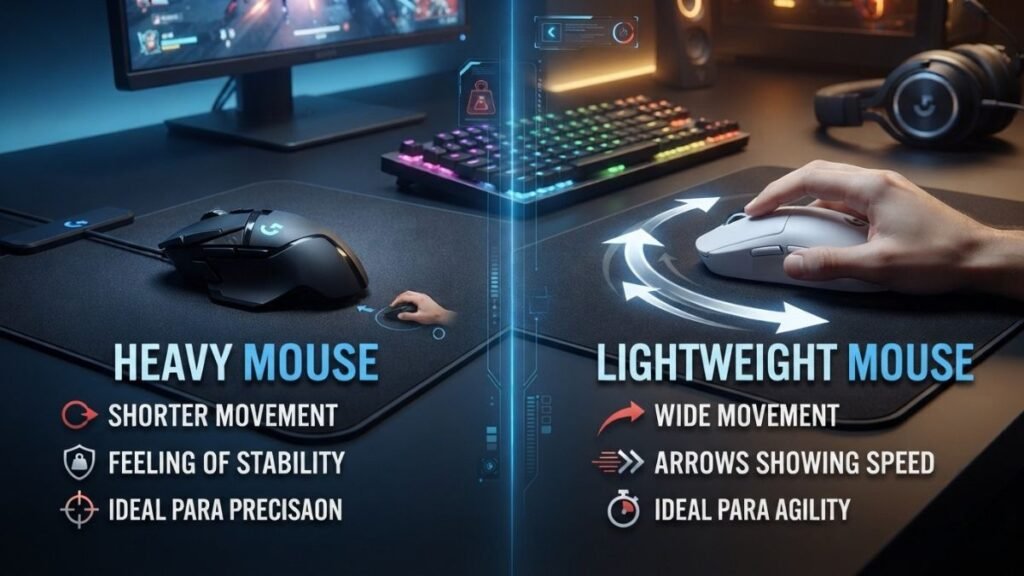
Choosing between a lightweight and heavy gaming mouse depends on how a player interacts with their setup. Weight changes the physical feeling of movement, but it does not determine gaming skill or overall performance by itself.
Some players prefer the speed and flexibility of lightweight designs, while others prefer the stability and controlled movement offered by heavier mice.
Performance Differences
The main difference between lightweight and heavier gaming mice is how they respond during movement.
A lightweight gaming mouse requires less force to start moving, which can help with fast directional changes and quick reactions. A heavier mouse creates more resistance, which some users find helpful for steady and controlled movements.
| Feature | Lightweight Gaming Mouse | Heavy Gaming Mouse |
|---|---|---|
| Movement speed | Faster acceleration and repositioning | More controlled movement |
| Physical effort | Requires less force | Requires more force |
| Quick adjustments | Easier for rapid corrections | More deliberate adjustments |
| Stability | May feel less planted | Often feels more stable |
| Long sessions | Can reduce movement fatigue | May create more physical effort |
Neither design is universally better. The right choice depends on the player’s habits and comfort.
Comfort and Ergonomics
Weight is only one part of mouse comfort. A lightweight gaming mouse with an unsuitable shape may feel worse than a heavier mouse that fits the user’s hand properly.
Important comfort factors include:
- Hand size
- Grip style
- Button placement
- Mouse height
- Weight balance
For example, a player using a fingertip grip may prefer a smaller, lighter mouse because they rely on quick finger movements. Someone using a palm grip may prefer a larger mouse with more support.
This is why understanding gaming mouse grip styles is useful before focusing only on weight.
Which Players Prefer Each Design?
Different gaming communities often develop different preferences based on gameplay requirements.
Lightweight Gaming Mouse Users Often Include:
- FPS players
- Competitive esports players
- Low sensitivity users
- Players who make large arm movements
Heavier Gaming Mouse Users Often Include:
- MMO players who value extra buttons
- Strategy game players
- Users who prefer stronger physical feedback
- Players who like slower controlled movement
Gaming style matters more than trends. A mouse should support the way someone naturally plays.
How Lightweight Gaming Mouse Designs Are Made
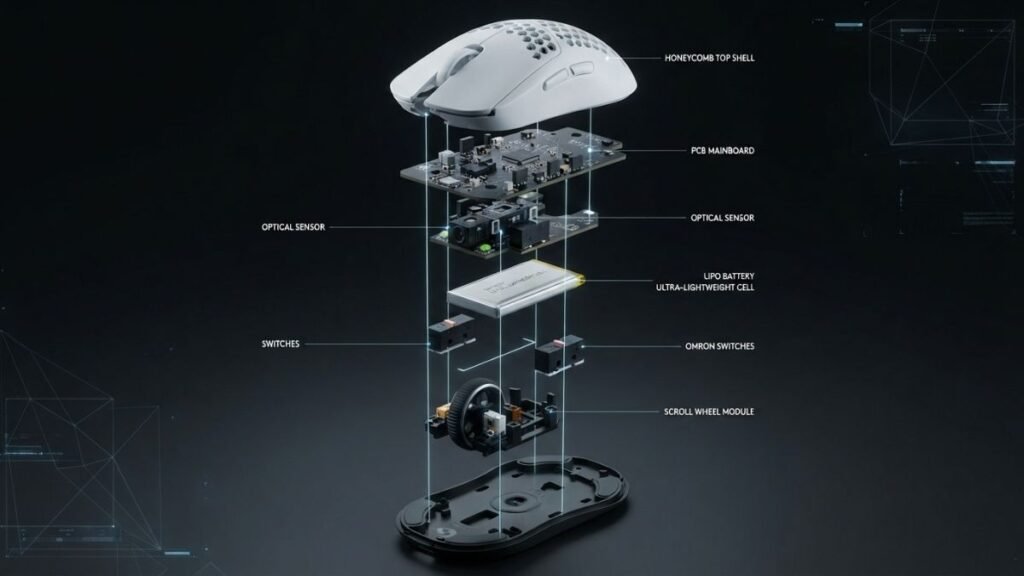
Creating a lightweight gaming mouse requires more than simply making the outer shell smaller. Manufacturers must reduce unnecessary materials while maintaining durability, performance, and comfort.
Modern lightweight designs often combine engineering improvements in materials, electronics, and internal layouts.
Honeycomb Shell Designs
One of the most recognizable lightweight mouse designs is the honeycomb shell.
This structure removes sections of the outer body while maintaining enough support for the internal components. The result is a lighter frame that uses less material.
A honeycomb design can reduce weight because fewer materials are used compared with a traditional solid shell.
However, this approach also creates different user experiences:
Advantages:
- Lower overall weight
- Unique appearance
- Reduced shell material
Possible disadvantages:
- More exposed internal areas
- Different cleaning requirements
- Not preferred by every user
Some players enjoy the lightweight feel, while others prefer the solid construction of traditional designs.
Internal Component Optimization
Modern lightweight gaming mice often reduce weight through internal engineering rather than only changing the outer design.
Manufacturers may optimize:
- Circuit board size
- Battery placement
- Internal supports
- Switch components
- Cable materials
The goal is to remove unnecessary weight while keeping essential gaming features.
Companies such as Logitech G develop gaming mice using specialized engineering approaches that balance weight reduction with performance features such as accurate sensors and wireless connectivity.
Wireless Technology and Battery Considerations
Wireless gaming mice present an additional challenge because batteries add significant weight.
Manufacturers must balance:
- Battery capacity
- Wireless performance
- Overall weight
- Usage time
Older wireless gaming mice were often heavier because battery technology and wireless components required more space.
Modern improvements in battery efficiency and internal design have allowed manufacturers to create lighter wireless gaming mice while balancing weight and battery life.
Wireless performance is also an important factor when comparing gaming mice. Players interested in connection differences can explore our guide on wireless vs wired gaming mouse.
Lightweight Gaming Mouse Design Trends
The popularity of lightweight gaming mice has influenced the entire gaming peripheral industry.
Manufacturers increasingly focus on reducing unnecessary materials while improving:
- Sensor efficiency
- Wireless response times
- Battery optimization
- Structural design
The trend shows that gaming hardware is moving toward more personalized designs rather than one universal mouse style.
Professional hardware analysis from sources such as Tom’s Hardware often highlights how modern gaming peripherals evolve through improvements in engineering, materials, and performance technology.
Are Lightweight Gaming Mice Better for Competitive Gaming?
Lightweight gaming mice have become especially popular among competitive players because many modern games reward quick reactions, precise aiming, and fast movement adjustments.
However, competitive performance depends on multiple factors. A lighter mouse can support certain playing styles, but it cannot replace practice, game knowledge, or proper settings.
Why Many Esports Players Prefer Lower Weight
Competitive gamers often make hundreds or thousands of mouse movements during a single session.
In fast-paced games, reducing physical resistance can make repeated movements feel easier and more consistent.
A lightweight gaming mouse can help players who:
- Use low sensitivity settings
- Perform large sweeping movements
- Need quick target adjustments
- Prefer fast and responsive equipment
For example, an FPS player tracking a moving opponent may need to continuously adjust their aim. A lighter mouse can make those small corrections feel smoother because less effort is required.
Games Where Lightweight Mice Have Advantages
A lightweight gaming mouse is often associated with games where aiming speed and precision are important.
Common examples include:
- First-person shooters (FPS)
- Battle royale games
- Tactical shooters
- Fast-paced action games
These game types often require:
- Rapid camera movement
- Quick reactions
- Frequent repositioning
The advantage comes from easier physical movement rather than additional software features.
When a Heavier Mouse May Be Better
Although lightweight gaming mice are popular, heavier designs still have advantages.
Some players prefer heavier mice because they provide:
- A more stable feeling
- Stronger physical feedback
- More controlled movements
- A traditional premium feel
For games that require less rapid aiming, the difference may be less noticeable.
For example, MMO players may prioritize additional buttons and customization options over minimum weight.
The best choice depends on the player’s priorities.
Limitations of Lightweight Gaming Mouse Designs
While lightweight designs provide several benefits, they also involve compromises.
Understanding these limitations helps users avoid assuming that lower weight automatically creates better performance.
Durability Concerns
Reducing weight requires careful engineering because removing material can affect structural design.
Some lightweight mice use thinner shells or open designs to reduce mass. These approaches can change how the mouse feels compared with a traditional solid-body model.
A well-designed lightweight mouse can still be durable, but construction quality remains an important consideration.
Feature Trade-Offs
Reducing weight sometimes requires manufacturers to make design decisions.
Potential trade-offs may include:
| Feature | Possible Lightweight Design Trade-Off |
|---|---|
| Battery size | Smaller battery to reduce weight |
| Extra buttons | Fewer buttons for simpler construction |
| RGB lighting | Reduced lighting to save weight and power |
| Large shells | Smaller designs for weight reduction |
A lightweight gaming mouse is usually designed around movement efficiency rather than maximum features.
Finding the Right Balance Between Weight and Comfort
The lightest gaming mouse is not always the most comfortable option.
A mouse should match:
- Hand size
- Grip style
- Gaming habits
- Preferred movement style
A player who dislikes the shape of an extremely lightweight mouse may perform better with a slightly heavier option that feels natural.
Comfort directly affects consistency, especially during long gaming sessions.
How to Choose the Right Lightweight Gaming Mouse
Choosing a lightweight gaming mouse involves more than looking at the number of grams.
Players should consider how the mouse fits their personal gaming setup.
Consider Your Gaming Style
Different games require different types of control.
Ask:
- Do you play fast FPS games?
- Do you use large arm movements?
- Do you prefer quick reactions or controlled movement?
- Do you play for short sessions or many hours?
Players who rely on speed and quick adjustments may benefit more from lightweight designs.
Match Weight With Grip Style
Grip style strongly affects how a mouse feels.
The three common grip styles are:
| Grip Style | Description | Typical Preference |
|---|---|---|
| Palm grip | Entire hand rests on the mouse | Often prefers larger shapes |
| Claw grip | Fingers are arched with partial palm contact | Often works well with medium designs |
| Fingertip grip | Only fingertips control movement | Often suits smaller lightweight mice |
A lightweight gaming mouse may feel especially natural for fingertip and claw grip users because these grips rely heavily on precise finger control.
Focus on Features Beyond Weight
Weight should not be the only deciding factor.
Important features include:
- Sensor accuracy
- Polling rate
- Shape
- Button quality
- Wireless performance
- Build quality
A balanced gaming mouse with the right features may provide a better experience than the lightest model available.
What Is the Ideal Weight for a Gaming Mouse?
The ideal weight for a gaming mouse depends on personal preference, grip style, and game type. Many competitive players prefer lightweight designs below 80 grams because they allow faster movement, but comfort and control are more important than weight alone.
Conclusion
A lightweight gaming mouse can improve the physical experience of gaming by making movement faster, reducing effort, and supporting quick adjustments. These advantages are especially noticeable for players who enjoy competitive FPS games and use large, fast mouse movements.
However, weight is only one part of gaming mouse performance. Shape, sensor quality, grip style, and comfort all influence how well a mouse works for an individual player.
The best lightweight gaming mouse is not necessarily the one with the lowest weight. It is the one that matches the player’s natural movement style and provides reliable control during real gameplay.
As gaming hardware continues to evolve, lightweight designs will likely remain an important part of modern peripheral technology.
Frequently Asked Questions (FAQ)
What is a lightweight gaming mouse?
A lightweight gaming mouse is a gaming-focused mouse designed with reduced weight to improve movement speed and reduce physical effort. These mice are commonly used by players who want faster control, easier repositioning, and improved comfort during long gaming sessions.
Is a lightweight gaming mouse better for FPS games?
A lightweight gaming mouse can be beneficial for FPS games because it allows faster movements and easier aim adjustments. However, performance still depends on factors such as skill level, sensitivity settings, sensor quality, and personal comfort.
What weight is considered a lightweight gaming mouse?
There is no official industry standard, but gaming mice under around 80 grams are commonly considered lightweight. Models below 60 grams are often described as ultra lightweight gaming mice.
Are lightweight wireless gaming mice good for competitive gaming?
Modern lightweight wireless gaming mice can perform well for competitive gaming because improved wireless technology has reduced latency concerns. The quality of the sensor, connection system, and overall design are more important than whether the mouse is wired or wireless.
Does a lighter gaming mouse improve aim?
A lighter gaming mouse does not automatically improve aim, but it can make movement easier and faster. Players who use low sensitivity settings or large arm movements may notice the benefits more than users who prefer smaller wrist movements.
Are honeycomb lightweight gaming mice durable?
Honeycomb lightweight gaming mice can be durable when designed with quality materials and proper engineering. However, the open shell design may not appeal to every user because it changes the feel, cleaning requirements, and overall construction.
Should beginners use a lightweight gaming mouse?
Beginners can use a lightweight gaming mouse, but choosing based only on weight is not recommended. New players should focus on comfort, shape, and learning proper control before deciding whether a lighter design fits their gaming style.