A gaming mouse sensor is the component that detects physical movement and converts it into precise cursor movement on your screen.
Sensor quality affects tracking accuracy, speed, and consistency during gaming. While DPI numbers receive attention, real performance depends on accurate motion detection, low error rates, and reliable tracking.
A gaming mouse may look like a simple device, but inside it contains technology designed to translate every hand movement into digital input.
For competitive players, especially in fast-paced games like first-person shooters, even small differences in tracking consistency can affect aiming precision, responsiveness, and overall control.
The term gaming mouse sensor explained covers much more than just DPI numbers. Modern gaming mice use advanced optical sensors that capture thousands of images per second to understand movement across a surface.
These sensors process information continuously and send positioning data to the computer with high precision.
According to Logitech G, modern gaming sensors are designed to provide accurate tracking with features such as high DPI ranges, improved motion detection, and reduced unwanted acceleration.
However, higher specifications do not automatically mean better gaming performance. A 30,000 DPI sensor is not necessarily more useful than a well-designed 16,000 DPI sensor. Factors such as tracking consistency, sensor accuracy, lift-off distance, and real-world responsiveness often matter more.
Understanding how gaming mouse sensors work helps users make better decisions and recognize which specifications actually influence gameplay.
Understanding Gaming Mouse Sensor Technology
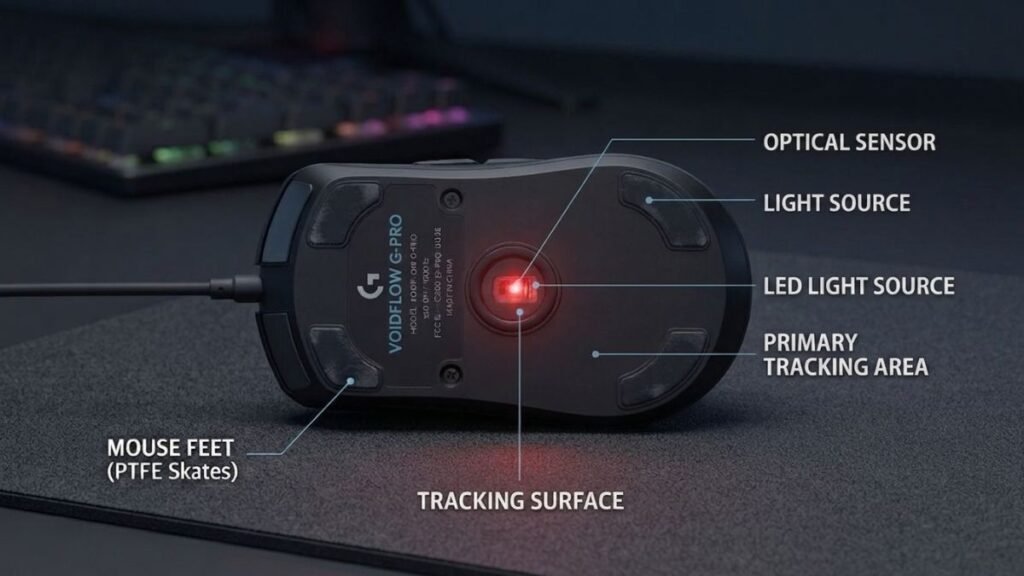
A gaming mouse sensor acts like the “eyes” of the mouse. It continuously observes the surface underneath the device and calculates movement direction and distance before sending that information to the computer.
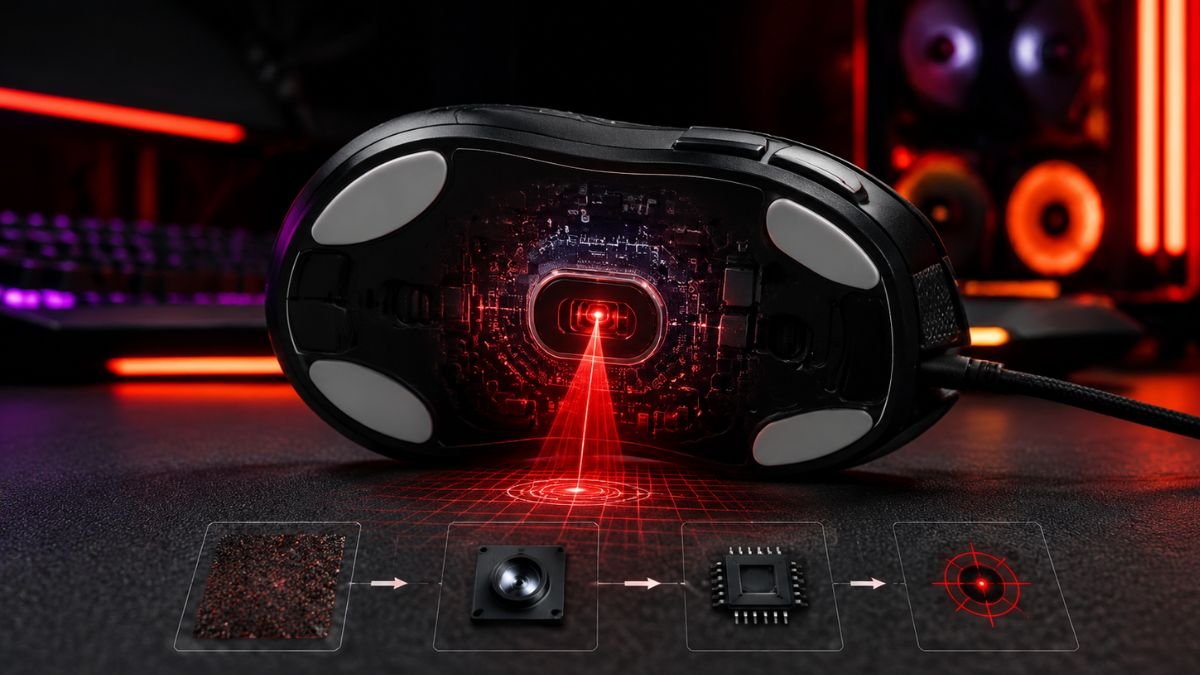
Most modern gaming mice use optical sensors, which rely on an LED or infrared light source combined with a small camera system. The sensor captures microscopic changes in the surface texture and compares these images to determine movement.
Unlike traditional office mice that prioritize basic navigation, gaming sensors are designed for:
- High-speed tracking capability
- More consistent tracking
- More reliable movement detection
- Better performance during rapid movements
The sensor is especially important in games where precise aiming matters. For example, an FPS player making a small adjustment to target an opponent needs the mouse to reproduce that movement accurately without skipping or adding unwanted motion.
How Optical Gaming Mouse Sensors Work
Optical sensors use light reflection to track movement.
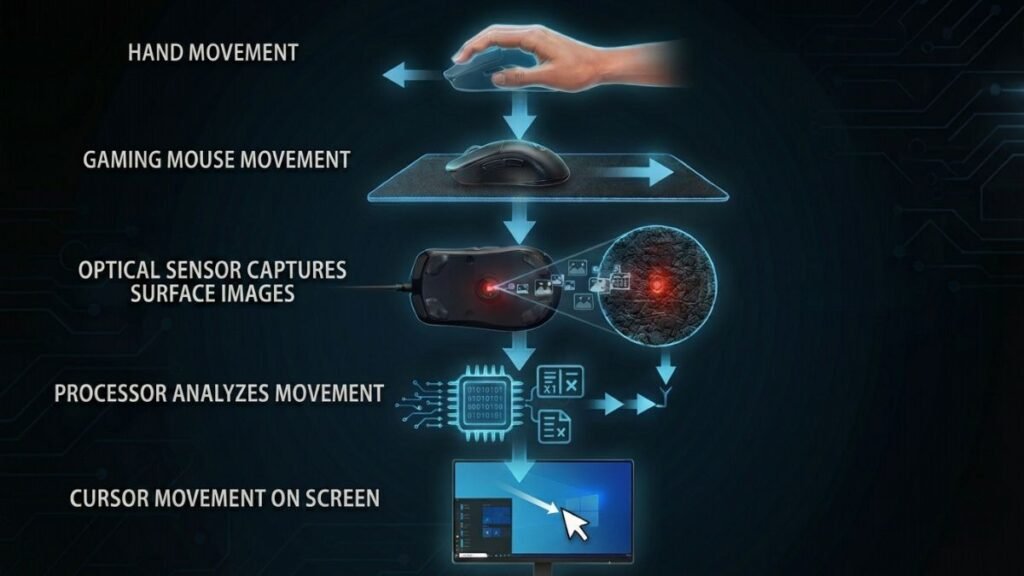
The process works like this:
- A light source illuminates the surface below the mouse.
- A sensor captures thousands of surface images every second.
- The processor compares image changes.
- The mouse calculates direction and distance.
- The movement is converted into cursor movement.
This process occurs at very high speeds, allowing modern gaming mice to track hand movements with minimal delay.
The technology is similar to a miniature camera system, but it is optimized specifically for movement detection rather than capturing images.
Optical vs Laser Mouse Sensors
For many years, gaming mice used both optical and laser sensor technologies. However, modern gaming mice have largely moved toward advanced optical sensors because they generally provide more predictable tracking performance.
| Feature | Optical Sensor | Laser Sensor |
|---|---|---|
| Tracking method | LED/infrared light | Laser illumination |
| Surface compatibility | Works best on consistent surfaces | Works on more surfaces |
| Gaming consistency | Usually more predictable | May be less predictable |
| Common usage today | Most gaming mice | Less common |
Laser sensors can track a wider variety of surfaces, but some implementations may introduce less predictable tracking behavior. Modern optical sensors generally provide consistent tracking and have become the more common choice in gaming mice.
Why Sensor Technology Matters More Than Marketing Numbers
Gaming mouse specifications often highlight impressive numbers, especially DPI. However, sensor performance is not determined by a single specification.
A high-quality sensor should provide:
- Accurate movement reproduction
- Consistent tracking at different speeds
- Minimal unwanted acceleration
- Reliable performance during quick movements
For example, a competitive FPS player usually benefits more from predictable tracking than from extremely high DPI settings that they may never use.
Understanding the difference between specifications and real-world performance is essential when evaluating gaming mouse technology.
Key Gaming Mouse Sensor Specifications Explained
Understanding gaming mouse sensors requires looking beyond the marketing numbers printed on product pages. Specifications such as DPI, IPS, acceleration, and polling rate help describe sensor performance, but each one affects the user experience differently.
A good gaming mouse sensor is not simply the one with the highest numbers. The best performance comes from balanced tracking accuracy, consistent response, and predictable movement.
DPI Explained: What Does Mouse Sensitivity Really Mean?
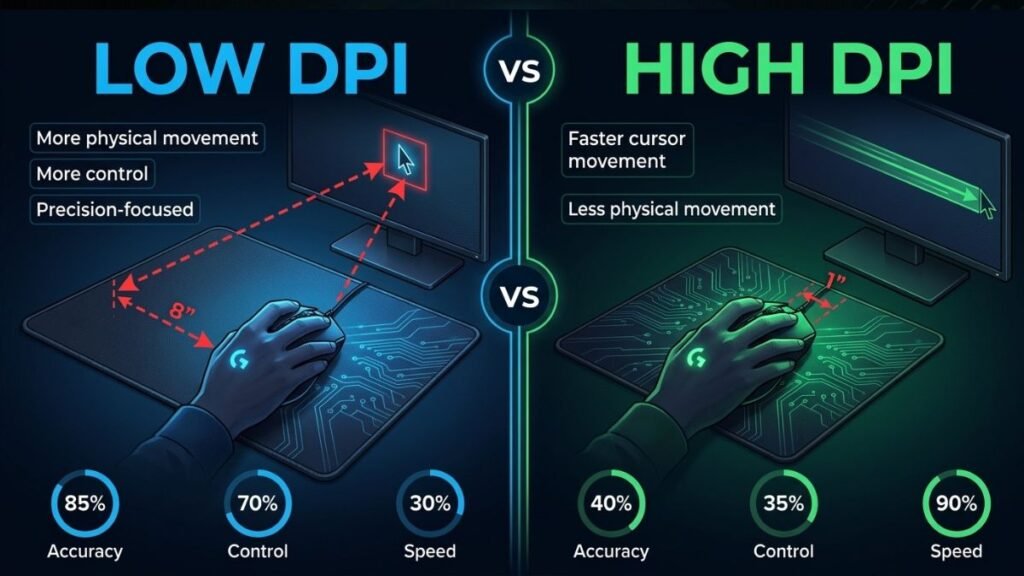
DPI, or dots per inch, is commonly used to describe mouse sensitivity and indicates how much cursor movement results from a given physical mouse movement.
For example:
- Lower DPI settings create slower, more controlled cursor movement.
- Higher DPI settings create faster cursor movement.
With the same system and in-game sensitivity settings, a mouse set to 800 DPI produces less cursor movement than one set to 3200 DPI when both are moved the same physical distance.
However, DPI does not directly measure sensor quality.
A sensor with extremely high DPI capability does not automatically provide better accuracy. Many competitive players use moderate DPI settings combined with appropriate in-game sensitivity to achieve a comfortable balance between speed and aiming control.
Why Most Gamers Do Not Use Maximum DPI
Modern gaming mice can advertise DPI values above 20,000 or even 30,000. While these numbers indicate the sensor’s available sensitivity range, most players do not use such extreme settings.
Common gaming DPI ranges include:
| Gaming Style | Typical DPI Range |
|---|---|
| Competitive FPS games | 400–1600 DPI |
| General PC gaming | 800–2400 DPI |
| High-sensitivity use | 2400+ DPI |
The important factor is consistency.
A reliable sensor at a comfortable DPI setting usually provides better results than using an extremely high sensitivity that reduces control.
For a deeper explanation of sensitivity settings, users can explore the guide on gaming mouse DPI explained.
IPS Explained: Tracking Speed Limit
IPS stands for inches per second and measures how quickly a mouse can physically move while maintaining accurate tracking.
This specification becomes important during fast movements.
For example:
A player quickly moving their mouse across a large mouse pad during an FPS game performs a fast swipe movement. If the sensor cannot process that speed correctly, the cursor may:
- Stop tracking
- Jump unexpectedly
- Move inaccurately
A higher IPS rating indicates that the sensor is designed to maintain tracking at higher movement speeds, although IPS alone does not determine overall sensor accuracy.
Why IPS Matters for Competitive Gaming
Casual users may never reach the limits of a modern gaming sensor. However, competitive players often perform rapid movements where sensor stability becomes important.
A quality sensor should maintain:
- Accurate position tracking
- Smooth movement reproduction
- Consistent response during quick swipes
This is one reason gaming mouse sensors are designed differently from standard office mouse sensors.
Unwanted Mouse Acceleration Explained
Mouse acceleration occurs when cursor movement changes depending on how quickly the mouse moves.
For consistent aiming, mouse movement should remain predictable without unintended acceleration:
- Move the mouse 2 inches slowly → cursor moves a specific distance
- Move the mouse 2 inches quickly → cursor should move the same distance
Unwanted acceleration can make aiming feel inconsistent because the same physical movement creates different results.
For precision-focused gaming, predictable sensor behavior is usually preferred.
Polling Rate vs Sensor Performance
Polling rate measures how often the mouse sends input reports to the computer.
It is usually measured in Hertz (Hz).
Examples:
| Polling Rate | Reports Per Second |
|---|---|
| 125Hz | 125 updates per second |
| 500Hz | 500 updates per second |
| 1000Hz | 1000 updates per second |
| 4000 Hz+ | 4000+ reports per second |
A higher polling rate can reduce input delay, but it is only one part of overall mouse performance.
A fast polling rate cannot compensate for poor sensor accuracy.
Accurate reporting still depends on the sensor detecting movement reliably before that data is sent to the computer.
What Makes a Gaming Mouse Sensor Accurate?
Sensor accuracy depends on how consistently the device converts physical movement into digital input without errors, unwanted acceleration, or tracking interruptions.
Several factors influence real-world accuracy:
Tracking Consistency
A good sensor should translate repeated physical movements into consistent on-screen movement.
This matters because gamers build muscle memory based on predictable mouse behavior.
Low Lift-Off Distance
Lift-off distance refers to how far a mouse can be lifted from the surface before the sensor stops tracking.
This matters especially for players who frequently reposition their mouse during gameplay.
A lower lift-off distance helps reduce unwanted tracking when the mouse is lifted and repositioned.
Motion Processing Quality
The sensor processor handles the information captured from the surface.
Effective sensor processing can help minimize:
- Tracking errors
- Delays
- Unwanted corrections
This is why sensor design involves more than just the optical component itself.
How Gaming Mouse Sensors Affect Real-World Gaming Performance
Technical specifications are useful, but the real value of a gaming mouse sensor appears during actual use. A sensor’s purpose is not to produce impressive numbers on a specification sheet — it is to accurately translate hand movement into predictable in-game actions.
Different gaming situations place different demands on sensor performance.
FPS Gaming: Why Tracking Consistency Matters
First-person shooter games are one of the clearest examples of why sensor quality matters.
Games such as competitive shooters require players to make:
- Small aiming adjustments
- Fast flick movements
- Repeated tracking movements
- Quick direction changes
During these situations, a reliable sensor helps maintain consistency between physical movement and on-screen movement.
Consistent sensor behavior helps players develop predictable aiming habits. If identical physical movements produce different on-screen results, maintaining consistent aim becomes more difficult.
Fast Flick Movements
A flick shot requires moving the mouse quickly from one position to another.
During this movement, the sensor needs to maintain:
- High-speed tracking
- Accurate positioning
- Minimal processing errors
A sensor that exceeds its tracking capabilities during extremely fast movements may produce inaccurate or inconsistent movement data.
Low-Sensitivity Gaming
Many competitive FPS players use lower sensitivity settings to make larger physical mouse movements for precise aiming adjustments.
In this situation, sensor quality becomes important because the mouse needs to accurately track long, fast movements without losing precision.
Gaming Mouse Sensor vs Ergonomic Mouse Design
A sensor is only one part of the overall gaming mouse experience.
The shape, weight, and grip design also influence control.
For example:
- A lightweight mouse may feel easier to move quickly.
- An ergonomic mouse shape may provide better comfort for longer sessions.
- Different grip styles change how users control movement.
Understanding how users hold and control a mouse is important because sensor accuracy works together with physical design.
Players can learn more about this relationship in the guide on gaming mouse grip styles.
Common Gaming Mouse Sensor Myths
Many gaming mouse discussions focus on numbers, but some popular assumptions are misleading.
Understanding these myths helps users focus on features that actually matter.
Myth 1: Higher DPI Always Means Better Performance
A common misconception is that a mouse with higher DPI automatically has a better sensor.
This is not true.
DPI only describes sensitivity. It does not measure:
- Tracking consistency
- Accuracy
- Processing quality
- Motion prediction
A well-tuned sensor with a lower DPI range can outperform a sensor marketed with extreme numbers.
Myth 2: More Expensive Sensors Always Improve Aim
A premium gaming mouse may include advanced sensor technology, but better hardware does not instantly improve gaming skill.
A player’s performance also depends on:
- Practice
- Sensitivity settings
- Hand control
- Game experience
A high-quality sensor provides reliable input, but it does not replace technique.
Myth 3: Every Gamer Needs the Highest Polling Rate
Higher polling rates can reduce reporting intervals, but they are not always necessary for every user.
Factors such as:
- Computer hardware
- Game settings
- Personal preference
- Battery impact on wireless devices
can influence whether higher polling rates provide noticeable benefits.
Choosing the Right Gaming Mouse Sensor: What Actually Matters?
When evaluating a gaming mouse sensor, focus on practical performance rather than marketing numbers.
The most important factors include:
| Feature | Why It Matters |
|---|---|
| Tracking accuracy | Determines how precisely movement is reproduced |
| Consistency | Provides predictable movement response |
| IPS rating | Shows maximum tracking speed capability |
| Lift-off distance | Helps limit unwanted tracking when repositioning |
| Sensor processing | Helps maintain accurate movement data |
The Importance of Balanced Sensor Performance
A good gaming mouse sensor should provide a balance between speed and control.
Extreme specifications may look impressive, but most users benefit more from:
- Reliable tracking
- Predictable movement
- Comfortable sensitivity settings
- Stable performance
The best sensor is the one that disappears during gameplay — allowing the player to focus on the game instead of the hardware.
How to Improve Gaming Mouse Sensor Performance
Even the most advanced gaming mouse sensor depends on proper setup and usage. Many tracking problems are not caused by the sensor itself but by incorrect settings, unsuitable surfaces, or inconsistent configurations.
Optimizing the environment around the mouse can help users get more consistent performance.
Use a Quality Mouse Surface
The surface underneath a gaming mouse affects how accurately the sensor can detect movement.
A good mouse pad provides:
- Consistent texture
- Reliable tracking
- Smooth movement
- Better control during fast movements
While modern optical sensors can work on many surfaces, a consistent mouse pad surface can help provide more predictable tracking conditions.
Adjust DPI and Sensitivity Together
DPI settings should work together with in-game sensitivity.
A common mistake is increasing DPI without adjusting other settings.
For better control:
- Choose a comfortable DPI level
- Adjust game sensitivity gradually
- Test movement consistency
- Avoid changing settings too frequently
Consistency is usually more valuable than constantly searching for the “perfect” number.
Keep Sensor and Firmware Updated
Gaming mouse manufacturers may release firmware updates that can improve:
- Compatibility
- Performance stability
- Device features
Companies such as Razer and Logitech G provide software platforms that allow users to configure and update supported gaming peripherals.
Gaming Mouse Sensor: Key Takeaways
A gaming mouse sensor is responsible for converting physical movement into accurate digital input. While specifications like DPI, IPS, and polling rate provide useful information, they do not tell the entire story.
The most important characteristics of a quality gaming sensor are:
- Accurate tracking
- Consistent movement detection
- Low unwanted acceleration
- Reliable performance during fast movements
- Predictable response
For most gamers, a balanced and accurate sensor is more valuable than extreme specifications that are rarely used.
Understanding sensor technology helps users choose gaming equipment based on real performance rather than marketing numbers.
Conclusion
Gaming mouse sensors play an important role in accurate and consistent PC gaming control.
They determine how effectively a mouse translates physical movement into actions on the screen.
Although manufacturers often highlight maximum DPI values and advanced specifications, real-world performance depends more on tracking consistency, accuracy, and predictable behavior.
A better understanding of sensor technology helps gamers recognize which features actually matter. Whether playing competitive FPS games or using a mouse for everyday gaming, a reliable sensor provides the foundation for smoother and more controlled movement.
The goal is not always the highest specification — it is finding a mouse sensor that delivers accurate and consistent tracking during real-world use.
FAQ — Gaming Mouse Sensor Explained
What is a gaming mouse sensor?
A gaming mouse sensor is the component that detects mouse movement and converts it into digital cursor movement. Modern gaming mice usually use optical sensors that capture surface changes to provide accurate tracking during gaming and everyday use.
Are higher DPI gaming mouse sensors better?
Higher DPI does not automatically mean a better gaming mouse sensor. DPI only measures sensitivity, while overall performance depends on tracking accuracy, consistency, IPS capability, and how reliably the sensor responds during movement.
What sensor type is best for gaming mice?
Modern optical sensors are generally preferred for gaming because they provide predictable tracking and accurate movement detection. Advances in optical technology have made optical sensors a common choice in modern gaming mice.
Does a gaming mouse sensor improve aim?
A quality gaming mouse sensor can provide more consistent input, but it does not directly improve gaming skill. Better aim also depends on practice, settings, hand control, and experience.
What DPI should I use with a gaming mouse sensor?
Many gamers use DPI settings between 400 and 1600, but the best setting depends on in-game sensitivity, personal preference, and the type of game being played.
Why is IPS important in a gaming mouse sensor?
A higher IPS rating indicates that the sensor is designed to track movement at higher speeds, which can be useful during fast mouse movements.
Do expensive gaming mice have better sensors?
Expensive gaming mice often include advanced sensors and additional features, but price alone does not guarantee better performance. A well-designed sensor with accurate tracking can provide reliable performance without necessarily being the most expensive option.