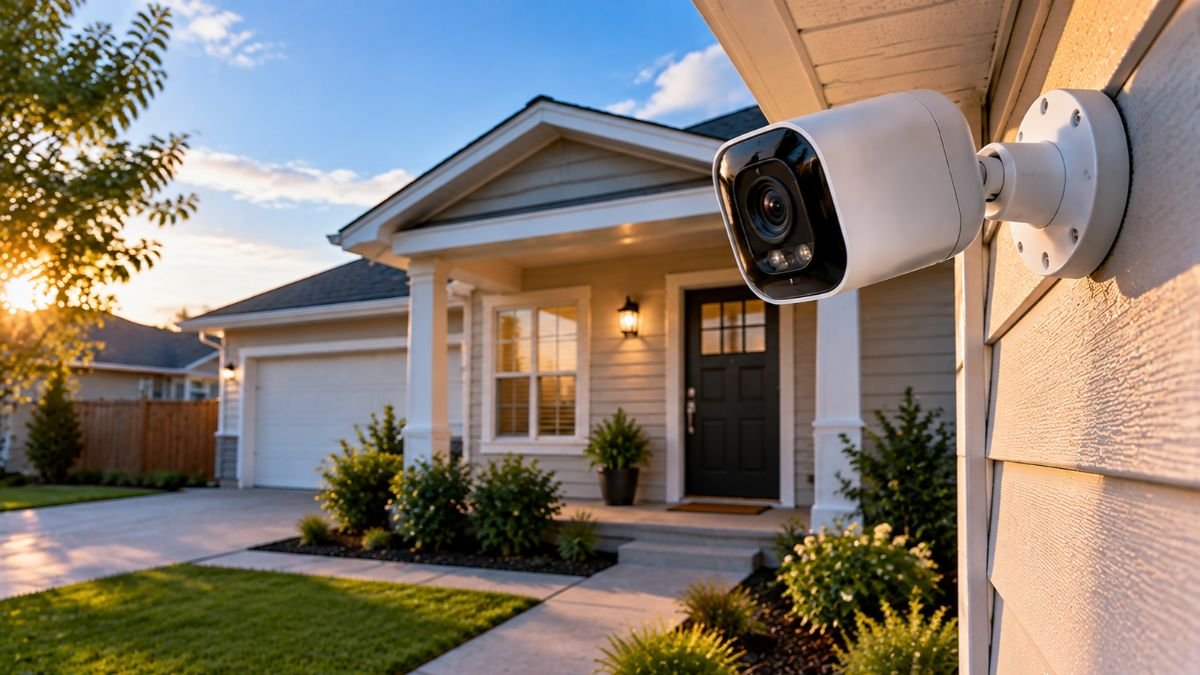
Security cameras are connected devices that capture video, detect activity, and help homeowners monitor their properties. Modern systems can provide live video streaming, motion alerts, night vision, two-way audio, and video storage through cloud platforms or local recording devices.
Understanding how these technologies work helps homeowners make informed decisions about home monitoring, connectivity, and privacy.
Home security technology has evolved beyond traditional surveillance systems. Today’s smart cameras can connect to home networks, communicate with mobile applications, and provide remote access to video footage.
Some models can even distinguish between people, vehicles, and other types of movement using intelligent detection features.
However, understanding security cameras involves more than looking at video resolution or the number of features listed on a product page. Connectivity, power requirements, recording methods, network reliability, and software security all influence how these devices perform.
For example, a wireless camera may be easier to install than a wired system, but its performance can depend on Wi-Fi coverage and battery life. Similarly, cloud recording makes remote access convenient, but it may introduce subscription requirements and additional privacy considerations.
These differences become particularly important when cameras are integrated into a larger smart home devices ecosystem.
Understanding the technology behind security cameras helps homeowners recognize how different systems operate, what their limitations are, and which features actually make a difference in everyday use.
How Security Cameras Work
Security cameras capture images through an optical lens and an electronic image sensor. The captured information is processed into digital video, which can then be transmitted to a recording device, stored locally, or uploaded to a cloud platform.
Most modern residential security cameras use digital imaging technology combined with software that manages video recording, motion detection, and remote access.
Although different models use different hardware configurations, the basic operating process is similar.
The Main Components of a Security Camera
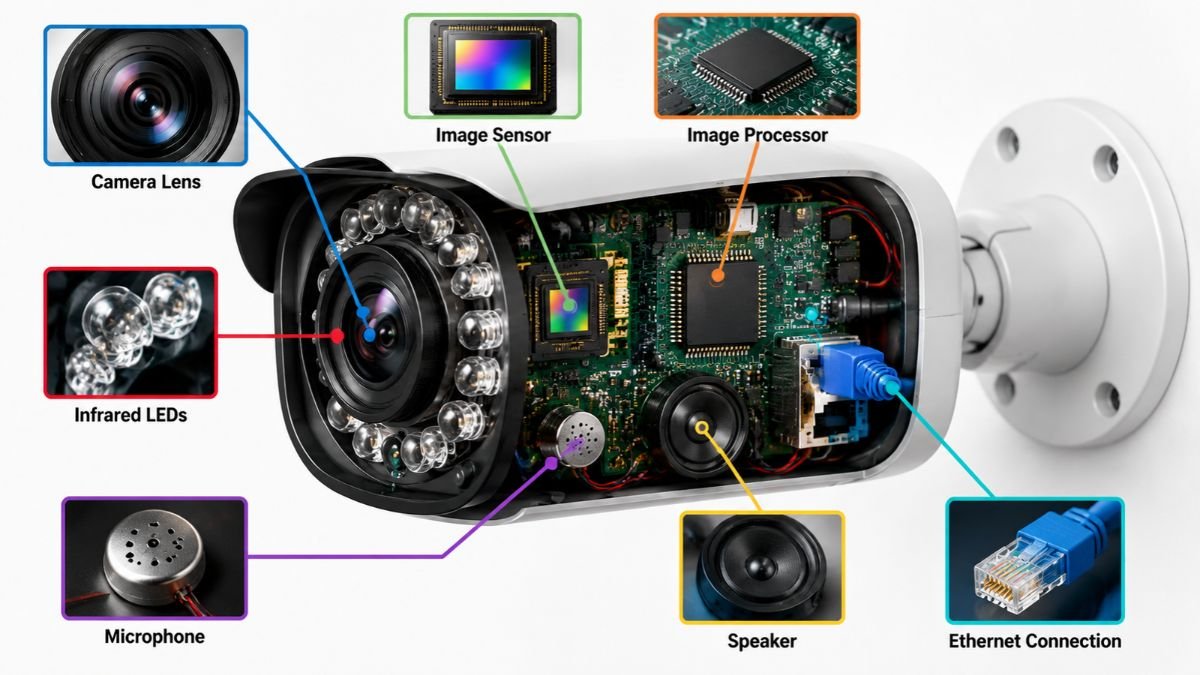
A modern security camera combines several hardware and software components that work together to capture and process video.
The main components include:
- Lens: Collects incoming light and determines how much of the surrounding area appears in the image.
- Image Sensor: Converts incoming light into electronic signals that form the digital image.
- Image Processor: Processes image information, manages video compression, and supports features such as motion detection.
- Network Module: Allows the camera to communicate through Wi-Fi, Ethernet, or another supported connection.
- Storage System: Saves recordings on a memory card, internal storage, network recorder, or cloud platform.
- Microphone and Speaker: Support audio capture and two-way communication when these features are available.
Each component has a specific purpose, but their performance is interconnected.
For example, a high-resolution image sensor cannot guarantee clear footage if the lens is poor, lighting conditions are inadequate, or video compression removes too much detail.
Similarly, advanced motion detection depends on both the camera’s image quality and its processing capabilities.
How Security Cameras Capture and Process Video
The video capture process begins when light enters the camera through its lens.
The image sensor converts that light into electronic information. The camera’s processor then handles the image data and prepares it for storage or transmission.
Most digital cameras use video compression to reduce file sizes and make recordings easier to transmit over networks.
Common compression technologies include H.264 and H.265. H.265, also known as High Efficiency Video Coding (HEVC), can provide more efficient compression than H.264 under comparable conditions. Actual results depend on encoder settings, video content, and supported devices.
This matters because security cameras may generate substantial amounts of video data, particularly when recording continuously at higher resolutions.
The camera must balance image quality, storage requirements, and available network bandwidth.
How Video Reaches Your Smartphone
One of the most useful features of modern security cameras is the ability to view footage remotely. Instead of checking recordings directly on a monitor connected to the camera, homeowners can access supported video feeds through a smartphone, tablet, or computer.
Most connected security cameras follow a similar process:
- The camera captures video through its image sensor.
- Its processor converts the captured information into a digital video stream.
- The camera sends the stream through Wi-Fi, Ethernet, or another supported connection.
- Depending on the system, the video or access request passes through a manufacturer’s cloud infrastructure or another supported connection method.
- The application displays the available live footage or retrieves previously recorded video.
The exact architecture varies between manufacturers. Some devices use cloud-based services to establish remote connections, while others support more direct communication between devices.
Live Streaming vs. Recorded Video
Live streaming and recorded video serve different purposes.
Live streaming allows users to view what the camera is capturing at that moment. It is useful when someone wants to check an entrance, driveway, or another monitored area remotely.
Recorded video allows users to review footage captured earlier. Depending on the system, recordings may be stored continuously or saved only when the camera detects a relevant event.
Some cameras also support event-based video previews. These recordings show a short period surrounding detected movement, helping users understand what triggered an alert.
Receiving a motion notification does not always mean the complete event has been recorded. Recording duration and event history depend on the camera’s settings, storage configuration, and service plan.
What Happens When the Internet Stops Working?
Internet interruptions can affect security cameras differently depending on their design.
A camera that relies entirely on cloud connectivity may lose remote access and cloud recording when the internet connection becomes unavailable.
However, some systems can continue recording locally.
For example, an IP camera connected to a local NVR may continue sending video to the recorder even when the household internet connection is down, provided the local network and power supply remain operational.
Understanding this difference is important when deciding how much a security system should depend on internet connectivity.
Different Types of Security Cameras
Security cameras are available in several designs, each developed for particular monitoring environments and installation requirements.
The differences involve more than appearance. Indoor and outdoor models have different environmental requirements, while wired and wireless systems use different approaches to power and communication.

Indoor Security Cameras
Indoor security cameras are designed to monitor spaces inside residential and commercial buildings.
They are commonly installed in living rooms, hallways, home offices, and other shared areas where users want to observe activity.
Most indoor models have compact designs and include features such as motion detection, live streaming, and two-way audio.
Some also offer privacy modes that temporarily disable recording or physically cover the camera lens.
Common uses include:
- Monitoring activity around entrances and hallways.
- Checking pets while homeowners are away.
- Observing shared living spaces.
- Monitoring home offices and equipment.
- Checking activity in selected indoor areas.
Camera positioning is particularly important indoors.
A camera pointed directly toward a bright window may produce overexposed footage, making objects inside the room harder to identify. Similarly, positioning it too far from the area being monitored can reduce the usefulness of captured details.
Privacy should also influence installation decisions. Cameras should not unnecessarily record bedrooms, bathrooms, or other spaces where people reasonably expect privacy.
Outdoor Security Cameras
Outdoor security cameras are designed to operate in environments exposed to weather and changing lighting conditions.
Unlike indoor models, they must account for rain, dust, temperature changes, sunlight, and other environmental factors.
Common installation locations include:
- Front entrances and porches.
- Driveways and garages.
- Backyards and patios.
- Side entrances.
- Outdoor storage areas.
One important specification is the camera’s Ingress Protection (IP) rating.
IP ratings describe the level of protection an enclosure provides against solid particles and water under defined testing conditions.
For example, an IP65 rating indicates dust-tight protection and resistance to water jets. It does not mean the camera is designed to remain underwater.
Outdoor cameras also need suitable mounting locations. Installing a camera beneath an eave may provide some protection from direct rain and sunlight, but the actual suitability depends on the manufacturer’s installation instructions and environmental rating.
Wired Security Cameras
Wired security cameras use physical cables to provide power, transmit video, or handle both functions.
Traditional CCTV cameras often use coaxial cables, while modern IP cameras commonly use Ethernet connections.
One particularly useful technology is Power over Ethernet (PoE).
PoE allows compatible cameras to receive electrical power and transmit network data through a single Ethernet cable. This can simplify installation because the camera does not necessarily need a separate power cable near its mounting location.
The IEEE 802.3 Working Group develops and maintains Ethernet networking standards, including technologies related to power delivery over Ethernet. More information is available through the IEEE 802.3 Ethernet Working Group.
Wired systems can be practical for permanent monitoring installations where consistent power and network connectivity are priorities.
However, cable routing, compatible networking equipment, and installation costs should be considered before choosing this configuration.
Wireless Security Cameras
Wireless security cameras generally use Wi-Fi to communicate with a router or another supported network device.
Their main advantage is installation flexibility. Instead of running a network cable between the camera and router, users can connect compatible models through an existing wireless network.
However, the word wireless can be misleading.
A wireless camera does not necessarily operate without electrical wiring. Some models still require a power adapter connected to an outlet. Others use rechargeable batteries, removable battery packs, or solar-assisted charging.
There are therefore two separate considerations:
- Data connectivity: How the camera communicates with the network.
- Power supply: How the camera receives electricity.
A plug-in Wi-Fi camera can provide continuous power while using wireless network communication. A battery-powered Wi-Fi camera may offer greater placement flexibility but require periodic charging.
Wireless performance also depends on signal strength, network congestion, router compatibility, and the distance between the camera and access point.
Video Doorbell Cameras
Video doorbell cameras combine traditional doorbell functionality with connected video monitoring.
They are generally installed near a home’s main entrance and allow homeowners to see visitors through a connected application.
Most models include some combination of:
- Live video streaming.
- Motion detection.
- Visitor notifications.
- Two-way audio.
- Doorbell button alerts.
- Recorded event history.
Some devices also support package detection or person recognition, depending on the manufacturer’s software.
Video doorbells are particularly useful because they provide information about activity directly around the entrance.
However, positioning matters. A doorbell camera installed too high or too low may provide an unsuitable viewing angle.
Floodlight Security Cameras
Floodlight cameras combine video surveillance with outdoor lighting.
They are generally installed near garages, driveways, entrances, and other exterior areas where additional illumination can be useful.
When supported motion detection identifies activity, the camera may activate its integrated lights and begin recording or sending notifications.
Floodlight cameras may also support:
- Infrared night vision.
- Color night recording with integrated lighting.
- Motion detection zones.
- Two-way audio.
- Remote light controls.
- Adjustable brightness settings.
Unlike some battery-powered cameras, floodlight models may require a permanent electrical connection. Homeowners should check installation requirements and electrical compatibility before mounting one.
Understanding the Differences Between Security Camera Types
| Camera Type | Main Purpose | Typical Power | Important Consideration |
|---|---|---|---|
| Indoor | Monitoring interior spaces | Plug-in or battery | Placement and privacy |
| Outdoor | Monitoring exterior areas | Plug-in, wired, or battery | Weather resistance |
| Wired | Stable physical connectivity | Usually wired | Cable installation |
| Wireless | Flexible network connectivity | Plug-in or battery | Wi-Fi coverage |
| Video Doorbell | Monitoring entrances | Wired or battery | Doorway positioning |
| Floodlight | Outdoor monitoring with lighting | Often hardwired | Electrical requirements |
These categories are not mutually exclusive. An outdoor camera can also be wireless, while a floodlight camera can use a wired network connection.
The most useful way to understand a camera is to consider its installation environment, connectivity method, power source, and recording capabilities together.
Security Camera Features Explained
Modern security cameras include several technologies designed to improve image quality, detect activity, and make video monitoring more convenient. However, not every feature provides the same practical benefit.
Some technologies improve the amount of visual detail captured by the camera, while others help users identify activity, communicate remotely, or manage recordings.
Resolution and Video Quality
Resolution describes the number of pixels used to create a digital image. In security cameras, it influences how much visual detail can appear in recorded footage.
Common resolutions include 720p, 1080p, 2K, and 4K.
| Resolution | Pixel Dimensions | Main Characteristics |
|---|---|---|
| 720p | 1280 × 720 | Basic HD video |
| 1080p | 1920 × 1080 | Full HD |
| 2K | Varies by format | Higher pixel count than Full HD |
| 4K UHD | 3840 × 2160 | Greater image detail |
Higher resolution can help users distinguish objects, observe activity, and examine recorded footage more closely.
However, resolution alone does not determine video quality. Lens quality, image sensor performance, lighting, compression, and camera positioning also influence the final image.
A 4K camera positioned too far from an entrance may provide less useful identification detail than a properly positioned Full HD camera.
Higher resolution also increases storage and bandwidth requirements, particularly when recording continuously.
Understanding 4K Security Cameras
4K security cameras use Ultra High Definition video resolution, commonly measuring 3840 × 2160 pixels. This provides four times the total pixel count of standard 1080p Full HD video.
The additional image detail can be useful when monitoring larger areas or reviewing footage where smaller objects need to be examined.
However, homeowners should consider the entire recording system before choosing a high-resolution configuration.
A 4K camera may require:
- More storage capacity.
- Higher network bandwidth.
- Compatible recording equipment.
- Sufficient processing performance.
- Appropriate lighting and camera positioning.
Video compression can reduce file sizes, but it does not eliminate the additional data requirements associated with higher-resolution recording.
Night Vision Technology
Night vision allows security cameras to capture footage when natural lighting becomes limited.
Many residential cameras use infrared (IR) LEDs to illuminate the monitored area without producing visible light.
The camera’s image sensor detects the reflected infrared light and converts it into an image, which is commonly displayed in black and white.
Its effectiveness depends on infrared illumination strength, camera sensitivity, distance, environmental conditions, and the presence of physical obstructions.
For example, a nearby wall or reflective surface may interfere with infrared illumination and create unwanted glare.
Infrared Night Vision vs. Color Night Vision
Some security cameras support color night vision, which allows them to capture color footage in low-light environments.
These systems generally rely on sensitive image sensors, available ambient light, or integrated visible-light illumination.
| Feature | Infrared Night Vision | Color Night Vision |
|---|---|---|
| Typical image | Black and white | Color |
| Visible lighting | Usually not required | Often requires available light |
| Darkness performance | Suitable for very dark environments | Depends on illumination |
| Common application | Nighttime monitoring | Low-light monitoring |
Color night vision can help distinguish visual details such as clothing or vehicle colors when enough light is available.
Infrared night vision is generally more suitable when the monitored area needs illumination without visible lighting.
Neither technology guarantees clear footage at every distance or in every lighting condition.
Motion Detection Technology
Motion detection identifies changes within a camera’s field of view.
When movement is detected, the camera may begin recording, send an alert, activate a light, or trigger another supported function.
Basic motion detection can respond to different types of movement, including:
- People walking through an area.
- Vehicles passing nearby.
- Animals moving around a property.
- Tree branches moving in the wind.
- Shadows changing because of sunlight.
Although this technology is useful, basic motion detection can generate unnecessary alerts.
For example, an outdoor camera facing a busy street may repeatedly detect passing vehicles even when the homeowner is primarily interested in activity near the front entrance.
This is why detection sensitivity and activity zones are important configuration features.
AI-Powered Motion Detection
Some modern security cameras use artificial intelligence to analyze captured images and classify detected objects.
Instead of reporting every movement as a generic motion event, these systems may identify categories such as people, vehicles, and animals.
This can help homeowners receive more relevant notifications.
However, AI detection is not perfect. Performance can vary because of poor lighting, partially hidden objects, camera positioning, distance, weather conditions, image quality, and software limitations.
Users should understand that AI classification is an automated interpretation of visual information, not a guarantee that every event will be correctly identified.
Some security cameras can also work with compatible lighting systems, allowing detected movement to trigger automated illumination. Understanding smart lighting technology helps explain how these devices can work together within a connected home.
Person, Vehicle, and Animal Detection
Different detection categories serve different monitoring purposes.
Person detection identifies visual patterns associated with human movement. It can help distinguish people from other moving objects.
Vehicle detection identifies vehicles appearing within the camera’s field of view. It may be useful for monitoring driveways, parking areas, and garage entrances.
Animal detection identifies animals moving through monitored areas. This can be helpful for homeowners who want to understand when pets or wildlife enter a particular space.
The availability of these features depends on the camera’s hardware, software, and supported application. Some systems also require subscriptions to access advanced detection or notification features.
Field of View and Viewing Angle
The field of view describes how much of the surrounding area a camera can capture. It is generally expressed in degrees.
A wider field of view allows a camera to cover more horizontal space, while a narrower viewing angle focuses on a smaller area.
A wide-angle camera may cover a large backyard or driveway, reducing the number of cameras needed for basic observation.
A narrower field of view may be more useful when monitoring a specific entrance where visual detail is more important than overall coverage.
The viewing angle should match the installation location and monitoring purpose. A very wide field of view can capture more surroundings, but distant objects may appear smaller.
Activity Zones and Motion Sensitivity
Activity zones allow users to select specific portions of the camera’s viewing area for motion detection.
This feature is useful when the camera captures areas that do not need continuous monitoring.
Consider a camera installed above a front entrance. Its viewing area may include the front door, sidewalk, street, and neighboring driveway. A homeowner may want notifications about activity near the entrance without receiving alerts whenever a vehicle passes on the road.
Activity zones help reduce these unnecessary notifications.
Motion sensitivity controls how easily the camera responds to movement.
Higher sensitivity may detect smaller movements but can increase false alerts. Lower sensitivity can reduce unnecessary notifications but may also miss some activity.
The ideal configuration depends on the environment, camera placement, and the type of activity being monitored.
Two-Way Audio
Two-way audio allows users to communicate through a camera using its built-in microphone and speaker.
For example, a homeowner may use the feature to speak with a delivery driver or communicate with someone standing near an entrance.
Common applications include:
- Communicating with visitors.
- Speaking with delivery personnel.
- Checking on family members in shared spaces.
- Listening to activity around an entrance.
Audio quality depends on microphone sensitivity, speaker performance, background noise, and network conditions.
There are also privacy considerations. Recording or transmitting conversations may be subject to state and local laws, depending on the circumstances and whether people have consented.
How Security Camera Connectivity Works
Connectivity determines how security cameras communicate with routers, recording devices, mobile applications, and cloud services. It also influences how easily users can access live footage and receive notifications when they are away from home.
Different cameras use different connection technologies. Some rely on Wi-Fi, while others use Ethernet cables or cellular networks. Certain systems can also operate through local connections without requiring continuous internet access.
Wi-Fi Security Cameras
Wi-Fi security cameras connect to a wireless router or access point to communicate with other devices on a home network.
This connection allows compatible cameras to transmit video, receive configuration commands, and communicate with supported mobile applications.
One of the main advantages of Wi-Fi connectivity is installation flexibility. Homeowners can position cameras in different areas without running an Ethernet cable between every camera and the router.
However, wireless connectivity depends on signal quality.
Walls, floors, metal structures, large furniture, and the distance between the camera and router can weaken Wi-Fi signals. Network congestion can also affect video transmission, particularly when multiple devices are using the same connection.
Before installing a Wi-Fi camera, homeowners should consider:
- Distance from the wireless router.
- Number of walls and obstacles between devices.
- Available internet upload speed.
- Router compatibility.
- Number of connected devices.
- Camera resolution and video transmission requirements.
Testing the connection at the intended installation location is more reliable than checking Wi-Fi strength beside the router.
When integrating wireless cameras into a connected property, understanding the complete smart home setup can help homeowners plan device connectivity and network requirements.
Understanding 2.4 GHz and 5 GHz Wi-Fi
Many security cameras support the 2.4 GHz Wi-Fi band, while some newer models also support 5 GHz connectivity.
Both frequencies have different characteristics that can influence camera performance.
2.4 GHz Wi-Fi generally provides greater coverage and better ability to pass through walls and other obstacles. However, it can experience interference from other devices operating in the same frequency range.
5 GHz Wi-Fi generally offers more available bandwidth and can support higher data transmission rates over shorter distances. Its signal typically has more difficulty passing through physical obstacles compared with 2.4 GHz.
| Feature | 2.4 GHz Wi-Fi | 5 GHz Wi-Fi |
|---|---|---|
| Coverage | Generally greater | Generally shorter |
| Wall penetration | Generally better | Generally weaker |
| Available bandwidth | Lower | Higher |
| Interference | Can be more congested | Often less congested |
| Typical camera use | Longer-range connections | Higher-bandwidth connections at shorter distances |
For example, a camera installed in a detached garage may benefit from the greater coverage of a 2.4 GHz network.
A camera located closer to the router may benefit from 5 GHz connectivity if the device supports it and sufficient signal strength is available.
Not every camera supports both frequencies. Some models require a 2.4 GHz connection during setup, so checking the manufacturer’s specifications before installation can prevent compatibility problems.
Ethernet and PoE Cameras
Ethernet-connected security cameras use physical network cables to communicate with routers, switches, or recording systems.
Unlike Wi-Fi cameras, they do not depend on wireless signal strength for their primary network connection.
One technology commonly used in network-based surveillance is Power over Ethernet (PoE).
PoE allows compatible network equipment to transmit electrical power and data through the same Ethernet cable.
A PoE installation generally requires:
- A compatible PoE camera.
- A PoE network switch or injector.
- Ethernet cabling.
- A router or suitable recording system.
- A compatible power and network configuration.
PoE can simplify installation because it reduces the need for separate power connections near each camera.
However, Ethernet cabling still needs to be routed correctly. Outdoor installations may also require appropriate cable protection and weather-resistant connections.
Security Cameras Without Wi-Fi
Some security cameras can operate without connecting to a household Wi-Fi network.
This is possible because Wi-Fi is only one method of communication between cameras and other system components.
For example, an IP camera connected directly to an NVR through Ethernet can transmit footage over a local network without requiring a wireless connection.
Traditional CCTV systems can also record through coaxial connections to a DVR.
The main configurations include:
- DVR systems: Connect compatible cameras to a digital video recorder through physical cables.
- NVR systems: Receive video from network cameras through Ethernet or another supported network connection.
- Direct Ethernet systems: Connect cameras to local network equipment without using Wi-Fi.
- Cellular cameras: Use mobile networks to communicate with supported remote services.
Operating without Wi-Fi does not necessarily mean operating without the internet. A local recording system may continue capturing video without internet access, while remote viewing and cloud services may become unavailable.
Cellular Security Cameras: 4G and LTE Connectivity
Some security cameras use cellular networks instead of relying on a home Wi-Fi connection.
These cameras typically contain a cellular modem and require a compatible SIM card or embedded cellular connectivity.
They communicate through supported mobile networks, such as 4G LTE, allowing users to monitor locations where traditional broadband connections may be unavailable.
Common applications include:
- Remote properties.
- Construction sites.
- Farms and agricultural buildings.
- Temporary outdoor installations.
- Detached structures without reliable Wi-Fi coverage.
Cellular cameras can provide more installation flexibility, but they introduce additional requirements.
Users need to consider mobile network coverage, supported frequency bands, data consumption, and cellular service costs.
Video streaming and continuous recording can consume substantial amounts of mobile data, especially when cameras transmit high-resolution footage frequently.
Cloud-Based Remote Access
Cloud connectivity allows compatible security cameras to communicate with remote services operated by their manufacturers or service providers.
Users can retrieve supported footage through an internet-connected mobile application.
Depending on the camera and service plan, cloud functionality may include remote live viewing, recorded event access, cloud video storage, motion notifications, and multiple-device access.
However, cloud functionality depends on several factors.
The camera must have a working network connection, the account must remain accessible, and the manufacturer’s services must be available.
Some features also require a paid subscription.
Before enabling cloud recording, users should understand how long recordings remain available, whether continuous recording is supported, and what happens when a subscription expires.
A cloud service should also be evaluated in terms of privacy and account security, particularly because recorded footage may contain sensitive information about household activity.
Video Storage: Cloud vs. Local Recording
Video storage determines where security camera recordings are saved, how long footage remains available, and how homeowners can access video when an event needs to be reviewed.
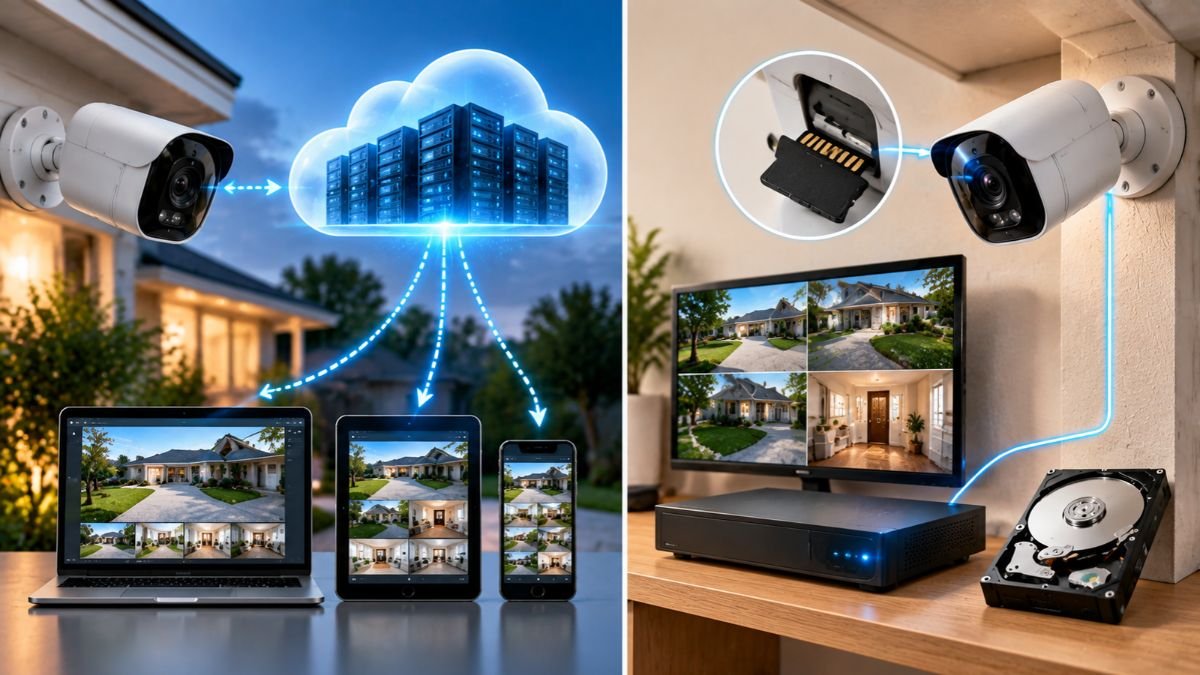
Some cameras upload recordings to remote cloud servers, while others save footage directly to memory cards or dedicated recording devices. Certain systems support both approaches, allowing users to combine local recording with remote storage.
The right storage configuration depends on recording frequency, video resolution, available storage capacity, internet connectivity, privacy requirements, and long-term costs.
Cloud Video Storage
Cloud video storage saves camera recordings on remote servers operated by a manufacturer or service provider.
Instead of keeping all footage on equipment inside the property, the camera sends supported video recordings through an internet connection to the provider’s storage infrastructure.
Homeowners can then access available footage through a mobile application or web-based account.
One advantage of cloud storage is remote accessibility. If someone needs to review an event while away from home, they can usually retrieve supported recordings without physically accessing the camera.
Cloud storage can also provide additional protection against the loss of locally stored footage.
For example, if a camera or recording device is stolen, recordings already uploaded to a remote service may remain accessible through the user’s account, depending on the service configuration.
Common cloud storage features include:
- Remote access to recorded footage.
- Automatic uploading of supported video events.
- Video history and playback.
- Access through compatible smartphones and computers.
- Storage across multiple connected cameras.
- Sharing selected recordings with other users.
However, cloud storage is not automatically included with every security camera.
Some manufacturers provide limited free storage, while others require a subscription for extended video history or advanced recording features.
Users should also understand how recordings are encrypted, how long footage is retained, and whether the service allows users to download important video files.
Local Video Storage
Local video storage saves recordings on physical equipment located inside the home or property.
Depending on the camera system, footage may be stored on a memory card, internal camera memory, a dedicated recording hub, or a network video recorder.
This approach can reduce dependence on cloud subscriptions and may allow recording to continue when the internet connection becomes unavailable.
However, local storage does not eliminate every potential risk.
If the recording device is damaged, stolen, or experiences a hardware failure, saved footage may become inaccessible.
The main local storage options include:
- MicroSD memory cards.
- Internal camera storage.
- Digital video recorders (DVRs).
- Network video recorders (NVRs).
- Dedicated local storage hubs.
Local recording is particularly useful for homeowners who want more direct control over where footage is stored.
MicroSD Cards and Camera-Based Storage
Some security cameras include a microSD card slot that allows video to be saved directly inside the device.
MicroSD cards are small removable storage devices commonly used in cameras, smartphones, and other electronic equipment.
Their compact size makes them convenient for cameras that do not require a separate recording unit.
However, storage performance depends on several factors.
Storage capacity determines how much video can be saved before older recordings need to be overwritten or deleted.
Write speed influences how effectively the card handles continuous video recording.
Card durability matters because surveillance cameras may write data repeatedly over long periods.
Users should check the manufacturer’s recommended memory card capacity, supported card types, and recording requirements before purchasing storage.
It is also important to understand whether the camera automatically overwrites older footage when storage becomes full.
This feature is commonly called loop recording.
With loop recording, the camera deletes or replaces older recordings to make room for new footage, according to its configured storage rules.
DVR vs. NVR Storage Systems
DVR and NVR systems are commonly used for local video recording, but they operate with different camera technologies.
A DVR generally works with compatible analog surveillance cameras and processes incoming video through the recorder.
An NVR is designed for network-based cameras, usually IP cameras, which process video before transmitting it to the recording system.
Both systems can save recordings to internal hard drives and support playback through connected monitors or compatible remote applications.
| Feature | DVR System | NVR System |
|---|---|---|
| Typical camera technology | Analog CCTV | IP cameras |
| Video processing | Generally performed by recorder | Generally performed by camera |
| Connection | Usually coaxial cable | Ethernet or network connection |
| Recording location | DVR hard drive | NVR hard drive |
| Network functionality | Depends on recorder | Depends on recorder and camera configuration |
| Common application | Traditional CCTV installations | Network-based surveillance |
An NVR can support advanced network camera features, depending on the recorder’s compatibility and available software.
However, not every IP camera works with every NVR. Compatibility may depend on supported protocols, video codecs, resolution limits, authentication requirements, and manufacturer-specific features.
Continuous Recording vs. Motion-Activated Recording
Security cameras generally use two common recording approaches: continuous recording and event-based recording.
Continuous recording captures video throughout the configured recording schedule.
This approach can provide a more complete record of activity because footage is available even when the camera does not identify movement.
However, continuous recording creates larger storage requirements.
Motion-activated recording saves video when the camera detects movement or another configured event.
This can reduce storage consumption because the camera does not need to save every moment of inactivity.
However, event-based recording depends on detection accuracy and recording settings.
For example, if a camera has poorly configured motion sensitivity, it may fail to record a relevant event or generate excessive recordings from minor movements.
| Feature | Continuous Recording | Motion-Activated Recording |
|---|---|---|
| Recording behavior | Records throughout configured periods | Records detected events |
| Storage requirements | Generally higher | Generally lower |
| Activity coverage | More complete timeline | Depends on detection |
| Playback | Review any recorded period | Review saved events |
| Common limitation | Uses more storage | May miss events |
Some systems support scheduled recording, allowing homeowners to combine different recording modes.
For example, a camera may record continuously during overnight hours and switch to event-based recording during the day.
Video Retention and Storage Capacity
Video retention describes how long security camera recordings remain available before they are deleted, overwritten, or expire.
Retention periods vary according to storage capacity, recording frequency, resolution, compression, and service settings.
For cloud systems, the provider may offer a defined recording history.
For local systems, the available storage capacity and recording configuration determine how much footage can be retained.
Several factors influence storage requirements:
- Video resolution: Higher-resolution footage generally requires more storage.
- Frame rate: Higher frame rates can increase the amount of recorded information.
- Compression: Efficient video codecs can reduce file sizes.
- Recording duration: Continuous recording requires more space than occasional event recording.
- Number of cameras: Multiple cameras increase total storage consumption.
- Audio recording: Audio may add to the overall amount of stored data.
A home with four cameras recording continuously will generally require more storage than a property with one camera recording only motion events.
Actual requirements depend on video encoding, frame rate, scene complexity, and recording duration.
Do Security Cameras Need a Monthly Subscription?
Not all security cameras require a monthly subscription.
Some models support local storage through microSD cards or dedicated recording systems, allowing users to save footage without paying for cloud storage.
Other cameras offer basic functionality without recurring payments but require subscriptions for extended recording history, advanced detection, or additional cloud features.
Before choosing a storage configuration, users should understand which features are available without a paid plan.
A camera may offer live viewing without a subscription but require payment for recorded video history.
Another model may support local recording while charging for remote cloud backups.
A security camera without a monthly subscription can still record video, provided it supports local storage or another recording method that does not depend on a paid service.
Choosing Between Cloud and Local Storage
Cloud and local storage are not necessarily competing technologies. Some security camera systems support both.
For example, a homeowner may use local recording for continuous video capture while keeping selected event recordings in the cloud.
This configuration can provide additional flexibility, although it may increase costs and system complexity.
When evaluating storage options, consider the following questions:
- Do you need remote access to recordings?
- Is continuous recording important?
- Do you prefer avoiding monthly subscriptions?
- How much video history do you need?
- Would you benefit from an additional off-site backup?
- How will recordings be protected against unauthorized access?
The most appropriate configuration depends on the monitoring requirements and the level of control the homeowner wants over recorded footage.
Security Cameras, Privacy, and Cybersecurity
Security cameras provide homeowners with greater visibility into activity around their properties, but connected surveillance devices also introduce privacy and cybersecurity considerations.
Modern cameras communicate with home networks, mobile applications, and cloud platforms. This connectivity creates additional points that need protection.
A camera may capture sensitive information, including household routines, visitor activity, vehicle movements, and conversations. If an account is compromised or a device is incorrectly configured, this information may become accessible to unauthorized individuals.
Protecting a security camera therefore involves more than choosing a strong password. Users should understand account permissions, network security, video encryption, software updates, and privacy settings.
Protecting Camera Accounts
Most connected security cameras require an account to manage device settings, access live video, and review recordings.
If someone gains unauthorized access to this account, they may be able to view camera feeds, change recording settings, or access stored footage.
The Federal Trade Commission (FTC) recommends using strong, unique passwords for connected cameras and enabling two-factor authentication when available.
Its official security camera guidance explains the importance of protecting camera accounts and reviewing available security features.
Several practices can help protect camera accounts:
- Use unique passwords: Avoid reusing passwords from email, social media, or other online accounts.
- Enable two-factor authentication: Add another verification step when signing in.
- Replace default credentials: Change factory usernames and passwords whenever the device allows it.
- Review account access: Remove users who no longer need permission to view camera footage.
- Check login activity: Look for unfamiliar devices or suspicious access attempts when account activity information is available.
Two-factor authentication is particularly useful because it adds another security layer beyond a password.
Securing the Home Network
Security cameras connected to Wi-Fi depend on the security of the surrounding home network.
A poorly protected router can expose connected devices to unnecessary risks, including unauthorized access and network interference.
The FTC recommends protecting the home router with a strong administrative password, keeping its software updated, and using supported Wi-Fi encryption.
Its guidance on securing internet-connected devices at home explains practical steps for managing connected cameras and other smart devices.
Homeowners can improve network security through several measures:
- Change the router’s default administrator password.
- Use WPA2 or WPA3 encryption when supported.
- Install available router firmware updates.
- Disable unnecessary remote administration features.
- Review connected devices periodically.
- Consider placing security cameras on a separate network.
A separate network can help isolate connected cameras from computers, smartphones, and other personal devices.
However, network separation is not a complete security solution. Router configuration, device permissions, software updates, and account protection remain important.
Understanding Video Encryption
Encryption protects digital information by converting it into a format that cannot be easily understood without the appropriate decryption key.
For security cameras, encryption can help protect video recordings, account credentials, and communication between connected devices.
There are two important encryption concepts to understand.
Encryption in transit protects information while it travels between devices or across a network.
Encryption at rest protects information stored on a device or server.
Not every camera system provides the same encryption capabilities.
Some manufacturers encrypt video transmission but use different protection methods for stored footage. Others offer additional encryption features that depend on the selected configuration or service plan.
Before relying on a security camera for sensitive monitoring, users should review whether video transmission is encrypted, whether stored recordings are protected, how account credentials are managed, and who can access saved footage.
Encryption is an important security measure, but it does not eliminate every risk. Weak passwords, compromised accounts, insecure devices, and unauthorized application access can still create vulnerabilities.
Privacy Settings and Camera Placement
Privacy should influence where security cameras are installed and how their recording features are configured.
A camera positioned to monitor a front entrance may also capture sidewalks, neighboring driveways, or areas outside the homeowner’s property.
Some security cameras include privacy masking, which allows users to block selected portions of the image.
For example, a homeowner may cover a neighboring window or another area that does not need monitoring.
Other cameras provide scheduling options that allow recording to stop during specific periods.
Useful privacy settings include:
- Privacy zones or masking.
- Scheduled recording.
- Camera lens covers.
- Microphone controls.
- User access permissions.
- Selective motion detection zones.
Indoor cameras require particular attention because they may capture family activities and other personal information.
Placing cameras in shared spaces rather than private areas can help reduce unnecessary surveillance.
Users should also review whether the camera manufacturer collects diagnostic information, usage data, or other information through its mobile application.
Audio Recording and U.S. Privacy Considerations
Security cameras with microphones can capture conversations as well as video.
This introduces additional privacy considerations because audio recording laws may differ from the rules governing ordinary video surveillance.
In the United States, federal law and state laws regulate the interception and recording of certain communications.
The federal Wiretap Act establishes restrictions on the intentional interception of wire, oral, and electronic communications, with specific exceptions.
The U.S. Department of Justice’s explanation of Title III and the Wiretap Act provides background on these federal protections.
The Reporters Committee for Freedom of the Press recording law guide also provides information about recording laws across U.S. states. Although designed for journalists, it can help readers understand why requirements vary by jurisdiction.
Before recording conversations, homeowners should consider:
- Whether people have a reasonable expectation of privacy.
- Whether applicable federal and state consent rules require notification or permission.
- Whether visitors, household workers, or other individuals may be recorded.
- Whether audio recording is necessary for the camera’s intended purpose.
Video-only monitoring and audio-enabled monitoring are not legally identical in every situation.
Homeowners should review the rules applicable to their location and circumstances before activating audio recording.
Firmware Updates and Security Maintenance
Security cameras rely on firmware to control their hardware and software functions.
Firmware updates can address security vulnerabilities, improve device stability, fix software problems, and support compatibility with other connected systems.
Unlike ordinary application updates, firmware updates modify the software that operates the camera itself.
The FTC recommends keeping connected devices and their associated applications updated to address security vulnerabilities and software problems. Its guidance on securing internet-connected devices explains why unused connected devices and unnecessary remote access features should also be reviewed.
Homeowners should develop a simple maintenance routine:
- Check for available camera firmware updates.
- Keep the manufacturer’s mobile application updated.
- Review account permissions periodically.
- Remove devices that are no longer in use.
- Check recording and storage settings.
- Confirm that cameras remain connected and operational.
Another important consideration is manufacturer support.
A camera that no longer receives security updates may become increasingly difficult to protect against newly discovered vulnerabilities.
Before using connected cameras for long-term monitoring, it is useful to understand how long the manufacturer expects to provide software and security support.
The U.S. Cyber Trust Mark
The U.S. Cyber Trust Mark is a voluntary cybersecurity labeling initiative established by the Federal Communications Commission (FCC) for eligible consumer wireless Internet of Things (IoT) products.
Its purpose is to help consumers recognize products that meet defined cybersecurity requirements.
The program includes a recognizable label and a QR code that can connect users to additional product security information.
The FCC’s official Cybersecurity Labeling Program order explains the program’s framework and requirements.
However, the Cyber Trust Mark should not be confused with a general guarantee that a product is completely secure.
Consumers should still review the manufacturer’s privacy policy, update support, account security features, and available device controls.
Installing and Maintaining Security Cameras
Installing security cameras correctly is essential for capturing useful footage and maintaining reliable monitoring.
Even cameras with advanced imaging and detection features may produce poor results when they are positioned incorrectly, connected to weak networks, or configured with unsuitable recording settings.
Installation involves more than mounting a camera on a wall. Homeowners need to consider viewing angles, lighting conditions, power availability, wireless coverage, storage configuration, and privacy requirements.
A properly planned installation can reduce unnecessary alerts, improve video coverage, and make everyday camera management easier.
Choosing the Right Camera Location
The first step in installing security cameras is identifying the areas that require monitoring.
Rather than installing cameras randomly, homeowners should consider which entrances, outdoor areas, and shared spaces need visibility.
Common residential monitoring locations include:
- Front entrances and porches.
- Driveways and garage doors.
- Backyard entrances.
- Side passages and gates.
- Ground-floor access points.
- Indoor common areas.
Each location presents different installation requirements.
For example, a camera monitoring a driveway may need a wider field of view to capture approaching vehicles. A camera installed near a front entrance may benefit from a more focused viewing angle that captures visitors clearly.
Camera placement should also account for potential obstructions.
Trees, decorative structures, roof extensions, and outdoor furniture can interfere with the camera’s viewing area. Before permanently mounting a camera, temporarily position it and review the live feed to confirm that the important areas are visible.
Camera Positioning and Viewing Angles
Camera positioning influences how much useful information appears in recorded footage.
A camera installed too high may capture the tops of people’s heads rather than useful facial details. A camera positioned too low may become easier to obstruct or tamper with.
The appropriate mounting height depends on the camera’s lens, field of view, installation environment, and monitoring objective.
For outdoor installations, consider:
- Avoiding direct sunlight entering the lens.
- Reducing glare from reflective surfaces.
- Keeping important entrances within the viewing area.
- Avoiding unnecessary coverage of neighboring private spaces.
- Ensuring the camera remains accessible for maintenance.
Lighting also influences image quality.
A camera facing directly toward a bright light source may produce overexposed footage. Similarly, an outdoor camera positioned near reflective glass may experience unwanted reflections during nighttime recording.
Testing the viewing angle during both daylight and nighttime conditions can help identify these problems before completing the installation.
Checking Power and Network Requirements
Security cameras require suitable power and connectivity to operate reliably.
The requirements depend on the camera’s design and installation method.
Battery-powered cameras need periodic charging or battery replacement. Plug-in cameras require a suitable electrical outlet, while PoE cameras need compatible Ethernet equipment.
Before installation, homeowners should confirm:
- The camera’s required voltage and power specifications.
- Whether a compatible power adapter is included.
- Whether Ethernet or PoE equipment is required.
- Whether the Wi-Fi signal is strong enough.
- Whether the recording device supports the camera.
- Whether outdoor cables need additional protection.
For wireless cameras, testing network performance at the final installation location is particularly important.
If wireless coverage is insufficient, a compatible access point or mesh networking system may help extend coverage.
However, the selected networking equipment must support the camera’s connection requirements.
Understanding Installation Requirements
Installation complexity varies considerably between camera types.
A battery-powered indoor camera may require little more than mounting, application setup, and network configuration.
A wired outdoor surveillance system may require cable routing, drilling, mounting hardware, network equipment, and electrical planning.
PoE installations also require compatible switches or injectors that provide sufficient power for the connected cameras.
Some homeowners may be comfortable installing simple wireless cameras themselves, while more complex electrical or structural work may require qualified installation services.
Outdoor installations deserve additional attention because exposed wiring, unsuitable mounting surfaces, and poor weather protection can affect long-term reliability.
Always follow the manufacturer’s installation instructions and avoid modifying electrical connections beyond your qualifications.
Configuring Recording and Notifications
After installation, the camera should be configured according to its intended monitoring purpose.
Default settings may not provide the most useful recording experience.
For example, a camera facing a busy street may generate frequent notifications because of passing vehicles. Adjusting motion sensitivity and activity zones can help reduce unnecessary alerts.
Useful configuration steps include:
- Set the correct date, time, and time zone.
- Select the appropriate recording mode.
- Adjust motion sensitivity.
- Configure activity detection zones.
- Enable relevant person or vehicle detection features when supported.
- Review notification preferences.
- Confirm storage and video retention settings.
- Check account permissions and privacy controls.
Recording schedules can also improve everyday usability.
For example, a homeowner may prefer continuous recording overnight and motion-based notifications throughout the day.
The available options depend on the camera’s software, storage configuration, and subscription arrangements.
Testing Camera Performance
A camera should be tested after installation to confirm that its main functions work correctly.
Simply seeing a live image in the application does not guarantee that every feature is operating as expected.
A practical testing process should include:
- Checking the live video feed.
- Reviewing image quality during daylight.
- Testing night vision after dark.
- Walking through the monitored area to trigger motion detection.
- Confirming that notifications arrive correctly.
- Testing two-way audio when available.
- Reviewing saved recordings.
- Checking remote access through a mobile network.
These checks can reveal problems that may otherwise remain unnoticed.
For example, a camera may display live footage correctly but fail to save recordings because its memory card is incompatible or its storage settings are incorrect.
Testing the complete recording and notification process helps confirm that the system performs as expected.
Routine Maintenance and Troubleshooting
Security cameras require occasional maintenance to remain reliable.
Outdoor cameras are particularly exposed to environmental conditions that can affect image quality and physical connections.
Dust, water spots, insects, and accumulated dirt can interfere with the camera lens.
Common maintenance tasks include:
- Cleaning camera lenses with suitable materials.
- Checking mounting brackets and physical connections.
- Inspecting outdoor cables for visible damage.
- Charging or replacing batteries when necessary.
- Reviewing available firmware updates.
- Checking storage capacity.
- Testing motion detection.
- Reviewing account access and privacy settings.
The following table explains some common problems and their possible causes.
| Common Problem | Possible Cause | Recommended Check |
|---|---|---|
| Camera disconnects frequently | Weak Wi-Fi signal | Check wireless coverage |
| Blurry footage | Dirty lens or poor focus | Clean the lens and review positioning |
| Missing recordings | Storage or recording configuration | Check storage and recording settings |
| Excessive motion alerts | High sensitivity or unsuitable detection zones | Adjust detection settings |
| Poor night vision | Obstruction or infrared reflection | Check camera placement |
| Battery drains quickly | Frequent recording or notifications | Review activity and power settings |
| Remote access unavailable | Internet, account, or service problem | Check network and application access |
If the problem continues, consult the manufacturer’s troubleshooting documentation.
Repeated disconnections, unexplained recording failures, and unsupported firmware versions should not be ignored because they can affect the reliability of the monitoring system.
Conclusion: Understanding Security Cameras and Their Role in Smart Homes
Security cameras have evolved into connected monitoring devices that combine digital imaging, network communication, intelligent detection, and video storage.
Understanding how these technologies work helps homeowners make informed decisions about monitoring their properties and protecting personal information.
The differences between wired and wireless cameras, cloud and local storage, and basic and AI-powered detection can significantly influence everyday performance.
Features such as night vision, motion detection, two-way audio, and remote access also serve different purposes depending on the installation environment.
However, effective monitoring requires more than advanced camera specifications. Correct positioning, reliable connectivity, suitable recording settings, regular maintenance, and strong cybersecurity practices all contribute to a dependable system.
Security cameras can also become part of a broader smart home setup that connects monitoring equipment with other household technologies.
As connected home technology continues to develop, understanding security cameras remains valuable for anyone interested in creating a more informed, organized, and secure home monitoring environment.
Frequently Asked Questions About Security Cameras
How do security cameras work?
Security cameras capture images through an optical lens and electronic image sensor. Their internal processors convert captured information into digital video, which can be transmitted to a recording device or cloud platform. Depending on the camera’s capabilities, users can watch live footage, receive motion alerts, and review previously recorded events.
Do security cameras work without Wi-Fi?
Yes, some security cameras operate without Wi-Fi. Wired CCTV systems connected to DVRs, Ethernet-connected IP cameras, and local NVR systems can capture and store footage without a wireless connection. However, remote viewing and cloud storage may require internet or cellular connectivity.
How long do security cameras keep recorded footage?
Security cameras can retain footage for different periods depending on storage capacity, recording resolution, video compression, and recording frequency. Cloud services may provide a fixed retention period, while local recording systems retain footage until storage becomes full or recordings are manually deleted or overwritten.
Are 4K security cameras better than 1080p cameras?
4K security cameras capture more pixels than 1080p cameras, providing greater potential image detail. This can help when reviewing footage from larger areas. However, lens quality, lighting, camera positioning, compression, and available storage also influence video quality. Higher resolution does not automatically guarantee better identification.
Can security cameras record without an internet connection?
Yes, security cameras with supported local recording can continue saving footage without internet access. For example, an IP camera connected to a local NVR may continue recording through the local network. However, cloud recording, remote viewing, and internet-based notifications may stop working during an internet outage.
What is the difference between cloud and local security camera storage?
Cloud storage saves recordings on remote servers operated by a service provider, allowing users to access supported footage through an internet connection. Local storage saves video on physical equipment such as memory cards, DVRs, or NVRs. Cloud storage supports remote access, while local storage provides more direct control over recording equipment.
How can homeowners improve security camera privacy?
Homeowners can improve security camera privacy by using strong passwords, enabling two-factor authentication, installing software updates, and limiting access to recorded footage. Camera placement should also avoid unnecessary monitoring of private areas and neighboring properties. Audio recording should be configured carefully according to applicable privacy and consent requirements.

I’m a Technology Editor at SmartGadgetWave with a passion for innovation, AI, and consumer technology. I enjoy exploring the latest gadgets, smart home devices, and wearable tech. My goal is to make technology easy to understand by sharing practical insights, honest perspectives, and helpful product comparisons so readers can make smarter tech decisions.