Last updated on November 1st, 2026 at 05:10 am
Smart plugs are small connected devices that turn regular electrical appliances into smart devices by adding remote control, scheduling, and automation features.
They connect through Wi-Fi or other smart home technologies, allowing users to manage lamps, appliances, and electronics through smartphone apps or voice assistants.
Smart plugs are one of the simplest ways to begin building a smart home because they do not require replacing existing devices. Instead of buying completely new smart appliances, homeowners can add intelligent control to many everyday products they already own.
Imagine turning off a bedroom lamp without getting out of bed, creating an automatic schedule for a coffee maker, or checking whether a device is still powered on while away from home. These small conveniences are the reason smart plugs have become a popular entry point into home automation.
According to the smart home ecosystem developed by companies such as Amazon Alexa and Apple HomeKit, connected devices are becoming easier to control through unified platforms. Smart plugs represent one of the most accessible steps toward creating a more automated living environment.
This guide explains how smart plugs work, the features that matter, their practical benefits, compatibility options, and the situations where they make the most sense.
What Are Smart Plugs?
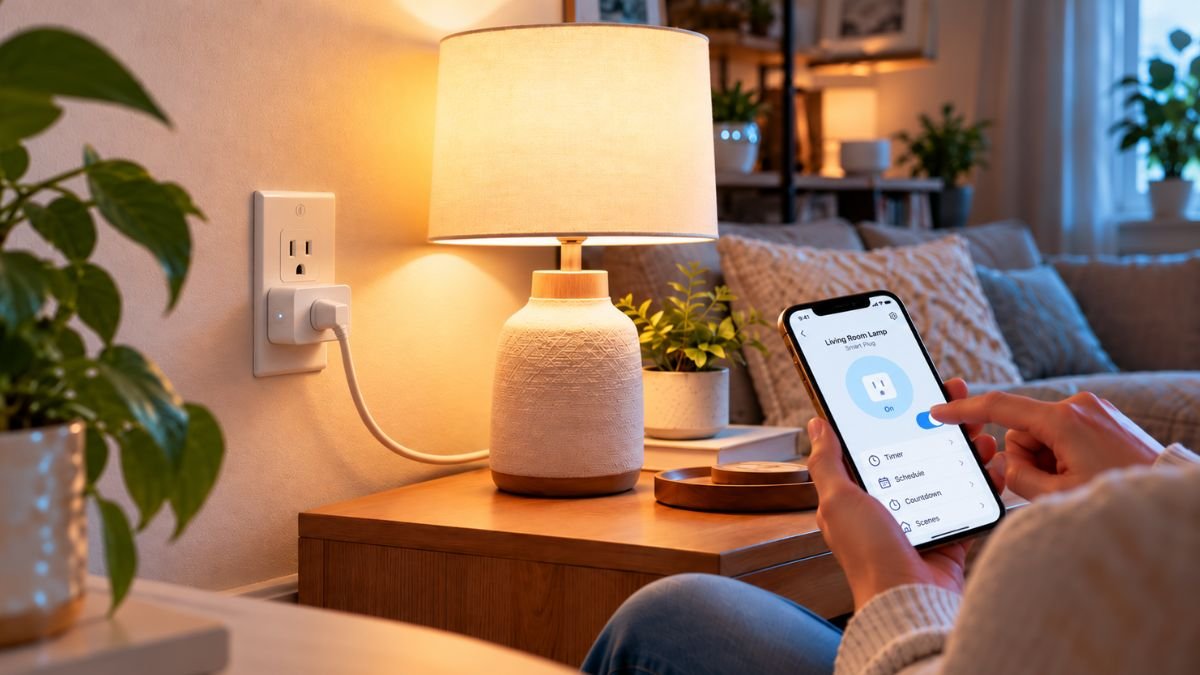
A smart plug is a connected electrical adapter that sits between a wall outlet and a regular device. It allows users to control when electricity flows to that device through a smartphone app, voice assistant, or automated schedule.
Unlike traditional plugs, which simply provide power, smart plugs add a digital control layer. They communicate with a home network and allow users to manage connected appliances remotely.
For example, a traditional lamp can become a smart lamp when connected to a smart plug. The lamp itself does not change, but the user gains additional control features such as:
- Turning the device on or off remotely
- Creating automatic schedules
- Using voice commands
- Monitoring energy consumption on supported models
- Connecting the device with other smart home routines
This makes smart plugs especially useful for people who want smart home benefits without replacing existing electronics.
How Smart Plugs Work
Smart plugs work by controlling the electrical connection between the wall outlet and the connected device.
When a user sends a command from a smartphone app or voice assistant, the smart plug receives the instruction and either allows or stops electricity from reaching the appliance.
The basic process looks like this:
- The smart plug connects to a home network, usually through Wi-Fi.
- The user installs the manufacturer’s mobile app.
- The smart plug communicates with the app and cloud services.
- The user controls the connected device remotely.
- Automation rules can be created based on schedules, routines, or triggers.
Many modern smart plugs also support integration with major smart home platforms, allowing multiple devices to work together.
For example:
- A smart plug connected to a coffee maker can turn on every morning at 6:30 AM.
- A lamp can automatically turn on at sunset.
- A living room device can switch off when a user leaves home.
The intelligence comes from the smart plug’s ability to manage power automatically rather than from the appliance itself.

Smart Plug vs Traditional Plug
The biggest difference between a traditional plug and a smart plug is control.
A traditional plug only provides electrical connection. Users must manually switch the connected device on or off.
A smart plug adds digital features that allow automation and remote management.
| Feature | Traditional Plug | Smart Plug |
|---|---|---|
| Manual power control | Yes | Yes |
| Smartphone control | No | Yes |
| Scheduling | No | Yes |
| Voice commands | No | Yes |
| Smart home integration | No | Yes |
| Energy monitoring | No | Available on some models |
However, smart plugs are not designed to make every appliance intelligent. They mainly control power delivery. A device that requires its own software controls or communication features may not gain additional functionality from being connected to a smart plug.
For example, turning a television on and off with a smart plug is possible, but it will not provide access to smart TV features or replace the TV’s remote control.
Understanding this limitation helps users choose the right applications for smart plugs.
Key Features of Smart Plugs
Smart plugs have evolved beyond simple remote switches. Modern models combine connectivity, automation, voice control, and energy management features that help users create more convenient and efficient homes.
However, not every smart plug includes the same capabilities. Understanding the differences between features helps homeowners choose technology that matches their needs instead of paying for unnecessary functions.
Remote Control Through Smartphone Apps
One of the most common reasons people use smart plugs is the ability to control devices remotely through a smartphone app.
After connecting a smart plug to a home network, users can typically turn connected devices on or off from anywhere with an internet connection.
For example:
- Turn off a forgotten lamp after leaving home
- Switch on a fan before arriving home
- Control holiday lights remotely
- Manage appliances while traveling
Most smart plug manufacturers provide dedicated mobile applications that allow users to create schedules, check device status, and manage multiple connected plugs from one place.
This feature is especially useful for devices that are normally controlled manually and do not need advanced smart functions.
A lamp, small heater, coffee maker, or decorative lighting system can gain remote access without requiring a complete replacement.
Voice Control With Alexa and Google Assistant
Voice control is one of the features that makes smart plugs feel like part of a complete smart home system.
Many smart plugs can connect with voice assistants such as:
- Amazon Alexa
- Google Assistant
- Apple HomeKit (on supported models)
After integration, users can control connected devices using simple commands.
Examples:
“Alexa, turn off the bedroom lamp.”
“Hey Google, turn on the coffee maker.”
This hands-free control can be helpful for accessibility, convenience, and daily routines.
For users already building a connected home, compatibility matters because different smart home platforms use different ecosystems.
A smart plug designed for Amazon Alexa may work differently from one designed for Apple HomeKit or Google Home.
Before purchasing a smart plug, users should check whether it supports their preferred platform.
Scheduling and Automation Features
Scheduling is one of the most practical features of smart plugs because it allows devices to operate automatically without daily manual control.
Instead of remembering to turn something on or off, users can create routines based on time.
Examples include:
- Turning porch lights on every evening
- Switching off bedroom electronics at bedtime
- Starting a coffee machine at a specific time
- Creating holiday lighting schedules
Smart plugs can also become part of larger automation routines.
For example:
A user could create a “Good Morning” routine where:
- A smart plug turns on a coffee maker
- Smart lights activate
- A smart speaker starts playing news
This type of automation is where smart plugs become more valuable than simple remote switches.
They allow everyday devices to participate in a connected home environment.
Energy Monitoring Capabilities
Some advanced smart plugs include energy monitoring features that provide information about electricity usage.
These models can track data such as:
- Power consumption
- Usage patterns
- Estimated energy costs
- Historical electricity data
Energy monitoring can help users understand which devices consume more electricity and identify opportunities to reduce unnecessary usage.
For example, a homeowner may discover that an entertainment setup continues drawing power when devices appear to be turned off.
However, energy monitoring should be viewed as an awareness tool rather than a guaranteed way to reduce electricity bills. Actual savings depend on user behavior, appliance efficiency, and overall energy habits.
Smart plugs with energy monitoring are particularly useful for users who want more visibility into their home’s electricity consumption.
Benefits of Using Smart Plugs at Home
Smart plugs are popular because they offer smart home functionality without requiring major changes to existing appliances.
Instead of replacing several devices with expensive smart versions, users can upgrade everyday electronics with a simple connected adapter.
Make Regular Devices Smarter
The biggest advantage of smart plugs is extending the life of existing devices.
A traditional lamp, fan, or decorative light does not need built-in smart technology to become part of a connected home.
By connecting these everyday products with other connected devices, users can gradually create a more automated environment without replacing all their existing electronics.
A smart plug adds:
- Remote access
- Automation
- Scheduling
- Voice control
For many beginners, this makes smart plugs one of the easiest entry points into home automation.
Someone interested in smart home technology can experiment with automation without investing in a large number of new devices.
Improve Convenience Through Automation
Smart plugs reduce small daily tasks that people often repeat.
A single action may seem insignificant, but automation becomes valuable when it removes repetitive routines.
Consider these examples:
A person wakes up every morning and turns on a coffee machine manually.
With a smart plug, the process can happen automatically according to a schedule.
A homeowner checks multiple lights before leaving the house.
With smart plugs and routines, selected devices can turn off automatically.
These small improvements create a smoother daily experience.
Manage Energy Usage More Effectively
Smart plugs can help users become more aware of how connected devices consume electricity.
Devices that are often left running unnecessarily can be monitored and controlled more easily.
Common examples include:
- Entertainment systems
- Desk equipment
- Decorative lighting
- Chargers
- Small appliances
Some users also create schedules that reduce unnecessary operation during hours when devices are not needed.
The main benefit is not that smart plugs magically reduce energy consumption, but that they provide more control over when devices operate.
Smart Plug Compatibility and Smart Home Integration
A smart plug becomes much more useful when it works together with other devices inside a connected home ecosystem.
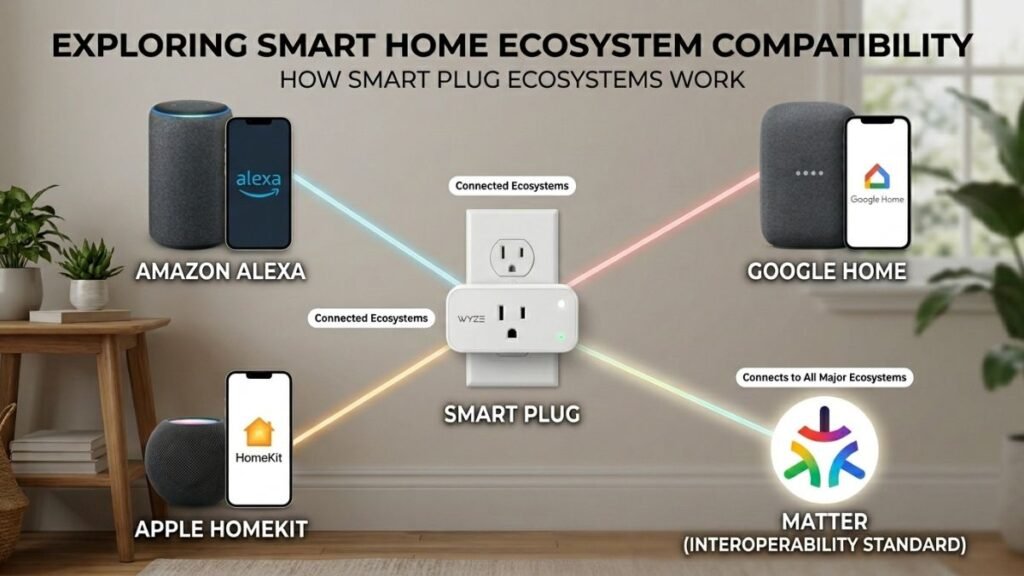
Compatibility is one of the most important factors to consider because smart home platforms are not always interchangeable. A smart plug that works well with one ecosystem may offer different features or setup options with another.
Before adding a smart plug to a home, users should understand which platforms it supports and how it fits into their existing smart devices.
Smart Plugs With Alexa
Amazon Alexa is one of the most widely used voice assistant platforms for smart home control.
Many smart plugs are designed to work with Alexa, allowing users to control connected devices through voice commands or Alexa routines.
For example, users can create routines such as:
- Turning on a lamp at sunset
- Switching off a device at bedtime
- Activating multiple devices with one command
A smart plug connected to Alexa can become part of a larger automation system where different smart devices work together.
For example:
A “Movie Night” routine could:
- Turn on entertainment devices connected to smart plugs
- Dim compatible smart lights
- Adjust other connected devices automatically
Many smart plugs work with Amazon Alexa, allowing users to control connected devices through voice commands and automated routines. Amazon’s Alexa Smart Home documentation explains how compatible devices can be integrated into Alexa experiences, enabling voice-based control and automation features.
When choosing a smart plug for Alexa, users should check:
- Alexa compatibility
- App setup requirements
- Whether voice control requires an additional hub
- Available automation features
Smart Plugs With Google Home
Google Home allows users to control compatible smart devices through Google Assistant.
Smart plugs that support Google Home can be managed through voice commands, the Google Home app, and automated routines.
Common examples include:
“Hey Google, turn off the living room lamp.”
“Hey Google, turn on the fan.”
Google Home integration can be especially useful for users who already use Android devices or other Google-connected products.
The advantage of ecosystem integration is convenience. Instead of managing several separate apps, users can organize compatible devices in one central location.
However, compatibility should always be checked before purchasing because not every smart plug supports every smart home platform.
Smart Plugs With Apple HomeKit
Apple HomeKit provides a smart home framework that allows compatible accessories to work together through Apple’s ecosystem.
Smart plugs that support HomeKit can be controlled through:
- Apple Home app
- Siri voice commands
- Apple device automation
For Apple users, HomeKit compatibility can be important because it allows smart plugs to become part of existing Apple-based routines.
Examples:
- Turning on a desk lamp when arriving home
- Automating devices based on time
- Creating scenes that control multiple accessories together
Apple explains that HomeKit-compatible accessories can communicate through the Home app, allowing users to manage supported smart home devices from Apple devices.
For users interested in Apple-based smart homes, checking for official Apple HomeKit compatibility is an important step before choosing a smart plug.
Matter Compatibility and the Future of Smart Plugs
One challenge in smart home technology has traditionally been ecosystem compatibility.
A smart home becomes more effective when different devices can communicate and work together. For users who want to expand beyond individual smart plugs, learning how to create a smart home setup can help build a more connected and automated living environment.
A device designed for one platform may not work smoothly with another. This is where Matter has become an important development in smart home technology.
Matter is a connectivity standard designed to improve communication between smart home devices from different manufacturers.
A Matter-compatible smart plug may work across multiple ecosystems, including:
- Amazon Alexa
- Google Home
- Apple Home
- Other supported smart home platforms
The goal is to make smart home setup easier by reducing compatibility barriers.
For consumers, this means future smart plugs may become more flexible because users will not have to choose their entire ecosystem based on one device.
Common Uses for Smart Plugs
One reason smart plugs have become popular is their flexibility. They can add automation to many everyday devices that people already own.
However, they work best with devices that only require simple power control.
Smart Plugs for Lamps and Lights
Lighting is one of the most common uses for smart plugs.
A regular lamp connected to a smart plug can gain features such as:
- Remote control
- Automatic schedules
- Voice commands
- Vacation lighting routines
For example, homeowners can schedule outdoor or indoor lights to turn on automatically in the evening.
This can improve convenience and create the appearance of an occupied home when traveling.
However, smart plugs are not always the best solution for every lighting setup. Devices that require dimming control or color adjustment usually need dedicated smart bulbs or smart lighting systems instead.
Smart Plugs for Kitchen Appliances
Smart plugs can also be useful in kitchens for appliances with simple power functions.
Examples include:
- Coffee makers
- Slow cookers
- Electric kettles
- Small kitchen devices
A coffee maker connected to a smart plug can be scheduled to turn on at a specific time, making morning routines easier.
However, users should always consider appliance safety.
Some devices require manual activation after receiving power, meaning a smart plug may not provide full automation.
For example, a coffee machine with a physical power button that stays off after power returns may not work as expected.
Smart Plugs for Entertainment Devices
Entertainment areas often contain multiple devices that consume standby power.
Smart plugs can help manage:
- Gaming setups
- Speakers
- Streaming devices
- Decorative lighting
- Desk equipment
Users can create schedules that turn selected devices off when they are not needed.
For example, a gaming setup could automatically power down connected accessories overnight.
However, smart plugs should not replace proper device shutdown procedures for electronics that require software-based closing processes.
Limitations and Things to Consider Before Using Smart Plugs
Smart plugs are one of the easiest ways to introduce automation into a home, but they are not designed for every type of device.
Understanding their limitations helps users avoid compatibility issues, safety problems, and unrealistic expectations.
A smart plug controls the flow of electricity. It does not add smart features to an appliance that was never designed to support them.
For example, a smart plug can turn a lamp on and off, but it cannot automatically add brightness control or color-changing features to a regular light bulb.
Before installing smart plugs throughout a home, users should consider device compatibility, electrical requirements, and the type of automation they actually need.
Devices That Should Not Use Smart Plugs
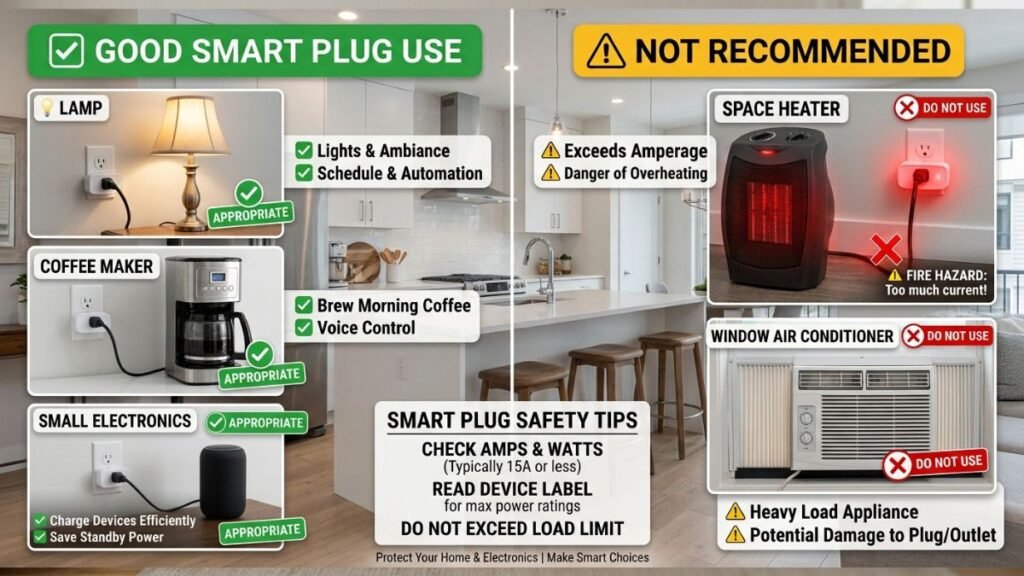
Smart plugs work best with simple devices that operate immediately when power is supplied.
Good examples include:
- Lamps
- Decorative lights
- Fans with simple switches
- Coffee makers with automatic start capability
- Small electronics
However, some devices may not work correctly or safely with smart plugs.
Examples include:
- High-power appliances beyond the smart plug rating
- Heating devices without proper safety controls
- Appliances requiring manual activation after power loss
- Medical equipment
- Large motors or specialized equipment
Users should always check the smart plug’s electrical specifications before connecting any appliance.
Important factors include:
- Maximum wattage
- Voltage rating
- Current capacity
- Indoor or outdoor certification
A smart plug is not a universal replacement for every electrical switch.
Wi-Fi Dependence and Connectivity Issues
Many consumer smart plugs rely on Wi-Fi because it allows simple setup without requiring an additional hub.
However, Wi-Fi-based devices can experience problems related to:
- Weak wireless signals
- Router changes
- Network interruptions
- App connection issues
If the Wi-Fi connection fails, many smart plugs may lose remote control functionality until the connection is restored.
For better reliability, users should:
- Place the smart plug within strong Wi-Fi range
- Keep router firmware updated
- Use a stable home network
- Follow manufacturer setup instructions carefully
Some advanced smart home users may prefer alternative communication technologies such as Zigbee or Thread because they can offer different advantages for larger connected environments.
Smart Plug Security Considerations
Because smart plugs connect to home networks, security should be considered during setup.
Basic security practices include:
- Using strong passwords for smart home accounts
- Keeping device firmware updated
- Downloading apps only from official sources
- Avoiding unknown third-party devices
Connected devices are becoming a larger part of modern homes, making responsible setup an important part of smart home ownership.
Smart Plug Setup Problems and Common Fixes
Although smart plugs are designed for beginners, some users may experience setup difficulties.
Common problems include:
Smart plug not connecting to Wi-Fi
Possible solutions:
- Check whether the plug supports the home network frequency
- Move closer to the router
- Reset the device and repeat setup
Smart plug appears offline
Possible solutions:
- Restart the router
- Check app permissions
- Update firmware
Voice assistant cannot find the smart plug
Possible solutions:
- Confirm account linking
- Enable the correct smart home skill
- Check compatibility requirements
Most setup issues are related to network configuration rather than hardware failure.
Are Smart Plugs Worth Adding to a Smart Home?
For many users, smart plugs are one of the most practical first steps into home automation.
They provide useful smart features without requiring expensive replacements of existing appliances.
A homeowner does not need to completely redesign a house to experience automation. A single smart plug connected to a lamp, coffee maker, or entertainment device can demonstrate how connected technology improves daily routines.
The biggest advantages of smart plugs are:
- Affordable entry into smart home technology
- Easy installation
- Remote control
- Automation possibilities
- Compatibility with major ecosystems
However, they are not a solution for every situation.
Users should choose smart plugs for devices where power control is useful and avoid expecting them to transform ordinary appliances into fully intelligent products.
For beginners building a connected home, smart plugs work well alongside broader smart home systems such as smart lighting, voice assistants, and automation platforms.
Exploring related technologies like smart home devices can help users understand how different connected products work together.
Conclusion
Smart plugs are simple devices that provide a practical introduction to home automation. By adding remote control, scheduling, and smart assistant compatibility to everyday appliances, they allow users to create more convenient routines without replacing existing electronics.
The best use cases are devices that only need basic power control, such as lamps, small appliances, and entertainment accessories. Understanding compatibility, limitations, and safety considerations helps users get the most value from this technology.
As smart home ecosystems continue to grow, smart plugs remain one of the easiest ways to connect traditional devices with modern automation.
Frequently Asked Questions About Smart Plugs
What are smart plugs used for?
Smart plugs are used to control regular electrical devices remotely through smartphone apps, voice assistants, or automation schedules. They are commonly used for lamps, coffee makers, fans, and entertainment accessories.
Do smart plugs save electricity?
Smart plugs can help users monitor and control device usage, but they do not automatically reduce electricity consumption. Energy savings depend on how users schedule and manage connected devices.
Do smart plugs work without Wi-Fi?
Most Wi-Fi smart plugs require an internet connection for remote control features. Some models using technologies like Zigbee or Thread may work differently and may require compatible hubs or controllers.
Can smart plugs work with Alexa?
Yes, many smart plugs support Amazon Alexa integration. Compatible models can be controlled through Alexa voice commands and included in Alexa routines.
Can smart plugs work with Google Home?
Many smart plugs are compatible with Google Home and Google Assistant. Users should verify compatibility before purchasing to ensure the device works with their preferred ecosystem.
Are smart plugs safe to use?
Smart plugs are generally safe when used according to manufacturer guidelines. Users should check electrical ratings and avoid connecting appliances that exceed the device’s supported power limits.
Can smart plugs make any appliance smart?
No. Smart plugs mainly provide power control. They can automate when a device receives electricity, but they cannot add advanced features like smart displays, sensors, or app controls to traditional appliances.

I’m a Technology Editor at SmartGadgetWave with a passion for innovation, AI, and consumer technology. I enjoy exploring the latest gadgets, smart home devices, and wearable tech. My goal is to make technology easy to understand by sharing practical insights, honest perspectives, and helpful product comparisons so readers can make smarter tech decisions.