Last updated on November 1st, 2026 at 04:54 am
A smart home setup connects everyday devices such as lighting, speakers, thermostats, security systems, and appliances into a connected ecosystem that can be controlled automatically or remotely.
Building a smart home from scratch requires choosing the right platform, creating a reliable network foundation, selecting compatible devices, and designing automation that improves daily life.
The idea of a smart home has changed significantly in recent years. What was once considered advanced technology is now becoming part of everyday living.
Homeowners and renters are using connected devices to improve comfort, security, energy efficiency, and convenience without needing complex technical knowledge.
However, creating a smart home is not simply about buying the newest gadgets available. A successful system requires planning.
Many beginners start by purchasing individual devices without considering how those products will work together. This often leads to multiple apps, compatibility issues, unreliable connections, and a frustrating user experience.
A well-designed smart home setup starts with understanding your needs first.
Do you want better home security? Easier lighting control? Energy savings? Voice automation? Or a complete connected home experience?
The answer determines which devices should come first.
According to the U.S. Department of Energy, smart technologies and energy management solutions can help homeowners improve efficiency, monitor energy usage, and reduce unnecessary energy consumption.
This guide explains how to build a smart home from scratch, including choosing a platform, selecting devices, improving connectivity, creating automation routines, avoiding common mistakes, and preparing your system for future technology.
Understanding the Foundation of a Smart Home Setup
Before adding devices, it is important to understand how smart home technology works.
A smart home is not just a group of connected products. It is a system where hardware, software, wireless communication, and automation work together.
What Is a Smart Home Setup?
A smart home setup is a connected environment where devices can communicate with each other and perform actions automatically or through user commands.
A basic smart home may include:
- Smart lights
- Smart speakers
- Smart plugs
- Smart thermostats
- Security cameras
- Smart locks
- Motion sensors
- Connected appliances
Instead of manually controlling each device, users can create automated actions.
Examples:
- Lights turn on when someone enters a room.
- The thermostat adjusts when nobody is home.
- Doors automatically lock at night.
- Security cameras send alerts when movement is detected.
The main purpose of smart home technology is not adding complexity. It is reducing repeated tasks and making everyday activities easier.
How Smart Home Devices Communicate
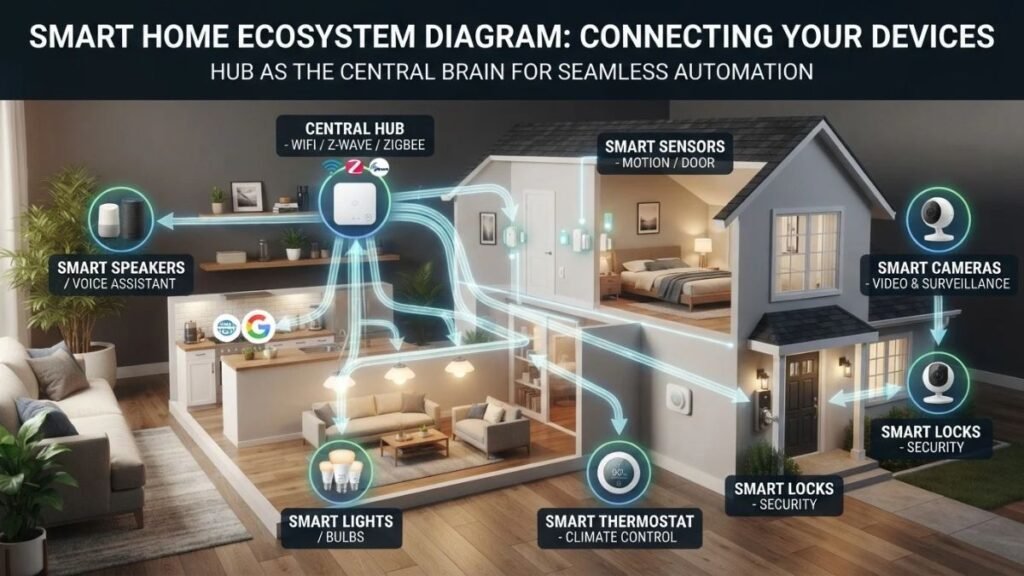
Smart devices use different communication technologies to connect with each other and your smart home devices ecosystem.
The most common technologies include:
| Technology | How It Works | Common Uses |
|---|---|---|
| Wi-Fi | Connects devices directly to your router | Cameras, speakers, displays |
| Bluetooth | Short-range wireless connection | Sensors and accessories |
| Zigbee | Low-power mesh network | Smart lights and sensors |
| Z-Wave | Dedicated smart home communication protocol | Security and automation devices |
| Matter | Cross-platform smart home standard | Compatible devices across ecosystems |
Smart home security systems should also be designed with proper privacy and cybersecurity practices in mind. Resources from the National Institute of Standards and Technology (NIST) provide guidance on improving cybersecurity practices for connected technologies and digital systems.
For beginners, choosing devices that support widely adopted technologies can make future expansion easier.
Planning Your Smart Home Before Buying Devices
The most effective smart home setup begins with planning.
Before purchasing devices, identify what problems you want technology to solve.
Define Your Smart Home Goals
Different users have different priorities.
A homeowner focused on convenience may want:
- Automated lighting
- Voice control
- Smart appliances
- Daily routines
Someone focused on security may prioritize:
- Cameras
- Smart locks
- Motion sensors
- Door and window alerts
Users interested in energy savings may choose:
- Smart thermostats
- Energy monitoring devices
- Automated switches
Your goals should determine your first purchases.
Choose Your Smart Home Ecosystem

One of the biggest decisions when building a smart home is selecting the ecosystem that will control your devices.
The most popular options include:
| Platform | Main Strength |
|---|---|
| Amazon Alexa | Wide device compatibility |
| Google Home | Strong integration with Google services |
| Apple Home | Privacy-focused ecosystem for Apple users |
| Samsung SmartThings | Flexible automation options |
There is no single perfect platform for everyone.
The best choice depends on:
- Your existing devices
- Your smartphone ecosystem
- The products you plan to add later
- Your preferred control method
For example, someone who already uses Apple devices may prefer Apple Home, while users looking for broader compatibility may choose Alexa or Google Home.
Think About Future Expansion
A common mistake is choosing devices only for current needs.
A better approach is asking:
- Will this device work with future products?
- Does it support common standards?
- Does the manufacturer provide software updates?
- Can it integrate with my existing ecosystem?
A smart home should grow over time instead of requiring a complete replacement every few years.
Essential Smart Home Devices to Start With
A strong smart home setup does not begin with filling every room with connected technology. The best approach is to start with devices that provide immediate value and create a foundation for future automation.
For most beginners, the first smart home devices should improve three areas:
- Convenience
- Security
- Energy management
Starting with a small number of reliable devices also makes it easier to understand how your ecosystem works before adding more advanced technology.
Smart Lighting: The Best First Step for Most Homes

Smart lighting is one of the easiest ways to begin building a smart home because it requires minimal installation and provides instant benefits.
Unlike traditional bulbs, smart lights can be controlled through:
- Smartphone applications
- Voice assistants
- Automated schedules
- Motion sensors
- Location-based triggers
A simple example:
You arrive home in the evening, and your entryway lights automatically turn on. When you leave, unnecessary lights switch off without manually touching a button.
This type of automation is what makes a smart home feel natural.
To explore the technology behind connected bulbs, smart switches, wireless protocols, lighting schedules, and automated routines in more detail, read our complete guide to smart lighting.
Smart Bulbs vs Smart Switches
When creating a smart lighting system, users usually choose between smart bulbs and smart switches.
| Feature | Smart Bulbs | Smart Switches |
|---|---|---|
| Installation | Simple replacement | Requires wiring |
| Best for | Renters and beginners | Homeowners |
| Controls existing fixtures | No | Yes |
| Electrical work required | No | Usually yes |
| Long-term flexibility | Good | Excellent |
Smart bulbs are ideal for people who want a quick upgrade.
Smart switches are better for homeowners who want to automate existing ceiling lights, wall fixtures, and multiple rooms.
How Smart Lighting Automation Works
Smart lighting becomes much more useful when combined with routines.
Examples include:
Morning Routine
- Bedroom lights gradually increase brightness
- Kitchen lights turn on
- Smart speaker provides weather updates
Evening Routine
- Outdoor lights activate automatically
- Living room lights adjust brightness
- Security system checks doors
Night Routine
- Lights turn off
- Doors lock
- Temperature adjusts for sleeping
The real benefit of smart lighting is not controlling a bulb from your phone. It is creating an environment that responds automatically.
Smart Speakers and Voice Assistants
A smart speaker is often the first central control device in a beginner-friendly smart home setup.
It allows users to control connected devices through voice commands instead of opening multiple applications.
Popular voice assistant ecosystems include:
- Amazon Alexa
- Google Assistant
- Apple Siri through HomeKit
What Can Smart Voice Assistants Control?
A connected voice assistant can manage many parts of a smart home.
Examples:
- Smart lights
- Thermostats
- Smart locks
- Cameras
- Entertainment systems
- Timers
- Automated routines
Common commands include:
“Turn off the kitchen lights.”
“Set the thermostat to 72 degrees.”
“Show the front door camera.”
Voice control is especially useful for accessibility, busy households, and situations where manually controlling devices is inconvenient.
Limitations of Voice-Controlled Smart Homes
Although voice assistants are convenient, they are not perfect.
Common limitations include:
- Misheard commands
- Internet dependency
- Privacy concerns
- Different commands between platforms
A reliable smart home should not depend only on voice control.
The best systems combine:
- Voice commands
- Smartphone control
- Physical switches
- Automated routines
This creates a more flexible experience.
Smart Plugs: Making Traditional Devices Smarter
Smart plugs are among the simplest devices for beginners because they add automation without replacing existing appliances.
For users who want to understand their features, compatibility options, and practical applications in more detail, learning how smart plugs work can help them make better decisions when expanding a connected home.
A smart plug connects between a regular electrical device and a wall outlet.
This allows users to remotely control devices that normally only have manual switches.
Common Uses for Smart Plugs
Smart plugs can automate:
- Lamps
- Coffee makers
- Fans
- Decorative lighting
- Small appliances
Examples:
A morning routine can automatically turn on a coffee machine connected to a smart plug.
A vacation routine can turn lights on and off at different times to create the appearance that someone is home.
Why Smart Plugs Are Useful in Beginner Smart Homes
Smart plugs teach users the basics of automation without requiring major changes.
They introduce concepts such as:
- Scheduling
- Remote control
- Energy monitoring
- Device routines
For many beginners, smart plugs are an affordable way to understand how automation works before investing in larger systems.
Creating a Smart Home Security Setup
Security is one of the biggest reasons homeowners adopt smart home technology.
A modern smart home security setup can help users monitor their property, receive alerts, and control access remotely.
Common security devices include:
- Smart cameras
- Video doorbells
- Smart locks
- Motion sensors
- Alarm systems
Smart Cameras and Video Doorbells

Smart cameras allow homeowners to view their property remotely through mobile applications, making them an important part of a smart home security system.
Important features include:
- Live video streaming
- Motion detection
- Night vision
- Two-way communication
- Cloud or local recording options
To understand the technology behind these devices in more detail, explore our guide to how security cameras work, covering camera types, key features, connectivity, and video storage options.
Video doorbells add another layer by allowing users to see and communicate with visitors before opening the door. Connected doorbell cameras have become increasingly popular because they provide convenient remote monitoring, real-time alerts, and easier access control for homeowners.
Where Should Smart Cameras Be Installed?
The best camera locations usually focus on important access points.
Common placements include:
- Front door
- Driveway
- Backyard entrance
- Garage area
- Main hallway
Avoid positioning cameras where they unnecessarily capture private spaces.
A good security setup balances visibility with privacy.
Smart Locks and Digital Access
Smart locks replace traditional keys with digital access methods.
Depending on the model, users may unlock doors using:
- Smartphone apps
- Keypads
- Fingerprints
- Temporary access codes
Smart locks can be useful for:
- Families
- Rental properties
- Home offices
- People who frequently share access
Smart Lock Security Practices
A smart lock should always be configured carefully.
Recommended practices:
- Use a strong account password
- Enable two-factor authentication
- Update device software
- Remove old user access codes
Convenience should always be balanced with security.
Building a Reliable Smart Home Network
A strong network is one of the most overlooked parts of a smart home setup.
Many smart devices depend on your internet connection, especially:
- Security cameras
- Smart displays
- Voice assistants
- Connected appliances
A weak network can create problems such as:
- Slow response times
- Devices disconnecting
- Failed automation routines
- Camera delays
Improving Wi-Fi for Smart Home Devices
Before adding many connected devices, check your home network performance.
Helpful improvements include:
- Placing your router in a central location
- Using a mesh Wi-Fi system for larger homes
- Updating router firmware
- Separating high-demand devices when needed
A reliable network creates a stronger foundation for future smart home automation and future expansion.
How Many Devices Can a Smart Home Network Handle?
The number of devices your network can support depends on:
- Router quality
- Internet speed
- Device communication methods
- Home size
- Network configuration
A few smart bulbs and speakers usually create little demand, but multiple security cameras and connected appliances require stronger network planning.
Creating Smart Home Automation Routines
A smart home becomes truly useful when devices start working together automatically. Without automation, connected devices are simply individual gadgets controlled through apps or voice commands.
A well-designed smart home setup uses automation to reduce repeated tasks and create a home environment that responds naturally to your daily habits.
What Are Smart Home Routines?

A smart home routine is a group of automated actions triggered by a specific event.
Most routines follow a simple structure:
Trigger → Condition → Action
Example:
Trigger:
Motion detected in the hallway
Condition:
Only between 10 PM and 6 AM
Action:
Turn on hallway lights at low brightness
This approach allows devices to work together without requiring manual control.
Useful Smart Home Automation Examples
Welcome Home Routine
A welcome home automation can activate when you arrive.
Possible actions:
- Unlock smart door
- Turn on entry lights
- Adjust thermostat
- Play music
- Disable security mode
This creates a personalized arrival experience.
Leaving Home Routine
A leaving routine helps reduce wasted energy and improve security.
Possible actions:
- Turn off unnecessary lights
- Lock doors
- Adjust thermostat
- Activate security cameras
- Turn off selected smart plugs
Bedtime Routine
A bedtime automation can simplify your nighttime habits.
Possible actions:
- Turn off downstairs lights
- Lock doors
- Lower thermostat temperature
- Close smart blinds
- Activate security monitoring
Energy Saving Routine
Smart automation can also improve energy management.
Examples:
- Turn off unused devices
- Adjust temperature based on occupancy
- Schedule lighting based on daylight
- Monitor energy usage
According to the U.S. Department of Energy Energy Saver Guide, better energy management practices can help households reduce unnecessary energy consumption.
Smart Home Installation: DIY vs Professional Setup
When building a smart home from scratch, one important decision is whether to install everything yourself or hire professional help.
The right option depends on the complexity of your system.
DIY Smart Home Installation
DIY installation works well for many beginner devices.
Examples:
- Smart bulbs
- Smart plugs
- Smart speakers
- Basic security cameras
- Smart displays
Advantages:
- Lower cost
- Faster setup
- Easy upgrades
- More control over device selection
Many modern smart devices are designed specifically for consumer installation.
Challenges of DIY Installation
Although simple devices are easy to install, larger systems can become complicated.
Common challenges include:
- Device compatibility issues
- Network problems
- Multiple applications
- Advanced automation settings
- Electrical requirements
Planning before installation helps avoid unnecessary troubleshooting.
Professional Smart Home Installation

Professional smart home installation may be useful for larger projects.
Examples include:
- Whole-home automation
- Smart electrical systems
- Integrated security systems
- Smart home wiring
- Multi-room entertainment systems
Professional installers can help design systems where different technologies work together properly. They can also help with complex setups involving wiring, multiple rooms, advanced automation, and integrated security systems.
Understanding Smart Home Installation Cost
The cost of creating a smart home depends on how advanced you want the system to become.
A small beginner setup may require only a few affordable devices, while a complete automated home can involve professional installation and advanced equipment.
Factors That Affect Smart Home Setup Cost
Several factors influence the total investment:
| Factor | How It Affects Cost |
|---|---|
| Number of devices | More devices increase equipment cost |
| Home size | Larger homes may need more coverage |
| Installation complexity | Electrical work increases labor costs |
| Security requirements | Cameras and access systems add expense |
| Network upgrades | Larger systems may require better Wi-Fi |
Start Small and Expand Gradually
A common misconception is that building a smart home requires a large upfront investment.
A better strategy is gradual expansion:
Stage 1: Foundation
- Smart speaker
- Smart lights
- Smart plugs
Stage 2: Comfort
- Smart thermostat
- Sensors
- Automated routines
Stage 3: Advanced Automation
- Smart locks
- Security systems
- Connected appliances
This approach allows homeowners to understand what technology actually improves their daily lives.
Smart Home Privacy and Security Considerations
Connected devices provide convenience, but they also require responsible management.
Every internet-connected device should be treated as part of your digital environment.
Protect Your Smart Home Accounts
The account controlling your smart home is one of the most important security points.
Recommended practices:
- Create strong unique passwords
- Enable two-factor authentication
- Update applications regularly
- Remove unused devices
- Review connected accounts
A compromised account could potentially give access to multiple connected devices.
Manage Smart Device Privacy Settings
Different devices collect different types of information.
Before using a new device:
- Review privacy settings
- Understand data collection options
- Check microphone and camera permissions
- Learn storage policies
Users should choose devices from manufacturers that provide clear privacy controls.
Keep Smart Devices Updated
Firmware updates often include:
- Security improvements
- Performance fixes
- Compatibility updates
Ignoring updates can leave devices running outdated software.
A simple maintenance routine helps keep a smart home reliable over time.
Common Smart Home Setup Mistakes to Avoid
Many smart home problems are caused by poor planning rather than poor technology.
Understanding common mistakes can help beginners build a better system.
Buying Devices Without Checking Compatibility
One of the biggest mistakes is purchasing products without checking whether they work together.
Before buying a device, check:
- Supported platforms
- Required hub
- Wireless technology
- App compatibility
- Future expansion options
A cheaper device is not always a better choice if it creates ecosystem limitations later.
Creating Too Many Complicated Automations
Automation should simplify your life.
Some users create too many routines and eventually find the system difficult to manage.
Good automation should:
- Save time
- Reduce repetitive actions
- Improve comfort
- Work reliably
Simple routines usually provide the highest value.
Ignoring Physical Controls
A smart home should still work when technology fails.
Good systems include:
- Traditional switches
- Manual controls
- Backup access methods
Technology should improve your home experience, not make basic tasks difficult.
Future-Proofing Your Smart Home Setup
A well-designed smart home setup should not only solve today’s problems but also support future technology improvements.
Smart home technology continues to evolve, and new devices, platforms, and communication standards are introduced regularly. Building a flexible system makes it easier to upgrade without replacing everything.
Choose Devices With Better Compatibility
One of the most important factors when expanding a smart home is compatibility.
A device should not only work today. It should also fit into your future plans.
Before purchasing new smart devices, consider:
- Supported smart home platforms
- Wireless communication standards
- Software update support
- Integration with existing devices
- Manufacturer reliability
The growth of universal standards such as Matter Smart Home Standard is helping reduce compatibility problems by allowing supported devices from different brands to communicate more easily.
Consider Local Control vs Cloud-Based Systems
Many smart home devices depend on cloud services to function.
Cloud-based systems are convenient because they allow remote access from anywhere. However, they also depend on:
- Internet availability
- Manufacturer servers
- Account access
Some advanced users prefer systems that provide local control because they can offer:
- Faster response times
- More privacy
- Greater reliability during internet outages
The right choice depends on your technical comfort level and the type of automation you want.
Plan Your Smart Home Device Placement
Device placement affects both performance and convenience.
A smart home setup works best when devices are installed where they naturally support daily activities.
Smart Speakers
Place smart speakers in areas where voice commands are frequently used:
- Kitchen
- Living room
- Bedroom
- Home office
Avoid placing them near loud appliances or areas with excessive background noise.
Smart Cameras
Security cameras should focus on important areas:
- Main entrances
- Driveways
- Garages
- Outdoor spaces
Camera placement should provide useful coverage while respecting privacy.
Smart Sensors
Sensors are most effective when placed where activity changes.
Examples:
- Motion sensors in hallways
- Door sensors on entrances
- Temperature sensors in frequently used rooms
The goal is to collect useful information without creating unnecessary complexity.
Building a Smart Home Setup Based on Your Lifestyle
There is no single perfect smart home design. The best system depends on how people live.
A technology setup should support your habits rather than forcing you to change them.
Smart Home Setup for Families
Families often benefit from:
- Smart locks
- Security cameras
- Automated lighting
- Smart thermostats
- Shared access controls
Examples:
Parents can receive notifications when children arrive home.
Lights can automatically turn on in common areas during evening hours.
Smart Home Setup for Remote Workers
People working from home may prioritize:
- Smart lighting
- Temperature control
- Smart speakers
- Noise management
- Automated office routines
A workspace routine could:
- Turn on desk lighting
- Adjust room temperature
- Activate focus music
- Reduce distractions
Smart Home Setup for Older Adults
Smart technology can also improve comfort and accessibility.
Useful features include:
- Voice-controlled devices
- Automated lighting
- Emergency alerts
- Smart sensors
- Easy-access controls
Simple automation can reduce the need for repetitive physical tasks.
Complete Smart Home Setup Checklist for Beginners
Use this checklist when creating your first connected home.
Planning Phase
Before buying devices:
- Define your main goals
- Choose your smart home ecosystem
- Check Wi-Fi coverage
- Decide your budget
- Plan future expansion
First Devices to Install
A beginner-friendly setup usually starts with:
- Smart speaker or hub
- Smart lights
- Smart plugs
- Basic security camera
- Smart thermostat
These devices create a strong foundation without unnecessary complexity.
Security Setup Checklist
Before connecting devices:
- Create strong passwords
- Enable two-factor authentication
- Update device firmware
- Review privacy settings
- Remove unused devices
Expansion Ideas
After your foundation is working, consider adding:
- Smart blinds
- Smart appliances
- Environmental sensors
- Smart irrigation systems
- Advanced security features
Smart Home Setup: Beginner, Intermediate, and Advanced Levels
Different users need different levels of automation.
| Experience Level | Recommended Devices | Main Purpose |
|---|---|---|
| Beginner | Smart lights, plugs, speakers | Learn basic automation |
| Intermediate | Cameras, locks, sensors, thermostats | Improve comfort and security |
| Advanced | Hubs, integrated systems, whole-home automation | Complete smart home control |
A beginner system can eventually become an advanced smart home. The important part is creating a strong foundation first.
The Future of Smart Home Technology

The future of smart homes is moving toward systems that require less manual control and more AI-powered automation.
Instead of users telling every device what to do, smart homes will increasingly understand patterns and respond automatically.
Future developments may include:
- More advanced AI-powered automation
- Better device compatibility
- Improved energy management
- More personalized experiences
- Stronger privacy-focused solutions
The next generation of smart homes will focus less on individual gadgets and more on creating intelligent living environments.
Final Thoughts
Building a smart home setup from scratch does not require expensive equipment or complicated installation.
The best approach is to start with your real needs, choose compatible devices, create a reliable network foundation, and expand gradually.
Smart home technology works best when it quietly improves everyday life:
- Lights that respond automatically
- Security systems that provide peace of mind
- Devices that reduce repetitive tasks
- Automation that saves time
A successful smart home is not defined by the number of connected devices. It is defined by how effectively technology improves the way you live.
Frequently Asked Questions About Smart Home Setup
What is the easiest way to start a smart home setup?
The easiest way to start a smart home setup is by choosing one ecosystem and adding simple devices such as smart lights, a smart speaker, and smart plugs. These products provide immediate benefits without requiring complex installation.
How much does a basic smart home setup cost?
A basic smart home setup can be created with a small number of affordable devices. The total cost depends on the number of devices, brand selection, security features, and whether professional installation is required.
Do all smart home devices work together?
Not all smart home devices work together automatically. Compatibility depends on the platform, communication technology, and standards supported by each device. Checking compatibility before purchasing helps avoid problems.
Is Wi-Fi enough for a smart home setup?
Wi-Fi is enough for many beginner smart homes, especially those using smart speakers, lights, and plugs. Larger systems with many cameras and devices may require stronger networking equipment or additional solutions.
Do I need a smart home hub?
A smart home hub is not always required. Beginners can often start with a smart speaker or smartphone app. Larger systems may benefit from a dedicated hub for better automation and device management.
Are smart home devices secure?
Smart home devices can be secure when users follow good practices such as using strong passwords, enabling two-factor authentication, updating software, and reviewing privacy settings.
Can I build a smart home if I live in a rental property?
Yes. Renters can create a smart home setup using devices that do not require permanent installation, such as smart bulbs, smart plugs, speakers, and removable sensors.

I’m a Technology Editor at SmartGadgetWave with a passion for innovation, AI, and consumer technology. I enjoy exploring the latest gadgets, smart home devices, and wearable tech. My goal is to make technology easy to understand by sharing practical insights, honest perspectives, and helpful product comparisons so readers can make smarter tech decisions.