The best gaming mouse is not simply the one with the highest DPI or fastest polling rate. Gaming mouse performance depends on sensor accuracy, tracking consistency, reporting speed, ergonomics, and connectivity.
Understanding DPI, sensors, polling rate, IPS, and acceleration helps you evaluate specifications based on real-world use rather than simply choosing the biggest number.
Choosing a gaming mouse can become surprisingly complicated once you start comparing specifications. One model may advertise 35,000 DPI, another 50,000 DPI, while a third emphasizes 8,000 Hz polling, ultra-low weight, or a specialized optical sensor.
At first glance, the mouse with the largest numbers may appear to be the obvious choice.
But gaming mouse technology does not work that way.
A sensor’s maximum DPI, for example, tells you how far its sensitivity range extends. It does not automatically tell you that the mouse is more accurate at the sensitivity you actually use. The same principle applies to polling rate, tracking speed, acceleration, and even weight.
Modern gaming mice have become extremely capable. Razer’s current Focus Pro 50K Optical Sensor, for example, is specified for up to 50,000 DPI, 930 IPS, and 90G acceleration, illustrating how far sensor technology has advanced.
Yet those maximum specifications are only part of the picture.
The more useful question is what each technology actually does and when it matters. A competitive FPS player, an MMO player, and someone who uses the same mouse for gaming and everyday productivity may have very different priorities.
Understanding the technology behind a gaming mouse makes those differences much easier to evaluate.
What Makes a Gaming Mouse Different?
A gaming mouse is still a pointing device, but gaming-oriented models are designed around more demanding requirements for movement tracking, input response, physical control, and customization.
The difference is not usually one individual component. It comes from how several technologies work together.
A modern gaming mouse may include:
- An optical tracking sensor
- Adjustable DPI or CPI sensitivity
- Configurable polling rates
- Wired or low-latency wireless connectivity
- Mechanical or optical mouse switches
- Programmable buttons
- Onboard profile memory
- Specialized mouse feet
- A shape designed around particular grip styles
Each component has a different job.
The sensor detects physical movement.
The DPI setting determines how that detected movement is translated into cursor or camera movement.
The polling rate determines how frequently the mouse reports information to the computer.
The switches register button presses.
The shape, weight, and surface materials determine how the mouse physically interacts with your hand and mouse pad.
Two gaming mice can have similar headline specifications and still feel completely different in actual use.
A mouse with an extremely capable sensor can still be uncomfortable. A lightweight mouse can still have a shape that does not suit your hand. A high polling rate can be technically impressive without being particularly useful for every gaming setup.
In other words, gaming mouse performance is a combination of electronic capability and physical usability.
For example, Razer’s current Basilisk V3 Pro 35K combines a Focus Pro 35K optical sensor with configurable DPI, 70G acceleration, multiple connection options, programmable controls, and optical mouse switches.
The specifications describe what the hardware can do. They do not independently determine whether that combination is right for a particular player.
How Gaming Mouse Sensors Work
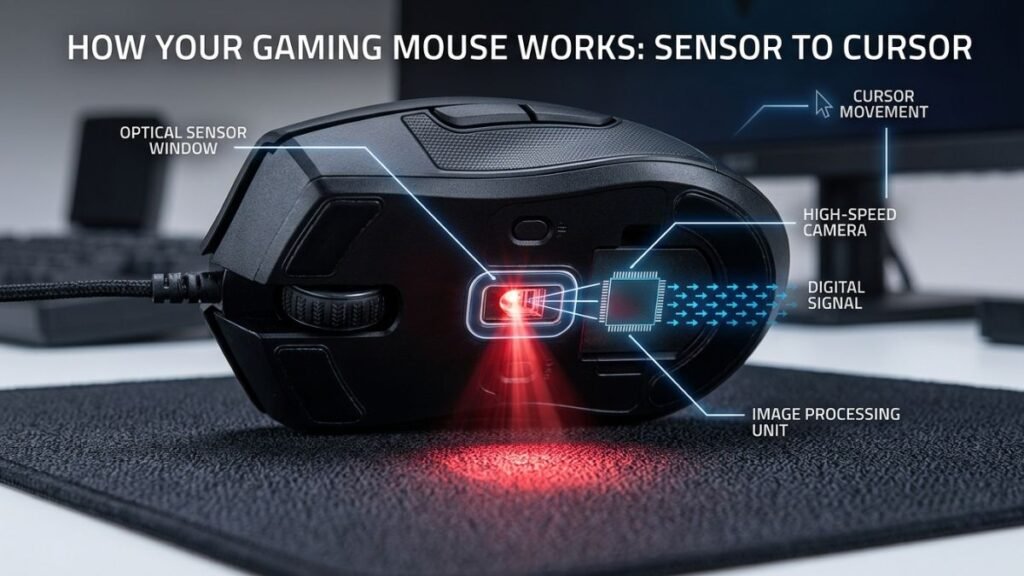
The sensor is one of the most important components in a gaming mouse because it converts physical movement across a surface into digital movement data.
Modern gaming mice generally use optical sensors. Instead of using a mechanical ball to detect movement, an optical system observes the surface beneath the mouse and analyzes changes between successive images.
Those changes are processed into movement information that the mouse sends to the computer.
Modern gaming mouse sensors have come a long way. Current sensor families can offer extremely high sensitivity ranges while also providing features designed to improve tracking consistency across different surfaces.
Razer’s current Focus Pro sensor family, for example, includes models ranging from 26,000 DPI to 50,000 DPI, with maximum tracking speeds reaching 930 IPS and maximum acceleration reaching 90G on its latest 50K generation.
Those numbers are useful for understanding the capability of the hardware, but they should not be confused with recommended everyday settings.
A mouse sensor does not become automatically more useful simply because its maximum specifications are higher.
Optical Sensors
Optical sensors work by observing the surface beneath the mouse and detecting changes as the mouse moves.
The sensor essentially creates a sequence of surface observations and compares them to determine how the mouse has moved.
This approach allows modern gaming mice to achieve extremely precise movement detection.
Surface behavior can also matter. Different materials can produce different tracking conditions, which is why some sensor technologies include features designed to adapt to different surfaces.
For example, Razer’s Focus Pro technology includes Smart Tracking, which is designed to maintain a consistent lift-off distance across surfaces. Its latest Focus Pro 50K generation also supports tracking on certain glass surfaces under specified conditions.
A good gaming mouse sensor is about more than maximum DPI.
Tracking consistency, surface compatibility, lift-off behavior, firmware implementation, and the way the sensor processes movement can all contribute to the overall experience.
DPI and Sensor Resolution
DPI stands for dots per inch and is commonly used to describe mouse sensitivity.
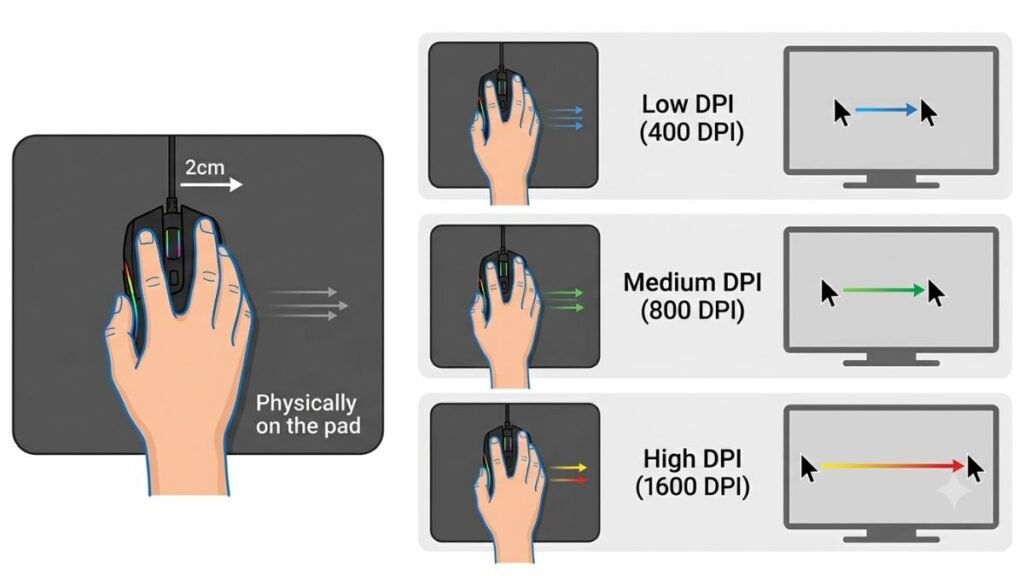
In practical terms, a higher DPI setting means that the same physical mouse movement produces more cursor movement on the screen.
For example, if you move the mouse a short distance, a higher DPI setting will generally move the cursor farther than a lower DPI setting.
That makes DPI primarily a sensitivity measurement, not a direct measurement of mouse quality.
Modern sensors can support extremely high DPI values. Razer’s Focus Pro 50K sensor, for instance, supports sensitivity up to 50,000 DPI and allows adjustment in individual 1-DPI increments.
That level of adjustment provides considerable flexibility, but it does not mean a gamer should use 50,000 DPI.
The important distinction is between maximum DPI capability and the DPI setting that makes sense for your actual use.
A sensor can have a very high maximum DPI while still being used at a much lower setting for gaming.
Tracking Speed and Acceleration
DPI is only one number found on a gaming mouse specification sheet.
Two other specifications commonly appear alongside it: IPS and G.
IPS, or inches per second, describes the maximum movement speed at which a sensor is specified to maintain tracking.
G, or gravitational acceleration, describes the maximum acceleration the sensor is designed to track under its specifications.
For example, Razer’s Focus Pro 50K sensor is rated for up to 930 IPS and 90G acceleration, while its Focus Pro 35K generation is rated for up to 750 IPS and 70G.
These numbers help describe the sensor’s tracking envelope.
However, they should be interpreted carefully.
A player making very fast, aggressive mouse movements may have more reason to care about tracking speed than someone who primarily uses small, controlled movements. Likewise, the difference between two already-capable sensors may be less meaningful than differences in ergonomics, sensitivity settings, or physical control.
These specifications are useful, but how much they matter depends on the way you actually use the mouse.
What DPI Really Means
DPI is one of the most misunderstood specifications in gaming mice because manufacturers frequently highlight very large maximum values.
The basic concept is straightforward: DPI determines how much cursor movement results from a given amount of physical mouse movement.
A higher DPI produces greater cursor movement from the same physical movement. A lower DPI produces less.
That does not make one automatically more accurate than the other.
DPI vs. In-Game Sensitivity
Gaming sensitivity is usually determined by more than the mouse’s DPI setting.
Many PC games apply their own sensitivity multiplier to the mouse input. This means two players can use different DPI settings while achieving similar overall camera movement.
Imagine two players using the same game.
Player A uses a lower DPI and moves the mouse farther across the mouse pad.
Player B uses a higher DPI and makes smaller physical movements.
If their in-game sensitivity settings are configured appropriately, both can achieve a similar overall turning speed.
This is particularly relevant in first-person shooters, where players often balance physical mouse movement against the amount of camera rotation they want.
The result is that DPI should be considered together with in-game sensitivity rather than evaluated in isolation.
A player with a large mouse pad may prefer settings that require greater physical movement. Someone with limited desk space may prefer a different sensitivity range.
Neither approach is universally correct.
Is Higher DPI Better?
No. Higher maximum DPI does not automatically mean a better gaming mouse.
Maximum DPI describes the upper limit of the sensor’s sensitivity range.
It does not tell you which sensitivity setting will provide the best control for your games.
A 50,000-DPI sensor can be technically more advanced than an older sensor with a lower maximum, but that does not mean a player benefits from operating at 50,000 DPI.
For many gaming situations, predictable tracking, appropriate sensitivity, comfortable control, and consistent input matter more than having the largest possible DPI number.
This is one reason comparing gaming mice exclusively by maximum DPI can produce misleading conclusions.
The better question is:
Does the sensor provide the tracking behavior and sensitivity range that match the way you actually play?
Understanding Polling Rate and Latency
Polling rate describes how frequently a mouse reports information to the computer.
It is measured in hertz (Hz).
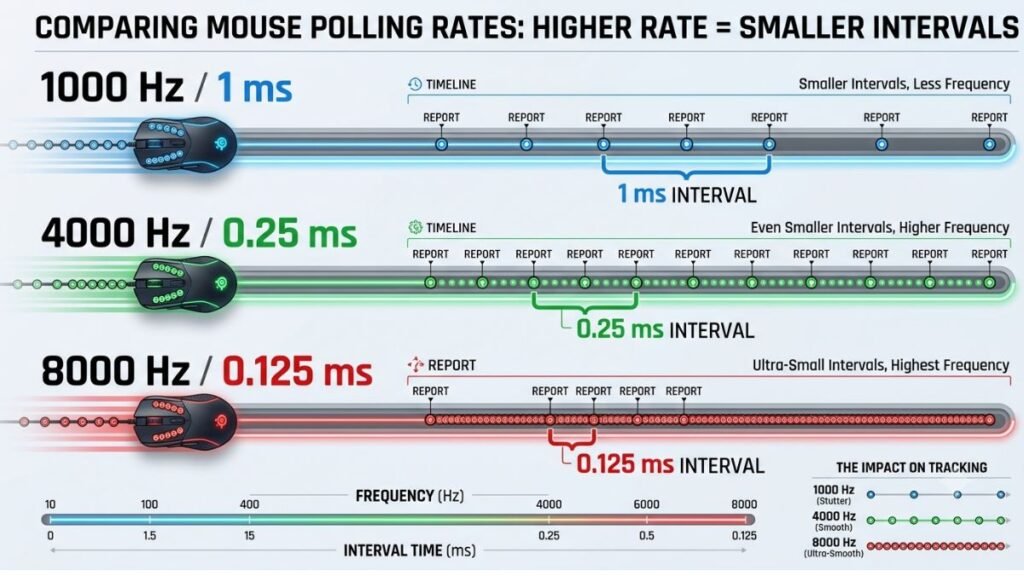
A mouse operating at 1,000 Hz can report its position up to 1,000 times per second. At 8,000 Hz, the theoretical reporting frequency increases to 8,000 times per second.
That changes the theoretical interval between reports.
Razer explains that its 8,000 Hz HyperPolling technology can reduce the theoretical polling interval from 1 millisecond at 1,000 Hz to 0.125 milliseconds at 8,000 Hz.
That is a measurable technical difference.
The important question, however, is how much of that difference matters in your particular gaming system.
125 Hz vs. 500 Hz vs. 1,000 Hz
Different polling rates represent different reporting intervals.
| Polling Rate | Theoretical Report Interval | Reports Per Second |
|---|---|---|
| 125 Hz | 8 ms | 125 |
| 500 Hz | 2 ms | 500 |
| 1,000 Hz | 1 ms | 1,000 |
| 2,000 Hz | 0.5 ms | 2,000 |
| 4,000 Hz | 0.25 ms | 4,000 |
| 8,000 Hz | 0.125 ms | 8,000 |
The table shows the mathematical relationship between polling frequency and reporting interval.
It does not mean that an 8,000 Hz mouse makes every part of a gaming system eight times faster.
The mouse is only one stage of the input pipeline. The computer, game, graphics processing, display refresh rate, and other components also influence what the player ultimately sees and feels.
Razer specifically notes that higher polling rates can produce smoother visual behavior when combined with high-refresh-rate monitors.
That makes the surrounding hardware relevant when evaluating higher polling rates.
What 4,000 Hz and 8,000 Hz Change
Higher polling rates allow the mouse to send position information to the computer more frequently.
At a theoretical level, moving from 1,000 Hz to 8,000 Hz reduces the reporting interval from 1 ms to 0.125 ms.
Razer describes this as up to eight times more data being transmitted per second from the device to the PC.
This can be relevant for high-refresh-rate gaming environments where small differences in input timing and cursor updates are more meaningful.
However, higher polling should not be treated as a universal upgrade that every gamer needs.
The practical result depends on the complete system.
A high-end gaming PC paired with a high-refresh-rate display is a more appropriate environment for exploring the benefits of very high polling rates than an older system with limited processing capability and a conventional display.
There is also another consideration: higher polling rates can increase the amount of input data that the computer needs to process.
For that reason, the most useful approach is to view 4,000 Hz and 8,000 Hz as performance options, rather than as automatic indicators of a superior gaming mouse.
Other Gaming Mouse Technologies That Matter
DPI and polling rate receive most of the attention in gaming mouse specifications, but they are only part of the technology that determines how a mouse performs.
Sensor implementation, click technology, connectivity, weight, shape, and grip can all have a meaningful effect on the experience.
In practice, a mouse with slightly less impressive headline specifications can be a better fit if its physical design and tracking behavior suit the player more effectively.
Motion Accuracy and Tracking
A gaming mouse sensor needs to translate physical movement into cursor movement consistently.
That means the important question is not simply how high the sensor’s maximum DPI can go. It is how predictably the sensor tracks the movements you actually make.
Modern sensors can include technologies designed to maintain consistent tracking when the mouse is lifted, repositioned, or used on different surfaces.
For example, Razer’s Smart Tracking technology is designed to maintain a consistent lift-off distance across surfaces. The company also describes its Focus Pro 50K sensor as capable of tracking on glass surfaces at least 2 mm thick under specified conditions. (razer.com)
Lift-off distance matters particularly to players who frequently reposition a mouse.
Consider a low-sensitivity FPS player. They may move the mouse across a large mouse pad, lift it, reposition it, and continue aiming. If the sensor registers unwanted movement while the mouse is being lifted, the cursor or camera can move when the player does not intend it to.
A consistent lift-off behavior can therefore be more relevant to that player than an extremely high maximum DPI.
Tracking performance can also depend on the physical surface.
A gaming mouse pad provides a consistent surface designed for mouse movement, but modern sensors may support a broader range of surfaces. Even so, “supports multiple surfaces” should not be interpreted as “every surface performs identically.”
Surface texture, reflectivity, cleanliness, sensor implementation, and firmware can all influence tracking behavior.
Switches and Click Technology
The sensor controls movement tracking, but mouse switches determine how button presses are registered.
This is a separate part of the mouse’s technology.
Traditional mechanical mouse switches use physical contacts to register a click. Optical mouse switches use light-based detection to determine when the switch has been actuated.
Manufacturers increasingly use optical switches in gaming mice because they can offer different characteristics in actuation, durability, and contact design.
For example, Razer’s third-generation Optical Mouse Switches are specified for up to 90 million clicks in compatible products. (razer.com)
A high click-lifecycle rating can be useful when evaluating durability, but it does not tell you whether the click feel will be comfortable for a particular person.
Click force, travel, feedback, sound, button design, and placement can all influence the experience.
This distinction is especially important because mouse technology is highly physical.
A sensor may determine whether movement is accurately tracked, but the buttons determine how the user interacts with the device dozens or thousands of times during a gaming session.
Wired and Wireless Connectivity
Wireless gaming mice have changed significantly compared with earlier generations of wireless peripherals.
The assumption that a wireless mouse must automatically be slower than a wired mouse is no longer accurate as a general rule.
Modern gaming mice can use dedicated 2.4 GHz wireless systems designed specifically around low-latency communication.
Some models also support Bluetooth for compatibility and USB connectivity for wired operation.
The three connection types serve different purposes:
| Connection | Typical Strength | Consideration |
|---|---|---|
| Wired USB | Consistent connection and charging-free operation | Cable can affect movement |
| 2.4 GHz wireless | Low-latency gaming and freedom of movement | Requires receiver and battery |
| Bluetooth | Broad device compatibility and efficiency | Usually not the primary choice for competitive gaming |
The exact implementation matters more than the connection label alone.
For example, Razer’s Viper V3 Pro supports HyperSpeed Wireless and wired connectivity, while compatible HyperPolling hardware can enable polling rates up to 8,000 Hz. (razer.com)
That illustrates an important distinction: wireless technology can be designed specifically for gaming performance.
Bluetooth is different.
Bluetooth is particularly useful when a mouse needs to work across multiple types of devices, such as laptops, tablets, or other computers. A gaming-focused 2.4 GHz receiver, however, is generally designed with responsiveness and continuous gaming input as higher priorities.
This makes connection mode part of the use-case decision rather than simply a wired-versus-wireless quality ranking.
Ergonomics, Weight and Grip
Electronic specifications are only half of the equation.
The physical shape of a gaming mouse determines how your hand interacts with it, and that can have a major effect on comfort and control.
Three common grip styles are:
- Palm grip: much of the palm rests against the body of the mouse.
- Claw grip: the palm has less contact while the fingers remain arched.
- Fingertip grip: the mouse is primarily controlled using the fingertips.
These descriptions are useful starting points, but real users do not always fit perfectly into one category.
Hand size also changes how a mouse feels.
A large ergonomic mouse may provide substantial palm support for someone with larger hands but feel difficult to control for someone with smaller hands.
Conversely, a very compact mouse may be easy to reposition but provide insufficient support for a larger hand.
Weight creates a similar trade-off.
A lighter mouse can require less effort to reposition, which may appeal to players who make frequent, rapid movements. A heavier mouse can feel more planted and substantial.
Neither characteristic is automatically superior.
The same principle applies to mouse feet.
High-quality feet can reduce friction and make movement feel smoother, but the ideal amount of resistance depends on the user’s sensitivity, surface, and control preferences.
For that reason, ergonomics should be treated as a performance characteristic rather than an aesthetic feature.
A theoretically excellent sensor cannot compensate for a mouse shape that causes discomfort or makes precise movement difficult.
Which Gaming Mouse Specifications Matter Most?
There is no universal specification hierarchy that applies to every player.
The importance of each feature depends on the games you play, your sensitivity settings, your hand size, your grip, your computer, your display, and whether you prioritize competitive performance or general versatility.
A useful way to interpret a specification sheet is to ask what each specification actually tells you.
| Specification | What It Describes | Practical Importance |
| Sensor | Movement detection and tracking | Very high |
| DPI range | Available sensitivity settings | Medium |
| Polling rate | Reporting frequency | Medium to high |
| IPS | Specified tracking speed | Medium |
| Acceleration | Specified acceleration capability | Medium |
| Switch type | How clicks are registered | High |
| Weight | Physical mass | High |
| Shape | Hand and grip compatibility | Very high |
| Connectivity | Communication with the computer | High |
| Software | Configuration and customization | Medium |
The table highlights an important distinction.
Some specifications describe electronic capability, while others describe how the mouse physically interacts with the user.
Both matter.
When Maximum Specifications Actually Matter
Extreme specifications are not meaningless.
They can be valuable when they address a real limitation or fit a demanding use case.
A competitive player using a high-refresh-rate display may have more reason to consider a higher polling rate than someone using a standard office monitor.
A player using very fast, broad mouse movements may care more about tracking speed and sensor consistency.
Someone who frequently switches between gaming and productivity may place greater value on multiple connection modes or programmable buttons.
Likewise, a player with limited desk space may benefit from a sensitivity setup that requires less physical mouse travel.
The important point is that maximum specifications become useful when they correspond to an actual requirement.
Without that requirement, the number may simply be unused headroom.
This is particularly relevant when comparing the advertised DPI of different gaming mice.
A 50,000-DPI maximum can demonstrate the capability of a modern sensor, but it does not automatically make the mouse more precise at 800, 1,600, or another sensitivity chosen by the user.
Common Gaming Mouse Technology Myths
Gaming mouse specifications are often presented as if higher numbers automatically equal better performance.
That can make it difficult for new buyers to separate meaningful technology from specifications that are primarily useful for comparison.
Myth 1: Higher DPI Always Means Better Accuracy
Higher DPI does not automatically mean greater accuracy.
DPI controls sensitivity, while tracking quality depends on the sensor’s broader implementation.
A player using a lower DPI can still achieve extremely precise control if the sensor tracks consistently and the sensitivity is appropriate for the game.
The maximum DPI number should therefore be treated as a capability, not an accuracy score.
Myth 2: 8,000 Hz Is Always Better Than 1,000 Hz
An 8,000 Hz polling rate provides a shorter theoretical reporting interval than 1,000 Hz.
But that does not mean every player will experience a dramatic improvement.
The practical effect depends on the display refresh rate, game, computer performance, and complete input pipeline.
Razer’s documentation confirms that 8,000 Hz reduces the theoretical interval to 0.125 ms compared with 1 ms at 1,000 Hz. (razer.com)
That is a genuine technical difference.
The mistake is assuming that every technical difference produces an equally noticeable real-world improvement.
Myth 3: Wireless Gaming Mice Are Too Slow for Competitive Gaming
This idea was more reasonable with older wireless technologies, but it is no longer a reliable generalization.
Modern dedicated wireless gaming systems are designed for low-latency communication.
Current gaming mice can support high polling rates over wireless connections when paired with compatible receivers. Razer’s Viper V3 Pro, for example, supports up to 8,000 Hz with compatible HyperPolling hardware.
Wireless does introduce additional considerations, including battery management, receiver placement, and potential interference.
But the simple statement that “wireless is too slow for gaming” does not accurately describe current high-performance gaming wireless systems.
Myth 4: More Buttons Always Make a Gaming Mouse Better
More buttons increase the number of available controls.
They do not automatically improve the mouse.
An MMO player may benefit from numerous programmable buttons because abilities, items, and commands can be mapped directly to the mouse.
A competitive FPS player may prefer fewer controls to maintain a simple hand position and minimize accidental inputs.
The useful question is not:
“How many buttons does it have?”
It is:
“Do the available controls match the way I use the mouse?”
Myth 5: The Most Expensive Gaming Mouse Has the Best Technology
Price is not a direct measurement of sensor quality.
A higher-priced mouse may include premium materials, a sophisticated wireless system, optical switches, extensive software, a specialized shape, additional buttons, or other features.
But a user who does not need those features may gain little from paying for them.
A less expensive model with a capable sensor and suitable ergonomics can provide an excellent experience.
This is why understanding the technology is more useful than simply ranking mice by price.
How to Read a Gaming Mouse Specification Sheet
A specification sheet can initially look like a collection of impressive numbers.
The easiest way to understand it is to examine each category according to what it tells you about actual use.
Start With the Sensor
First, identify the sensor and examine its key capabilities.
Look for:
- Maximum DPI
- Maximum IPS
- Maximum acceleration
- Surface-tracking features
- Lift-off behavior
- Available sensitivity controls
- Firmware or software features
Do not stop at the maximum DPI.
A sensor’s overall tracking behavior is more informative than a single headline number.
If two mice both provide more sensitivity than you are likely to use, their maximum DPI may tell you very little about which one will perform better for you.
Check the Polling Rate
Next, examine the supported polling rates.
Look at whether the mouse supports:
- 125 Hz
- 500 Hz
- 1,000 Hz
- 2,000 Hz
- 4,000 Hz
- 8,000 Hz
Not every mouse supports all of these levels.
Also check whether a higher polling rate requires a specific receiver or accessory.
For example, the Viper V3 Pro’s specifications distinguish its standard wireless operation from higher polling configurations that use compatible HyperPolling hardware.
This distinction matters because the headline “8,000 Hz” specification may depend on the configuration being used.
Examine the Physical Design
After evaluating the electronics, look at the physical characteristics.
Check:
- Weight
- Dimensions
- Overall shape
- Button placement
- Side-button position
- Grip compatibility
- Cable design
- Mouse feet
These specifications can have a more immediate effect on daily comfort than relatively small differences between already-capable sensors.
A mouse that fits your hand naturally can be easier to control for long gaming sessions than a technically impressive model with an unsuitable shape.
Consider Connectivity
Determine which connection modes are available.
A mouse may support:
- Wired USB
- 2.4 GHz wireless
- Bluetooth
- Multiple connection modes
Then check whether performance changes between those modes.
For example, Bluetooth may be useful for connecting to a laptop while 2.4 GHz wireless may be the preferred mode for gaming.
The flexibility can be valuable if one mouse needs to serve multiple roles.
Look Beyond the Headline Number
A specification sheet should help answer practical questions.
If a mouse advertises 50,000 DPI, ask whether you need that sensitivity.
If it advertises 8,000 Hz, ask whether your computer and display make higher polling relevant.
If it weighs 50 grams, ask whether that weight and shape match your grip and movement style.
If it advertises an extremely high click-lifecycle rating, consider whether click feel and button placement also suit you.
The most useful gaming mouse specifications are therefore not necessarily the largest ones.
They are the ones that correspond to the way you actually use the device.
A good evaluation process moves from numbers to context:
What does the specification mean?
What does it change?
Will that change matter for my games and setup?
That approach is much more reliable than choosing a gaming mouse based on a single impressive number.
How to Choose the Right Gaming Mouse Technology for Your Setup
There is no single specification that determines whether a gaming mouse is good.
The right combination depends on how you play, how you hold the mouse, how much space you have, and what your computer and display can take advantage of.
For a competitive FPS player, consistent sensor tracking, appropriate sensitivity, low-latency connectivity, and a comfortable shape may matter more than having an extreme DPI range.
For an MMO player, programmable buttons and software customization may be much more important.
For someone who uses one mouse for gaming, work, and a laptop, connectivity and ergonomics may take priority.
A practical evaluation can therefore follow this order:
- Find a suitable shape and size.
- Check the sensor’s tracking capabilities.
- Choose a sensitivity range that matches your games.
- Evaluate polling rate according to your system.
- Consider wired, 2.4 GHz, and Bluetooth connectivity.
- Check switches, buttons, weight, and software.
- Ignore specifications that do not provide a meaningful benefit for your use.
This approach prevents one impressive number from dominating the decision.
What Matters Most in Different Gaming Scenarios?
| Gaming Scenario | Technologies Worth Prioritizing | Why |
|---|---|---|
| Competitive FPS | Sensor consistency, shape, weight, polling rate | Precise and repeatable movement |
| MMO | Programmable buttons, software, ergonomics | More accessible commands |
| Casual gaming | Comfort, reliable sensor, connectivity | Balanced everyday experience |
| Laptop gaming | Bluetooth, 2.4 GHz, portability | Flexibility between devices |
| Large desk setup | Shape, feet, cable or wireless system | Comfortable movement over distance |
| Small desk setup | Sensitivity, compact design, wireless | Less physical travel required |
The table should not be interpreted as a rigid buying formula.
It is a way to identify where the most relevant differences are likely to appear.
Final Takeaway
Gaming mouse technology has advanced far beyond simply measuring how quickly a cursor moves across the screen.
Modern sensors can provide extremely high DPI ranges, high tracking speeds, sophisticated surface detection, and very consistent movement. Polling rates have also increased substantially, with some current models supporting 4,000 Hz or 8,000 Hz operation.
But higher specifications do not automatically produce a better experience.
The best gaming mouse for a particular player is the one whose sensor, sensitivity, polling rate, shape, weight, switches, connectivity, and software work together for that person’s actual needs.
DPI is useful, but it is only one part of the equation. A capable sensor at a sensible sensitivity can provide excellent gaming performance if its tracking behavior and other characteristics suit the user.
Understanding what each specification actually means gives you a much better basis for evaluating gaming mouse technology—and avoids being distracted by numbers that may have little practical relevance to your setup.
Frequently Asked Questions
What is DPI on a gaming mouse?
DPI measures mouse sensitivity, describing how much cursor movement is produced by a given amount of physical movement. A higher DPI moves the cursor farther with the same physical mouse movement, but higher DPI does not automatically mean greater accuracy. Gaming performance depends on the sensor, sensitivity configuration, tracking consistency, and the player’s control preferences.
Is a higher DPI better for gaming?
A higher DPI is not automatically better for gaming. DPI determines sensitivity rather than directly measuring sensor accuracy. Many players use relatively moderate DPI settings combined with in-game sensitivity controls. The most useful setting is the one that provides predictable and comfortable control for the game, mouse pad, and player’s movement style.
What is the best DPI for a gaming mouse?
There is no universal best DPI for every gaming mouse user. The appropriate setting depends on the game, mouse pad size, preferred sensitivity, and physical movement style. Competitive FPS players often favor configurations that allow precise physical control, while other games may work well with higher sensitivity. The sensor’s maximum DPI should not be treated as the recommended setting.
Is 8,000 Hz polling rate better than 1,000 Hz for gaming?
An 8,000 Hz polling rate provides a shorter theoretical reporting interval than 1,000 Hz: 0.125 milliseconds compared with 1 millisecond. However, the practical benefit depends on the complete system, including the game, processor, graphics performance, and display refresh rate. Higher polling can be useful in high-performance setups but is not essential for every gamer.
Are wireless gaming mice as fast as wired gaming mice?
Modern 2.4 GHz wireless gaming mice can provide very low-latency performance and can be suitable for competitive gaming. Dedicated gaming wireless systems are designed differently from basic wireless peripherals. However, wireless mice introduce considerations such as battery life, receiver placement, and charging. Bluetooth is generally a different use case from dedicated low-latency 2.4 GHz gaming connectivity.
Does a gaming mouse sensor affect accuracy?
Yes. The sensor is responsible for detecting physical movement and converting it into digital movement information. Tracking consistency, surface behavior, lift-off characteristics, and the sensor’s implementation can influence how predictable the mouse feels. Maximum DPI alone does not determine sensor quality, so evaluating the broader sensor specifications is more useful.
Does a lighter gaming mouse make you aim better?
A lighter gaming mouse does not automatically improve aim. Lower weight can make rapid repositioning easier and may appeal to players who use large movements, but shape, grip, balance, sensor behavior, and personal preference also matter. A slightly heavier mouse that fits the user’s hand comfortably can provide better control than an extremely lightweight mouse with an unsuitable design.