Wireless vs wired gaming mouse technology has changed significantly, with modern wireless models offering low-latency performance that can compete with traditional wired options.
The main differences now involve connection reliability, battery management, setup preferences, and personal gaming needs rather than simple speed advantages.
For many years, choosing between a wireless vs wired gaming mouse was an easy decision for serious PC gamers. Wired mice were considered the safer option because they provided a direct connection, consistent power, and minimal concerns about signal delays.
Wireless models, meanwhile, were often associated with slower response times, interference problems, and battery limitations.
That perception has changed as wireless gaming technology has improved. Modern gaming mice use specialized wireless protocols designed to reduce latency and maintain stable communication between the mouse and computer.
Many players now use wireless mice for competitive gaming without experiencing the limitations that affected older generations.
However, choosing between wired and wireless is still not only about performance numbers. Factors such as gaming environment, desk setup, maintenance preferences, and personal comfort can influence which option makes more sense.
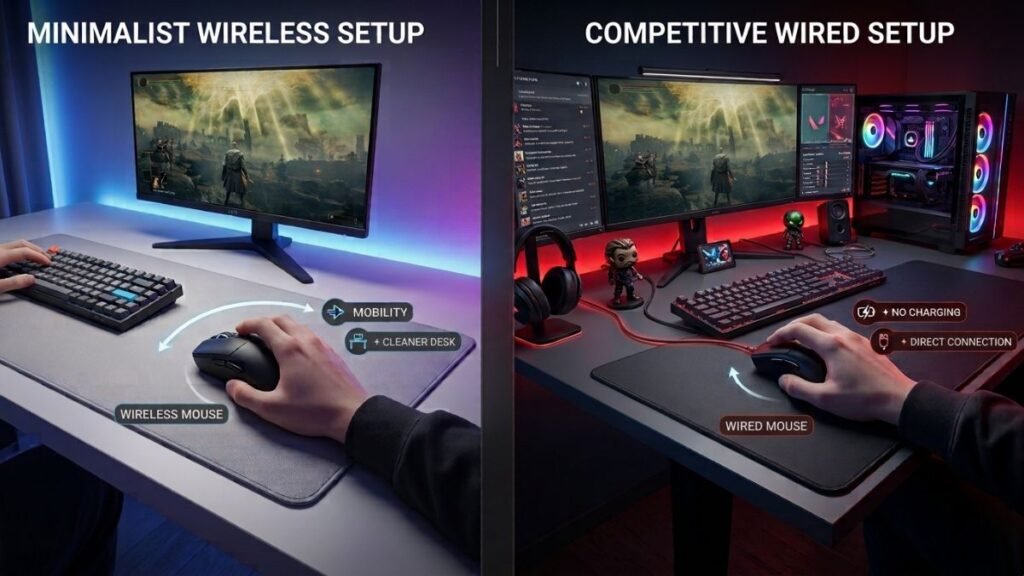
A competitive FPS player may prioritize every possible advantage in responsiveness, while a casual gamer may value a cleaner desk setup and unrestricted movement. Understanding how each connection type works makes it easier to separate real differences from outdated assumptions.
Wireless vs Wired Gaming Mouse: The Main Differences
A wired gaming mouse and a wireless gaming mouse perform the same basic function: translating hand movements and clicks into actions on a computer. The biggest difference is how the device communicates with the system.
Wired mice send information through a physical cable, usually USB, creating a direct connection between the mouse and computer. Wireless mice transmit data through radio frequency technology or Bluetooth.
Modern gaming-focused wireless mice typically use dedicated 2.4GHz connections instead of standard Bluetooth because gaming requires faster response times and more consistent communication.
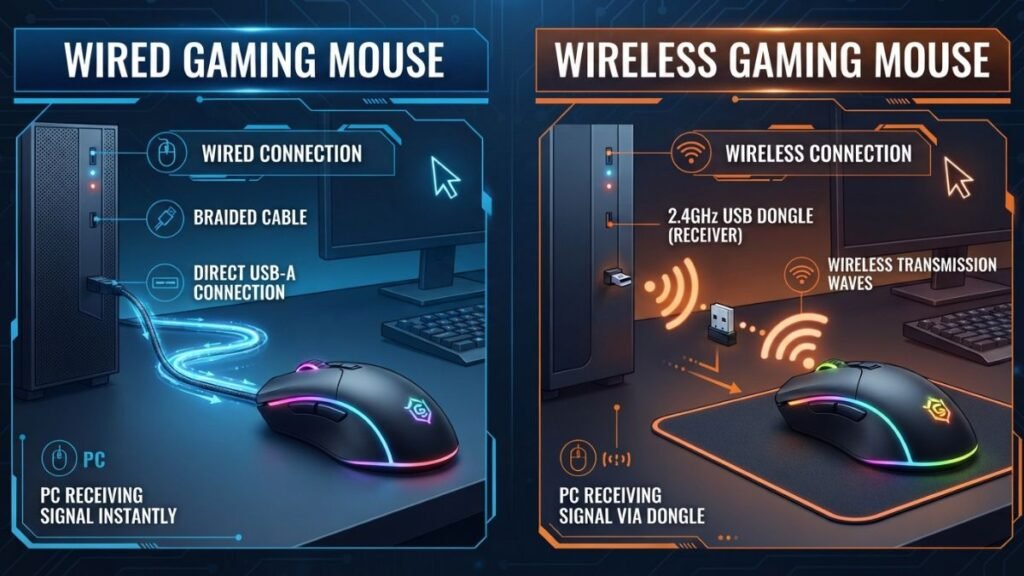
| Feature | Wired Gaming Mouse | Wireless Gaming Mouse |
|---|---|---|
| Connection | USB cable | Wireless receiver or Bluetooth |
| Power source | Computer connection | Rechargeable or replaceable battery |
| Movement freedom | Limited by cable | More freedom of movement |
| Latency concerns | Traditionally lower | Modern models offer very low latency |
| Maintenance | No charging required | Requires battery management |
| Desk setup | More cables | Cleaner appearance |
The choice depends less on whether one technology is universally better and more on how the mouse will be used.
How Wired Gaming Mice Work
Wired gaming mice transfer all communication and power through a physical cable connected to the computer.
The cable provides a stable pathway for:
- movement tracking data;
- button inputs;
- power delivery;
- communication between hardware components.
Because the connection is direct, wired mice do not require batteries or wireless transmitters. This makes them simple to use because players can connect the mouse and immediately begin gaming.
For competitive environments, some players still prefer wired models because they eliminate concerns about:
- battery levels;
- wireless interference;
- receiver placement;
- charging schedules.
Another advantage is consistency. A wired mouse receives continuous power from the computer, meaning performance does not depend on battery conditions.
However, the main limitation is physical freedom. The cable can create drag, especially during large mouse movements used in lower DPI gaming setups.
How Wireless Gaming Mice Work
Wireless gaming mice communicate with computers using wireless signals instead of a physical cable.
Most gaming-focused wireless mice use a dedicated USB receiver operating on the 2.4GHz frequency range. This approach is designed to provide faster communication compared with traditional Bluetooth connections.
Manufacturers such as Logitech G have developed dedicated wireless gaming technologies focused on reducing latency while maintaining stable connections during gameplay.
Wireless gaming mice typically include:
- internal batteries;
- wireless transmitters;
- USB receivers;
- power management systems.
The main advantage is freedom of movement. Without a cable attached, players can move the mouse naturally without worrying about cable resistance.
This can be especially noticeable in:
- FPS games requiring wide movements;
- large desk setups;
- minimalist gaming environments.
The trade-off is that wireless devices require additional management. Players need to monitor battery levels and occasionally recharge the mouse.
Performance Comparison: Latency, Accuracy and Responsiveness
Performance is one of the biggest reasons gamers compare a wireless vs wired gaming mouse. While wired mice historically had an advantage because of their direct connection, modern wireless gaming technology has reduced this gap significantly.
Today, gaming performance depends on several factors:
- connection technology;
- sensor quality;
- polling rate;
- firmware optimization;
- computer configuration.
The connection type alone does not determine whether a mouse performs well.
Input Latency and Response Time
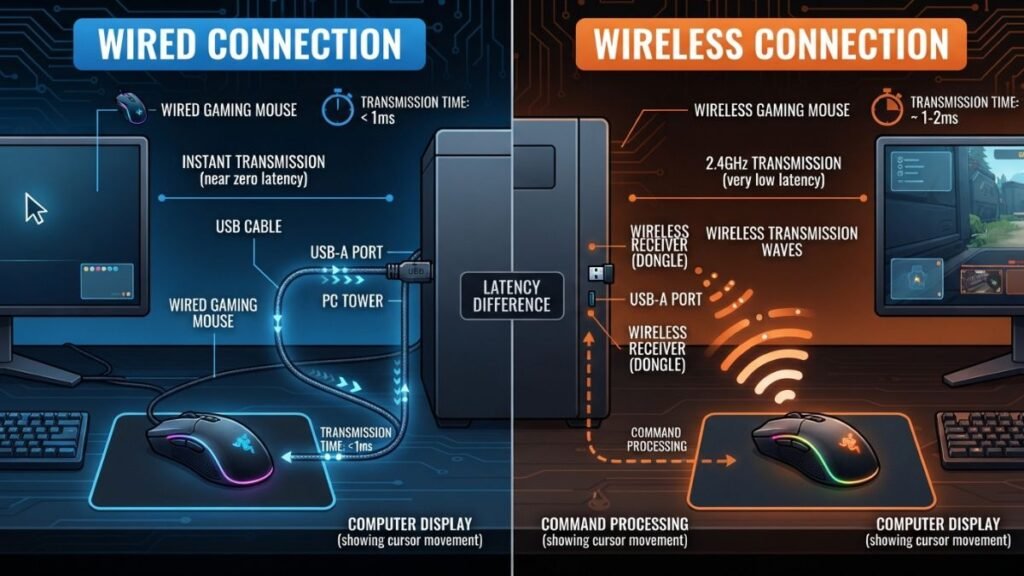
Input latency refers to the time between moving the mouse or clicking a button and the computer registering that action.
For many years, wired mice were preferred because the physical connection provided predictable communication. However, modern wireless gaming mice use dedicated receivers designed specifically for fast data transmission.
Technologies such as Razer HyperSpeed Wireless technology are designed to reduce wireless communication delays and provide reliable performance for gaming environments.
For most everyday gaming situations, the difference between a high-quality wired and wireless gaming mouse is now extremely small.
The more important factor is choosing a well-designed gaming mouse rather than focusing only on whether it has a cable.
Sensor Accuracy and Tracking Performance
Connection technology is only one part of gaming mouse performance. The sensor inside the mouse plays a major role in tracking accuracy and movement consistency.
Understanding gaming mouse technology helps explain why sensor quality, tracking performance, and hardware design influence the overall gaming experience.
A high-quality sensor helps determine:
- how accurately movement is detected;
- how smoothly the cursor responds;
- how well the mouse performs during fast movements.
For example, sensor technologies such as HERO sensor technology focus on balancing precision performance with efficient power consumption.
This is especially important for players who use:
- low DPI settings;
- large mouse movements;
- competitive FPS aiming techniques.
A wireless mouse with an advanced sensor can outperform a wired mouse with a lower-quality sensor.
The connection type matters, but the complete hardware package matters more.
Polling Rate and Gaming Performance
Polling rate measures how often a mouse reports its position to the computer.
A higher polling rate can provide more frequent updates, which may create smoother cursor movement in certain gaming situations.
Common polling rates include:
| Polling Rate | Reporting Frequency | Typical Use |
|---|---|---|
| 125Hz | 125 reports per second | Basic computer use |
| 500Hz | 500 reports per second | General gaming |
| 1000Hz | 1000 reports per second | Competitive gaming |
However, a higher polling rate does not automatically guarantee better performance.
The player’s setup, monitor refresh rate, game type, and personal preference all influence whether the difference is noticeable.
Wireless Gaming Mouse vs Wired Gaming Mouse for FPS Games
FPS games often create the biggest debate around wireless vs wired mouse gaming because competitive shooters require fast reactions and precise aiming.
Games such as:
- Counter-Strike;
- Valorant;
- Apex Legends;
- Overwatch;
place strong demands on mouse responsiveness.
Are Wireless Mice Good Enough for Competitive Gaming?
Modern wireless gaming mice can be suitable for competitive gaming when they use:
- low-latency wireless connections;
- reliable sensors;
- optimized firmware;
- proper battery management.
The idea that every wireless mouse has noticeable delay is outdated. The performance difference between quality wireless and wired models is much smaller than it was in previous generations.
For many competitive players, the benefits of wireless freedom can actually improve comfort because there is no cable resistance during quick movements.
When Wired Connection Still Has Advantages
Despite improvements in wireless technology, wired mice still offer practical advantages.
A wired gaming mouse provides:
- no battery concerns;
- constant power;
- simple plug-and-play operation;
- no need for charging.
For tournament environments, shared computers, or users who prefer maximum simplicity, wired models remain a reliable option.
The difference is no longer about one technology being clearly superior. It is about which limitations the user prefers to manage.
Choosing Based on Your Gaming Style
Players should also consider sensitivity preferences, because gaming mouse DPI settings can influence aiming control and movement precision.
Different gaming styles create different priorities.
A player who spends several hours in competitive FPS games may value:
- consistent performance;
- lightweight design;
- unrestricted movement.
A casual player may prioritize:
- convenience;
- cleaner desk organization;
- easier everyday use.
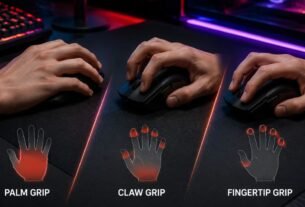
Factors such as hand position and comfort also influence the experience. Understanding your preferred gaming mouse grip styles can help when choosing a mouse design that feels natural during longer sessions.
Battery Life, Reliability and Daily Usage
Beyond speed and responsiveness, everyday usability is one of the biggest differences between a wireless vs wired gaming mouse.
A gaming mouse is a device used for hours at a time, so practical factors such as charging, cable management, and reliability can influence the overall experience.
A mouse that performs well but creates unnecessary maintenance may not be the best choice for every user.
Battery Management in Wireless Gaming Mice
Battery life is one of the main considerations when choosing a wireless gaming mouse.
Modern models typically use rechargeable batteries, with battery life varying depending on:
- lighting settings;
- polling rate;
- usage hours;
- battery capacity;
- power efficiency.
Users who play frequently need to develop simple charging habits to avoid interruptions.
Many wireless gaming mice include features such as:
- battery indicators;
- low-power modes;
- automatic sleep functions;
- optional charging cables.
For most users, battery management becomes a small routine rather than a major inconvenience.
However, players who dislike charging any device may still prefer wired options because they eliminate this responsibility completely.
Cable Limitations and Desk Setup Considerations
One of the biggest advantages of wireless mice is improved freedom of movement.
A wired gaming mouse can sometimes create resistance caused by:
- cable friction against the desk;
- cable weight;
- limited movement range;
- cable positioning.
This is especially noticeable for players who use:
- low sensitivity settings;
- large mouse pads;
- wide arm movements.
Some gamers solve this issue with mouse bungees or improved cable positioning, but wireless models naturally remove the cable from the equation.
For users who prioritize a clean and organized workspace, wireless mice can also create a more minimal desk setup. However, even wireless setups still include other devices and connections that require organization.
Proper gaming cable management helps keep your entire gaming workspace cleaner and easier to maintain.
Long-Term Reliability Differences
Reliability depends more on the quality of the mouse rather than whether it uses a cable.
A well-designed wireless gaming mouse can provide years of reliable performance when properly maintained.
Possible concerns with wireless models include:
- battery degradation over time;
- receiver damage;
- charging port wear.
Wired models avoid battery-related issues but still depend on physical components such as:
- cable durability;
- USB connector condition;
- internal switches.
Both designs have potential failure points.
The better choice depends on which type of maintenance the user prefers.
Wireless or Wired Mouse for Gaming: Which One Should You Choose?
There is no universal answer to whether a wireless or wired gaming mouse is better.
The right choice depends on:
- gaming habits;
- performance requirements;
- workspace setup;
- personal preferences.
A competitive player and a casual user may choose different options for completely valid reasons.
Best Choice for Competitive Players
Competitive players should focus on the complete performance package rather than only the connection type.
Important factors include:
- accurate sensor;
- comfortable shape;
- suitable weight;
- reliable performance;
- consistent responsiveness.
A high-quality wireless gaming mouse can be a strong choice for competitive gaming because modern wireless systems have minimized many previous limitations.
However, some professional environments may still prefer wired options because they remove battery management completely.
Best Choice for Casual and Everyday Gamers
For casual gamers, both options can work well.
A wireless mouse may be better for users who want:
- fewer cables;
- easier movement;
- cleaner desk organization;
- flexibility between gaming and everyday tasks.
A wired mouse may be better for users who prefer:
- simple setup;
- no charging;
- lower maintenance.
The decision should be based on convenience rather than outdated assumptions.
Factors to Consider Before Choosing
Comfort is another important factor, and understanding different gaming mouse grip styles can help users choose a design that matches their hand position.
Before deciding between wireless and wired, consider:
| Question | Why It Matters |
|---|---|
| What games do you play? | FPS games may benefit from maximum comfort and responsiveness |
| How important is cable freedom? | Wireless removes physical restrictions |
| Do you want to charge devices regularly? | Wired eliminates battery management |
| How large is your desk setup? | Movement space affects comfort |
| Do you travel with your setup? | Wireless can be easier to transport |
The best mouse is the one that matches your actual usage.
Common Myths About Wireless Gaming Mice
Many opinions about wireless gaming mice come from older technology rather than current hardware.
Understanding what is still true and what has changed helps users make better decisions.
“Wireless Always Has More Delay”
This was more accurate with older wireless devices.
Modern gaming-focused wireless mice use dedicated communication systems designed for fast response times.
For normal gaming situations, a quality wireless mouse can provide performance close to wired alternatives.
The key difference is choosing a gaming-specific wireless model rather than a general office mouse.
“Wired Mice Are Always More Accurate”
Accuracy depends mainly on the sensor, firmware, and overall design.
A wired connection does not automatically make a mouse more precise.
A wireless gaming mouse with a high-quality sensor can provide excellent tracking performance.
“Wireless Gaming Mice Are Not Reliable”
Modern wireless mice are significantly more reliable than earlier generations.
Current models are designed with:
- improved signal stability;
- better battery efficiency;
- optimized wireless receivers.
The reliability gap between wired and wireless options has become much smaller.
Final Thoughts on Wireless vs Wired Gaming Mouse
The choice between a wireless vs wired gaming mouse is no longer a simple decision based only on speed or latency.
Modern wireless gaming mice have improved significantly, offering reliable connections, accurate sensors, and performance levels suitable for most gaming scenarios. The biggest advantages of wireless models are freedom of movement, cleaner setups, and improved flexibility.
Wired gaming mice still remain valuable because they provide consistent power, simple operation, and no need for battery management.
For competitive gamers, the most important factors are often sensor quality, comfort, weight, and responsiveness rather than the presence of a cable. For everyday users, convenience and personal preference may matter more.
The best choice is the one that fits your gaming style, workspace, and expectations. Understanding the real differences between wireless and wired technology helps you choose based on facts instead of outdated assumptions.
Frequently Asked Questions About Wireless vs Wired Gaming Mouse
Is wireless mouse better than wired for gaming?
A wireless mouse can be better than a wired mouse for gaming depending on the user’s needs. Modern wireless gaming mice offer low latency, accurate sensors, and reliable performance, while wired models provide constant power and no charging requirements.
Does a wireless gaming mouse have more input lag?
A quality wireless gaming mouse does not necessarily have noticeable input lag compared with a wired model. Modern gaming wireless technologies are designed to minimize communication delays and provide fast response times for gaming.
Are wired mice better for FPS games?
Wired mice can still be a good choice for FPS games because they provide a direct connection without battery concerns. However, many modern wireless gaming mice are also suitable for competitive FPS gaming due to improved latency and sensor technology.
How long do wireless gaming mice batteries last?
Wireless gaming mouse battery life depends on the model, usage habits, lighting settings, polling rate, and power efficiency. Battery life can vary significantly between models and configurations.
Can professional gamers use wireless gaming mice?
Yes. Many competitive players use wireless gaming mice because modern models provide fast response times, accurate tracking, and freedom of movement. The choice usually depends on comfort, preference, and the specific gaming environment.