

Last updated on November 1st, 2026 at 12:24 am
| Gaming Setup Mistake | Why It Happens | Better Approach |
|---|---|---|
| Buying expensive hardware first | Beginners focus only on performance | Plan the complete setup before upgrading |
| Ignoring desk organization | Workspace planning is overlooked | Create a practical and comfortable layout |
| Poor cable management | Organization is delayed | Manage cables from the beginning |
| Choosing accessories by appearance | Trends influence buying decisions | Buy items that solve real problems |
| Ignoring ergonomics | Comfort is underestimated | Prioritize posture and long-session comfort |
| Poor budget planning | Money is spent on one area only | Balance hardware, accessories, and workspace |
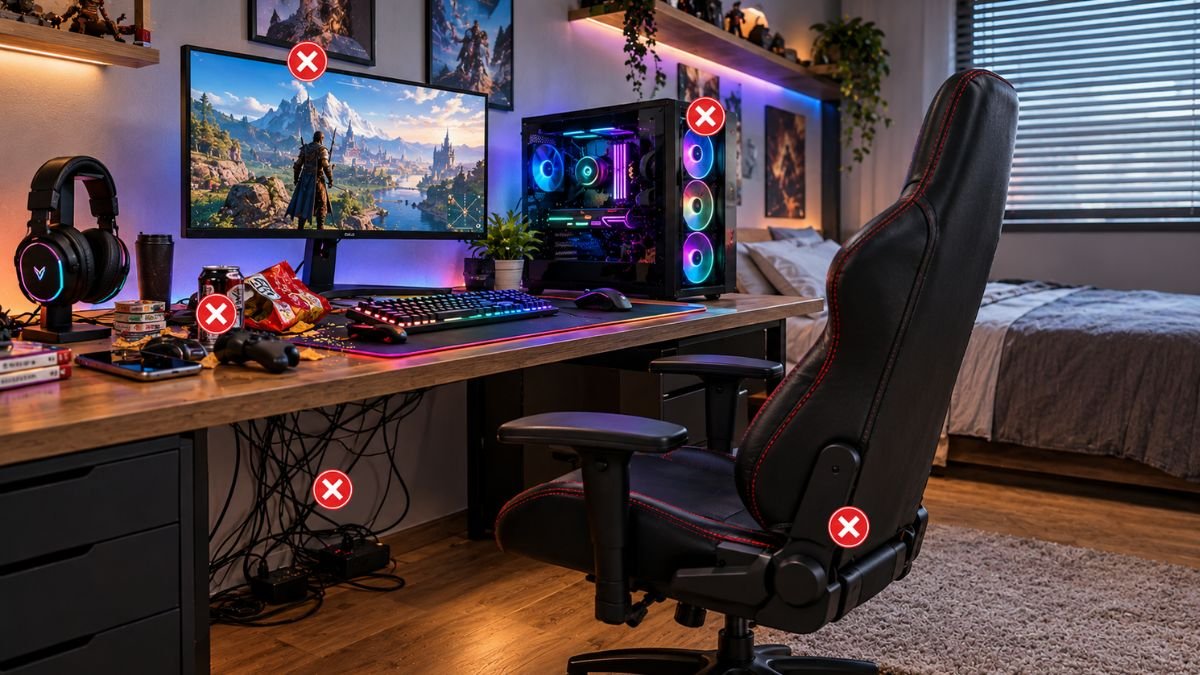
Gaming setup mistakes can make a gaming space uncomfortable, inefficient, and frustrating even when the hardware is powerful. Beginners often focus on expensive components while ignoring planning, ergonomics, organization, and compatibility.
Avoiding these mistakes helps create a balanced gaming environment where performance, comfort, and usability work together.
Creating a gaming setup is an exciting process. For many beginners, building a dedicated gaming space feels like a major milestone. The problem is that many first-time gamers focus heavily on buying powerful hardware while overlooking the smaller decisions that affect everyday use.
A setup with an expensive graphics card, premium keyboard, and multiple accessories can still feel disappointing if the desk layout is uncomfortable, the monitor is positioned incorrectly, or cables create unnecessary clutter.
These are some of the most common gaming setup mistakes beginners make.
A frequent situation among new PC gamers is spending most of the available budget on internal components while using an unsuitable desk, uncomfortable chair, or poorly planned workspace.
The result is a setup that looks impressive in photos but does not provide a better experience during actual gaming sessions.
A successful gaming setup is not defined only by hardware specifications. It combines balanced components, proper organization, comfortable ergonomics, and equipment that matches the user’s real gaming habits.
According to principles used in professional workspace design, factors such as posture, equipment positioning, and viewing angles can influence comfort during long computer sessions. The same ideas apply to gaming environments where players often spend several hours at a desk.
This guide explains the most common bad gaming setup decisions beginners make, why they happen, and how to avoid creating a setup that wastes money or reduces gaming comfort.
Buying Expensive Hardware Without Planning the Complete Setup
One of the most common gaming setup mistakes beginners make is purchasing individual components without considering how everything works together.
Many new gamers start by choosing the most powerful graphics card, fastest processor, or highest refresh-rate monitor available. However, a gaming setup is a complete environment, not just a collection of expensive parts.
A balanced setup considers how hardware, accessories, and workspace design interact.
For example, a powerful gaming PC paired with an unsuitable monitor or poor desk arrangement may prevent users from experiencing the benefits they expected after upgrading.
Focusing Only on PC Performance
A common misconception among beginners is that better gaming automatically comes from stronger internal hardware.
While components such as GPUs, CPUs, and memory are important, gaming quality also depends on:
- Display capability
- Input devices
- Audio quality
- Network stability
- Workspace comfort
- Software configuration
A high-performance computer cannot fully improve the gaming experience if other parts of the setup create limitations.
While many beginners focus only on upgrading their PC components, gaming performance depends on several factors beyond raw hardware power. Graphics performance, display capabilities, and software optimization all influence the final experience.
NVIDIA explains how modern GPU performance and gaming technologies help improve gaming performance through advanced graphics processing and optimization.
Ignoring Compatibility Between Components
Another beginner mistake is purchasing equipment without checking whether different parts of the setup work well together.
Examples include:
- Buying a high refresh-rate monitor without hardware capable of supporting it
- Choosing accessories that require additional adapters
- Purchasing oversized equipment for a limited desk area
- Selecting features that are rarely used
Before buying any upgrade, beginners should consider:
- Will this improve my actual gaming experience?
- Does it solve an existing problem?
- Does it work with my current equipment?
- Will it still be useful in the future?
Planning prevents unnecessary spending and helps create a more practical setup.
Creating a Setup Around Appearance Instead of Function
Gaming setups shown online often focus heavily on aesthetics. RGB lighting, decorative accessories, and visually impressive layouts can create inspiration, but copying these designs without considering personal needs can lead to poor decisions.
Some of the worst gaming setups are not bad because they lack expensive equipment. They fail because the user cannot comfortably use them.
A functional setup should answer practical questions:
- Is the monitor positioned correctly?
- Is there enough desk space?
- Are frequently used accessories easy to reach?
- Are cables organized?
- Does every item serve a purpose?
A visually attractive setup should support gaming, not make everyday use harder.
Choosing the Wrong Desk and Workspace Layout
The physical workspace is one of the most overlooked parts of a gaming setup. Many beginners spend most of their budget on computer hardware while treating the desk environment as an afterthought.
However, the desk is where every part of the gaming experience comes together. A poorly planned workspace can create problems that no hardware upgrade can solve.
A powerful PC, premium monitor, and expensive accessories will not feel enjoyable if the user constantly struggles with limited space, uncomfortable positioning, or poor organization.
For beginners planning their first setup, following a detailed gaming setup guide can help create a more balanced environment instead of simply collecting expensive equipment.
Using a Desk That Is Too Small
One of the most common bad gaming setup problems is choosing a desk that cannot comfortably support all necessary equipment.
A small desk may appear suitable at first, but problems usually appear after adding:
- A gaming monitor
- Keyboard and mouse
- Speakers or headset stand
- Controller accessories
- Charging devices
- Decorative items
When every item competes for limited space, the setup becomes difficult to use and maintain.
A practical desk should provide enough room for movement, especially for mouse control. Competitive players often require more surface area because large mouse movements are part of their gameplay style.
Before purchasing a desk, beginners should consider:
- Current equipment size
- Future upgrades
- Available room space
- Cable routing options
- Monitor placement
A slightly larger and better-planned workspace can prevent expensive changes later.

Poor Monitor Placement
Monitor positioning is another area where beginners frequently make mistakes.
Many users focus on buying a high-resolution or high-refresh-rate display but ignore where the monitor is placed.
Common problems include:
- Monitor positioned too high
- Screen placed too far away
- Incorrect viewing angle
- Excessive glare from room lighting
Monitor placement affects comfort, posture, and the overall viewing experience.
A display that is positioned correctly allows users to maintain a natural sitting position instead of constantly leaning forward or adjusting their head position.
Monitor positioning affects comfort and viewing experience, but display technology also influences how smoothly games appear.
Features such as G-SYNC display technology help reduce visual issues like screen tearing by synchronizing display refresh rates with compatible graphics hardware.
Ignoring Cable Management From the Beginning
Cable management is often ignored until the desk becomes messy.
Many beginners think cable organization is only about appearance, but it also affects maintenance and usability.
Poor cable organization can make it harder to:
- Clean the workspace
- Identify connection problems
- Replace equipment
- Add future accessories
A simple cable management plan during the initial setup can prevent creating a cluttered workspace later.
Helpful approaches include:
- Grouping similar cables together
- Using cable clips or sleeves
- Keeping power cables separated from frequently moved cables
- Planning cable routes before placing equipment
For a deeper organization approach, beginners can explore the guide on gaming cable management.
Ignoring Ergonomics and Comfort During Long Gaming Sessions
A gaming setup should be designed around the person using it, not only around the equipment.
One of the biggest mistakes beginners make is creating a setup that looks impressive but becomes uncomfortable after extended use.
Gaming sessions can last several hours, and small positioning problems can become noticeable over time.
Choosing a Chair Based Only on Appearance
A common mistake is selecting a chair because it matches the gaming room aesthetic without considering actual comfort.
A suitable gaming chair should support a comfortable sitting position through features such as:
- Adjustable height
- Proper back support
- Comfortable arm placement
- Suitable seat depth
A chair does not need to be the most expensive option available. The important factor is whether it supports the user’s body and gaming habits.
A stylish chair that causes discomfort after an hour of gaming is not improving the setup.
A comfortable gaming setup should consider more than just appearance. Proper positioning of chairs, monitors, and accessories can influence long-session comfort.
Following ergonomic workspace principles can help create a more practical environment for extended computer use.
Incorrect Keyboard and Mouse Position
Keyboard and mouse placement directly affects comfort and control.
Common mistakes include:
- Keeping the keyboard too far away
- Using limited mouse space
- Positioning the mouse at an uncomfortable angle
- Creating unnecessary wrist pressure
For gamers who play competitive titles, mouse movement space is especially important.
A small desk may force users to lift and reposition the mouse frequently, which can affect consistency during gameplay.
A better approach is arranging the desk so frequently used equipment has enough room while unnecessary items are moved away.
Creating Poor Lighting Conditions
Lighting is another commonly ignored part of gaming setups.
Many beginners create rooms that are either too dark or overloaded with decorative lighting.
Both situations can reduce comfort.
A better lighting approach includes:
- Reducing screen glare
- Avoiding extreme brightness differences
- Using balanced ambient lighting
- Keeping the display as the main focus
RGB lighting can improve the visual style of a setup, but it should support the environment rather than become the main purpose of the room.
Choosing Accessories Based Only on Appearance
Gaming accessories can improve comfort, organization, and usability, but one of the most common gaming setup mistakes beginners make is purchasing accessories because they look impressive rather than because they solve a real problem.
A setup filled with RGB lighting, decorative items, and unnecessary devices may look attractive online but create a less practical experience in everyday use.
The best accessories are not always the most noticeable ones. They are the ones that improve how the user interacts with the setup.
Buying Too Many Unnecessary Accessories
Many beginners purchase accessories because they look impressive, but a better approach is understanding how different products fit into their setup.
Modern gaming hardware ecosystems offer different types of devices designed for different gaming preferences and use cases.
This can lead to:
- Limited desk space
- More cable clutter
- Higher costs
- Devices that are rarely used
Examples of unnecessary purchases may include:
- Decorative accessories that reduce workspace
- Multiple devices with the same purpose
- Features that do not improve gameplay
- Accessories purchased only because they are popular online
Before adding any new item, beginners should ask:
- Does this improve comfort?
- Does this solve a problem?
- Will I use this regularly?
- Does this improve organization or performance?
A practical setup should grow based on real needs, not trends.
Ignoring Useful Small Accessories
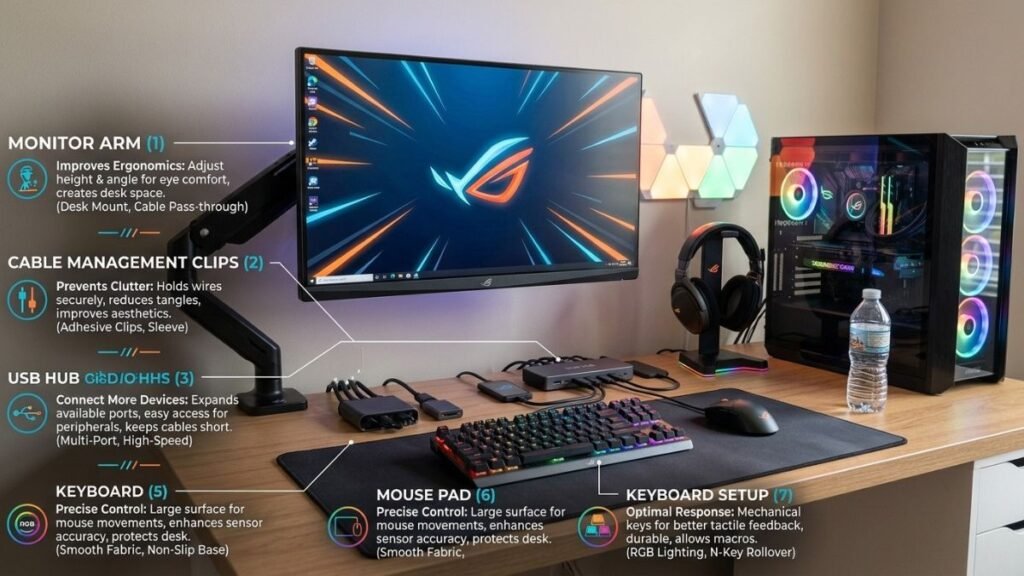
While buying too many accessories can create problems, ignoring helpful small upgrades is another mistake.
Some smaller additions can improve daily usability:
- Quality mouse pads
- Cable organizers
- Monitor arms
- USB hubs
- Headset stands
These items may not increase gaming performance directly, but they can improve organization and make the setup easier to use.
Many gaming peripherals are designed with different features that help users improve comfort, control, and overall setup functionality.
For example, a monitor arm may be extremely useful for someone with multiple displays but unnecessary for a user with a single monitor and limited desk space.
Understanding the difference between useful upgrades and unnecessary additions is part of creating a balanced setup.
For more practical accessory planning, see this guide about gaming desk accessories.
Many beginners focus heavily on graphics and visual upgrades while overlooking audio quality.
However, sound plays an important role in gaming immersion, communication, and awareness.
A poorly planned audio setup can affect:
- Team communication
- Understanding in-game sounds
- Entertainment quality
- Long-session comfort
Choosing a Headset Without Understanding Features
A common mistake is selecting a headset only because it has a gaming-focused design.
The label “gaming headset” does not automatically mean it is the right choice for every user.
Important factors include:
| Feature | Why It Matters |
|---|---|
| Microphone quality | Improves communication during multiplayer games |
| Comfort | Important during longer gaming sessions |
| Connection type | Determines compatibility and convenience |
| Sound positioning | Helps identify directional audio cues |
| Build quality | Affects long-term durability |
A competitive player may prioritize microphone quality and positional audio, while a casual player may care more about comfort and convenience.
The right choice depends on how the headset will actually be used.
Ignoring Room Acoustics
Even good audio equipment can perform poorly in an unsuitable environment.
Room layout affects how sound behaves.
Common issues include:
- Speakers positioned incorrectly
- Excessive reflections from hard surfaces
- Equipment placed too close together
Simple improvements may include:
- Adjusting speaker placement
- Reducing unnecessary desk vibration
- Organizing the room layout
- Creating better separation between devices
A better environment can sometimes improve audio quality without purchasing new equipment.
Creating a Setup Without Considering Future Upgrades
Another important gaming setup mistake is building a workspace that only works for the current situation.
A beginner setup should have enough flexibility for future improvements.
Many users eventually add:
- A second monitor
- New peripherals
- Streaming equipment
- Additional storage
- Better lighting
Without planning, these upgrades can quickly create space and organization problems.
Buying Components Without Expansion Planning
Beginners often focus only on current needs and forget about future changes.
Examples include:
- A desk with no room for additional equipment
- Limited USB connections
- Poor cable routing options
- No space for accessories
A flexible setup allows users to improve gradually without rebuilding everything.
Good planning does not mean buying everything immediately. It means creating a foundation that can adapt over time.
Overbuilding Too Early
Another common mistake is trying to create a professional gaming setup immediately.
Many beginners purchase advanced equipment before understanding their actual requirements.
A better approach is gradual improvement:
- Build a comfortable foundation
- Identify real limitations
- Upgrade the areas that affect daily use
- Improve organization over time
A simple setup that works well is often better than an expensive setup filled with features that are rarely used.
Building a Gaming Setup Without Managing the Budget Properly
Budget planning is one of the most important parts of avoiding a bad gaming setup.
Many beginners spend most of their money on one impressive component while ignoring other areas that influence the overall experience.
A balanced setup usually provides more value than an unbalanced one.
Beginners looking for practical inspiration can explore different gaming setup ideas based on available space, budget, and personal needs.
Spending Too Much on One Component
Examples of poor budget allocation include:
- Buying a high-end GPU while using an outdated monitor
- Purchasing premium accessories while ignoring comfort
- Spending heavily on appearance before fixing usability problems
Every upgrade should have a clear purpose.
A casual gamer who plays a few hours per week may benefit more from improving comfort and organization before investing in advanced hardware.
A competitive player may prioritize display responsiveness, input performance, and audio accuracy.
The correct choice depends on the user’s gaming habits.

Choosing Features Instead of Real Benefits
Technology products often include impressive specifications, but beginners may not always understand which features actually improve their experience.
A useful way to evaluate equipment is asking:
| Feature | Practical Question |
|---|---|
| High refresh rate | Can my hardware actually use it? |
| RGB lighting | Does it improve function or only appearance? |
| Wireless connectivity | Does it make my setup more convenient? |
| Extra buttons/features | Will I use them regularly? |
Understanding practical benefits helps prevent unnecessary spending.
What Makes a Gaming Setup Good?
A good gaming setup combines balanced hardware, comfortable ergonomics, proper organization, and equipment that matches the user’s gaming habits. Expensive components alone do not guarantee a better experience. A well-planned setup focuses on usability, comfort, performance, and future flexibility.
Final Checklist: Is Your Gaming Setup Actually Balanced?
Before spending money on new hardware or accessories, beginners should evaluate whether their current setup has real problems.
A better gaming setup does not always require expensive upgrades. In many cases, improving organization, positioning, and planning can create a noticeable difference.
Use this checklist:
| Area | Question to Consider |
|---|---|
| Comfort | Can I use my setup for long sessions without discomfort? |
| Hardware Balance | Do my components work well together? |
| Desk Space | Do I have enough room for current and future equipment? |
| Organization | Are cables and accessories easy to manage? |
| Functionality | Does every item improve my experience? |
| Upgrade Planning | Can my setup adapt to future changes? |
A balanced setup focuses on solving actual problems instead of adding unnecessary equipment.
What Is the Biggest Gaming Setup Mistake?
The biggest gaming setup mistake beginners make is focusing on expensive hardware while ignoring the complete user experience.
A successful gaming setup requires balanced components, comfortable ergonomics, proper organization, and equipment choices based on real gaming needs rather than appearance alone.
Final Thoughts: Build a Gaming Setup That Works for You
Creating a gaming setup is not about copying the most expensive rooms seen online or purchasing every available accessory. The strongest setups are created through thoughtful planning and understanding what actually improves the gaming experience.
Many beginners learn these lessons only after rebuilding their setup multiple times. Planning first can prevent unnecessary purchases and improve the long-term experience.
The most common gaming setup mistakes happen when beginners prioritize appearance over functionality. A setup can have powerful hardware and impressive lighting but still feel uncomfortable if the desk layout, accessories, and environment are poorly planned.
Avoiding a bad gaming setup starts with focusing on fundamentals:
- Choose balanced hardware
- Prioritize comfort
- Organize cables early
- Plan your workspace
- Upgrade based on real limitations
A good setup should support the way you play today while giving you room to improve in the future.
The goal is not to build the most expensive gaming space. The goal is to build a space that feels comfortable, performs well, and makes every gaming session better.
FAQ: Gaming Setup Mistakes Beginners Should Avoid
What are the most common gaming setup mistakes beginners make?
The most common gaming setup mistakes include buying hardware without planning, ignoring ergonomics, choosing unnecessary accessories, poor cable management, and creating a setup focused only on appearance. Beginners often improve their experience more by organizing and optimizing their current setup before spending money on upgrades.
Can expensive equipment still create a bad gaming setup?
Yes. Expensive equipment does not automatically create a better gaming setup. A powerful computer can still feel uncomfortable if the monitor position, desk layout, chair, or accessories are poorly chosen. A balanced setup designed around actual usage is often more effective than an expensive but poorly planned one.
How can beginners avoid creating a bad gaming setup?
Beginners can avoid a bad gaming setup by planning their workspace before buying equipment, checking hardware compatibility, prioritizing comfort, organizing cables, and choosing accessories that solve specific problems instead of purchasing items only because they look impressive.
What is the biggest mistake when building a gaming setup?
One of the biggest mistakes is focusing only on performance hardware while ignoring the rest of the environment. A gaming setup includes the computer, display, accessories, desk, seating, and organization. Every part contributes to the overall experience.
Should beginners buy gaming accessories immediately?
Beginners should avoid buying every accessory at the beginning. It is better to identify problems first and purchase items that improve comfort, organization, or usability. Accessories should support the setup rather than create unnecessary clutter.
How often should you upgrade a gaming setup?
A gaming setup should be upgraded when existing equipment no longer meets your needs. For example, users may upgrade when they experience performance limitations, insufficient storage, poor display quality, or workspace problems. Upgrading based on actual needs usually provides better value.
Are RGB accessories important for a gaming setup?
RGB accessories can improve the appearance of a gaming room, but they do not directly improve gaming performance. Beginners should prioritize hardware balance, comfort, and functionality before spending money on decorative features.

I’m a Technology Editor at SmartGadgetWave with a passion for innovation, AI, and consumer technology. I enjoy exploring the latest gadgets, smart home devices, and wearable tech. My goal is to make technology easy to understand by sharing practical insights, honest perspectives, and helpful product comparisons so readers can make smarter tech decisions.


