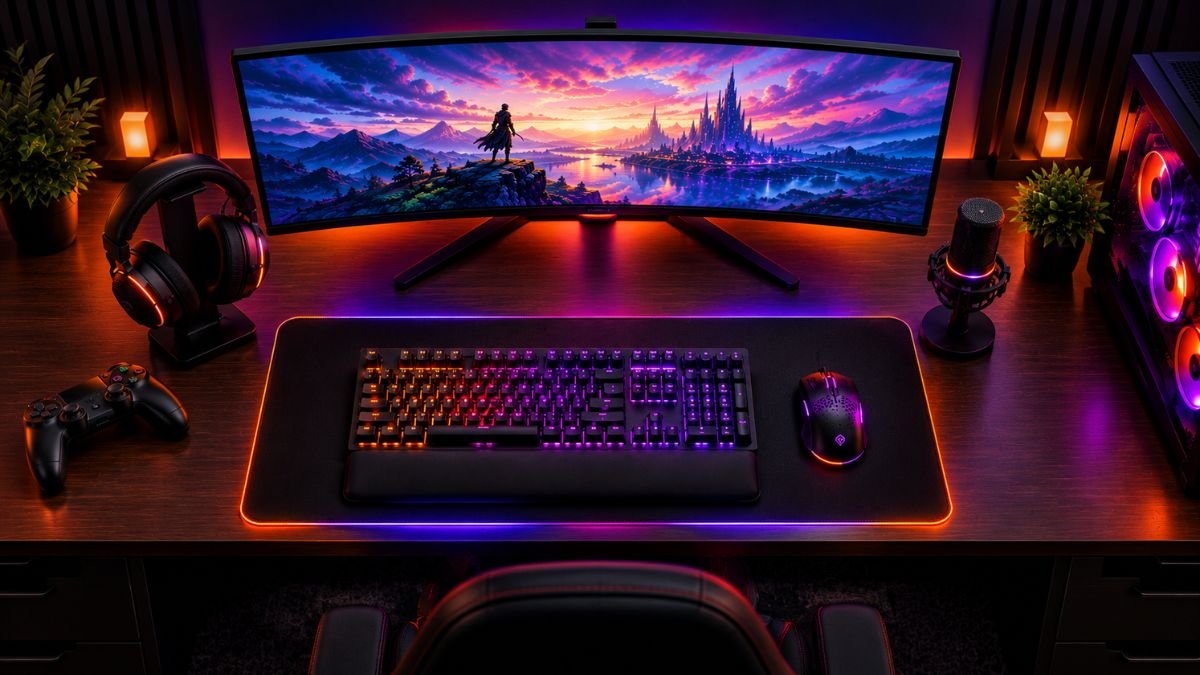
A gaming setup combines essential components and accessories designed to improve how players interact with games through better performance, comfort, organization, and connectivity.
A well-planned setup focuses on performance, usability, and personal preferences rather than simply adding more devices.
A gaming setup has become much more than a computer, console, and display. Modern gaming environments combine multiple technologies that influence comfort, control, immersion, and overall experience.
For many players, the challenge is not finding more accessories. The challenge is understanding which components actually make a difference and how they work together.
A keyboard affects interaction speed. A mouse influences precision. Audio equipment changes how players experience game environments. Even small improvements such as cable management or ergonomic adjustments can influence long gaming sessions.
The growth of gaming as a mainstream entertainment activity has also expanded the number of available accessories.
According to the Entertainment Software Association, millions of Americans regularly participate in video games across PC, console, and mobile platforms, creating demand for more personalized gaming environments.
However, building a better setup requires understanding the purpose behind each component.
A strong gaming setup balances:
- Performance
- Comfort
- Organization
- Compatibility
- Personal gaming habits
This guide explains the essential categories of gaming setup accessories and how each one contributes to a better experience.
Understanding The Foundation Of A Gaming Setup
A gaming setup is a combination of hardware, accessories, and environmental choices that create a complete gaming experience.
Modern gaming environments often combine multiple accessory categories, including keyboards, mice, audio devices, and other peripherals, as explained by Logitech G’s overview of gaming accessories.
Understanding different categories of gaming setup accessories helps users create a more balanced and organized environment.
While many people associate gaming setups only with powerful computers or expensive consoles, the overall experience depends on how different elements interact.
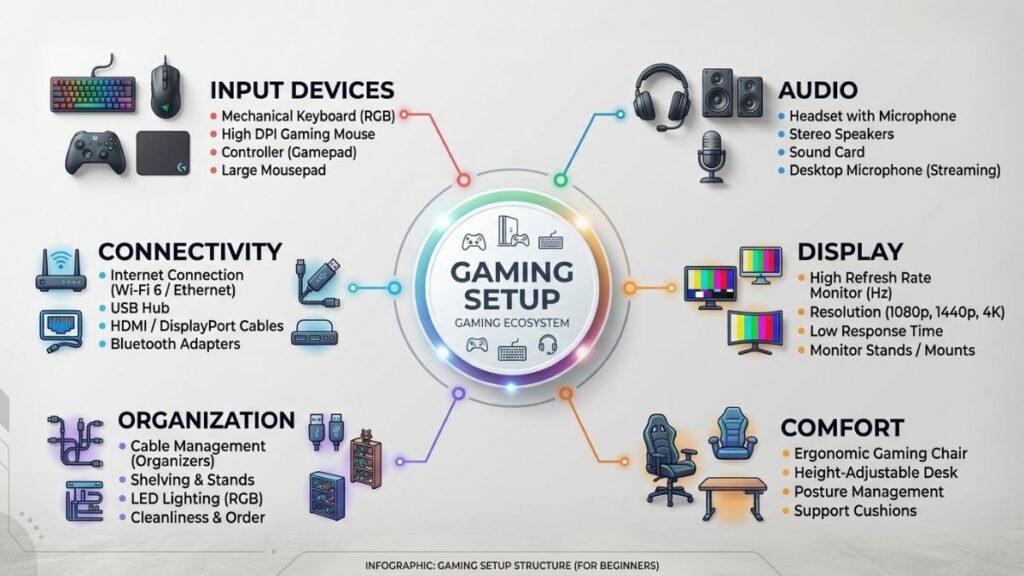
A balanced setup usually includes several categories:
| Category | Purpose |
|---|---|
| Input devices | Control games with precision and comfort |
| Audio equipment | Improve immersion and communication |
| Display accessories | Improve visual experience |
| Desk organization | Create a cleaner and more practical environment |
| Comfort accessories | Support longer gaming sessions |
| Connectivity solutions | Maintain reliable device performance |
The most effective setups are designed around the player’s needs. A competitive esports player may prioritize low latency and precision, while a casual gamer may focus more on comfort, organization, and atmosphere.
The foundation should always begin with understanding how each accessory contributes to the experience rather than selecting devices based only on appearance.
Once you understand these basics, exploring different gaming setup ideas can help you create a space that matches your budget, room size, and personal needs.
Choosing The Right Gaming Desk Setup Accessories
A gaming desk is the central area where all components of a gaming setup come together. While many users focus on powerful hardware first, the physical environment around the player has a major influence on comfort, organization, and usability.
A well-designed desk setup reduces distractions and creates a more efficient space for gaming, streaming, studying, or everyday computer use.
The purpose of gaming desk accessories is not only visual improvement. The best accessories solve practical problems such as:
- Limited desk space
- Cable clutter
- Poor device placement
- Uncomfortable positioning
- Lack of organization
A complete gaming setup is not only about choosing the right hardware. Proper gaming cable management helps organize connections, reduce desk clutter, and create a cleaner and more functional workspace.
A cleaner environment allows players to focus more easily because their equipment becomes easier to access, maintain, and manage.
Desk Organization And Cable Management
Why Cable Management Matters In Gaming Setups
Cable management is one of the simplest improvements a gamer can make. A setup with multiple devices often includes cables for keyboards, mice, headsets, monitors, speakers, charging stations, and other accessories.
Without organization, cables can create:
- A cluttered appearance
- Difficult cleaning
- Limited desk flexibility
- Confusion when connecting devices
Solutions such as cable channels, clips, sleeves, and under-desk trays help keep cables organized while maintaining easier access.
Cable management also improves future upgrades because adding or replacing equipment becomes simpler when the wiring system is already organized.
Monitor Placement And Display Positioning
The monitor is one of the most important elements of any gaming setup because it directly affects visual interaction.
Proper positioning can improve:
- Viewing comfort
- Posture
- Eye movement
- Available desk space
Many gamers use monitor arms or stands to adjust height, distance, and angle.
The ideal position depends on personal preference, but the display should generally allow comfortable viewing without requiring excessive neck movement.
A properly positioned monitor also creates additional space underneath the display for accessories such as controllers, keyboards, or audio equipment.
Gaming Input Devices And Control Experience
Input devices are among the most important gaming setup accessories because they create the connection between the player and the game.
The keyboard and mouse determine how users interact with digital environments, while controllers and other devices provide alternative control methods depending on the gaming platform.
Different gaming genres require different types of input.
For example:
- Competitive shooters often benefit from precise mouse tracking
- Strategy games require accurate keyboard commands
- Racing games may benefit from specialized controllers
- Console gaming often depends on ergonomic gamepads
Understanding the purpose of each device helps users create a setup that matches their gaming habits.
Mechanical Keyboards And Gaming Performance
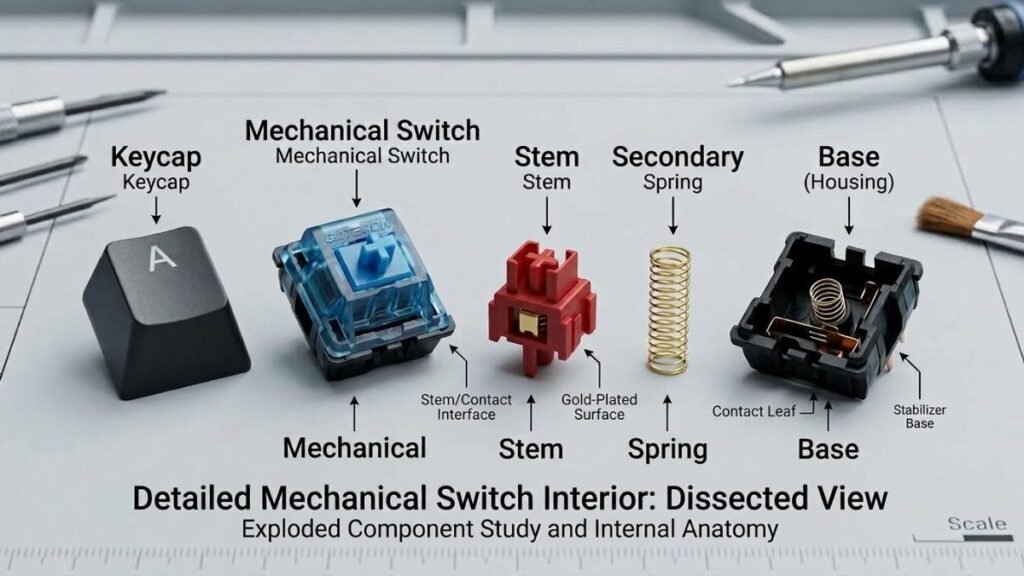
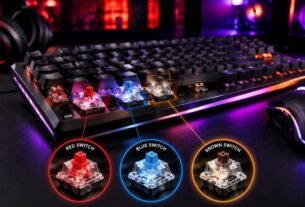
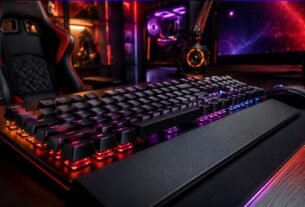
Mechanical keyboards have become a popular component of gaming setups because they provide different switch options, customization possibilities, and distinct typing experiences.
Understanding mechanical keyboard technology helps users recognize why different keyboards feel different and which features matter beyond appearance.
Gaming peripheral manufacturers such as Logitech G develop keyboards, mice, headsets, and other accessories designed around different gaming preferences and use cases.
The technology behind mechanical keyboards depends largely on the switch mechanism beneath each key.
Different switches can influence:
- Key resistance
- Sound profile
- Activation feel
- Response characteristics
Keyboard Features That Influence The Experience
A gaming keyboard may include several technologies designed for different user needs:
| Feature | Purpose |
|---|---|
| Mechanical switches | Provide individual key mechanisms with different feedback styles |
| Anti-ghosting | Helps register multiple simultaneous key presses |
| N-key rollover | Allows multiple inputs to be detected accurately |
| Programmable keys | Enables custom shortcuts and commands |
| RGB lighting | Provides visual customization |
However, not every feature has the same impact for every player.
For many users, typing comfort, layout preference, and reliability may matter more than additional lighting effects.
Gaming Mouse Technology And Precision
The mouse is another essential component because accuracy and responsiveness directly affect interaction.
Modern gaming mice often include advanced sensors designed to track movement with high precision.
Understanding gaming mouse sensors helps explain why sensor performance influences control, especially in fast-paced games.
Important concepts include:
- DPI sensitivity
- Tracking accuracy
- Polling rate
- Grip style
- Weight balance
Mouse Comfort And Grip Style
A technically advanced mouse may not provide the best experience if it does not match the user’s hand position.
Common grip styles include:
| Grip Style | Description |
|---|---|
| Palm grip | The entire hand rests on the mouse |
| Claw grip | Fingers create an arched position |
| Fingertip grip | Only fingertips contact the mouse |
Ergonomics becomes increasingly important during longer sessions because repeated movements can create discomfort when equipment does not match the user.
A complete gaming environment is not only built around performance hardware. Workspace improvements also matter, and the right gaming desk accessories can help create a more organized, comfortable, and efficient setup.
Creating An Immersive Gaming Audio Environment
Audio plays a major role in gaming because sound provides information beyond visual elements.
A good gaming audio setup helps players experience:
- Environmental details
- Directional sounds
- Team communication
- Immersion
Headsets, microphones, speakers, and audio interfaces all contribute to the overall experience.
Different users may prioritize different features. Competitive players often focus on positional awareness, while casual gamers may value comfort and sound quality.
Gaming Headsets, Microphones And Communication
Gaming audio solutions combine sound output and communication features, with manufacturers such as Logitech G offering different headset and audio categories for gaming environments.
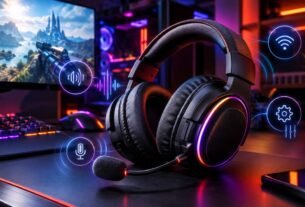
A gaming headset combines audio output and communication features into a single accessory.
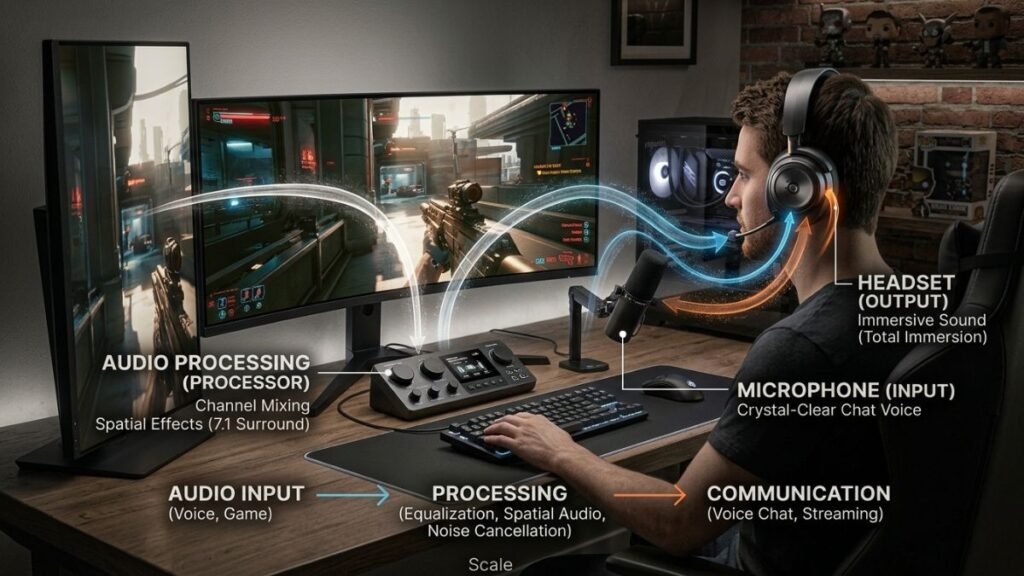
Important considerations include:
- Audio quality
- Microphone clarity
- Comfort
- Connection type
- Software features
Modern gaming headsets may support technologies such as virtual surround sound, wireless connectivity, and customizable audio profiles.
For a deeper understanding of how these systems work, gaming headset technology explains the technical elements behind modern gaming audio devices.
Wireless Audio In Gaming Setups
Wireless technology has become increasingly common because it reduces cable clutter and provides greater freedom of movement.
However, wireless accessories involve different considerations:
- Battery management
- Connection stability
- Latency
- Charging requirements
The quality of a wireless experience depends on the technology used and how the device communicates with the computer or console.
Understanding Wireless Technologies In Modern Gaming Setups
Wireless accessories have changed how gamers design their spaces. Removing cables can create cleaner desks and more flexible arrangements.
For example, wireless gaming keyboards often use dedicated wireless technology to balance convenience and responsiveness.
Different wireless technologies serve different purposes.
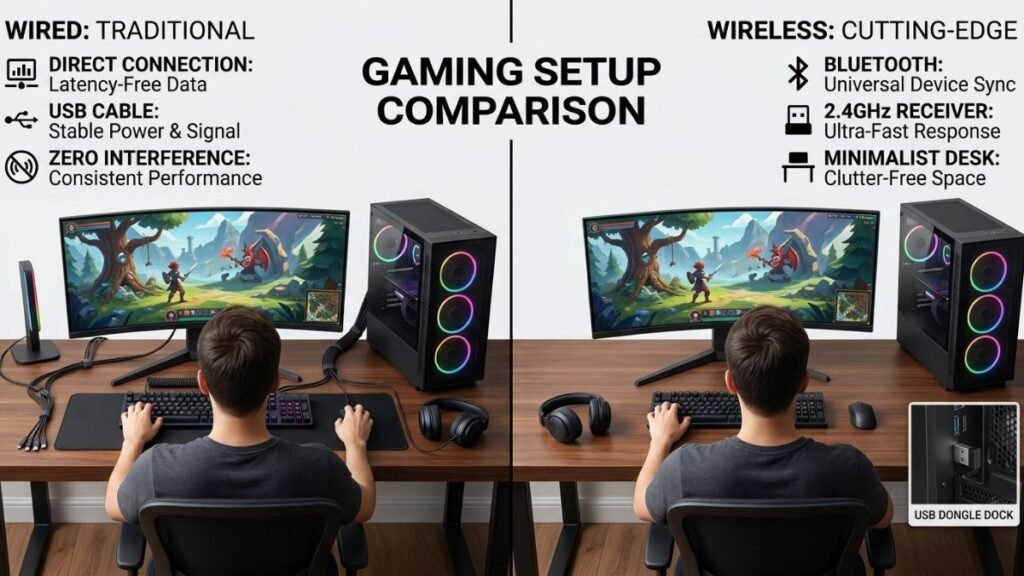
Common connection methods include:
| Connection Type | Common Use | Main Advantage |
|---|---|---|
| Bluetooth | General wireless devices | Broad compatibility |
| 2.4GHz wireless | Gaming peripherals | Lower latency and dedicated connection |
| Wired connection | Performance-focused setups | Consistent reliability |
Understanding these differences helps users choose accessories based on actual needs rather than marketing claims.
Creating A Comfortable Gaming Environment
A gaming setup is not only about performance-focused hardware. Comfort plays an equally important role because many users spend several hours at their desk during gaming sessions, streaming, or other computer activities.
Poor ergonomics can affect posture, movement, and overall enjoyment. A well-designed environment allows players to interact with their equipment naturally while reducing unnecessary physical strain.
Comfort-focused gaming setup accessories usually improve:
- Sitting position
- Device accessibility
- Desk organization
- Long-session usability
- Overall workspace efficiency
The goal is not to create the most expensive setup. The goal is to create an environment where every component has a practical purpose.
Gaming Chairs And Ergonomic Support
The chair is one of the most overlooked parts of a gaming setup.
While keyboards, mice, and monitors receive more attention, the chair directly affects the user’s posture and comfort throughout the entire session.
A suitable gaming chair or ergonomic chair should provide support through features such as:
| Feature | Purpose |
|---|---|
| Adjustable height | Helps align the body with the desk |
| Lumbar support | Supports the lower back area |
| Armrest adjustment | Reduces shoulder and wrist tension |
| Reclining function | Allows position changes during breaks |
| Breathable materials | Improves comfort during extended use |
However, the most expensive chair is not automatically the best choice. Proper adjustment and fit are often more important than additional features.
Desk Height And Monitor Position
The relationship between the chair, desk, and monitor creates the foundation of ergonomic comfort.
A poorly positioned workspace may cause users to:
- Raise their shoulders
- Bend their neck forward
- Place wrists at uncomfortable angles
- Adjust their sitting position frequently
A balanced setup considers the complete arrangement rather than individual accessories.
Monitor height, keyboard placement, and mouse position should work together to create a natural interaction area.
Improving Gaming Setup Visual Design And Organization
Many gaming setups include visual elements such as RGB lighting, decorative accessories, and themed designs.
While aesthetics are personal preferences, organization has practical benefits beyond appearance.
A clean setup can make devices easier to locate, reduce distractions, and create a more enjoyable workspace.
RGB Lighting And Gaming Atmosphere
RGB lighting has become a common feature in modern gaming environments.
It can be used for:
- Personal customization
- Background illumination
- Creating a specific atmosphere
- Matching other devices
However, lighting does not directly improve gaming performance.
Its main value comes from personalization and environmental design.
A balanced setup uses lighting as a supporting element rather than allowing visual effects to become distracting.
Gaming Setup Accessories For Better Organization
Organization accessories help maintain a cleaner workspace.
Common examples include:
- Headphone stands
- Controller holders
- Cable clips
- Desk shelves
- Charging stations
- Storage solutions
These accessories are useful because they reduce unnecessary movement and keep frequently used equipment accessible.
A well-organized desk also makes future upgrades easier because there is already a clear structure for adding new devices.
Choosing Accessories Based On Gaming Needs
There is no single universal gaming setup because different players have different priorities.
A competitive PC gamer, casual console player, and content creator may require completely different environments.
The right approach is identifying which areas matter most.
Competitive Gaming Setup Considerations
Players focused on competitive gaming often prioritize:
- Low-latency input devices
- Accurate mouse tracking
- Reliable audio communication
- High refresh-rate displays
- Consistent connectivity
For these users, small differences in responsiveness and precision may influence gameplay.
Understanding technologies such as gaming mouse DPI can help explain how sensitivity settings affect control and movement.
Casual Gaming Setup Considerations
Casual gamers usually benefit more from:
- Comfortable seating
- Organized workspace
- Good audio quality
- Easy device switching
- Simple cable management
The focus is creating an enjoyable environment without unnecessary complexity.
A practical setup does not require every available accessory. It requires accessories that improve the user’s actual experience.
Content Creation And Streaming Setup Considerations
Gaming setups are increasingly used for activities beyond playing games.
Many users also stream, record videos, or create online content.
These setups may require additional equipment such as:
- Microphones
- Cameras
- Lighting systems
- Capture devices
- Additional displays
The important consideration is designing a workspace where gaming and content creation can work together efficiently.
Understanding Gaming Setup Compatibility
Compatibility is one of the most important factors when selecting gaming setup accessories.
An accessory may have impressive specifications but provide limited value if it does not work properly with existing hardware.
Before adding new equipment, users should consider:
| Compatibility Factor | Question To Ask |
|---|---|
| Platform support | Does it work with PC, console, or both? |
| Connection type | Does the device support the required connection? |
| Software support | Is configuration software available? |
| Physical space | Does the desk have enough room? |
| Power requirements | Does it require additional charging or connections? |
Wired vs Wireless Gaming Accessories
Both wired and wireless accessories have advantages depending on the user’s priorities.
Wired devices typically provide:
- Consistent connection
- No battery management
- Simple setup
Wireless devices provide:
- Cleaner desk appearance
- Greater movement flexibility
- Reduced cable clutter
The best choice depends on the environment, gaming habits, and personal preference.
Building A Balanced Gaming Setup
A successful gaming setup is created by balancing multiple factors instead of focusing on a single upgrade.
A powerful computer with uncomfortable seating or poor organization may not create the best overall experience.
A balanced setup considers:
- Performance
- Comfort
- Organization
- Reliability
- Personal preferences
The most valuable accessories are those that solve real problems and improve daily interaction with technology.
Building A Gaming Setup For Different Platforms
A gaming setup should be designed around the platform and the way a person interacts with games.
Although many accessories are associated with PC gaming, modern setups can include computers, consoles, handheld devices, and hybrid entertainment systems.
Each platform has different requirements, which means the most useful accessories can vary significantly.
A PC gamer may prioritize:
- Keyboard and mouse performance
- Desk organization
- Multiple displays
- Customization options
A console gamer may focus more on:
- Controller comfort
- Audio equipment
- Charging solutions
- Display setup
A portable gaming user may prioritize:
- Compact accessories
- Battery solutions
- Travel-friendly equipment
Understanding these differences helps users avoid building a setup based only on trends.
Before exploring individual gaming setup accessories, understanding how different components work together can help create a more effective setup.
PC Gaming Setup Accessories
PC gaming setups usually offer the highest level of customization because users can select individual components and accessories.
Common PC gaming setup categories include:
- Mechanical keyboards
- Gaming mice
- Headsets
- Microphones
- Monitor accessories
- Desk organization tools
- Lighting solutions
The advantage of a PC setup is flexibility. Users can gradually improve individual parts instead of replacing the entire system.
For example, upgrading from a basic keyboard to a mechanical keyboard changes the interaction experience, while adding a dedicated microphone can improve communication quality during multiplayer sessions.
Console Gaming Setup Accessories
Console setups are often simpler but still benefit from carefully selected accessories.
Useful additions may include:
- Comfortable controllers
- Charging docks
- Headsets
- Storage solutions
- Display improvements
- Cable management accessories
Since consoles typically use standardized hardware, accessory selection focuses more on comfort, convenience, and entertainment experience.
A well-organized console setup can provide the same level of enjoyment as a more complex PC environment.
Gaming Setup For Better Productivity
Modern gaming setups are increasingly used for more than gaming.
Many users use the same workspace for:
- School
- Remote work
- Content creation
- Video editing
- Streaming
Because of this, accessories that improve organization and comfort can provide value beyond gaming.
Multi-Purpose Gaming Workspaces
A flexible gaming setup allows users to switch between different activities without completely reorganizing their environment.
Useful improvements include:
- Adjustable monitor positioning
- Comfortable seating
- Organized cable systems
- Reliable audio equipment
- Flexible lighting
A workspace designed for multiple purposes often creates better long-term value because the accessories support everyday technology use.
Streaming And Content Creation Accessories
Gaming content creation requires additional equipment because the setup becomes both a gaming environment and a production space.
Common additions include:
| Accessory | Purpose |
|---|---|
| Microphone | Improves voice quality during recordings |
| Webcam | Enables video communication and streaming |
| Lighting | Improves camera visibility |
| Capture device | Records console gameplay |
| Additional monitor | Helps manage multiple applications |
The important factor is creating a workflow where gaming equipment and content creation tools work together efficiently.
Common Gaming Setup Mistakes To Avoid
Building a gaming setup can become complicated when users focus only on adding more accessories.
More devices do not always create a better experience.
Some common mistakes include:
Choosing Appearance Over Function
RGB lighting, themed designs, and decorative accessories can improve visual appeal, but they should not replace practical improvements.
A visually impressive setup may still feel uncomfortable if:
- The monitor position is incorrect
- The chair lacks support
- Cables are unmanaged
- Devices do not match user needs
The best setups combine aesthetics with usability.
Ignoring Compatibility
Before adding accessories, users should confirm:
- Platform support
- Connection requirements
- Available desk space
- Software compatibility
- Power requirements
An accessory with advanced features may become frustrating if it does not integrate properly with existing equipment.
Upgrading Too Many Things At Once
A common mistake is changing multiple components without understanding which upgrade actually improved the experience.
A better approach is identifying the biggest limitation first.
For example:
- Poor audio → improve headset or speakers
- Uncomfortable sessions → improve ergonomics
- Slow interaction → evaluate input devices
- Cluttered workspace → improve organization
Focused improvements usually create better results than random upgrades.
How A Gaming Setup Improves The Overall Experience
The purpose of gaming setup accessories is to create a better connection between the player and technology.
Each category solves a different problem:
| Accessory Category | Main Benefit |
|---|---|
| Input devices | Better control and interaction |
| Audio equipment | Increased immersion and communication |
| Ergonomic accessories | Improved comfort |
| Organization tools | Cleaner workspace |
| Connectivity solutions | Reliable device operation |
| Lighting accessories | Personalization and atmosphere |
A successful setup is not defined by the number of accessories included. It is defined by how effectively each component supports the user’s goals.
Future Trends In Gaming Setup Technology
Gaming environments continue to evolve as technology advances.
Future setups are likely to include improvements in areas such as:
- Wireless performance
- Smart lighting integration
- Adaptive ergonomics
- More immersive audio
- Better device connectivity
As gaming becomes more connected with entertainment, productivity, and content creation, accessories will continue expanding beyond traditional gaming purposes.
The next generation of gaming setups will likely focus on creating flexible environments that support multiple digital activities.
Maintaining And Improving A Gaming Setup Over Time
A gaming setup is not something that needs to be completed in one step. Many users build their environment gradually by improving individual components based on their changing needs.
Technology evolves, gaming habits change, and new accessories become available. A flexible setup allows users to upgrade specific areas without replacing everything.
A practical improvement strategy focuses on:
- Identifying current limitations
- Improving the areas that affect daily use
- Maintaining compatibility
- Avoiding unnecessary upgrades
The best setups are not always the most expensive ones. They are the ones where each component has a clear purpose.
Evaluating Which Upgrade Matters Most
Before adding new components to a gaming setup, users should evaluate what currently limits their experience.
Different problems require different solutions.
| Current Problem | Potential Improvement |
|---|---|
| Uncomfortable gaming sessions | Improve chair, desk position, or ergonomics |
| Poor control accuracy | Evaluate mouse and keyboard setup |
| Weak communication | Improve microphone or headset |
| Limited workspace | Improve organization and cable management |
| Visual discomfort | Adjust monitor position or display setup |
This approach prevents unnecessary spending and helps users create a more intentional environment.
Balancing Performance And Comfort
A common misunderstanding is that gaming performance only depends on hardware specifications.
While processing power, graphics capability, and display technology matter, the interaction between the player and the setup also influences the overall experience.
A comfortable environment allows users to:
- Maintain better focus
- Spend more time using their equipment
- Reduce distractions
- Enjoy technology more naturally
Performance and comfort should be considered together rather than treated as separate priorities.
Creating A Personalized Gaming Setup
Every gaming setup reflects the user’s preferences, available space, and gaming habits.
There is no single design that works for everyone.
A competitive player, casual gamer, and content creator may all use different accessories while creating equally effective environments.
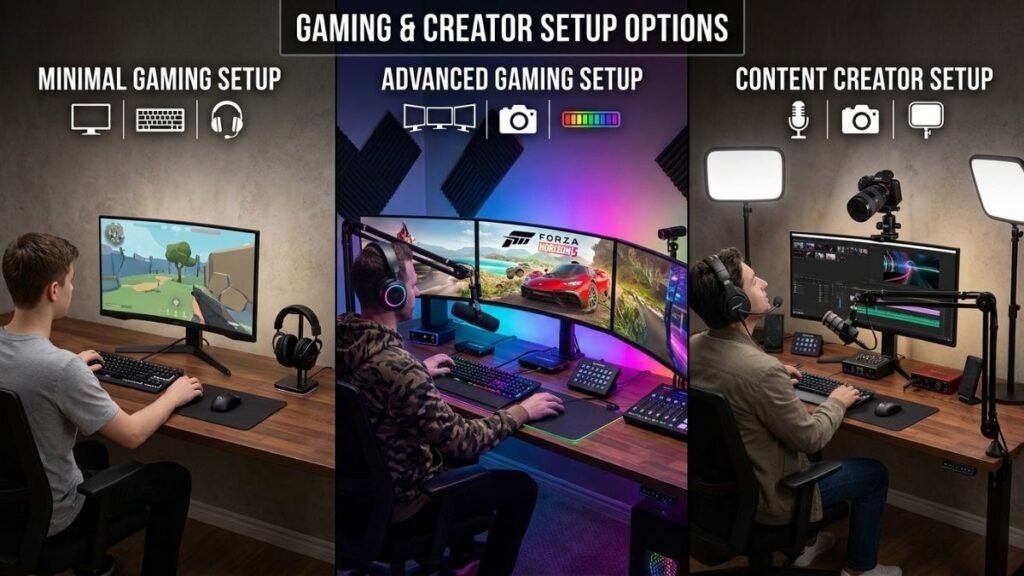
Minimal Gaming Setup Approach
A minimal setup focuses only on essential components.
It usually prioritizes:
- Reliable input devices
- Comfortable seating
- Quality audio
- Clean organization
This approach works well for users who prefer simplicity and want a practical workspace without unnecessary equipment.
A smaller setup can still provide an excellent gaming experience when each component serves a clear purpose.
Advanced Gaming Setup Approach
Advanced setups often include additional technologies designed for customization and productivity.
These may include:
- Multiple monitors
- Dedicated microphones
- Advanced lighting systems
- Streaming equipment
- Specialized controllers
- Custom organization solutions
The important factor is ensuring that additional complexity creates real value.
Adding more devices does not automatically improve usability. Each addition should solve a specific need.
Gaming Setup Accessories And Technology Evolution
Gaming accessories continue to develop as manufacturers introduce new approaches to interaction, connectivity, and personalization.
Several technology areas are influencing future gaming environments.
Wireless Connectivity Improvements
Wireless gaming accessories continue becoming more advanced as manufacturers improve:
- Connection stability
- Battery efficiency
- Response times
- Device compatibility
Modern wireless technology allows users to create cleaner setups while maintaining reliable performance.
However, wireless solutions still require consideration of charging habits and connection environments.
Smart And Connected Gaming Environments
Smart technology is also becoming part of gaming spaces.
Future gaming setups may include:
- Automated lighting adjustments
- Connected devices
- Voice-controlled environments
- Adaptive accessories
These technologies focus on creating more personalized and flexible spaces.
More Flexible Gaming Workspaces
The separation between gaming, work, and entertainment spaces continues to decrease.
Many users now create environments that support multiple activities:
- Gaming
- Remote work
- Learning
- Streaming
- Digital creation
Because of this change, accessories that improve flexibility and organization are becoming increasingly valuable.
Final Checklist For Building A Better Gaming Setup
Before adding new accessories, users can evaluate their setup through a simple checklist.
Performance
- Are input devices responsive?
- Does the setup support the games being played?
- Are connectivity options reliable?
Comfort
- Is the seating position comfortable?
- Are the keyboard and mouse positioned naturally?
- Is the monitor placed correctly?
Organization
- Are cables managed properly?
- Are frequently used accessories easy to access?
- Is there enough workspace?
Personal Experience
- Does the setup match gaming habits?
- Does each accessory provide a practical benefit?
- Is the environment enjoyable to use?
A thoughtful approach creates a setup that remains useful for longer and adapts as technology needs change.
Conclusion
Gaming setup components are not simply decorative additions. They are tools that improve how players interact with technology through better control, comfort, organization, and immersion.
A strong gaming environment is built by understanding the purpose of each component and selecting accessories that solve real problems.
From keyboards and mice to audio equipment, connectivity solutions, and ergonomic improvements, every element contributes to the overall experience.
The most effective gaming setups are not defined by how many accessories they include. They are defined by how well each component works together to support the user’s goals.
As gaming technology continues to evolve, the future of gaming setups will focus on flexibility, personalization, and creating spaces that support both entertainment and everyday digital activities.
FAQ — Gaming Setup Guide
What components are important in a gaming setup?
Gaming setup accessories are devices and tools that improve a player’s gaming environment, including input devices, audio equipment, organization tools, lighting, and comfort-focused equipment. They help improve interaction, convenience, and overall usability.
Which components are most important in a gaming setup?
The most important gaming setup accessories depend on the user’s needs. Common essential categories include a reliable keyboard, mouse, audio solution, comfortable seating, and proper workspace organization.
Do gaming setup accessories improve gaming performance?
Some accessories can improve specific aspects of gaming, such as control accuracy, communication, or comfort. However, accessories alone do not guarantee better performance because skill, hardware capability, and personal preference also influence results.
Are wired or wireless components better for a gaming setup?
Wireless and wired gaming accessories have different advantages. Wired devices generally provide consistent connections, while wireless options offer cleaner setups and greater movement flexibility. The right choice depends on the user’s priorities.
How should beginners build a gaming setup?
Beginners should start with essential components that improve daily use, such as comfortable seating, reliable input devices, good audio, and workspace organization. Additional accessories can be added as specific needs appear.
Are RGB gaming setup accessories necessary?
RGB accessories are not required for gaming performance. Their main purpose is customization and creating a personalized environment. Practical improvements such as comfort and usability usually have a greater impact.
How often should gaming setup accessories be upgraded?
Gaming setup accessories should be upgraded when they no longer meet the user’s needs, become outdated, or create limitations. Regular upgrades are not necessary if existing equipment continues to provide a good experience.