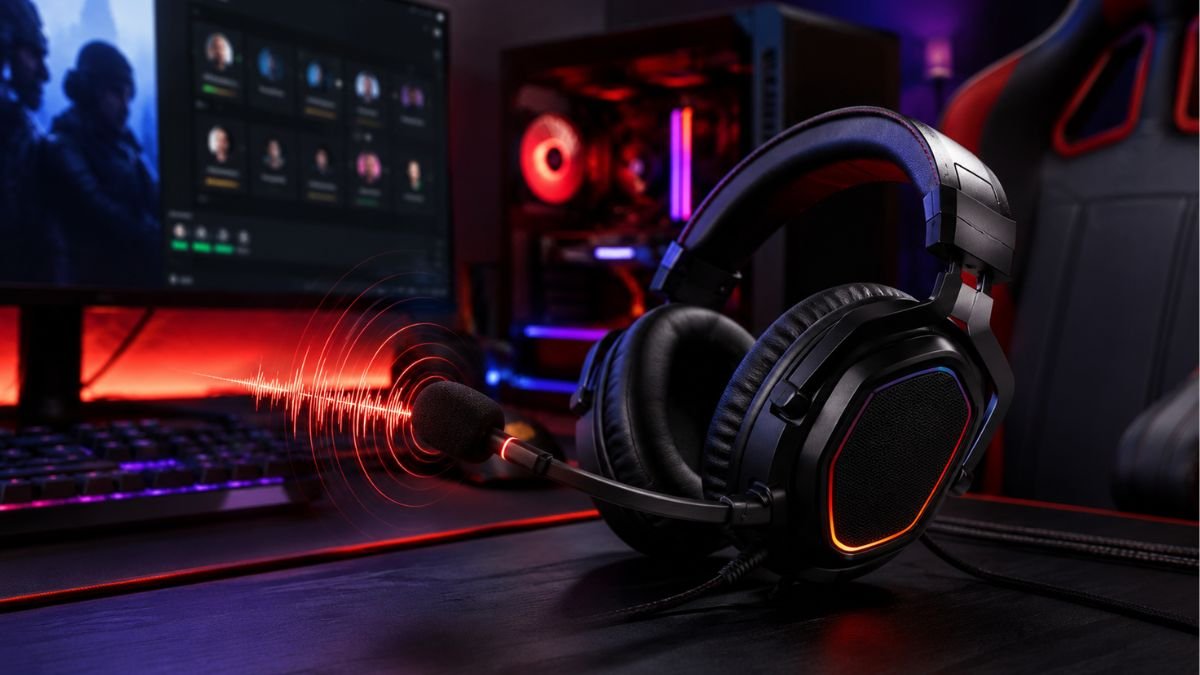
Gaming headset microphones are built to capture a player’s voice clearly during online games, voice chats, and streaming. They use different technologies such as boom designs, noise reduction, and voice pickup patterns to improve communication.
Understanding how these microphones work helps users recognize why some headsets deliver clearer conversations than others.
For many gamers, a headset microphone is something they only notice when it stops working properly. A teammate cannot hear clear instructions, background noise interrupts a conversation, or your voice sounds distant even when the headset is positioned correctly.
A gaming headset microphone is designed specifically for real-time communication, where clarity and consistency matter.
Unlike a traditional music-focused headphone setup, gaming headsets need to handle constant voice transmission while users are playing competitive multiplayer games, joining Discord conversations, or communicating during cooperative sessions.
The technology behind these microphones involves more than simply placing a microphone next to the ear cups. Factors such as microphone placement, pickup patterns, sensitivity, frequency response, and noise management all influence how accurately your voice is captured.
Modern gaming headsets also combine several technologies to solve common communication problems. For example, some designs use directional microphones to focus on the user’s voice, while others use software processing to reduce unwanted background sounds.
Understanding these concepts makes it easier to identify what actually affects microphone performance instead of relying only on marketing terms.
What Is a Gaming Headset Microphone?
A gaming headset microphone is a small audio input device integrated into a gaming headset that captures the user’s voice and converts sound waves into digital or electrical signals.
Its primary purpose is communication rather than recording professional audio. The microphone needs to perform well in environments where there may be keyboard sounds, room noise, fans, conversations, or other distractions. These capabilities are part of the broader gaming headset technology used to improve both audio playback and voice communication.
Unlike standalone microphones used for professional recording, headset microphones prioritize:
- Clear voice communication
- Convenient positioning
- Low delay during conversations
- Compact design
- Easy integration with gaming devices
A well-designed headset microphone does not need to capture every sound in the environment. Instead, it is usually optimized to focus on the person wearing the headset.
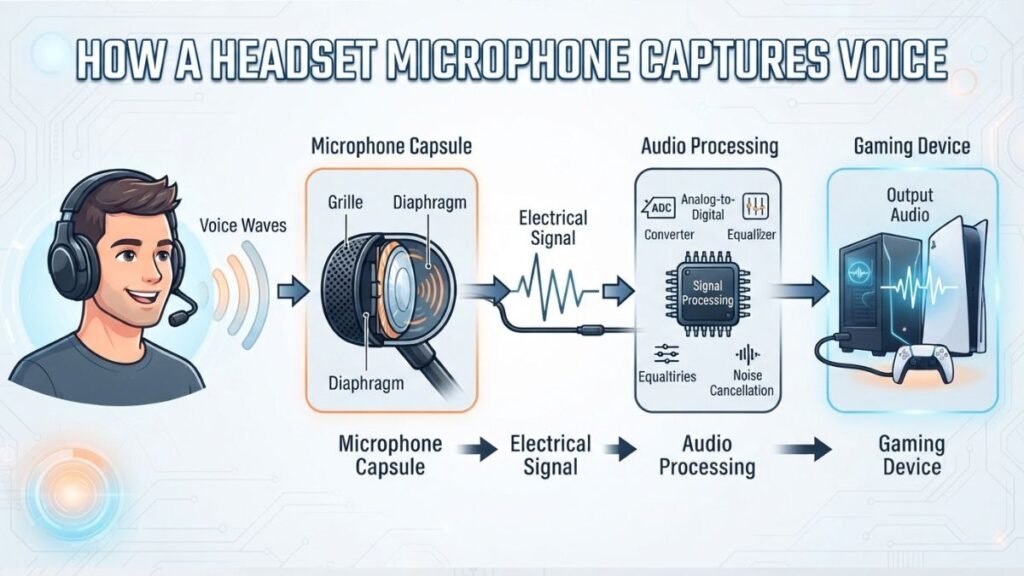
How Gaming Headset Microphones Capture Your Voice
When someone speaks into a headset microphone, sound waves from their voice reach the microphone capsule. Inside the microphone, a small component called a transducer converts those vibrations into an electrical signal.
That signal is then processed by the connected device, such as:
- A gaming PC
- Console system
- USB audio interface
- Wireless headset receiver
The quality of this process depends on several technical factors.
A microphone that is positioned closer to the user’s mouth usually captures stronger voice signals because the distance between the speaker and microphone is reduced. This is one reason why boom microphones are common in gaming headsets.
The design also helps reduce the impact of environmental sounds. By focusing on nearby speech rather than all surrounding audio, headset microphones can provide clearer communication during gameplay.
According to the principles explained by the Audio Engineering Society, microphone performance depends on factors such as transducer design, acoustic environment, and signal processing rather than a single specification alone.
Types of Gaming Headset Microphones
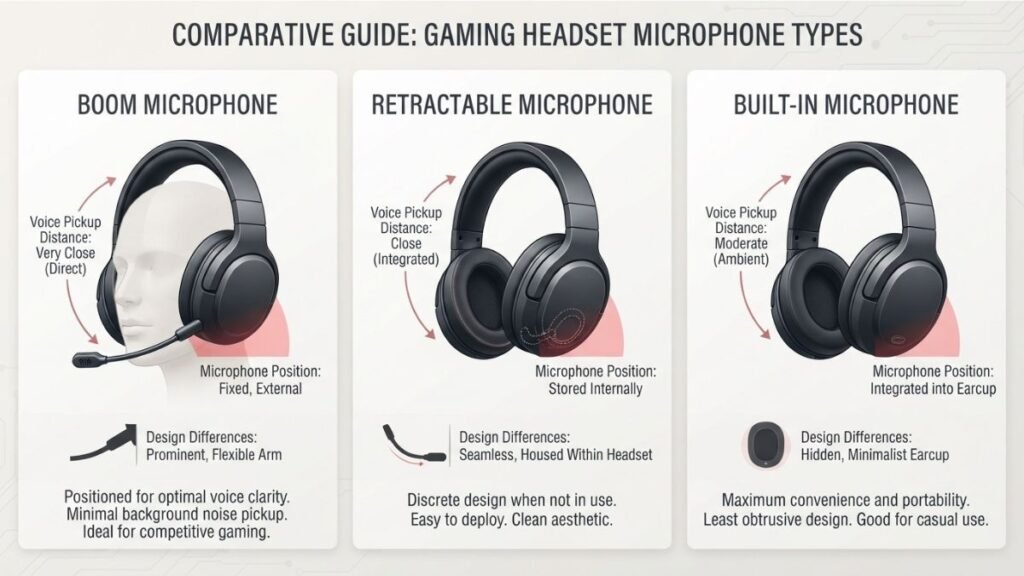
Gaming headset microphones are available in several different designs. Each type uses a different approach to balancing convenience, voice clarity, and physical design.
Boom Microphones
Boom microphones are the most recognizable design in gaming headsets. They use a small microphone attached to an adjustable arm that extends closer to the user’s mouth.
This placement provides several advantages:
- More consistent voice pickup
- Better separation from environmental sounds
- Easier positioning
- Improved communication clarity
Because the microphone sits close to the speaker’s mouth, it generally receives a stronger voice signal compared with microphones positioned farther away.
However, boom microphones also have limitations. Poor positioning can affect voice volume, and the microphone arm may become inconvenient for users who switch frequently between gaming and everyday listening.
Retractable and Detachable Microphones
Some gaming headsets use microphones that can be hidden inside the headset or removed completely when not needed.
Retractable microphones are designed for flexibility. Users can extend the microphone during gaming sessions and store it away when using the headset casually.
Detachable microphones provide another type of flexibility because the microphone can be removed completely.
These designs are often useful for users who want a headset that can serve multiple purposes, but microphone performance still depends on the underlying hardware design, not only whether the microphone can be removed.
Built-In Headset Microphones
Built-in microphones are integrated directly into the headset body rather than using an external boom arm.
This approach creates a cleaner appearance and can make the headset easier to carry. However, microphone placement becomes more challenging because the microphone is usually farther away from the user’s mouth.
To compensate, manufacturers often rely on software processing and noise reduction techniques.
The trade-off is that built-in microphones may prioritize convenience and design simplicity over the direct voice capture advantages of a traditional boom microphone.
Key Features That Affect Gaming Microphone Quality
A gaming headset microphone’s quality is not determined by a single specification. Many users assume that a microphone with higher sensitivity or more features will automatically sound better, but real-world performance depends on how different technologies work together.
Factors such as microphone directionality, noise handling, frequency response, and signal processing all influence how clearly your voice is transmitted during gaming sessions.
Microphone Pickup Patterns
One of the most important concepts behind microphone performance is the pickup pattern.
A pickup pattern describes how a microphone captures sound from different directions. Some microphones are designed to capture sound from a wider area, while others focus more strongly on sounds coming from a specific direction.
Gaming headsets commonly use directional microphone designs because they are intended to prioritize the user’s voice.
A directional microphone can help reduce unwanted sounds by focusing more on audio coming from the speaker’s position.
For gaming communication, this can be useful because the environment often includes:
- Mechanical keyboard sounds
- Mouse clicks
- Background conversations
- Computer fans
- Room noise
A microphone that captures every sound equally may transmit more unwanted audio to teammates.
Understanding pickup patterns is also important because no microphone completely removes background noise. Placement, room conditions, and distance from the speaker still influence the final result.
Noise Reduction Technology
Noise reduction is one of the most commonly discussed features in gaming microphones, but it is often misunderstood.
There are two different approaches:
Hardware-based noise reduction uses the physical microphone design to reduce unwanted sounds before they are recorded.
Software-based noise reduction processes the audio signal after capture and attempts to identify and reduce unwanted background sounds.
Modern gaming audio systems often combine both methods.
For example, software solutions can analyze incoming audio and separate voice frequencies from some types of background noise. However, aggressive processing can sometimes affect voice naturalness by making speech sound artificial or compressed.
According to NVIDIA Broadcast, AI-powered audio processing can help reduce background noise and improve microphone clarity during real-time communication.
For gaming communication, the goal is not to remove every sound. The goal is to maintain a clear voice signal while reducing distractions.
Frequency Response and Sensitivity
Two technical specifications often appear when discussing microphones:
- Frequency response
- Sensitivity
Frequency response describes the range of frequencies a microphone can capture.
Human speech mainly occupies a specific range of frequencies, so a gaming headset microphone does not necessarily need the same frequency range as a professional studio microphone.
A microphone optimized for voice communication focuses on making speech understandable and balanced.
Sensitivity refers to how effectively a microphone converts sound into an electrical signal.
A highly sensitive microphone can capture quieter sounds, but this is not always an advantage. In a noisy environment, excessive sensitivity may also capture unwanted sounds.
The ideal balance depends on the user’s environment and how the microphone processes incoming audio.
Wired vs Wireless Gaming Headset Microphones
Connectivity can influence microphone performance because the audio signal must travel between the headset and the gaming device.
Both wired and wireless headset microphones have advantages and limitations depending on the technology used.
USB and 3.5mm Microphones
Wired gaming headsets commonly connect through:
- USB connections
- 3.5mm audio jacks
A USB connection allows the headset to use built-in digital processing hardware, which can help manage microphone output before it reaches the computer.
A 3.5mm connection is more universal because many devices support this standard, including PCs, controllers, and portable devices.
However, the final microphone quality depends on more than the connection type. The microphone capsule, placement, and audio processing are equally important.
A high-quality microphone design with a 3.5mm connection can outperform a poorly designed USB microphone.
Wireless Microphone Performance
Wireless gaming headsets have improved significantly as wireless audio technologies have developed.
Modern wireless systems can transmit voice data with low delay, allowing users to communicate during fast-paced games without noticeable interruptions.
However, wireless microphone performance depends on several factors:
- Wireless technology used
- Signal stability
- Battery management
- Internal audio processing
The connection method alone does not determine microphone quality.
A wireless headset with good microphone hardware can provide excellent communication, while a poorly designed wireless microphone may still produce unclear audio.
Some gaming audio systems combine microphone hardware with software processing to improve communication performance.
Common Gaming Headset Microphone Problems
Even a well-designed gaming headset microphone can experience issues caused by settings, positioning, compatibility, or environmental factors.
Many microphone problems are not caused by damaged hardware but by incorrect configuration.
Low Microphone Volume
A common problem is when teammates report that your voice sounds too quiet.
Possible causes include:
- Microphone positioned too far away
- Incorrect input volume settings
- Low microphone sensitivity
- Software configuration issues
Moving a boom microphone closer to the mouth can often improve voice capture because the microphone receives a stronger signal.
However, placing it too close can introduce unwanted breathing sounds or distortion.
Background Noise During Communication
Background noise usually occurs when the microphone captures more environmental sound than intended.
Common causes include:
- High microphone sensitivity
- Poor microphone positioning
- Noisy surroundings
- Lack of noise filtering
Reducing microphone sensitivity or changing the microphone position may help improve clarity.
Software noise reduction can also help, but it should not be viewed as a replacement for good microphone design and proper placement.
Gaming Headset Microphone Not Working
When a gaming headset microphone stops working, the issue is often related to connection or software settings.
Common troubleshooting steps include:
- Checking whether the correct microphone input is selected.
- Confirming the headset is properly connected.
- Testing the microphone with another application.
- Reviewing system permissions for microphone access.
Official support resources, such as Logitech’s guide for fixing gaming headset microphone issues, provide guidance for identifying common headset microphone connection and configuration problems.
Understanding Gaming Headset Microphone Performance
When learning about gaming headset microphones, it is easy to focus only on specifications and marketing terms. However, the most useful features are the ones that improve real communication during gaming.
A microphone does not need to capture every sound around the user. It needs to deliver a clear and understandable voice while working reliably in different environments.
Features That Improve Voice Clarity
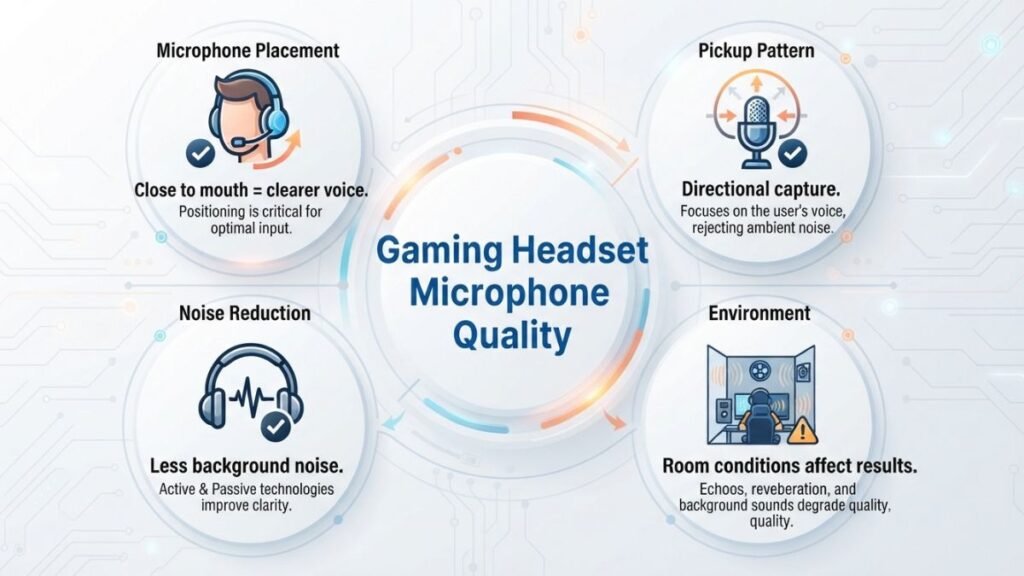
Voice clarity depends on several elements working together.
A microphone positioned close to the speaker, combined with suitable audio processing, usually produces better communication than a microphone that is simply more sensitive.
Important factors include:
- Microphone placement
- Pickup direction
- Signal processing
- Connection stability
- Environmental noise
For example, a player communicating during a competitive multiplayer match needs teammates to understand short and important instructions quickly. In this situation, clear speech is often more valuable than capturing a wide range of background sounds.
A good gaming headset microphone is designed around communication rather than studio-quality recording.
Features That Reduce Background Distractions
Background noise is one of the biggest challenges for gaming communication.
Many gaming environments include sounds that can interfere with voice transmission:
- Keyboard typing
- Controller buttons
- Air conditioning
- Fans
- Other people speaking nearby
Technologies such as directional microphone designs and digital processing help reduce the impact of these distractions.
However, users should understand that microphone technology has limitations. A microphone cannot completely remove every sound in a room. Physical distance, room acoustics, and microphone positioning still play a major role.
This is why two people using similar headsets may experience different results depending on their setup.
How Microphone Design Improves Gaming Communication
Communication quality is not only about how loud a microphone sounds. It is also influenced by how gaming headsets combine audio playback and voice communication features compared with traditional listening devices. Understanding these differences helps explain why gaming headsets and regular headphones have different designs.
A balanced gaming headset microphone should provide:
- Clear speech reproduction
- Stable audio transmission
- Low distortion
- Consistent volume
- Comfortable positioning
For online gaming, clarity is especially important because conversations often happen quickly. A teammate needs to understand information immediately without asking for repeated explanations.
This is why microphone design is an important part of the overall gaming headset experience, alongside audio playback and comfort.
Gaming Headset Microphone Maintenance and Setup Tips
Many microphone issues can be improved without replacing the headset.
Small adjustments to positioning, software settings, and the gaming environment can significantly affect communication quality.
Position the Microphone Correctly
Microphone placement has a direct impact on voice quality.
A boom microphone should usually be positioned near the side of the mouth rather than directly in front of it. This helps capture speech while reducing strong breathing sounds.
If the microphone is too far away, the user may sound quiet or distant.
If it is too close, the audio may become distorted.
Finding the correct position often requires small adjustments based on the microphone design.
Check Software Settings
Operating systems and communication applications can change how a microphone behaves.
Users should review:
- Input volume levels
- Selected microphone device
- Automatic gain settings
- Noise suppression options
Applications such as Discord also include audio processing settings that can influence microphone output.
A properly working headset may still sound poor if software settings are incorrectly configured.
Consider the Gaming Environment
The surrounding environment has a major influence on microphone performance.
A microphone in a quiet room will usually perform better than the same microphone in a noisy environment.
Simple improvements can include:
- Reducing background noise sources
- Creating more distance from noisy equipment
- Using a consistent microphone position
- Avoiding placing speakers close to the microphone
The microphone and environment work together, which means hardware quality is only one part of the final result.
Conclusion
A gaming headset microphone is more than a simple voice input device. It combines microphone hardware, positioning, audio processing, and connectivity technologies to deliver clear communication during gaming.
Understanding concepts such as pickup patterns, noise reduction, sensitivity, and microphone placement helps users recognize what affects real-world performance.
The best microphone experience does not come from one feature alone. Clear communication depends on how the microphone design works together with the user’s setup, environment, and intended use.
As gaming communication continues to become more important through multiplayer games, streaming, and online communities, understanding microphone technology helps users make better decisions and avoid being influenced only by marketing terms.
FAQ — Gaming Headset Microphones Explained
What is a gaming headset microphone?
A gaming headset microphone is a microphone integrated into a gaming headset that captures a player’s voice for online communication. It is designed to prioritize clear speech transmission during gaming, voice chats, and multiplayer interactions.
Why do gaming headset microphones have boom designs?
Gaming headset microphones often use boom designs because placing the microphone closer to the user’s mouth improves voice capture. This positioning helps create clearer communication while reducing the impact of surrounding sounds.
Are wireless gaming headset microphones as good as wired microphones?
Modern wireless gaming headset microphones can provide reliable voice communication when they use stable wireless technology and proper audio processing. However, microphone quality depends on the microphone design itself, not only whether the headset is wired or wireless.
Why does my gaming headset microphone pick up background noise?
A gaming headset microphone may pick up background noise because of high sensitivity, microphone positioning, room conditions, or limited noise processing. Adjusting the microphone position and settings can often improve the result.
What makes a gaming headset microphone sound clear?
Clear gaming headset microphone performance depends on factors such as microphone placement, pickup pattern, audio processing, sensitivity, and the surrounding environment. No single specification determines overall quality.
Can a gaming headset microphone work for streaming?
A gaming headset microphone can work for casual streaming and voice communication. However, users who need professional-level audio recording may prefer dedicated microphones because they provide greater control over sound capture.