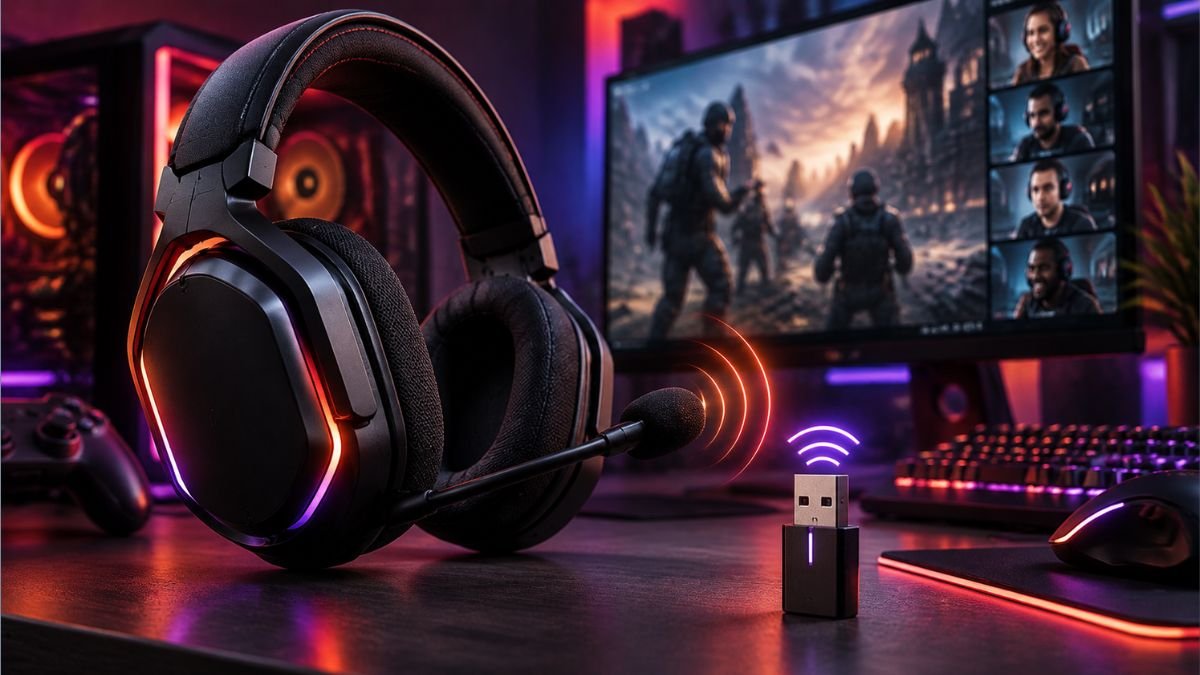
A wireless gaming headset is a gaming audio device that connects to computers or consoles without a traditional cable, using technologies such as 2.4GHz wireless or Bluetooth.
These headsets are designed to provide game audio, voice communication, and mobility while balancing latency, sound quality, battery life, and compatibility.
For many gamers, removing the cable from a headset changes the entire experience. A wireless gaming headset can make a desk setup cleaner, allow more freedom of movement, and reduce the frustration of tangled cables during long gaming sessions. However, choosing wireless audio is not simply about removing a wire.
Modern gaming headsets use different wireless technologies, and those differences directly affect performance. A headset designed for competitive PC gaming may prioritize low latency, while another designed for console entertainment may focus more on comfort, battery life, and platform compatibility.
The biggest confusion usually comes from understanding terms like Bluetooth, 2.4GHz wireless, spatial audio, microphone quality, and connection range. Two headsets may both be described as wireless but deliver very different experiences because they use different connection methods and hardware.
According to the Bluetooth Special Interest Group, Bluetooth technology has become a widely adopted wireless communication standard across consumer devices, but gaming applications often require additional considerations such as latency and synchronization.
Understanding how wireless gaming headsets work helps users make better technology decisions in the future. Instead of focusing only on product names or marketing features, it is more useful to understand the technologies that influence real-world gaming performance.
What Is a Wireless Gaming Headset?
A wireless gaming headset is an audio device designed specifically for gaming that connects to a computer, console, or other gaming system without requiring a traditional wired connection.
Understanding how gaming headsets compare with regular headphones helps users identify why gaming-focused audio devices include features designed specifically for interactive experiences.
Unlike regular wireless headphones that mainly focus on music and entertainment, gaming headsets are designed around interactive experiences. They combine audio output, microphone communication, comfort features, and connection technologies that support real-time gameplay.
A gaming headset needs to handle several tasks at the same time:
- Deliver clear game sounds.
- Provide accurate positional audio.
- Allow communication through an integrated microphone.
- Maintain a stable connection during gameplay.
- Reduce delays between an action on screen and the sound reaching the player.
The biggest difference between a wireless gaming headset and a standard Bluetooth headphone is the priority given to response time. In gaming, even small delays can affect competitive experiences, especially in fast-paced games where players depend on audio signals to react quickly.
Modern wireless gaming headsets typically use either 2.4GHz wireless connections, Bluetooth, or a combination of both. Some models also include wired USB or 3.5mm connections as backup options, giving users more flexibility across different devices.
How Wireless Gaming Headsets Work
Wireless gaming headsets work by transmitting digital audio signals from a gaming device to the headset through a wireless connection.
The process usually involves three main components:
- The gaming device A PC, console, or mobile device sends audio information, such as game sounds, voice chat, and system notifications.
- The wireless transmitter Many gaming headsets use a USB dongle that connects to the device and communicates directly with the headset. This transmitter helps maintain a stable connection and reduces latency.
- The headset receiver Inside the headset, a wireless receiver captures the signal and converts it back into audio that reaches the speakers or drivers.
The internal components then process the sound through different technologies, including digital signal processing (DSP), equalization settings, and virtual surround systems.
For example, a headset may separate different audio elements such as footsteps, environmental sounds, dialogue, and background effects to create a more immersive gaming experience.
Why Gamers Choose Wireless Audio
The main advantage of wireless gaming headsets is freedom of movement.
A cable can limit how players move around their setup, especially when using large desks, gaming chairs, or multi-monitor environments. Wireless models remove this physical restriction while keeping the essential features needed for gaming.
Common reasons gamers choose wireless headsets include:
| Benefit | Why It Matters |
|---|---|
| Cable-free setup | Creates a cleaner gaming environment and reduces cable management issues |
| Greater movement freedom | Allows players to move without worrying about cable length |
| Multi-device flexibility | Some models support computers, consoles, and mobile devices |
| Easier everyday use | Convenient for gaming, calls, and entertainment |
However, wireless does not automatically mean better. The experience depends heavily on the connection technology, battery capacity, audio hardware, and device compatibility.
A poorly designed wireless headset may introduce connection problems, shorter battery life, or compatibility limitations. Understanding the technology behind these devices helps users recognize which features actually influence performance.
Wireless Connection Technologies Explained
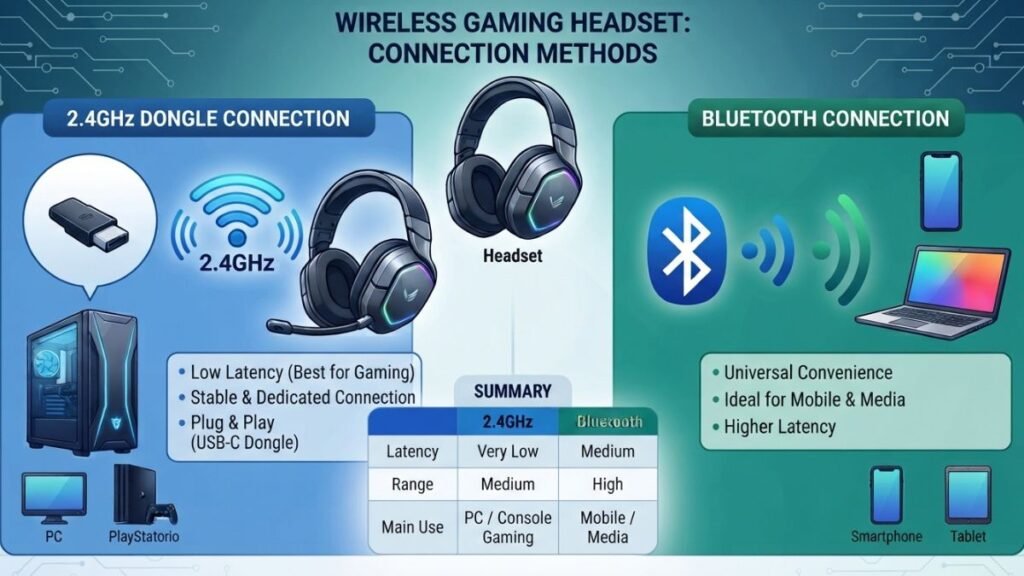
Wireless gaming headsets rely on different connection methods, and each technology has advantages and limitations. The type of wireless connection affects latency, compatibility, battery efficiency, and overall reliability.
Choosing the right connection method is also an important part of a complete gaming audio setup, because the connection can affect device compatibility, latency, audio routing, and how the system is configured.
The two most common technologies are 2.4GHz wireless and Bluetooth.
2.4GHz Wireless Connection
Many gaming-focused headsets use 2.4GHz wireless technology because it is designed to provide faster communication between the headset and the gaming device.
Most 2.4GHz gaming headsets connect through a small USB transmitter or dongle. This dedicated connection allows the headset to communicate directly with the computer or console instead of relying on the broader Bluetooth ecosystem.
The main advantages include:
- Lower latency compared with standard Bluetooth connections.
- More consistent audio synchronization.
- Better suitability for competitive gaming.
- Support for higher-quality gaming audio features.
This is why many PC and console gaming headsets use 2.4GHz connections as their primary wireless method.
According to manufacturers such as Logitech G, dedicated wireless gaming technologies are designed to balance speed, reliability, and audio performance for gaming environments.
However, 2.4GHz wireless usually requires a compatible USB transmitter. This means users need to check whether their gaming device supports the included dongle before connecting.
Bluetooth Connectivity
Bluetooth is one of the most common wireless technologies used across consumer electronics. It allows devices such as smartphones, tablets, laptops, and headphones to communicate without physical cables.
The Bluetooth Special Interest Group defines Bluetooth as a short-range wireless communication technology designed for exchanging data between connected devices.
For wireless gaming headsets, Bluetooth provides several advantages:
- Broad device compatibility.
- Easy pairing with mobile devices.
- Useful for music and everyday listening.
- Lower power consumption in many situations.
However, traditional Bluetooth connections may not always provide the lowest latency required for competitive gaming.
This does not mean Bluetooth is unsuitable for gaming. It can work well for casual gaming, mobile gaming, voice chat, and entertainment. The limitation appears mainly when precise timing between visual actions and audio feedback becomes important.
Many modern headsets solve this by combining both technologies:
- 2.4GHz wireless for gaming performance.
- Bluetooth for phones and everyday use.
This hybrid approach gives users more flexibility without forcing them to choose only one connection method.
Wired Mode and USB Connections
Although wireless connectivity is the main feature of a wireless gaming headset, many models also include wired connection options.
A wired mode can be useful in situations where battery life becomes limited or when users need maximum connection stability. Some headsets allow connection through USB cables, while others support a traditional 3.5mm audio cable.
These additional connection methods provide flexibility for different gaming environments.
Common wired options include:
| Connection Type | Main Purpose |
|---|---|
| USB connection | Provides digital audio and may support software features |
| 3.5mm audio connection | Works with a wide range of devices, including consoles and mobile devices |
| Charging cable connection | Allows charging while some headsets remain usable |
USB connections can provide additional features because the computer can communicate directly with headset software. This may enable equalizer adjustments, microphone settings, firmware updates, and virtual audio features.
However, wired connections also have limitations. A cable removes some of the convenience that makes wireless headsets attractive, especially for users who prefer a cleaner gaming setup.
The ability to switch between wireless and wired modes can make a headset more versatile, especially for gamers who use multiple devices.
Gaming Performance: Latency, Audio Quality and Microphones
Wireless gaming headsets are often judged by one question: Can they deliver the same performance as wired audio?
Understanding gaming headset technology helps explain how audio hardware, wireless systems, and software optimization influence overall gaming performance.
The answer depends on several technical factors, including connection type, audio processing, hardware quality, and software optimization.
Gaming performance is not determined by wireless technology alone. A well-designed wireless headset can provide excellent gaming experiences, while a poorly optimized model may struggle with delays, inconsistent audio, or weak microphone performance.
Understanding Wireless Audio Latency
Latency refers to the delay between an action happening on a device and the sound reaching the user’s ears.
In gaming, this delay can affect immersion and reaction time. For example, when a player hears footsteps, weapon sounds, or environmental effects, the audio needs to arrive quickly enough to match what is happening on screen.
Lower latency is especially important in competitive games where timing matters.
Common situations affected by latency include:
- Competitive first-person shooters.
- Racing games requiring precise reactions.
- Multiplayer games where communication speed matters.
- Rhythm-based games.
A connection with higher latency may create a noticeable delay between visual events and audio feedback.
This is one reason many gaming-focused wireless headsets use dedicated 2.4GHz connections instead of relying only on traditional Bluetooth.
The actual latency experience depends on multiple factors:
| Factor | Impact on Latency |
|---|---|
| Wireless technology | Determines communication speed between devices |
| Signal interference | Can affect connection stability |
| Audio processing | Additional processing can introduce delays |
| Software optimization | Affects how quickly signals are handled |
A headset designed for gaming usually balances these factors to maintain fast audio response while preserving sound quality.
How Drivers Affect Sound Quality
Inside every headset are speaker components called drivers. These convert electrical signals into sound waves that users hear.
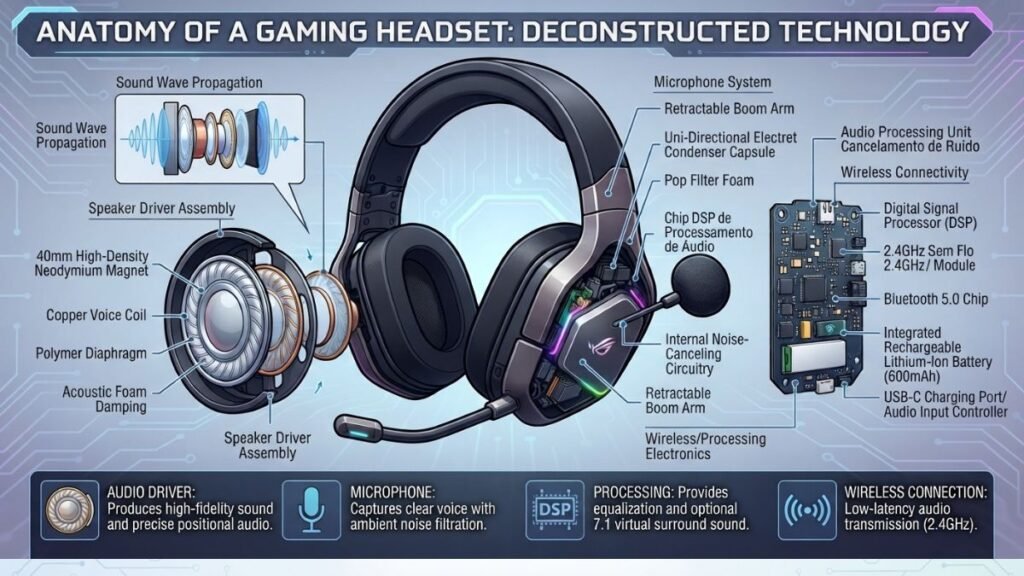
The size and design of drivers can influence:
- Sound detail.
- Bass response.
- Audio separation.
- Overall listening experience.
Many gaming headsets use dynamic drivers because they can produce a wide range of frequencies while remaining efficient for portable designs.
However, driver size alone does not determine audio quality. A larger driver does not automatically mean better sound.
Other elements also matter:
- Driver tuning.
- Digital signal processing.
- Equalizer settings.
- Headphone design.
- Software features.
For gaming, audio quality is not only about louder sound. Good gaming audio helps users identify direction, distance, and important environmental details.
For example, hearing the difference between a sound coming from the left, right, behind, or above can improve awareness during gameplay.
Modern gaming audio technologies often combine hardware and software processing to create more immersive experiences. Companies such as Dolby develop spatial audio technologies designed to improve how users perceive sound direction and depth.
Microphone Technology for Multiplayer Gaming
A microphone is one of the most important parts of a gaming headset because communication is central to many multiplayer experiences. The quality of gaming headset microphones affects voice clarity, background noise reduction, and overall communication during gameplay.
A quality gaming microphone should provide:
- Clear voice transmission.
- Reduced background noise.
- Consistent volume.
- Comfortable positioning.
Most wireless gaming headsets use boom microphones because they position the microphone closer to the user’s mouth, improving voice clarity compared with built-in microphones placed farther away.
Some models include additional microphone technologies such as:
- Noise reduction.
- Voice filtering.
- Automatic volume adjustment.
- Detachable microphone designs.
However, microphone quality can vary significantly between headsets. A headset with excellent audio performance may still provide average communication quality if the microphone hardware is limited.
For team-based games, streaming, or online meetings, microphone performance should be evaluated separately from audio quality.
A balanced wireless gaming headset needs to handle both sides of communication:
Immersive audio for the player and clear voice transmission for everyone else.
Compatibility With PC and Gaming Consoles
One of the most important considerations when understanding a wireless gaming headset is compatibility.
Unlike wired headsets that often rely on universal connectors, wireless models depend on specific connection technologies, software support, and platform requirements.
A headset that works perfectly with a gaming PC may not provide the same features when connected to a console. Some devices support multiple platforms, while others are designed specifically for certain ecosystems.
Before choosing any wireless gaming audio device in the future, users should understand how different platforms handle wireless connections.
Wireless Gaming Headsets for PC
PC gaming generally offers the widest compatibility options because computers support various connection methods and allow users to install manufacturer software.
Most PC-focused wireless gaming headsets connect through:
- USB wireless transmitters.
- Bluetooth.
- USB-C connections.
- Wired backup modes.
A dedicated USB transmitter is commonly preferred for PC gaming because it provides a direct connection between the headset and the computer.
PC users also benefit from additional software features, including:
- Custom equalizer settings.
- Microphone adjustments.
- Firmware updates.
- Battery monitoring.
- Surround sound configuration.
Gaming software from manufacturers such as Razer and Logitech G allows users to customize supported devices and adjust audio settings based on personal preferences.
However, PC compatibility does not always guarantee access to every feature. Some advanced functions may depend on specific operating systems, software versions, or manufacturer applications.
Wireless Gaming Headsets for PlayStation
PlayStation users need to pay attention to connection support because not every wireless headset works with every console.
Modern PlayStation consoles commonly support wireless headsets through compatible USB transmitters and approved wireless technologies.
For example, many gaming headsets designed for PlayStation use a USB dongle that connects directly to the console. This allows the headset to transmit game audio and microphone communication without requiring Bluetooth pairing.
Important factors for PlayStation users include:
- Console compatibility.
- Microphone support.
- Available audio features.
- Firmware updates.
- Chat functionality.
The official PlayStation ecosystem supports a range of wireless audio accessories, but users should always check compatibility before assuming a headset will work across all PlayStation devices.
Some headsets may support basic audio but lose features such as microphone access, surround sound, or customization controls when used on unsupported platforms.
Wireless Gaming Headsets for Xbox
Xbox has a more controlled wireless accessory ecosystem compared with many PC environments.
Some wireless gaming headsets use Xbox-specific wireless technology, while others connect through USB transmitters or Bluetooth depending on the model.
The main compatibility considerations include:
- Xbox console generation.
- Wireless connection method.
- Voice chat support.
- Access to headset controls.
The official Xbox accessory ecosystem includes wireless devices designed specifically for Xbox consoles, helping ensure reliable communication between gaming systems and compatible accessories.
A headset marketed as “wireless gaming” does not automatically mean it supports every console. A model may work on PC and PlayStation but require a different version for Xbox compatibility.
Important Features Beyond Wireless Connectivity
Wireless connection is only one part of a gaming headset experience.
Many users focus heavily on whether a headset is wireless but overlook other features that influence comfort, audio quality, and long-term usability.
A well-designed headset needs to balance:
- Sound performance.
- Comfort.
- Battery management.
- Microphone quality.
- Additional audio features.
Battery Life
Battery life is one of the biggest differences between wired and wireless gaming headsets.
A wired headset can receive continuous power through its cable, while a wireless model depends on an internal battery.
Battery performance affects:
- How long users can play between charges.
- Convenience during long gaming sessions.
- Whether the headset can be used while charging.
Important battery factors include:
| Battery Feature | Why It Matters |
|---|---|
| Playtime duration | Determines how long the headset works before charging |
| Charging speed | Reduces waiting time between sessions |
| Battery health | Affects long-term usability |
| Charging options | Influences convenience |
Some headsets also include quick charging features that provide additional playtime after a short charging period.
However, advertised battery numbers should be viewed carefully because actual performance can change depending on:
- Volume level.
- RGB lighting.
- Wireless mode.
- Microphone usage.
- Active noise cancellation.
Passive Noise Isolation
Passive noise isolation reduces external sounds through the physical design of the headset rather than electronic processing.
This technology depends on the materials and structure of the headset, including:
- Closed-back earcups.
- Memory foam cushions.
- Tight ear seals.
A well-designed headset can naturally block some surrounding noise, helping users focus on game audio without requiring additional power.
Passive isolation is common in gaming headsets because it works continuously and does not depend on batteries or software processing.
However, its effectiveness depends on factors such as:
- Earcup design.
- Material quality.
- How well the headset fits the user’s head.
A comfortable seal can improve both noise isolation and overall audio experience.
Active Noise Cancellation (ANC)
Active Noise Cancellation (ANC) uses built-in microphones and digital processing to detect surrounding sounds and create signals that reduce unwanted noise.
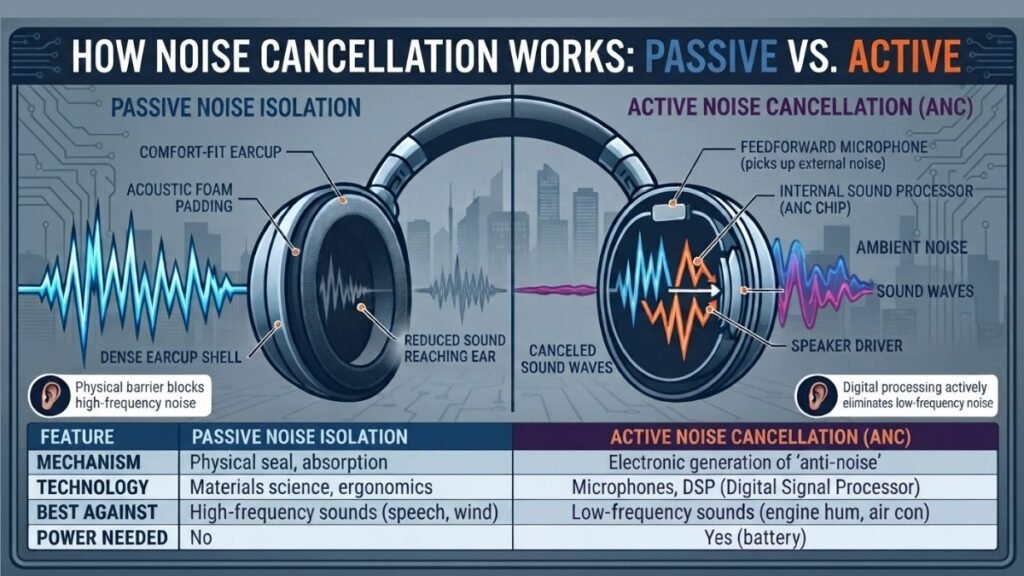
Unlike passive isolation, which physically blocks sound, ANC actively analyzes external noise and attempts to minimize it electronically.
ANC can be useful in environments with continuous background sounds, such as:
- Fans.
- Air conditioning systems.
- Traffic noise.
- Busy shared spaces.
While ANC is common in travel headphones, it is less universal in gaming headsets because many gamers prefer awareness of their surroundings, especially when playing at home.
The effectiveness of ANC depends on:
- Microphone quality.
- Noise processing algorithms.
- Headset design.
- The type of background sound being reduced.
For gaming, ANC is not always the most important feature. In many cases, accurate audio reproduction, comfort, and low latency have a greater impact on the overall experience.
Surround Sound and Spatial Audio
Many modern gaming headsets include advanced audio technologies that go beyond traditional stereo sound.
Players who want to understand whether these features provide real benefits can explore how surround sound gaming headsets work and when they are worth considering.
Traditional stereo audio uses two channels:
- Left audio.
- Right audio.
While stereo sound can provide a good experience, gaming often requires more awareness of where sounds are coming from. Spatial audio technologies attempt to create a more three-dimensional sound environment by processing audio signals to simulate different directions.
This can help players identify:
- The direction of footsteps.
- The location of environmental sounds.
- The position of in-game effects.
- Distance between the player and sound sources.
However, spatial audio quality depends on more than the software feature itself. Factors such as headset design, audio tuning, game support, and personal preference all influence the final experience.
Some games are specifically designed with advanced audio systems that can take advantage of spatial technologies. Others may provide limited benefits depending on how the audio was originally created.
A common misconception is that virtual surround sound automatically creates better gaming performance. In reality, accurate audio reproduction and good tuning are often more important than simply adding additional processing effects.
Spatial audio is only one part of the overall experience, as other gaming headset features also influence sound quality, comfort, microphone performance, and everyday usability.
Limitations of Wireless Gaming Headsets
Although wireless gaming headsets offer important advantages, they also come with limitations that users should understand.
Wireless technology continues to improve, but removing the cable introduces additional challenges involving power, connectivity, and compatibility.
Understanding these limitations helps users create realistic expectations.
Battery Dependency
The biggest difference between wired and wireless headsets is the need for battery power.
A wireless headset can provide excellent performance, but it eventually needs to be recharged. This creates a maintenance requirement that does not exist with traditional wired models.
Battery-related considerations include:
- Remembering to charge the headset.
- Reduced convenience when the battery is empty.
- Possible battery degradation over time.
- Limited usage during long sessions without charging.
For users who frequently play for many hours, battery capacity becomes an important factor.
Some wireless headsets include features such as:
- Fast charging.
- Replaceable batteries.
- Wired backup modes.
These features can reduce inconvenience, but they do not completely remove the dependency on power.
Connection Range and Signal Stability
Wireless range determines how far a user can move away from the connected device while maintaining a reliable connection.
The actual range depends on several factors:
- Wireless technology.
- Physical obstacles.
- Interference from other devices.
- Room layout.
- Signal strength.
A headset may work perfectly at a gaming desk but experience interruptions when used farther away or through walls.
2.4GHz wireless connections usually provide a dedicated link between the headset and transmitter, while Bluetooth connections are designed for broader device compatibility.
However, no wireless technology is completely immune to interference.
Users who experience connection issues should consider:
- Moving the transmitter closer.
- Avoiding physical obstacles.
- Reducing nearby wireless interference.
- Updating headset firmware when available.
Platform Restrictions
Compatibility is one of the most overlooked limitations of wireless gaming headsets.
A headset may support one platform fully while offering limited features on another.
Possible restrictions include:
- No microphone support.
- Missing software controls.
- Limited audio customization.
- Reduced compatibility with consoles.
For example, a headset designed primarily for PC may provide advanced software features that are unavailable when connected to a console.
This is why checking platform support before choosing a wireless gaming headset is essential.
Compatibility information from manufacturers such as Sony and Microsoft can help users understand how wireless accessories interact with their gaming ecosystems.
Are Wireless Gaming Headsets Worth Understanding Before Buying?
Understanding wireless gaming headsets is valuable because wireless audio technology involves more decisions than simply choosing between a cable and no cable.
The right headset depends on how the user plays, which devices they use, and which features matter most.
A competitive PC gamer may prioritize:
- Low latency.
- Stable 2.4GHz connections.
- Accurate positional audio.
- Strong microphone performance.
A casual console gamer may value:
- Comfort.
- Battery life.
- Easy setup.
- Multi-device support.
Someone who uses the headset for both gaming and everyday activities may prefer a model that combines multiple connection options, such as 2.4GHz wireless and Bluetooth.
The most important lesson is that wireless performance depends on the entire system:
- Connection technology.
- Audio hardware.
- Software support.
- Battery design.
- Platform compatibility.
A wireless gaming headset is not automatically better because it removes a cable. The best experience comes from understanding which technologies match the user’s specific needs.
Conclusion
Wireless gaming headsets have evolved from simple cable-free alternatives into advanced gaming accessories with specialized audio technologies, wireless standards, and compatibility options.
Understanding the differences between 2.4GHz wireless connections, Bluetooth, audio latency, microphone systems, and battery design helps users evaluate these devices more effectively.
Wireless technology can provide excellent gaming experiences when the headset is designed around reliable connections, accurate sound reproduction, and practical features. However, users should also consider limitations such as battery dependency, platform restrictions, and connection requirements.
As gaming setups continue to become more flexible and multi-device focused, understanding how wireless gaming headsets work will remain an important part of making informed technology decisions.
FAQ — Wireless Gaming Headsets Explained
Are wireless gaming headsets good for competitive gaming?
Yes, many wireless gaming headsets can provide excellent performance for competitive gaming when they use low-latency wireless technologies such as 2.4GHz connections. The overall experience depends on connection stability, audio tuning, microphone quality, and how well the headset matches the gaming platform being used.
Is 2.4GHz wireless better than Bluetooth for gaming headsets?
For many gaming situations, 2.4GHz wireless provides advantages because it is designed for faster communication and lower latency. Bluetooth offers broader compatibility and convenience, especially for mobile devices, but some Bluetooth connections may introduce more delay during fast-paced gaming.
Can a wireless gaming headset work on PC, PlayStation, and Xbox?
Some wireless gaming headsets support multiple platforms, but compatibility varies by model and connection method. A headset may work fully on PC but provide fewer features on a console. Users should check supported platforms, microphone functionality, and available features before choosing a headset.
Do wireless gaming headsets have audio delay?
Wireless gaming headsets can have some level of latency, but modern gaming-focused models are designed to minimize noticeable delays. Headsets using dedicated wireless connections, such as 2.4GHz transmitters, generally prioritize faster communication compared with standard Bluetooth connections.
How long do wireless gaming headsets usually last on battery?
Battery life varies depending on the headset design, volume level, wireless mode, lighting features, and microphone usage. Some models can operate for many hours on a single charge, while others may require more frequent charging depending on usage habits.
Are wireless gaming headsets better than wired headsets?
Neither option is universally better. Wired headsets offer continuous power and simple connectivity, while wireless gaming headsets provide greater movement freedom and cleaner setups. The better choice depends on whether the user values convenience, mobility, maximum stability, or simplicity.