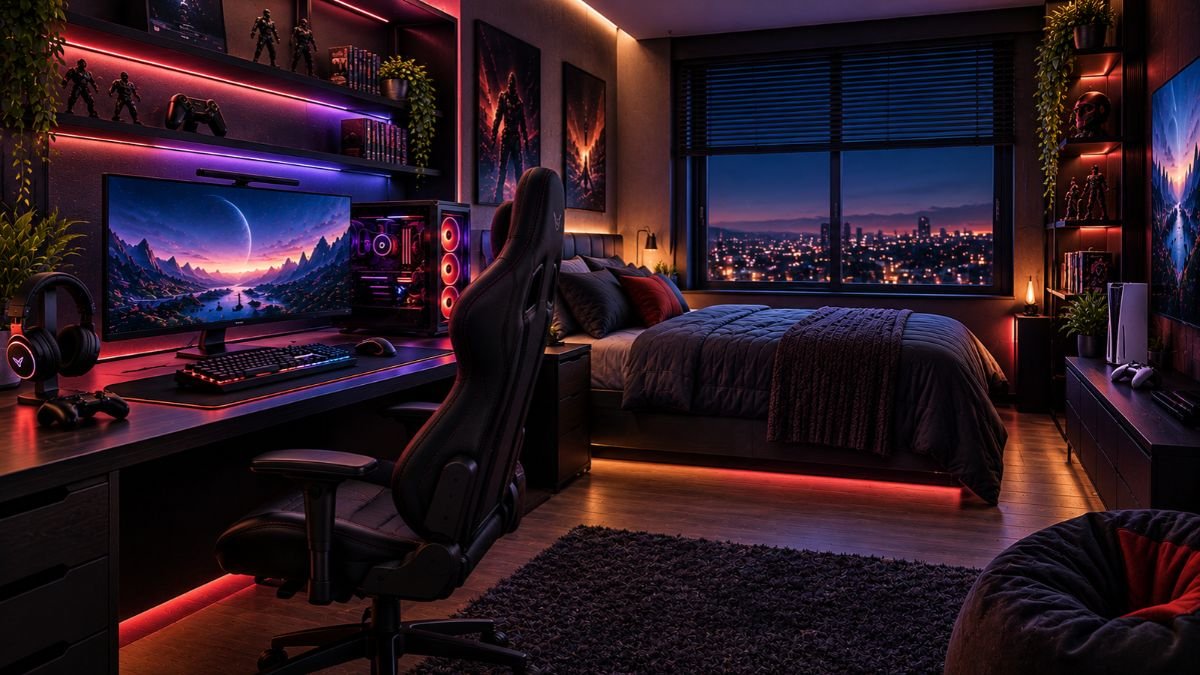
A gaming room setup is a planned space where gaming equipment, furniture, lighting, and organization work together to create a comfortable and functional environment. A good setup focuses on layout, ergonomics, accessibility, and personal style rather than simply adding expensive equipment.
Gaming has become a major form of entertainment in the United States, with industry research from the Entertainment Software Association showing the significant role video games play in modern households.
A gaming room setup should balance performance, comfort, and organization. The right design depends on your available space, gaming habits, equipment, and whether the room is used only for gaming or also for work and entertainment.
Creating a gaming space is no longer only about placing a desk and adding colorful lights. Modern gamers often use the same area for competitive gaming, streaming, studying, remote work, and relaxation. This makes planning more important than ever.
A poorly planned room can create problems such as uncomfortable seating positions, messy cables, limited movement, and unnecessary spending on accessories that do not improve the experience.
A well-designed gaming room should support the way you actually use technology. A competitive PC gamer may prioritize monitor placement and desk ergonomics, while a console player may focus more on seating, display position, and entertainment comfort.
This guide explains how to plan a gaming room setup step by step, from choosing the right layout and equipment placement to improving lighting, organization, and comfort.
How to Plan a Gaming Room Setup Before Adding Equipment
Before purchasing new accessories or decorating your space, the first step is understanding the room itself. Many gaming setups fail because users focus on appearance before considering practical factors like available space, movement, and daily usage.
A strong gaming room setup begins with planning:
- Available floor space
- Desk and chair placement
- Screen viewing position
- Storage requirements
- Cable routing
- Lighting conditions
- Other activities performed in the room
Planning first helps create a setup that looks better and functions more efficiently.
Understanding Your Available Space
The size of your room directly influences your gaming room design decisions.
A small bedroom may require a compact desk, wall-mounted storage, and a minimal accessory approach. A larger room allows more flexibility with dedicated gaming zones, multiple screens, additional seating, or entertainment areas.
Before arranging furniture, measure:
- Wall dimensions
- Door and window positions
- Power outlet locations
- Natural light sources
- Available walking space
A common mistake is buying furniture first and discovering later that the layout does not work comfortably.
For smaller rooms, vertical organization can create more usable space. Shelves, monitor arms, and wall-mounted accessories can reduce desk clutter without reducing functionality.
Choosing the Right Gaming Room Layout
The layout determines how comfortable your gaming sessions will be.
The main gaming position should usually be the center of attention. Your desk, monitor, or television should have a clear viewing angle while keeping cables and accessories easy to access.
Common gaming room layouts include:
| Layout Type | Best For | Main Advantage |
|---|---|---|
| Desk-focused setup | PC gamers | Better productivity and gaming workflow |
| TV entertainment setup | Console gamers | Comfortable viewing experience |
| Hybrid gaming office | Work and gaming users | One space for multiple activities |
| Corner setup | Small rooms | Better use of limited space |
A good layout also considers lighting direction. Placing a monitor directly in front of a bright window can create glare and reduce visibility.
Planning Around Your Main Activities
The ideal gaming room depends on what happens inside the space.
A competitive gamer may need:
- Stable desk positioning
- Comfortable chair support
- Low-distraction lighting
- Easy access to peripherals
A content creator may need:
- Camera-friendly background
- Additional lighting
- Microphone positioning
- Recording space
A casual gamer may prefer:
- Comfortable seating
- Simple organization
- Entertainment-focused design
Understanding your primary use prevents unnecessary purchases and creates a more personalized gaming environment.
Essential Elements of a Functional Gaming Room Setup
A great gaming room setup is not created by adding the most expensive equipment. It comes from choosing elements that improve comfort, organization, and the overall gaming experience.
Every component should have a purpose. A desk should support your gaming position, lighting should improve the atmosphere without causing distractions, and storage should keep accessories accessible without creating clutter.
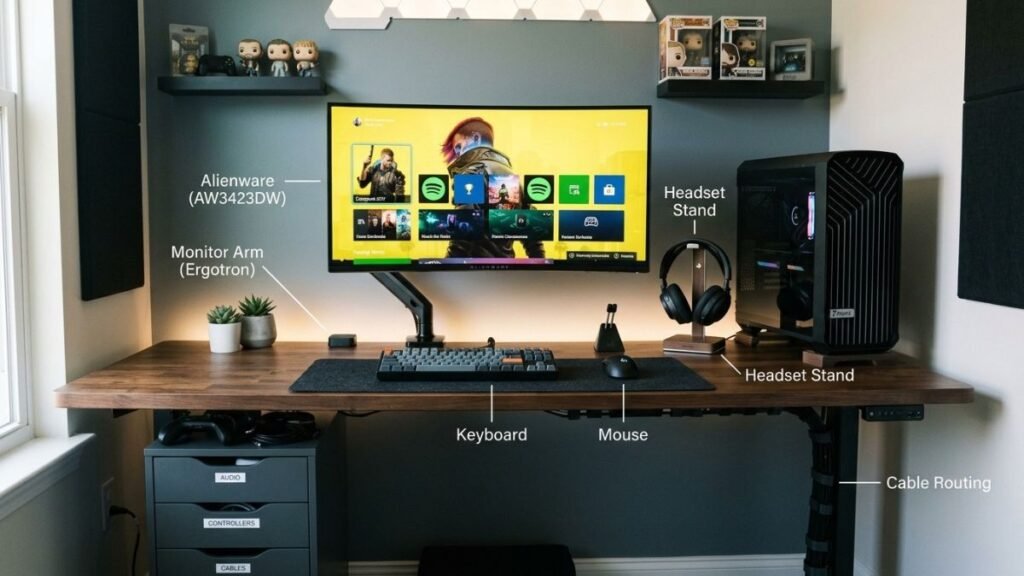
Gaming Desk and Workspace Organization
The gaming desk is the foundation of most gaming room setups, especially for PC gamers. It determines how much space you have for monitors, keyboards, controllers, speakers, and other accessories.
A functional gaming desk should provide:
- Enough surface area for your main equipment
- Comfortable arm positioning
- Space for cable management
- Room for future upgrades
Desk placement also affects how organized the room feels. Keeping frequently used accessories within reach reduces unnecessary movement and keeps the workspace cleaner.
For multi-purpose rooms, a desk should support both gaming and productivity. Many users combine gaming setups with home offices, making workspace flexibility an important consideration.
A monitor stand or arm can also improve desk organization by creating additional surface space underneath the display.
A well-organized workspace often depends on choosing the right accessories. Understanding different gaming desk accessories can help users create a cleaner and more functional gaming environment.
Monitor Placement and Viewing Comfort
Monitor positioning has a direct impact on comfort during long gaming sessions.
The position of your monitor and desk can influence long-term comfort during gaming sessions.
Following ergonomic workspace principles from NIOSH can help users create a more comfortable computer environment by considering factors such as posture, equipment placement, and workspace organization.
The display should be placed at a comfortable viewing height where users do not need to constantly tilt their head upward or downward. The distance between the eyes and screen also depends on monitor size and personal preference.
Important factors include:
| Factor | Why It Matters |
|---|---|
| Screen height | Helps maintain a comfortable viewing position |
| Viewing distance | Reduces unnecessary eye and neck movement |
| Monitor angle | Improves visibility and reduces reflections |
| Multiple displays | Supports gaming, streaming, and multitasking |
For multi-monitor setups, arranging screens at a slight angle can create a more natural viewing experience.
The ergonomic workspace principles recommend considering posture, screen positioning, and workspace arrangement to create a more comfortable computer environment.
Gaming Chair and Ergonomic Considerations
A gaming chair is not only a visual feature. It plays an important role in comfort, especially during extended gaming sessions.
A suitable chair should provide:
- Adjustable height
- Proper back support
- Comfortable arm positioning
- Enough movement flexibility
The goal is not necessarily choosing a chair designed specifically for gaming. The important factor is whether the chair supports a comfortable sitting position for your usage.
Poor seating choices can make even an expensive gaming setup uncomfortable. A balanced room should prioritize the user’s physical comfort as much as the appearance of the space.
Creating Better Gaming Room Lighting and Atmosphere
Lighting is one of the most noticeable parts of a gaming room setup, but it should be planned carefully. Good lighting improves the atmosphere while maintaining a comfortable environment for gaming.
Many users focus only on RGB effects, but practical lighting choices are equally important.
A balanced lighting setup usually combines:
- Main room lighting
- Desk lighting
- Ambient lighting
- Decorative elements
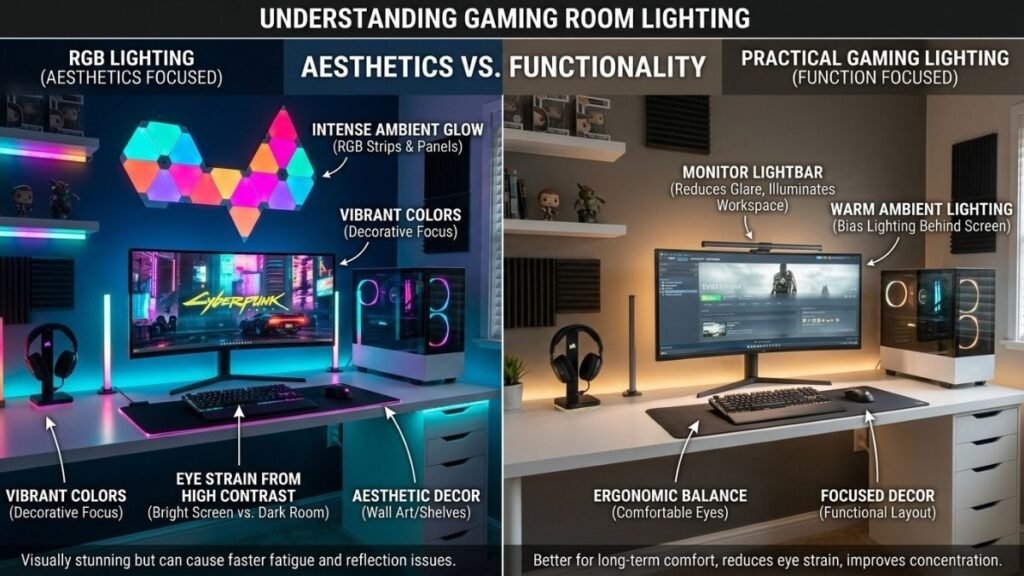
RGB Lighting vs Practical Lighting
RGB lighting has become popular because it allows users to personalize their gaming environment with different colors and effects.
However, RGB lighting should support the room design instead of becoming the only focus.
Effective RGB placement examples include:
- Behind monitors
- Under desks
- Behind shelves
- Around display areas
Directly facing bright lights can create distractions, especially during competitive gaming.
A better approach is using indirect lighting that creates atmosphere without affecting visibility.
Many gamers use RGB elements to personalize their environment, but understanding how an RGB gaming setup works can help create a more balanced visual experience.
Using Smart Lighting for a Better Experience
Smart lighting systems allow users to adjust brightness, colors, and schedules based on different activities.
Solutions such as smart lighting systems from Philips Hue demonstrate how connected lighting technology can be integrated into modern home environments.
For example:
- Brighter lighting during work or study
- Softer lighting during casual gaming
- Custom colors for entertainment sessions
Lighting should enhance the room experience while keeping the gaming area comfortable and functional.
Gaming Room Setup Ideas for Different Room Sizes
A successful gaming room setup does not require a large dedicated space. The best designs adapt to the room available and focus on efficient use of space.
A small bedroom, shared office, or large entertainment room can all become effective gaming environments when the layout matches the user’s needs.
The key is understanding that room size changes the approach, but it does not determine the quality of the experience.
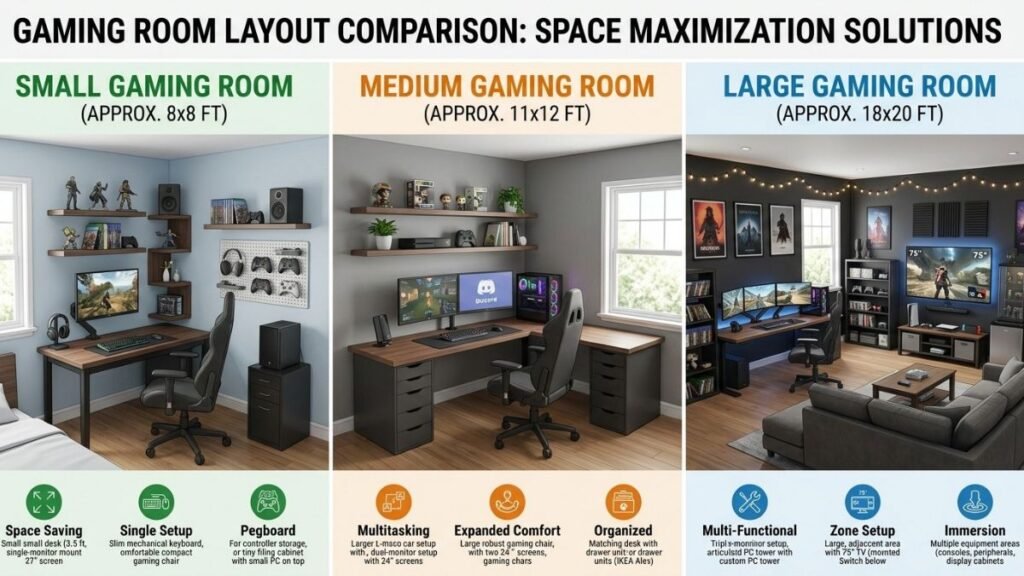
Small Gaming Room Setup Ideas
Small rooms require careful planning because every piece of furniture affects movement and comfort.
Instead of adding more equipment, focus on maximizing the available space.
Useful strategies include:
- Choosing a compact gaming desk
- Using monitor arms to free desk space
- Managing cables vertically or along walls
- Using shelves for accessories
- Keeping only frequently used equipment visible
A small gaming room often benefits from a minimal design. Too many decorative items can make the space feel crowded and reduce functionality.
For example, a bedroom corner can become a practical gaming area with a desk, monitor setup, comfortable chair, and organized storage without requiring an entire room.
The goal is creating a space where everything has a purpose.
Gaming Room Office Combination Ideas
Many people use the same room for gaming and remote work. This requires a setup that can transition between productivity and entertainment.
A hybrid gaming office should prioritize:
- Comfortable desk positioning
- Clean cable management
- Neutral background design
- Adjustable lighting
- Flexible accessories
A dual-purpose setup can include a professional workspace during the day and a gaming environment after work hours.
One effective approach is keeping the main desk area organized while adding gaming-focused elements through lighting, accessories, and decoration rather than replacing the entire workspace.
This type of setup is becoming more common as home offices and personal entertainment spaces continue to overlap.
Large Gaming Space Planning
A larger room provides more design opportunities, but it also requires better planning.
Extra space can be used for:
- Multiple gaming stations
- Console entertainment areas
- Display shelves
- Streaming corners
- Comfortable seating areas
However, a large room can feel empty if equipment placement is random.
Creating dedicated zones improves the overall experience:
| Zone | Purpose |
|---|---|
| Gaming Zone | Main desk, monitors, and accessories |
| Entertainment Zone | Console gaming and relaxation |
| Display Zone | Collectibles, hardware, or decorations |
| Storage Zone | Organization of equipment and cables |
A larger gaming room should still maintain easy movement and accessibility between areas.
Organizing Gaming Equipment and Accessories
Organization separates a comfortable gaming room setup from a cluttered one.
As gaming equipment increases, users often collect multiple controllers, cables, headsets, chargers, and accessories. Without proper organization, these items can quickly create visual and practical problems.
A clean setup improves usability because users spend less time searching for equipment and more time enjoying their space.
Managing Gaming Cables
Cable management is one of the most important improvements for any gaming room.
Common cable problems include:
- Power cables crossing the floor
- Unorganized charging cables
- Difficult access behind desks
- Tangled connections during upgrades
Simple solutions include:
- Cable sleeves
- Under-desk cable trays
- Velcro straps
- Cable clips
- Labeling important connections
A planned cable system also makes future upgrades easier because users can identify and replace connections without rebuilding the entire setup.
For users building a cleaner workspace, improving Gaming Cable Management Guide is one of the easiest ways to create a more organized setup.
Storing Controllers and Accessories
Gaming accessories should be easy to access without taking over the workspace.
Useful storage options include:
- Controller stands
- Headset holders
- Drawer organizers
- Wall shelves
- Storage boxes
The best storage solution depends on how often each item is used.
Frequently used accessories should remain within reach, while rarely used equipment can be stored away to keep the gaming area clean.
Keeping the Setup Clean and Flexible
A good gaming room setup should be easy to maintain and adapt.
Technology changes quickly, and users often add new devices over time. A flexible setup allows upgrades without requiring a complete redesign.
Avoid filling every available space. Leaving some room makes it easier to introduce new equipment, change layouts, or improve organization later.
Common Gaming Room Setup Mistakes to Avoid
Creating a gaming room setup is not only about adding equipment and decorations. Many users focus heavily on appearance while ignoring practical details that affect comfort, organization, and long-term usability.
Avoiding common mistakes helps create a space that feels better to use every day.
Focusing Only on Appearance
A visually impressive gaming room can look great in photos but still be uncomfortable for daily use.
Some setups prioritize:
- Excessive RGB lighting
- Too many decorations
- Unnecessary accessories
- Matching colors over functionality
A better approach is creating a balance between style and usability.
Before adding decorative elements, consider:
- Is the desk comfortable?
- Are cables organized?
- Is equipment easy to access?
- Does the lighting support the activity?
A gaming room should improve the gaming experience, not only create an attractive background.
Ignoring Comfort and Ergonomics
Long gaming sessions require a comfortable environment.
Ignoring posture, screen placement, or seating can create an unpleasant experience even with high-end equipment.
Important comfort factors include:
- Proper monitor height
- Comfortable chair position
- Suitable desk height
- Enough room for movement
Long gaming sessions also require attention to visual comfort. Following computer vision syndrome guidance can help users understand how screen habits, viewing distance, and eye comfort affect extended computer use.
Small adjustments, such as improving monitor positioning or reducing glare, can make a noticeable difference.
Buying Equipment Before Planning the Space
One of the most common mistakes is purchasing gaming equipment before understanding the room layout.
For example, buying:
- A large desk that does not fit the room
- Multiple monitors without enough workspace
- Decorative items that reduce usable space
can create unnecessary problems.
A better process is:
- Measure the available area.
- Decide the main purpose of the room.
- Plan furniture placement.
- Identify necessary equipment.
- Add decorative elements last.
Planning prevents wasted spending and creates a more organized result.
Gaming Room Setup Ideas for Different Budgets
A quality gaming room setup does not require a large investment. The best approach is prioritizing improvements that create the biggest impact.
Budget planning helps users decide where to spend more and where simple alternatives are enough.
Before making upgrades, understanding the overall gaming setup cost can help users plan their improvements more effectively.
The most valuable upgrades usually improve:
- Comfort
- Organization
- Performance
- Daily usability
Budget Gaming Room Setup
A budget gaming room focuses on creating a functional foundation.
Priority improvements include:
- Comfortable seating
- A suitable desk
- Good cable organization
- Proper lighting
- Efficient storage
A simple setup with organized equipment can feel better than an expensive room with poor planning.
For users with limited space or budget, improving organization often creates a bigger visual difference than buying additional accessories.
Mid-Range Gaming Space
A mid-range setup allows more personalization and improved convenience.
Possible additions include:
- Better desk organization
- Additional monitor support
- Improved lighting
- Dedicated accessory storage
- Enhanced audio setup
At this stage, users can focus on improving workflow and creating a more immersive environment.
The goal should be upgrading areas that affect daily use rather than adding technology only for appearance.
Premium Gaming Environment
A premium gaming room can include advanced customization and dedicated zones.
Common features may include:
- Multiple displays
- Streaming equipment
- Custom lighting systems
- Entertainment seating
- Display areas
However, higher spending does not automatically create a better experience.
A premium setup still depends on:
- Smart layout decisions
- Comfortable positioning
- Efficient organization
- Matching the user’s actual needs
The most effective gaming rooms combine technology with thoughtful design.
Creating a Gaming Room Setup That Works for Your Needs
A successful gaming room setup is not defined by the amount of equipment inside the room. The best spaces are created by combining thoughtful planning, comfortable furniture, organized technology, and a design that matches how the room will actually be used.
Before upgrading your gaming space, start with the basics: understand your available area, choose a practical layout, organize cables, and create a comfortable environment for longer sessions.
A small room can become an effective gaming area with smart organization, while a larger room can benefit from dedicated zones for gaming, entertainment, and storage.
The most important principle is creating a setup that works for you. A gaming room should support your gaming habits, improve comfort, and remain flexible as your equipment changes over time.
A complete gaming environment requires more than individual devices. Exploring the essential components of a gaming setup can help users create a more balanced and functional space.
By focusing on function first and aesthetics second, you can build a gaming space that feels better to use and continues to meet your needs in the future.
FAQ: Gaming Room Setup
What should a gaming room setup include?
A gaming room setup should include the essential elements needed for comfortable gameplay, such as a suitable desk, comfortable seating, display equipment, organized accessories, proper lighting, and effective cable management. The exact setup depends on available space, gaming style, and whether the room is also used for work or entertainment.
How do I design a gaming room setup in a small space?
A small gaming room setup should focus on efficient use of space. Compact desks, monitor arms, vertical storage, and organized cable management can help maximize limited areas. The goal is creating a comfortable gaming environment without overcrowding the room.
How much does a gaming room setup cost?
The cost of a gaming room setup depends on the equipment, furniture, and design choices involved. A basic setup can focus on essential improvements like organization and comfort, while more advanced spaces may include multiple displays, custom lighting, and dedicated entertainment areas.
What lighting is best for a gaming room setup?
The best lighting for a gaming room setup combines practical room lighting with optional ambient lighting. RGB lighting can improve the atmosphere, but it should complement the space rather than replace proper visibility and comfort-focused lighting.
How can I make my gaming room setup look better?
Improving a gaming room setup usually starts with organization. Managing cables, creating a consistent design style, improving lighting placement, and removing unnecessary clutter can make a room feel more polished without requiring expensive upgrades.
Is a gaming room setup only for PC gamers?
No. A gaming room setup can be designed for PC gaming, console gaming, streaming, or mixed entertainment use. The important factors are comfortable seating, suitable screen placement, organization, and a layout that matches the user’s activities.