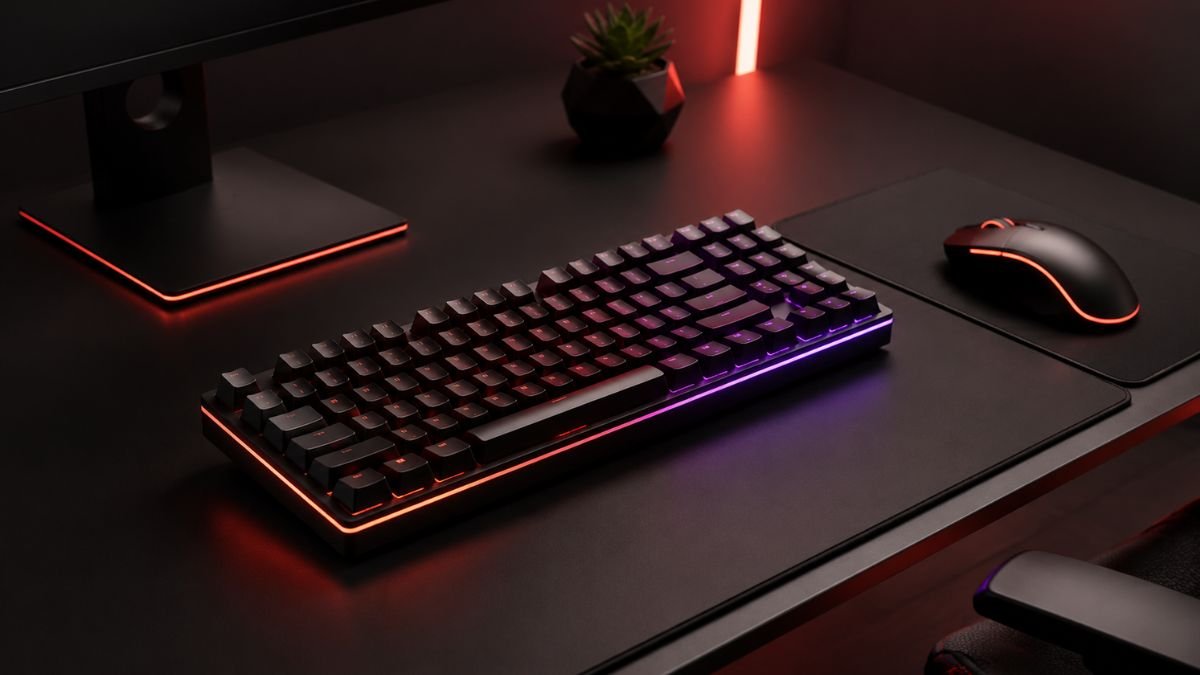
A gaming keyboard buying guide helps you understand the key factors to consider before choosing a gaming keyboard, including keyboard type, switch technology, layout size, connectivity, comfort, and important features.
The right keyboard depends on how you play, how you use your computer, and which features actually improve your overall experience.
Choosing a gaming keyboard is not always as simple as picking the model with the most features or the most eye-catching design. Modern keyboards are available with different technologies, layouts, switches, and customization options, making the decision more complex for beginners and experienced users alike.
Many gaming keyboards advertise features such as RGB lighting, mechanical switches, ultra-fast response times, and advanced software. While these features can be useful, understanding what they actually do is more important than simply choosing a keyboard based on specifications.
A good gaming keyboard should match your personal requirements. A competitive player may prioritize responsiveness and compact layouts, while someone who uses the same keyboard for gaming, studying, or working may prefer comfort and versatility.
The goal of this guide is to explain the essential aspects of gaming keyboards so you can make a more informed decision based on your own needs.
Understanding Different Types of Gaming Keyboards
Gaming keyboards are available in different technologies, and each type offers a different experience. Understanding these differences is the first step when choosing the right option.
Mechanical Gaming Keyboards
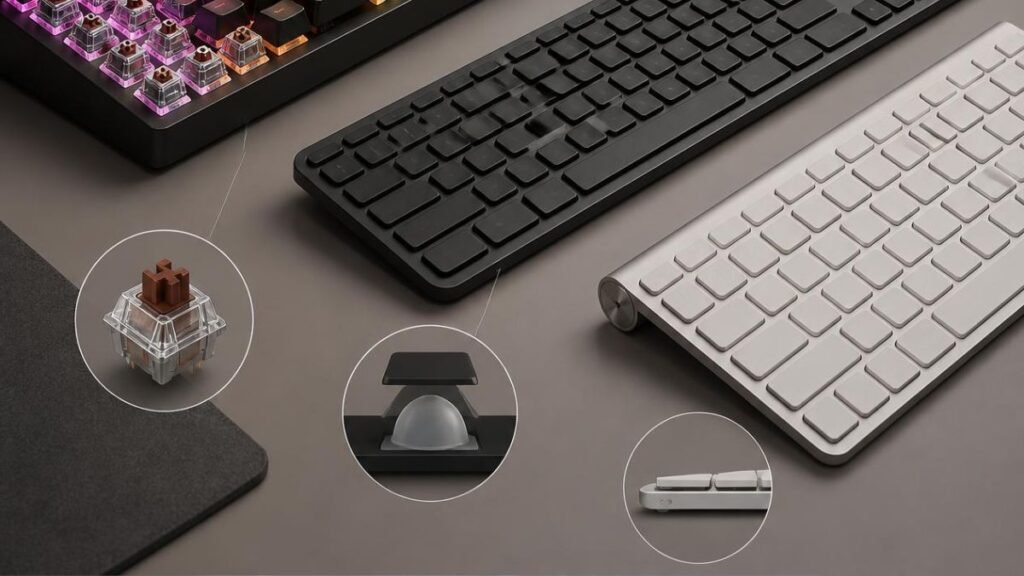
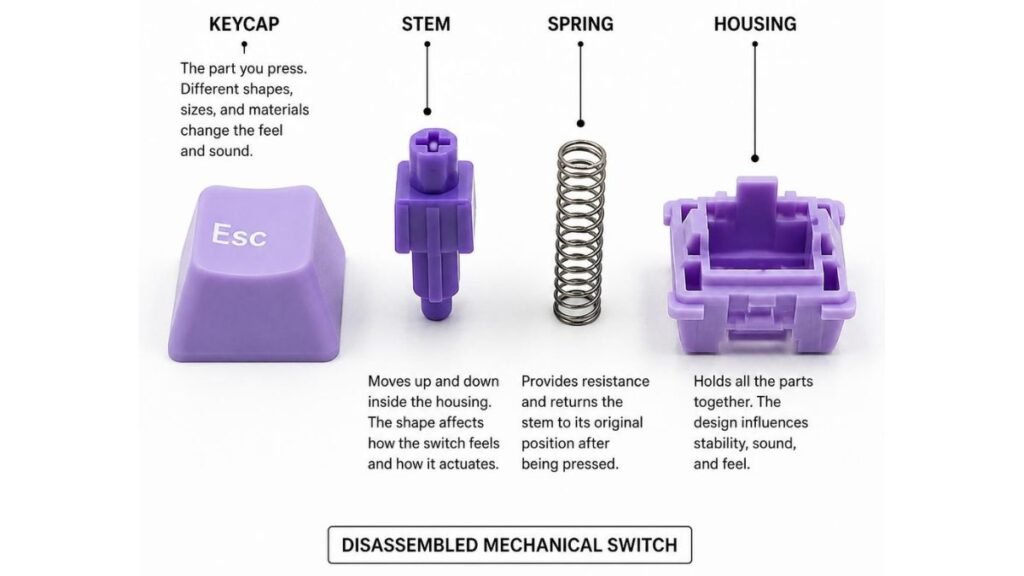
Mechanical keyboards use individual mechanical switches beneath each key. Instead of relying on a single membrane layer, every key has its own mechanism that registers input.
This design allows manufacturers to create different switch experiences, including variations in:
- key resistance;
- feedback;
- sound;
- actuation feeling;
- typing comfort.
Many gamers prefer mechanical gaming keyboards because they provide consistent key presses and a wider range of customization options.
Mechanical keyboards are commonly chosen by users who want:
- a more precise typing experience;
- different switch options;
- long-term durability;
- customization possibilities.
However, mechanical keyboards are not automatically the right choice for everyone. Some users may prefer quieter designs, simpler construction, or lower-cost options.
To understand more about this technology, read our guide on mechanical gaming keyboards.
Membrane Gaming Keyboards
Membrane keyboards use a different technology where key presses are registered through a rubber membrane layer.
Their main characteristics include:
- quieter operation;
- simpler construction;
- lighter designs;
- generally lower cost.
For users who play casually, use their computer occasionally, or prefer a quieter keyboard, membrane models can still provide a comfortable experience.
The main difference is that they usually offer fewer customization options compared with mechanical keyboards.
Hybrid Gaming Keyboards
Hybrid keyboards combine characteristics from different keyboard technologies.
They aim to provide a balance between:
- mechanical-style feedback;
- affordability;
- general usability.
These keyboards can be interesting for users who want some features associated with mechanical keyboards without choosing a fully mechanical design.
Understanding Keyboard Switches
Keyboard switches are one of the most important elements that influence how a keyboard feels.
A switch determines how each key press behaves, including:
- how much pressure is required;
- whether feedback is noticeable;
- how the key sounds;
- how the typing experience feels.
Linear, Tactile, and Clicky Switches
Mechanical switches are commonly divided into three main categories.
| Switch Type | Characteristics | Common Preference |
|---|---|---|
| Linear | Smooth key movement without a noticeable bump | Users who prefer consistent presses |
| Tactile | Provides physical feedback during pressing | Users who want typing feedback |
| Clicky | Includes tactile feedback with an audible sound | Users who enjoy noticeable feedback |
There is no universally perfect switch. The best option depends on personal preference and how the keyboard will be used.
For a deeper explanation of switch technology, explore our article about mechanical keyboard switches.
Choosing the Right Gaming Keyboard Size
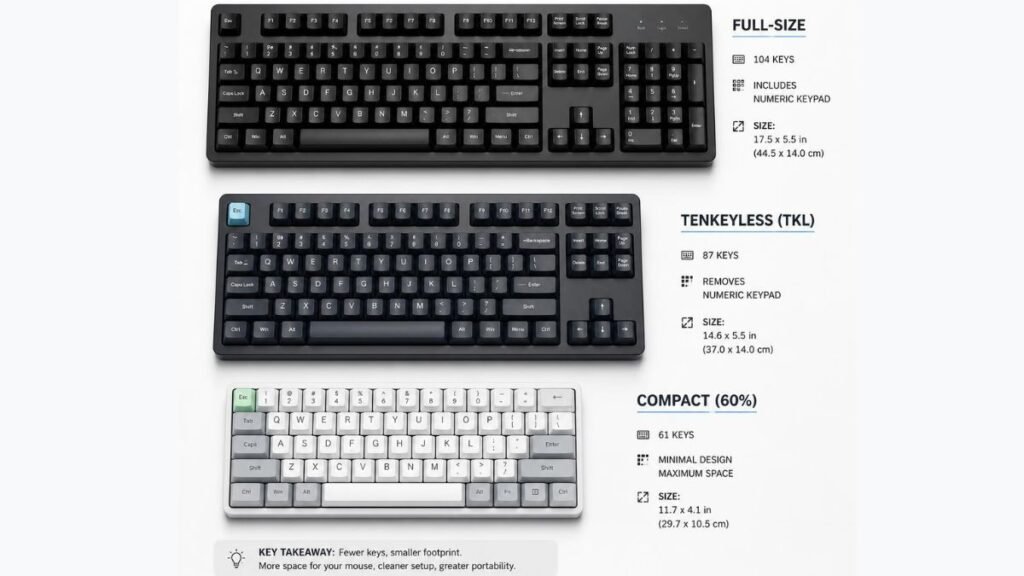
Keyboard size affects both comfort and available desk space.
Different layouts remove or include specific keys depending on their design.
Full-Size Keyboards
Full-size keyboards include:
- standard letter keys;
- function keys;
- navigation keys;
- number pad.
They are useful for users who:
- work with numbers;
- use productivity applications;
- prefer having every key available.
The downside is that they require more desk space.
Tenkeyless (TKL) Keyboards
Tenkeyless keyboards remove the number pad while keeping most essential keys.
Advantages include:
- more room for mouse movement;
- smaller footprint;
- balanced functionality.
TKL layouts are popular among gamers because they provide a good balance between space and usability.
Compact Keyboards
Compact keyboards remove additional keys to create a smaller design.
They are useful for users who:
- have limited desk space;
- prefer minimalist setups;
- frequently transport their keyboard.
However, users who rely on extra keys may need time to adjust.
For more details about layouts and sizes, see our guide on gaming keyboard sizes.
Wired vs Wireless Gaming Keyboards
Connectivity is another important factor when choosing a gaming keyboard.
Both wired and wireless keyboards can provide a good experience, but they offer different advantages.
Wired Gaming Keyboards
Wired keyboards connect directly through a cable.
Common benefits include:
- consistent connection;
- no battery management;
- simple setup;
- reliable daily use.
Many users choose wired keyboards because they prefer a direct connection without needing to think about charging.
Wireless Gaming Keyboards
Wireless keyboards provide more flexibility by reducing cable clutter.
Advantages include:
- cleaner desk organization;
- easier movement;
- more flexible setups.
Modern wireless gaming keyboards can offer reliable performance for many users.
However, wireless users should consider:
- battery life;
- charging habits;
- connection compatibility;
- wireless technology used.
For a detailed look at wireless options, read our guide on wireless gaming keyboards.
Important Gaming Keyboard Features to Understand
Gaming keyboards often include many additional features. Understanding what each feature does helps separate useful improvements from simple marketing.
Anti-Ghosting and Key Rollover
Anti-ghosting helps prevent incorrect inputs when multiple keys are pressed at the same time.
Key rollover determines how many simultaneous key presses can be registered correctly.
These features can be useful for:
- games with multiple commands;
- fast keyboard combinations;
- competitive gameplay situations.
Polling Rate and Response Time
Polling rate describes how frequently a keyboard communicates with the computer.
A higher polling rate can reduce the delay between input and registration, although real-world experience also depends on:
- switch technology;
- connection type;
- software;
- overall keyboard design.
Specifications are useful, but they should always be considered alongside comfort and usability.
RGB Lighting and Customization
RGB lighting is one of the most recognizable features of gaming keyboards.
Although lighting does not directly change gaming ability, it can improve:
- setup appearance;
- personalization;
- visibility in darker environments.
Many keyboards also include software that allows users to customize:
- lighting effects;
- shortcuts;
- profiles;
- key assignments.
How to Choose a Gaming Keyboard Based on Your Needs
The right gaming keyboard depends on more than technical specifications. Your gaming habits, workspace, typing preferences, and daily activities all influence which type of keyboard makes the most sense.
Instead of looking for the keyboard with the most features, focus on the features that match your actual usage.
Choosing a Keyboard for Competitive Gaming
Competitive gamers often prioritize consistency, comfort, and responsiveness.
Players who spend time with fast-paced games may prefer keyboards that offer:
- reliable key registration;
- comfortable switch feedback;
- layouts that provide enough mouse space;
- designs that support longer gaming sessions.
A compact or Tenkeyless keyboard can be useful for players who need additional desk space, especially when using wider mouse movements.
However, a smaller keyboard is not automatically better. Some players prefer having additional keys available for shortcuts, commands, or productivity tasks.
The ideal choice depends on personal preference and the type of games being played.
Choosing a Keyboard for Gaming and Everyday Use
Many users do not have separate keyboards for gaming and daily activities. In these cases, versatility becomes an important factor.
A balanced gaming keyboard can provide:
- comfortable typing;
- suitable gaming features;
- reliable construction;
- useful customization options.
Users who also work, study, write, or create content may prefer a layout that provides more functionality instead of focusing only on gaming features.
A keyboard should fit your complete computer experience, not only your gaming sessions.
Understanding Build Quality and Durability
A gaming keyboard is an accessory that can be used for thousands of hours, making construction quality an important consideration.
Materials and Keyboard Construction
Different keyboards use different materials and construction methods.
Factors that can influence durability include:
- keyboard frame materials;
- keycap quality;
- switch design;
- internal components;
- overall construction.
A well-built keyboard should feel stable during use and maintain consistent performance over time.
Keycaps and Long-Term Comfort
Keycaps affect both the appearance and feeling of a keyboard.
Important aspects include:
- texture;
- shape;
- material;
- resistance to wear.
Some users prefer smoother keycaps, while others prefer textured surfaces that provide additional grip.
Comfort is subjective, so the best option depends on personal preference and typing habits.
Gaming Keyboard Features That Are Often Misunderstood
Many gaming keyboards include advanced features, but understanding their practical value helps users make better decisions.
RGB Lighting Is Mainly About Customization
RGB lighting has become a common feature across gaming accessories.
While it can create an attractive setup and allow personalization, it does not directly affect:
- accuracy;
- game knowledge;
- reaction ability.
For most users, keyboard feel, comfort, and reliability are more important factors.
More Features Do Not Always Mean Better Experience
Some keyboards include:
- additional macro keys;
- advanced software;
- premium materials;
- multiple customization options.
These features can be valuable for specific users, such as streamers, creators, or people who frequently use custom commands.
However, additional features should match your needs. A simpler keyboard with the right design may provide a better experience than a more complex option with features you rarely use.
Common Mistakes When Choosing a Gaming Keyboard
Understanding common mistakes can help prevent disappointment after purchasing a new keyboard.
Ignoring Keyboard Size Before Buying
One of the most common mistakes is choosing a keyboard based only on appearance.
A large keyboard may provide more functionality but require additional desk space.
A compact keyboard may save space but remove keys that some users depend on.
Before choosing a layout, consider:
- available desk space;
- gaming preferences;
- work requirements;
- frequently used keys.
Choosing Switches Without Understanding Them
Switch preference is personal.
A switch that feels comfortable for one person may feel completely different for another.
Before selecting a keyboard, consider whether you prefer:
- smooth key presses;
- noticeable feedback;
- quieter operation;
- audible clicks.
Understanding switch types before purchasing helps avoid choosing a keyboard that does not match your expectations.
Focusing Only on Appearance
Gaming setups often prioritize visual design, and appearance is an important part of personalization.
However, a keyboard should not be selected only because it looks impressive.
Important factors to consider include:
- comfort;
- layout;
- switch type;
- durability;
- compatibility.
A visually attractive keyboard that does not feel comfortable may become frustrating over time.
A Simple Gaming Keyboard Buying Checklist
Before choosing a gaming keyboard, review these questions:
| Question | Why It Matters |
|---|---|
| What games do I mainly play? | Helps determine useful features |
| Do I need a full-size keyboard? | Determines the ideal layout |
| Do I prefer mechanical switches? | Affects typing and gaming feel |
| Will I use it for work or study? | Influences comfort requirements |
| Do I need wireless connectivity? | Determines setup flexibility |
| Which features will I actually use? | Prevents unnecessary spending |
This simple checklist helps create a clearer picture of what type of keyboard fits your situation.
Final Thoughts
Choosing a gaming keyboard is about understanding your own needs rather than simply choosing the model with the most features.
The most important factors are usually:
- keyboard type;
- switch technology;
- size and layout;
- connectivity;
- comfort;
- build quality.
Features like RGB lighting, advanced software, and additional customization can enhance the experience, but they should support the fundamentals rather than replace them.
A well-informed decision starts with understanding how gaming keyboards work and which features actually matter for your setup.
Whether you are building your first gaming station or improving an existing setup, learning these differences will help you choose a keyboard that feels comfortable, practical, and suitable for your everyday use.
FAQ — Gaming Keyboard Buying Guide
What should I look for in a gaming keyboard?
When choosing a gaming keyboard, consider the keyboard type, switch technology, layout size, connectivity, comfort, and build quality. The right features depend on your gaming habits and how you plan to use the keyboard.
Are mechanical keyboards better for gaming?
Mechanical keyboards are popular among gamers because they offer different switch options, consistent key presses, and customization possibilities. However, the best choice depends on personal preference, comfort, and budget.
What keyboard size is best for gaming?
The ideal keyboard size depends on your needs. Full-size keyboards provide more keys, Tenkeyless layouts offer more desk space, and compact keyboards maximize portability. Consider your games, workspace, and daily computer activities before choosing.
Are wireless gaming keyboards reliable?
Modern wireless gaming keyboards can provide a convenient experience with fewer cables and flexible setups. Users should consider battery life, charging needs, and connection compatibility when choosing a wireless option.
Do RGB gaming keyboards improve gaming performance?
RGB lighting mainly provides customization and visual appeal. It can improve the appearance of a gaming setup, but it does not directly improve gaming performance.
Are expensive gaming keyboards worth it?
A more expensive keyboard is not automatically the right choice. Higher-priced models may include premium materials or additional features, but the best value comes from choosing features that match your personal requirements.