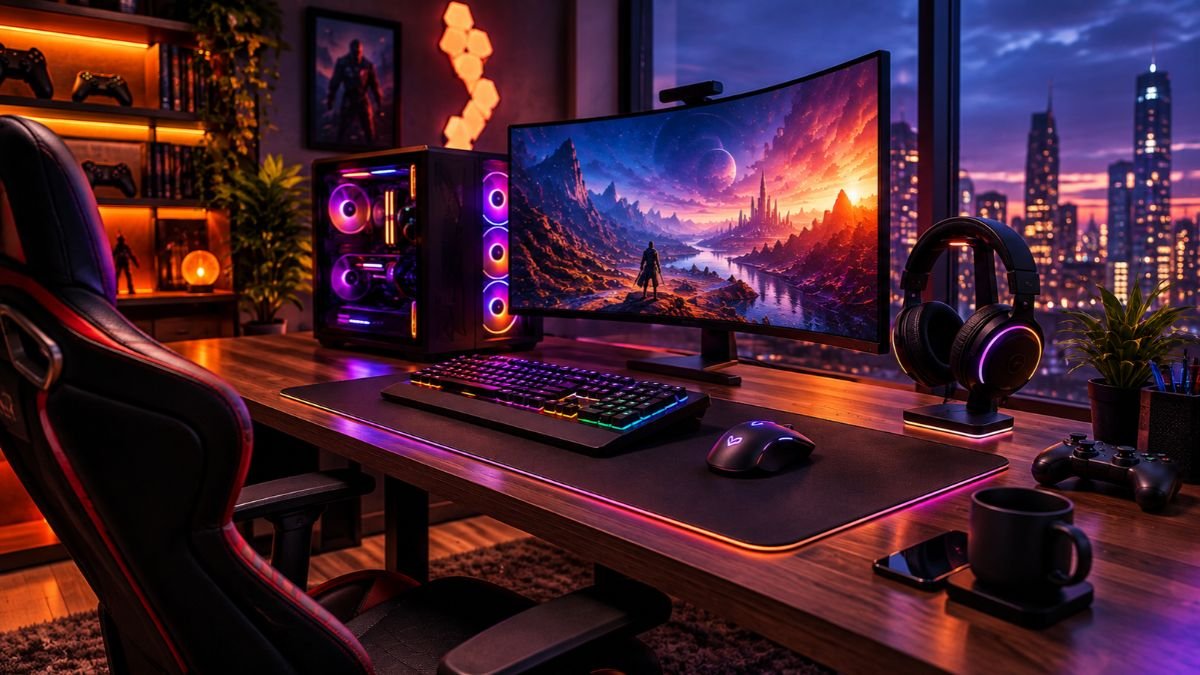
A gaming setup can cost anywhere from around $700 for a basic beginner setup to more than $8,000 for a premium gaming environment.
The final price depends on components such as the gaming PC, monitor, accessories, furniture, and additional equipment like streaming devices.
A balanced setup focuses on performance, comfort, and future upgrades rather than simply spending more money.
Building a gaming setup is no longer only about buying a computer and installing games. Modern gaming spaces often combine powerful hardware, high-refresh-rate displays, ergonomic furniture, personalized lighting, and accessories designed for better comfort and performance.
For someone creating their first gaming space, understanding the total cost can be confusing. Many people calculate only the price of a gaming PC while forgetting important expenses like monitors, keyboards, mice, headsets, desks, chairs, and cable management.
The gaming setup cost can vary significantly because every player has different goals. A casual gamer who plays online multiplayer titles may need a simple and affordable setup, while a competitive gamer or content creator may require higher-performance equipment.
According to the Entertainment Software Association (ESA), millions of Americans actively participate in video gaming, making gaming hardware and accessories a growing part of consumer technology.
As gaming continues to expand beyond entertainment into streaming, esports, and content creation, more users are building dedicated gaming environments.
This guide explains the realistic cost of a gaming setup, what components influence the budget, and how to create a setup that matches your actual needs.
What Components Affect Gaming Setup Cost?
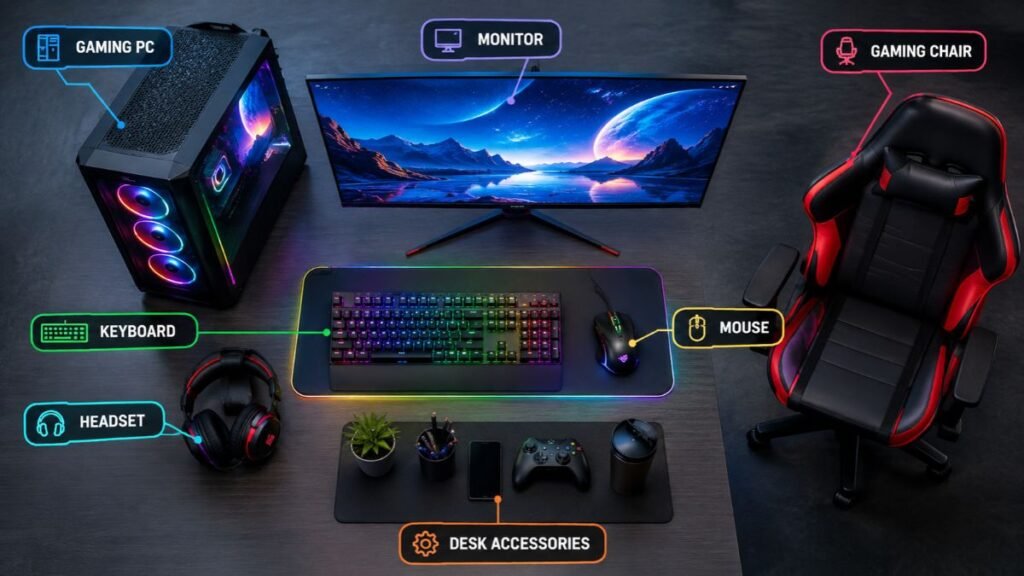
A complete gaming setup includes multiple parts, and each component contributes to the final price. The most expensive setup is not always the best choice. The goal is to create a balanced system where each part supports your gaming experience.
The main factors that influence gaming setup cost include:
- Gaming PC or console
- Monitor quality
- Keyboard and mouse
- Audio equipment
- Gaming desk and chair
- Lighting and room accessories
- Streaming equipment
Understanding these areas helps you decide where your budget should go.
Gaming PC Cost
The gaming PC is usually the largest investment in a setup because it controls performance, graphics quality, loading speeds, and upgrade possibilities.
Understanding the role of different gaming PC components helps users create a balanced setup and avoid spending money on hardware they may not need.
The main components affecting gaming PC cost include:
- Graphics card (GPU)
- Processor (CPU)
- RAM
- Storage
- Motherboard
- Power supply
- Cooling system
- PC case
The graphics card is one of the most important parts because it handles image rendering and directly affects gaming performance.
Modern graphics technologies from companies like NVIDIA GeForce support different performance levels, from entry-level gaming systems to advanced gaming machines.
Entry-Level Gaming PC Setup Cost
A beginner gaming PC setup is designed for users who want reliable performance without spending thousands of dollars.
A typical entry-level budget includes:
| Component | Estimated Cost |
|---|---|
| Gaming PC | $500–$800 |
| Monitor | $120–$250 |
| Keyboard and Mouse | $50–$150 |
| Headset | $40–$100 |
| Basic Accessories | $50–$100 |
Estimated complete setup cost: $700–$1,200
This type of setup is suitable for:
- Competitive games
- Indie games
- Older AAA titles
- Everyday computer tasks
For beginners, investing in a balanced system is usually more valuable than buying expensive accessories immediately.
Mid-Range Gaming PC Setup Cost
A mid-range gaming setup provides a stronger balance between price and performance. This category is popular among users who want smooth gameplay with modern games.
Typical budget:
| Component | Estimated Cost |
|---|---|
| Gaming PC | $1,000–$1,800 |
| Monitor | $250–$500 |
| Mechanical Keyboard | $80–$180 |
| Gaming Mouse | $50–$120 |
| Headset | $80–$200 |
Estimated complete setup cost: $1,500–$2,800
A mid-range setup can support:
- Higher refresh-rate gaming
- Modern AAA games
- Better graphics settings
- Longer hardware lifespan
High-End Gaming Setup Cost
A premium gaming setup focuses on maximum performance, advanced features, and a complete entertainment environment.
High-end setups may include:
- Powerful graphics cards
- Multiple monitors
- Premium peripherals
- Advanced cooling systems
- Streaming equipment
- Custom furniture
Typical costs:
| Component | Estimated Cost |
|---|---|
| High-End Gaming PC | $2,000–$5,000+ |
| Premium Monitor Setup | $500–$2,000 |
| Professional Accessories | $300–$1,000 |
| Advanced Equipment | $300+ |
Estimated complete setup cost: $3,000–$8,000+
These setups are generally designed for:
- Enthusiast gamers
- Streamers
- Content creators
- Competitive players
Monitor Cost in a Gaming Setup
The monitor is one of the most important parts of a gaming setup because it directly affects how games look and feel. Many beginners focus most of their budget on the gaming PC but choose a display that cannot fully take advantage of the hardware.
A powerful computer paired with a basic monitor may limit the overall experience because the display determines important factors such as:
- Resolution
- Refresh rate
- Response time
- Color quality
- Screen size
- Adaptive sync support
When planning your gaming setup cost, the monitor should be considered alongside the performance level of your PC.
For example, a high-end graphics card designed for smooth 4K gaming may not provide its full benefit when paired with an older 60Hz display.
Gaming Monitor Price Range
Different gaming goals require different types of monitors.
| Monitor Type | Average Cost | Best For |
|---|---|---|
| 1080p 144Hz Monitor | $150–$300 | Beginners and competitive gaming |
| 1440p 165Hz Monitor | $250–$600 | Most PC gamers |
| 4K High Refresh Monitor | $600–$1,500+ | Premium gaming setups |
A mid-range 1440p high-refresh monitor is often considered a balanced choice because it provides noticeable improvements in image quality and smoothness without reaching premium pricing.
What Monitor Features Matter for Gaming?
Not every expensive monitor provides a better gaming experience. The most useful features depend on how you play.
Refresh Rate
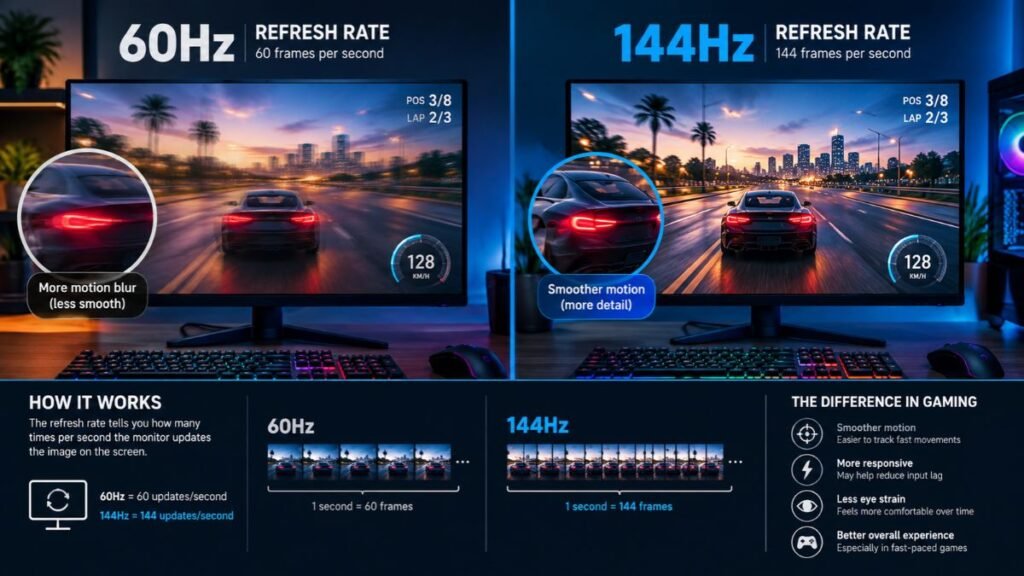
Refresh rate measures how many times the screen updates per second.
Common gaming refresh rates include:
- 60Hz
- 120Hz
- 144Hz
- 165Hz
- 240Hz+
Competitive gamers often prefer higher refresh rates because smoother motion can make fast gameplay easier to follow.
Resolution
Resolution determines image sharpness.
Common options:
| Resolution | Experience |
|---|---|
| 1080p | Affordable and easier for lower-cost PCs |
| 1440p | Strong balance between quality and performance |
| 4K | Highest image detail but requires stronger hardware |
Choosing the right resolution depends on both your budget and your graphics card capability.
Keyboard and Mouse Cost
Gaming peripherals are another important part of the overall gaming setup cost. While keyboards and mice do not improve graphics performance, they directly affect comfort, control, and interaction.
The right peripherals depend on:
- Gaming style
- Hand comfort
- Preferred layout
- Response requirements
- Personal preference
For example, competitive gamers may prioritize lightweight mice and fast-response keyboards, while casual players may focus more on comfort and durability.
Gaming Keyboard Cost
Gaming keyboards range from simple membrane models to advanced mechanical keyboards with customizable switches.
Typical pricing:
| Keyboard Type | Cost Range |
|---|---|
| Basic Gaming Keyboard | $30–$70 |
| Mechanical Gaming Keyboard | $80–$180 |
| Premium Custom Keyboard | $180+ |
Mechanical keyboards are popular because they provide different switch options, allowing users to choose based on typing feel, sound, and responsiveness.
Understanding the differences between layouts, switches, and performance features can help users choose the right keyboard for their needs.
Our guide on gaming keyboard features explains the key technologies that influence keyboard performance.
Gaming Mouse Cost
A gaming mouse can range from affordable models to premium devices designed for competitive gaming.
Typical pricing:
| Mouse Type | Cost Range |
|---|---|
| Basic Gaming Mouse | $20–$50 |
| Mid-Range Gaming Mouse | $50–$120 |
| Premium Gaming Mouse | $120–$200+ |
Important mouse features include:
- Sensor accuracy
- Weight
- Grip style
- Button placement
- Wireless performance
Key mouse features include sensor accuracy, weight, grip style, button placement, and wireless performance.
Companies such as Logitech G develop gaming mice with different designs for casual users, competitive players, and esports-focused gamers.
Gaming Headset Cost
Audio is often underestimated when calculating a gaming setup cost, but it plays a major role in immersion and communication.
A good gaming headset helps with:
- Clear game audio
- Voice communication
- Comfort during long sessions
- Directional sound awareness
Important headset features include:
- Microphone quality
- Wireless connectivity
- Comfort padding
- Battery life
- Audio tuning
Gaming Headset Price Range
| Headset Category | Average Cost |
|---|---|
| Entry-Level Gaming Headset | $40–$80 |
| Mid-Range Gaming Headset | $100–$200 |
| Premium Wireless Headset | $200–$400+ |
Premium headsets often add features such as:
- Better microphones
- Longer battery life
- Improved comfort
- Advanced audio processing
However, expensive audio equipment is not necessary for every gamer. A reliable headset that fits comfortably may provide a better experience than a feature-heavy model that does not match the user’s needs.
Gaming Desk and Chair Cost
A complete gaming environment is not only about performance hardware. Furniture also affects comfort, organization, and long-term usability.
Creating a comfortable gaming space also depends on choosing the right gaming desk accessories, which can improve organization, cable management, and everyday usability.
Many users spend thousands on gaming components but underestimate how much time they spend sitting at their desk.
A comfortable workspace can improve:
- Posture
- Gaming sessions
- Productivity
- Overall experience
Gaming Desk Cost
Gaming desks vary based on size, materials, and features.
| Desk Type | Average Cost |
|---|---|
| Basic Computer Desk | $80–$200 |
| Gaming Desk | $150–$500 |
| Premium Standing Desk | $400–$1,000+ |
Useful desk features include:
- Cable management
- Enough monitor space
- Strong construction
- Comfortable keyboard positioning
Users with multiple monitors or additional equipment should consider larger desk surfaces.
Gaming Chair Cost
A gaming chair is not required to enjoy games, but comfortable seating becomes increasingly important during longer sessions.
| Chair Category | Average Cost |
|---|---|
| Basic Gaming Chair | $100–$250 |
| Ergonomic Mid-Range Chair | $250–$600 |
| Premium Ergonomic Chair | $600–$1,500+ |
When choosing a chair, focus on:
- Adjustable support
- Seat comfort
- Material quality
- Long-term durability
A comfortable chair is often a better investment than purely decorative gaming furniture.
Gaming Lighting and Room Setup Cost
A gaming setup is not complete for many users without some level of personalization. While lighting and room accessories do not directly improve gaming performance, they can improve the atmosphere, organization, and overall enjoyment of the space.
When calculating your gaming setup cost, these elements should be considered optional upgrades after the core hardware is complete.
Common gaming room additions include:
- RGB lighting
- Monitor backlighting
- LED strips
- Wall panels
- Cable management accessories
- Display shelves
- Decorative elements
RGB Lighting Cost for Gaming Setup
RGB lighting has become a popular feature in modern gaming rooms because it allows users to customize the appearance of their environment.
However, lighting should be viewed as an aesthetic upgrade rather than a performance improvement.
Typical costs:
| Lighting Setup | Estimated Cost |
|---|---|
| Basic LED Strips | $20–$80 |
| RGB Desk Lighting | $50–$150 |
| Complete Room Lighting | $150–$400+ |
Smart lighting systems such as Philips Hue allow users to control colors, brightness, and automation through connected devices.
For users building a gaming setup on a limited budget, lighting should usually come after performance components, comfort, and essential accessories.
Streaming Equipment Cost for a Gaming Setup
A gaming streaming setup requires additional equipment because the goal is not only to play games but also to create content for an audience.
Streamers often invest in:
- Microphones
- Webcams
- Capture cards
- Lighting equipment
- Stream controllers
- Audio interfaces
The cost can vary significantly depending on the quality level.
Basic Streaming Setup Cost
A beginner streaming setup may include:
| Equipment | Estimated Cost |
|---|---|
| Webcam | $50–$150 |
| Microphone | $50–$150 |
| Basic Lighting | $30–$100 |
| Capture Card | $100–$200 |
Estimated additional cost:
$300–$700
This is suitable for users who want to start streaming casually while using their existing gaming system.
Professional Gaming Streaming Setup Cost
Professional creators often require higher-quality equipment.
A premium streaming setup may include:
| Equipment | Estimated Cost |
|---|---|
| Professional Microphone | $200–$500 |
| High-Quality Camera | $300–$1,000+ |
| Advanced Lighting | $200–$500 |
| Capture Equipment | $200–$500 |
Estimated additional cost:
$1,000–$3,000+
For creators, audio and video quality often become just as important as gaming performance.
How Much Does the Average Gaming Setup Cost?
The average gaming room setup cost depends on the user’s goals, preferred games, and performance expectations.
Different gamers have different priorities when building their setup. Exploring different gaming setup ideas can help users understand how budget, available space, and personal preferences influence the final configuration.
There is no single price that fits every gamer because different players prioritize different features.
A casual gamer may focus on affordability, while an enthusiast may prioritize maximum performance and customization.
Gaming Setup Cost Breakdown by Budget
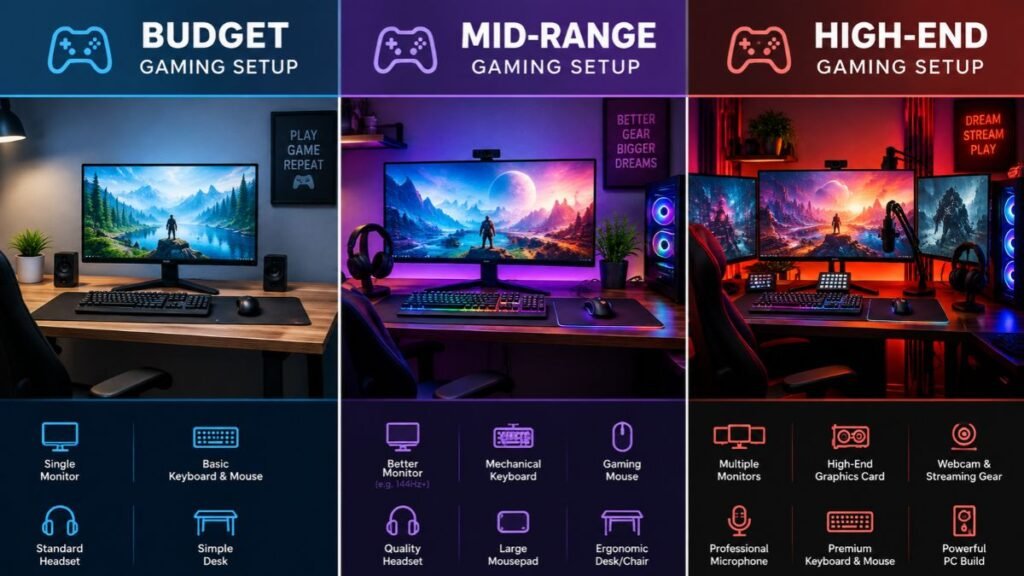
| Setup Level | Estimated Cost | Best For |
|---|---|---|
| Budget Gaming Setup | $700–$1,200 | Beginners and casual gamers |
| Mid-Range Gaming Setup | $1,500–$3,000 | Most PC gamers |
| High-End Gaming Setup | $3,000–$8,000+ | Enthusiasts and creators |
Budget Gaming Setup Cost
A low-cost gaming setup does not mean a poor experience. With careful planning, users can build a capable system without unnecessary spending.
A budget setup usually focuses on:
- Reliable gaming PC
- 1080p monitor
- Comfortable keyboard and mouse
- Basic headset
Example budget:
| Component | Estimated Cost |
|---|---|
| Gaming PC | $600 |
| Monitor | $200 |
| Keyboard and Mouse | $100 |
| Headset | $50 |
| Accessories | $50 |
Total:
Around $1,000
This type of setup is suitable for:
- Competitive online games
- Popular multiplayer titles
- Entry-level PC gaming
Mid-Range Gaming Setup Cost
A mid-range setup is often the most practical choice because it balances performance, price, and future upgrade options.
A typical mid-range setup may include:
| Component | Estimated Cost |
|---|---|
| Gaming PC | $1,200–$1,800 |
| Monitor | $300–$500 |
| Keyboard and Mouse | $150–$300 |
| Headset | $100–$200 |
| Desk and Chair | $400–$800 |
Total:
Approximately $2,000–$3,500
This setup can handle:
- Modern AAA games
- Higher resolution gaming
- Competitive gameplay
- Content creation basics
High-End Gaming Setup Cost
A high-end gaming setup focuses on maximum performance, premium comfort, and advanced customization.
These setups may include:
- Flagship graphics cards
- Multiple monitors
- Premium audio equipment
- Custom PC builds
- Professional streaming equipment
A premium setup can include hardware from companies such as Razer that specialize in gaming peripherals and accessories.
Typical budget:
$5,000–$10,000+
However, higher spending does not automatically mean a better experience. The best setup is the one that matches the user’s actual gaming habits.
Hidden Costs of Building a Gaming Setup
Many beginners underestimate smaller expenses that appear during the setup process.
Small improvements can make a major difference in keeping a gaming space organized. Proper gaming cable management helps reduce clutter, improve desk appearance, and create a cleaner overall setup.
These additional costs may include:
- Surge protectors
- USB hubs
- Cable management tools
- Extra storage
- Desk accessories
- Controller chargers
- Replacement cables
Common Additional Expenses
| Item | Estimated Cost |
|---|---|
| Surge Protector | $20–$80 |
| Cable Management | $20–$100 |
| USB Accessories | $20–$100 |
| External Storage | $50–$200 |
| Desk Accessories | $30–$150 |
These smaller purchases can add several hundred dollars to the final gaming setup cost.
How to Plan a Gaming Setup Budget Step by Step
Creating a gaming setup is easier when the budget is planned before buying individual components. Many beginners make the mistake of choosing products first and trying to calculate the total cost later.
A better approach is to decide what type of gaming experience you want and then divide your budget between the components that matter most.
Step 1: Define Your Gaming Goals
Before deciding your gaming setup cost, identify how you will use the setup.
Ask yourself:
- Do you mainly play casual games?
- Do you want competitive gaming performance?
- Are you planning to stream content?
- Do you need a setup for gaming and productivity?
Different goals require different investments.
For example:
A casual gamer may benefit more from a comfortable desk and reliable hardware, while a competitive player may prioritize a high-refresh-rate monitor and responsive peripherals.
Step 2: Prioritize Performance Components
Not every part of a gaming setup provides the same value.
For most PC gamers, the priority should be:
- Graphics card
- Processor
- Monitor
- Memory and storage
- Keyboard and mouse
- Furniture upgrades
- Lighting and decoration
The graphics card and processor directly influence gaming performance, while accessories mainly improve comfort and usability.
Step 3: Keep Room for Future Upgrades
A smart gaming setup budget considers future improvements.
Instead of replacing everything later, choose components that allow expansion.
Consider:
- Additional storage space
- Upgradeable motherboard options
- Quality power supply
- Good airflow case
- Extra desk space
A flexible setup can reduce long-term costs because individual parts can be upgraded when needed.
Common Mistakes When Building a Gaming Setup
Building a gaming setup is exciting, but poor planning can lead to unnecessary expenses.
Understanding common mistakes helps users spend money more effectively.
Spending Too Much on Appearance First
A visually impressive setup with RGB lighting and expensive decorations may look attractive, but appearance does not improve gaming performance.
A better spending order is:
- Gaming PC performance
- Quality monitor
- Comfortable peripherals
- Ergonomic furniture
- Visual upgrades
A balanced setup usually provides more value than an expensive setup focused only on aesthetics.
Buying More Performance Than You Need
One of the biggest mistakes is purchasing hardware that exceeds your actual requirements.
For example:
A player who mainly enjoys competitive games at 1080p may not need an extremely expensive system designed for maximum 4K gaming.
Before spending more, consider:
- Your favorite games
- Desired resolution
- Target frame rate
- Upgrade plans
Ignoring Audio and Comfort
Many users focus entirely on the PC and forget about the experience around it.
A gaming setup is used for many hours, so comfort matters.
Important areas include:
- Chair support
- Desk height
- Monitor position
- Headset comfort
- Cable organization
A comfortable setup can improve the experience even without upgrading expensive hardware.
PC Gaming Setup Cost vs Console Gaming Setup Cost
The total cost of gaming depends on the platform you choose.
A PC gaming setup usually requires more individual components, while console setups often have fewer hardware requirements.
| Setup Type | Typical Cost Range | Includes |
|---|---|---|
| Console Gaming Setup | $500–$1,500 | Console, TV/monitor, accessories |
| Entry PC Gaming Setup | $700–$1,500 | PC, monitor, peripherals |
| Mid-Range PC Setup | $1,500–$3,500 | Better hardware and accessories |
| Premium Gaming Setup | $5,000+ | High-end hardware and creator equipment |
Both options can provide excellent gaming experiences. The better choice depends on the user’s preferences, game selection, and customization needs.
Is an Expensive Gaming Setup Worth It?
An expensive gaming setup can provide advantages, but higher cost does not automatically mean a better experience.
Premium setups can offer:
- Higher frame rates
- Better image quality
- Improved comfort
- More customization
- Better content creation capability
However, many gamers can enjoy modern games with a carefully planned mid-range setup.
The best gaming setup is the one that matches your actual usage instead of simply having the most expensive components.
Conclusion: How Much Does a Gaming Setup Cost?
The cost of a gaming setup can range from approximately $700 for a beginner system to more than $8,000 for a premium gaming environment.
The biggest factors affecting the final price are:
- Gaming PC performance
- Monitor quality
- Accessories
- Furniture
- Streaming requirements
- Personal preferences
A good gaming setup is not created by spending the most money. It is created by choosing components that provide the right balance between performance, comfort, and future flexibility.
For most gamers, a carefully planned $1,500–$3,000 gaming setup provides an excellent combination of performance and value.
Frequently Asked Questions About Gaming Setup Cost
How much does a gaming setup cost for beginners?
A beginner gaming setup usually costs between $700 and $1,200. This budget can include a capable gaming PC, monitor, keyboard, mouse, headset, and basic accessories for everyday gaming.
What is the average gaming setup cost?
The average gaming setup cost is generally around $1,500 to $3,000 for many PC gamers. This range provides a balance between gaming performance, comfort, and upgrade potential.
Can you build a gaming setup for under $1,000?
Yes, a gaming setup under $1,000 is possible. The key is focusing on essential performance components first and avoiding unnecessary spending on premium accessories or decorations.
How much does a high-end gaming setup cost?
A high-end gaming setup can cost anywhere from $3,000 to more than $8,000 depending on the PC hardware, monitor setup, furniture, peripherals, and streaming equipment.
What is the most expensive part of a gaming setup?
The gaming PC is usually the most expensive component because the graphics card and processor have the biggest impact on performance. However, premium monitors and streaming equipment can also significantly increase the total budget.
Should I spend more on a gaming PC or accessories?
Most users should prioritize the gaming PC and monitor because they directly affect gaming performance. Accessories should be upgraded based on comfort, usage habits, and personal preference.