Last updated on November 2nd, 2026 at 12:29 am
Smart home devices are connected electronic products that allow people to control, automate, and monitor different parts of their homes using smartphones, voice assistants, and intelligent systems.
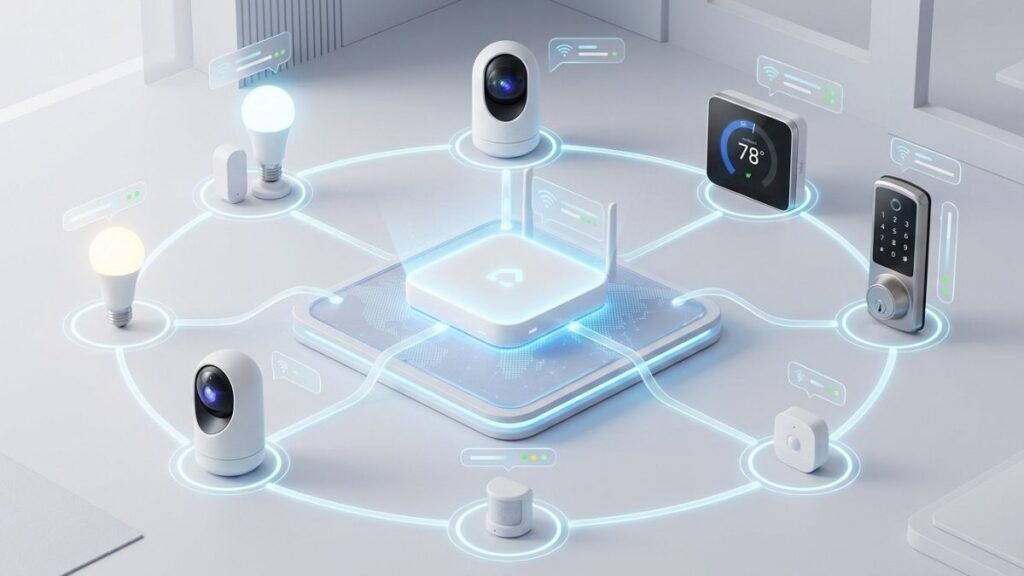
They include devices such as smart lights, security cameras, thermostats, speakers, locks, and appliances that communicate through connected networks to improve convenience, security, and efficiency.
The way people interact with their homes is changing.
A home is no longer only a collection of appliances and electronic devices. With modern connected technology, everyday objects can communicate, respond to commands, and automate routine tasks.
A light can turn on automatically when someone enters a room. A thermostat can adjust temperatures based on schedules. A security camera can send an alert when unexpected activity is detected. A speaker can control multiple devices through a simple voice command.
This shift has made smart home devices one of the fastest-growing segments of consumer technology.
However, for beginners, entering the smart home world can feel overwhelming.
There are hundreds of devices, multiple platforms, different wireless technologies, and compatibility questions that can make choosing the right setup confusing.
Should you start with smart lights or a smart speaker?
Do all devices work together?
Is a smart home expensive?
Which ecosystem should you choose?
This guide explains the foundation of smart home technology, how different devices work, what beginners should understand before buying, and how to create a connected smart home setup that actually improves everyday life.
What Are Smart Home Devices?
Smart home devices are electronic products that connect to a network and allow users to control or automate functions inside their homes.
Unlike traditional devices, smart devices can collect information, communicate with other systems, and perform actions automatically based on commands, schedules, or changes in their environment.
A traditional device usually performs one action.
For example:
A normal light bulb turns on when someone flips a switch.
A smart light bulb can:
- Turn on automatically at a scheduled time
- Change brightness levels
- Adjust colors
- Respond to voice commands
- Connect with other smart devices
The main difference is not simply internet connectivity.
The real advantage of smart home technology comes from automation and interaction between devices.
How Smart Home Devices Work
Most smart home devices operate through four main components:
Hardware and Sensors
The physical device contains technology that allows it to collect information or perform actions.
Examples:
- Motion sensors detect movement
- Cameras capture video
- Thermostats measure temperature
- Door sensors detect opening and closing
These sensors allow devices to understand what is happening around them.
Wireless Connectivity
Smart devices need a method to communicate with other devices and platforms.
Common connection technologies include:
| Technology | Common Uses | Main Advantage |
|---|---|---|
| Wi-Fi | Cameras, speakers, appliances | High speed and easy availability |
| Bluetooth | Locks, small accessories | Low power consumption |
| Zigbee | Sensors and lighting | Reliable mesh networking |
| Thread | Modern smart home devices | Efficient low-power communication |
The type of connection often determines how reliable and efficient a device will be.
For example, a smart security camera needs a stable connection because it transfers video data continuously. A small door sensor does not need the same bandwidth but benefits from low power consumption.
Smart Home Applications
Most smart devices connect through mobile applications.
Apps allow users to:
- Set up devices
- Adjust settings
- Create schedules
- Monitor activity
- Receive notifications
A homeowner can control devices remotely even when away from home.
For example:
Someone leaving work can open a smart home app and turn on lights before arriving home.
Smart Home Platforms
The final layer is the platform that connects different devices together.
Popular platforms include:
- Amazon Alexa
- Google Home
- Apple Home
These platforms allow users to create automation routines.
Example:
A “Good Night” routine could:
- Turn off selected lights
- Lock smart doors
- Adjust the thermostat
- Activate security monitoring
Why Smart Home Devices Are Becoming Popular
The growth of smart home technology is not only about having more gadgets.
Consumers are adopting connected devices because they solve practical problems.
Convenience in Everyday Tasks
One of the biggest benefits of smart home devices is reducing repetitive actions.
Small improvements can make daily routines easier.
Examples:
Instead of checking every room before leaving:
- Smart lights can turn off automatically
- Smart locks can secure doors
- Sensors can monitor activity
Instead of manually adjusting temperature:
- Smart thermostats can manage heating and cooling schedules
The purpose of automation is not to add complexity.
It is to remove unnecessary steps.
Better Control Over Home Systems
Smart devices provide more visibility into how a home operates.
Traditional devices usually provide limited information.
A normal thermostat changes temperature.
A smart thermostat can show:
- Usage patterns
- Temperature history
- Energy information
- Automation options
A normal security camera records footage.
A smart security camera can:
- Send notifications
- Allow remote viewing
- Connect with other security devices
This additional information helps users make better decisions.
Improved Home Security
Security is one of the strongest reasons many homeowners explore smart technology.
Smart security devices can provide:
- Remote monitoring
- Real-time notifications
- Automated responses
- Easier access control
Examples include:
- Smart cameras
- Video doorbells
- Smart locks
- Motion sensors
A connected security system allows homeowners to stay informed about their property even when they are away.
Types of Smart Home Devices Explained
Smart home technology includes many different categories designed to improve different areas of daily life.
Some devices focus on convenience, while others improve security, energy management, or entertainment.
For beginners, the best approach is not buying everything at once. Understanding each category helps identify which technologies actually solve problems in your home.
The main categories include:
- Smart lighting
- Smart speakers and voice assistants
- Smart security devices
- Smart thermostats
- Smart appliances
- Smart entertainment systems
- Smart sensors and automation devices

Smart Lighting Devices
Smart lighting is one of the most common starting points for people building their first smart home.
It is popular because installation is usually simple, the benefits are immediately noticeable, and it does not require major changes to a home.
Smart lighting products include:
- Smart bulbs
- Smart switches
- Smart LED strips
- Smart lamps
Unlike traditional lighting, smart lighting can be controlled through apps, voice commands, and automation routines.
To understand the technology behind connected bulbs, lighting controls, wireless connectivity, and home automation routines, explore our complete guide to smart lighting.
How Smart Lighting Works
A smart lighting system usually connects through:
- Wi-Fi
- Bluetooth
- Zigbee
- Thread
After setup, users can control lights through a smartphone app or connect them with a smart home platform.
Common actions include:
- Turning lights on and off remotely
- Adjusting brightness
- Changing colors
- Creating schedules
- Activating lights through motion sensors
Real-World Smart Lighting Examples
A smart lighting setup can create practical routines:
Morning Routine
Lights gradually increase brightness to help users wake up naturally.
Evening Routine
Lights automatically dim during nighttime hours.
Away Mode
Lights turn on and off randomly when homeowners are away to make the house appear occupied.
What Beginners Should Consider Before Buying Smart Lights
Not all smart lighting products work the same way.
Important factors include:
Compatibility
Check whether the lights support your preferred platform:
- Amazon Alexa
- Google Home
- Apple Home
Installation
Smart bulbs are usually easier because they replace existing bulbs.
Smart switches may require electrical installation but can control traditional lighting fixtures.
Connection Type
Wi-Fi bulbs are simple for beginners, while Zigbee and Thread systems may provide better performance for larger homes.
Smart Speakers and Voice Assistants
Smart speakers are often considered the control center of a smart home.
They allow users to interact with connected devices through voice commands.
Examples of tasks include:
- Turning lights on
- Adjusting temperature
- Playing music
- Setting reminders
- Creating routines
How Voice-Controlled Smart Homes Work
A voice assistant receives a command and sends instructions to compatible devices.
Example:
User says:
“Turn off the living room lights.”
The process:
- Smart speaker receives the voice command
- Voice assistant processes the request
- Connected platform sends instructions
- Smart lights perform the action
These actions usually happen within seconds.
Popular Smart Home Voice Platforms
Amazon Alexa
Amazon Alexa is widely used because of its large ecosystem of compatible devices.
It supports many categories, including:
- Lighting
- Security cameras
- Smart plugs
- Thermostats
- Entertainment devices
Official information about Alexa features and supported devices is available through the Amazon Alexa platform.
Google Home
Google Home integrates with Google’s ecosystem and works closely with Google services.
It can connect smart home control with:
- Android devices
- Google Assistant
- Google services
For users already using Google’s ecosystem, this can create a more connected experience.
Apple Home
Apple Home focuses on integration with Apple devices and emphasizes privacy-focused smart home management.
Users can control compatible accessories through:
- iPhone
- iPad
- Apple Watch
- HomePod
Apple explains its smart home ecosystem through its official Apple Home platform.
Smart Security Devices
Smart security is one of the fastest-growing areas of home automation.
Many homeowners begin their smart home journey because they want better visibility and control over their property.
Smart security devices include:
- Smart cameras
- Video doorbells
- Smart locks
- Motion sensors
- Smart alarms
Smart Security Cameras
Smart cameras allow homeowners to monitor their property remotely.
Features may include:
- Live video streaming
- Motion detection
- Smartphone notifications
- Night vision
- Two-way communication
For a deeper understanding of camera technology, explore our guide to how security cameras work, including their features, connectivity options, video storage, and privacy considerations.
A smart camera can provide awareness, but users should also consider:
- Privacy settings
- Storage options
- Network security
- Camera placement
Smart Doorbells
Video doorbells combine traditional doorbells with connected cameras.
They allow users to:
- See visitors remotely
- Receive motion alerts
- Communicate through two-way audio
A homeowner can answer a delivery person even when they are not physically at home.
Smart Locks
Smart locks replace or enhance traditional locks.
Common features include:
- Keyless entry
- Temporary access codes
- Remote locking
- Activity history
They are especially useful for:
- Families
- Rental properties
- People who frequently forget keys
Smart Thermostats and Climate Control Devices
Smart thermostats focus on improving comfort while helping users manage energy usage.
Traditional thermostats require manual adjustments.
Smart thermostats can automate temperature control based on:
- Schedules
- Occupancy
- User preferences
- Environmental conditions
Features of Smart Thermostats
Common features include:
- Smartphone control
- Learning schedules
- Temperature automation
- Energy reports
- Integration with smart home platforms
Example Smart Thermostat Routine
A homeowner leaves for work:
- Thermostat reduces heating or cooling
Before returning:
- Temperature adjusts automatically
At night:
- Temperature changes for sleeping comfort
The main benefit is reducing unnecessary manual adjustments.
Smart Appliances
Smart appliances bring connectivity into everyday household equipment.
Examples include:
- Smart refrigerators
- Smart ovens
- Smart washing machines
- Smart dishwashers
- Smart coffee makers
What Makes an Appliance Smart?
A connected appliance may provide:
- Remote control
- Notifications
- Maintenance alerts
- Usage information
- Automated settings
For example:
A smart washing machine can notify a user when laundry is complete.
A smart oven can allow monitoring through a mobile app.
Are Smart Appliances Necessary?
Smart appliances are not automatically better than traditional appliances.
The value depends on whether connected features solve a real problem.
A useful smart appliance should provide benefits such as:
- Saving time
- Improving efficiency
- Providing useful information
- Reducing daily effort
A connected feature that is rarely used may not justify additional cost.
Smart Sensors and Automation Devices
Sensors are an important part of advanced smart homes because they allow devices to respond automatically.
Common sensors include:
- Motion sensors
- Door sensors
- Temperature sensors
- Water leak sensors
- Air quality sensors
Why Sensors Matter
Without sensors, many smart devices only respond to direct commands.
With sensors, homes can become more automatic.
Example:
Without sensor:
User manually turns hallway lights on.
With sensor:
Motion detected → lights turn on automatically.
Sensors are what transform a collection of smart products into a coordinated smart home system.
How Smart Home Ecosystems Work
One of the most important concepts beginners need to understand is that smart home devices are not isolated products.
A truly useful smart home depends on how different devices communicate and work together.
This connected environment is called a smart home ecosystem.
An ecosystem determines:
- Which devices can connect
- Which app controls them
- Which voice assistant works
- Which automation features are available
- How easily the system can expand in the future
Choosing the right ecosystem early can prevent compatibility problems later.
Understanding Smart Home Platforms
The most common consumer smart home platforms are:
- Amazon Alexa
- Google Home
- Apple Home
Each platform has different strengths, but none is perfect for every user.
The best choice depends on:
- Devices you already own
- Smartphone ecosystem
- Privacy preferences
- Future expansion plans
Amazon Alexa Smart Home Ecosystem
Amazon Alexa is one of the most widely adopted smart home platforms, allowing users to control compatible smart home devices through voice commands, routines, and connected experiences using the Amazon Alexa smart home ecosystem.
It is popular because many manufacturers create devices that work with Alexa.
Compatible categories include:
- Smart lights
- Smart plugs
- Security cameras
- Smart locks
- Thermostats
- Entertainment devices
Alexa allows users to create routines that combine multiple actions.
Example:
A “Movie Night” routine could:
- Dim the lights
- Turn on a television
- Adjust smart blinds
- Start a speaker system
The strength of Alexa is its broad compatibility and large device ecosystem.
However, beginners should still check compatibility before purchasing because not every smart device supports every Alexa feature.
Google Home Smart Home Ecosystem
Google Home focuses on connecting smart devices with Google’s services and Assistant technology. The platform allows users to manage compatible devices, create routines, and control their connected home through the Google Home ecosystem.
It is often attractive for users who already use:
- Android smartphones
- Google Calendar
- Google services
- Google Nest products
Google Home allows users to manage connected devices through:
- Google Home app
- Voice commands
- Automated routines
A user can create routines based on daily habits.
Example:
A morning routine could:
- Turn on selected lights
- Provide weather information
- Adjust connected devices
- Read calendar appointments
The advantage of Google Home is the connection between smart home control and Google’s broader ecosystem.
Apple Home Smart Home Ecosystem
Apple Home is designed for users who prefer Apple’s ecosystem. It allows users to control compatible smart home accessories, create automations, and manage connected devices through Apple products using the Apple Home app.
It integrates with devices such as:
- iPhone
- iPad
- Apple Watch
- HomePod
Apple places strong emphasis on privacy and secure device communication.
According to Apple Home, users can control compatible accessories and create automations through Apple devices.
Apple Home can be a strong option for users who already rely heavily on Apple products.
However, beginners should remember that device selection may be more limited compared with broader platforms.
Smart Home Ecosystem Comparison
| Platform | Best For | Strengths | Considerations |
|---|---|---|---|
| Amazon Alexa | Users wanting broad device support | Large ecosystem and compatibility | Feature availability can vary by device |
| Google Home | Google and Android users | Strong assistant integration | Some advanced features depend on ecosystem |
| Apple Home | Apple users | Privacy and device integration | Smaller compatible device selection |
Matter: The Technology Improving Smart Home Compatibility
For years, one of the biggest challenges in smart home technology has been compatibility. Different manufacturers often used separate systems, making it difficult for consumers to create a connected home where devices worked together smoothly.
The Matter smart home standard was developed to improve interoperability between connected devices from different manufacturers.
A customer might buy:
- A smart speaker from one company
- Smart lights from another
- A security device from a third manufacturer
Then discover that some features do not work together.
This problem created the need for a common standard.
That standard is called Matter.
What Is Matter?
Matter is a smart home connectivity standard designed to help devices from different manufacturers communicate more easily.
It is supported by major technology companies and aims to simplify device compatibility.
The Connectivity Standards Alliance manages the Matter standard and works with companies that develop compatible smart home products.
Why Matter Matters for Beginners
Before standards like Matter, choosing smart home devices often required researching:
- Which app is needed
- Which platform is supported
- Whether devices communicate properly
Matter aims to make the buying process simpler.
Instead of asking:
“Does this device work with my exact system?”
Consumers can increasingly look for compatibility with common standards.
Thread Technology Explained
Thread is another important technology used in modern smart homes. It is a low-power wireless networking protocol designed for connected devices such as sensors, smart locks, and lighting products.
The Thread Group provides technical information about how Thread technology helps create reliable and secure smart home networks.
Thread is useful for devices such as:
- Sensors
- Smart locks
- Lighting
- Battery-powered accessories
How Thread Works
Traditional Wi-Fi devices usually connect directly to a router.
Thread devices create a mesh network where devices can communicate with each other.
Benefits include:
- Lower energy consumption
- Better reliability
- Efficient communication between devices
Thread is especially useful for homes with many small connected devices.
Smart Home Device Compatibility Explained
Compatibility is one of the most important factors when building a smart home.
A device may have impressive features, but if it does not work with your existing setup, the experience can become frustrating.
Before buying a smart home device, check:
- Supported platforms
- Required applications
- Connection technology
- Hub requirements
- Manufacturer support
Wi-Fi vs Bluetooth vs Zigbee vs Thread
Different connection technologies serve different purposes.
| Technology | Best Used For | Advantages | Limitations |
|---|---|---|---|
| Wi-Fi | Cameras, speakers, appliances | Fast and widely available | Higher energy use |
| Bluetooth | Small accessories | Simple setup and low power | Limited range |
| Zigbee | Sensors and lighting | Efficient mesh networking | Often requires hub |
| Thread | Modern connected devices | Reliable and energy efficient | Newer ecosystem |
Why Device Compatibility Is More Important Than Features
Many beginners focus on product features first.
For example:
“This camera has high-resolution video.”
But another question is more important:
“Will this camera work properly with my smart home system?”
A device with fewer features but better integration may provide a better experience.
A successful smart home is not a collection of expensive products.
It is a group of devices that communicate smoothly.
How to Choose the Right Smart Home Setup as a Beginner
The best smart home setup grows over time.
Beginners should avoid buying random devices and expecting everything to connect automatically.
A better approach is creating a simple foundation.
Step 1: Choose Your Main Ecosystem
Start by deciding:
- Alexa
- Google Home
- Apple Home
Consider the devices you already use.
For example:
An iPhone user may prefer Apple Home integration.
An Android user may prefer Google Home.
Someone prioritizing device variety may consider Alexa.
Step 2: Start With Useful Devices
A beginner setup does not need dozens of products.
A practical starting point may include:
- Smart speaker
- Smart lights
- Smart plug
- Smart security device
Among these options, smart plugs are often one of the easiest ways to introduce automation because they allow users to control existing devices without replacing them with completely new smart appliances.
These provide noticeable benefits without creating unnecessary complexity.

Step 3: Build Around Real Problems
The best smart home devices solve specific problems.
Examples:
Problem:
“I forget to turn lights off.”
Solution:
Smart lighting automation.
Problem:
“I want to monitor my home remotely.”
Solution:
Smart security devices.
Problem:
“I waste energy adjusting temperature manually.”
Solution:
Smart thermostat.
Benefits of Smart Home Devices
The value of smart home devices is not simply having more technology inside your house.
A well-designed smart home helps people complete everyday tasks more easily by combining automation, connectivity, and better control.
The biggest benefits usually fall into four areas:
- Convenience
- Security
- Energy management
- Personalization
However, the results depend on choosing devices that solve real problems instead of adding unnecessary complexity.
Convenience and Everyday Automation
The most noticeable benefit of smart home technology is reducing repetitive tasks.
Many small actions that people perform every day can be automated.
Examples:
- Turning lights on and off
- Adjusting temperature
- Locking doors
- Controlling entertainment systems
- Managing appliances
Instead of controlling each device separately, automation allows multiple actions to happen together.
Smart Home Routines
Routines are one of the most useful features of connected homes.
A routine combines several actions into one command or automatic event.
Example:
Morning Routine
A smart home could:
- Slowly increase bedroom lighting
- Adjust thermostat settings
- Start connected appliances
- Provide weather updates
- Display calendar information
Leaving Home Routine
When a person leaves:
- Selected lights turn off
- Smart locks secure doors
- Thermostat adjusts settings
- Security monitoring activates
Evening Routine
At night:
- Lights become warmer and dimmer
- Doors are checked
- Entertainment devices turn off
- Temperature adjusts for sleeping
The goal of routines is not to make homes complicated.
The goal is to make everyday life simpler.
Better Home Security and Monitoring
Security is one of the strongest reasons consumers adopt smart home devices.
Traditional security systems often required users to be physically present to check what was happening.
Smart security devices allow homeowners to monitor their homes remotely.
Common security devices include:
- Smart cameras
- Video doorbells
- Smart locks
- Motion sensors
- Window and door sensors
How Connected Security Systems Work
A smart security system can combine multiple devices.
Example:
A motion sensor detects movement.
↓
The camera starts recording.
↓
The homeowner receives a smartphone notification.
↓
Smart lights activate to improve visibility.
This type of automation creates faster awareness of unusual activity.
However, smart security devices should be viewed as monitoring tools, not complete replacements for responsible security practices.
Users should also consider:
- Strong account passwords
- Software updates
- Secure Wi-Fi networks
- Privacy settings
Energy Efficiency and Smart Home Devices
Energy management is another important advantage of connected technology. Smart home devices such as connected thermostats, lighting systems, and energy monitoring tools can help homeowners better understand and manage their energy consumption.
Resources from the U.S. Department of Energy provide information about energy efficiency and ways to reduce unnecessary energy consumption.
Many homes waste energy because systems continue operating when they are not needed.
Examples:
- Smart thermostats adjust heating and cooling
- Smart plugs monitor appliance usage
- Smart lights reduce unnecessary operation
- Energy monitoring devices provide usage information
How Smart Devices Help Reduce Waste
A traditional device usually operates according to manual input.
A smart device can respond automatically.
Example:
Traditional thermostat:
User manually changes temperature.
Smart thermostat:
- Detects schedule patterns
- Adjusts temperature automatically
- Provides usage insights
Smart devices do not automatically guarantee lower energy costs.
The biggest improvements usually come from combining:
- Better information
- Automation
- More efficient habits
Personalized Home Experiences
One of the future directions of smart home technology is personalization.
Instead of every user manually controlling devices, systems are becoming better at adapting to individual preferences.
Examples:
A smart lighting system may learn preferred brightness levels.
A smart thermostat may recognize temperature preferences.
A smart speaker may provide personalized information.
AI and the Future of Personalized Smart Homes
Artificial intelligence is expected to play a larger role in smart home automation.
Future systems may become better at:
- Understanding routines
- Predicting user needs
- Optimizing energy usage
- Coordinating multiple devices
According to MIT Technology Review, artificial intelligence is increasingly influencing consumer technology by enabling systems to become more adaptive and personalized.
Common Smart Home Mistakes Beginners Should Avoid
Building a smart home is easier than ever, but beginners often make mistakes that create unnecessary frustration.
Understanding these mistakes helps create a better long-term setup.
Buying Devices Without Checking Compatibility
One of the most common mistakes is choosing devices based only on features.
A product may look impressive but create problems if it does not integrate with existing devices.
Before purchasing, check:
- Supported platforms
- Required apps
- Connection technology
- Hub requirements
- Future compatibility
Example Compatibility Problem
A user buys:
- Smart lights from one ecosystem
- Security camera from another
- Smart speaker from another platform
Each device works individually.
But automation between them may be limited.
The result is a fragmented smart home.
Adding Too Many Devices Too Quickly
More devices do not always create a better experience.
A home with many disconnected products can become difficult to manage.
Common problems:
- Too many apps
- Confusing controls
- Difficult troubleshooting
- Higher maintenance
A better approach:
Start small.
Learn how your system works.
Expand when you identify a real need.
Ignoring Privacy and Security
Smart home devices collect and process information.
Users should also consider cybersecurity practices such as strong passwords, software updates, and secure networks when managing connected devices.
Organizations such as the National Institute of Standards and Technology cybersecurity resources provide guidance related to protecting digital systems and connected technologies.
Depending on the product, this may include:
- Voice interactions
- Camera recordings
- Usage patterns
- Device activity
Users should review:
- Privacy controls
- Data-sharing settings
- Account protection options
Choosing the Cheapest Option Without Considering Long-Term Support
Price is important, but smart devices also depend heavily on software and manufacturer support.
A cheaper device may become problematic if:
- Updates stop
- Security improvements are unavailable
- Compatibility decreases over time
Important factors include:
- Brand reliability
- Software support
- Security practices
- Ecosystem compatibility
The Future of Smart Home Technology
Smart home technology is moving from simple remote control toward intelligent automation.
The future will likely focus on systems that understand users better and require less manual interaction.
AI-Powered Smart Homes
Artificial intelligence will become increasingly important in connected homes.
Instead of only responding to commands, future systems may predict needs.
Examples:
A smart home may recognize:
- When residents usually arrive
- Preferred temperature settings
- Typical lighting patterns
- Energy usage habits
Then automatically adjust the environment.
More Unified Smart Home Experiences
Historically, smart homes have been challenging because devices came from different manufacturers with different systems.
Standards such as Matter are helping improve interoperability.
Future smart homes will likely focus less on individual gadgets and more on complete experiences.
As smart homes become more connected, technologies that improve device convenience and usability, such as wireless charging technology, may become increasingly important for future connected environments.
The question may shift from:
“What smart device should I buy?”
to:
“How can my home better support my lifestyle?”
Conclusion: Creating a Smart Home Starts With the Right Foundation
Smart home devices are changing the way people interact with their living spaces.
The most successful smart homes are not built by adding the largest number of connected products. They are built by choosing devices that solve real problems and work together as part of a reliable system.
For beginners, the best approach is simple:
- Understand how smart home technology works
- Choose a compatible ecosystem
- Start with useful devices
- Build gradually based on daily needs
- Pay attention to privacy and security
A smart home does not need to be complicated.
A few well-connected devices can already improve comfort, convenience, and control.
As technologies such as artificial intelligence, Matter, and improved connectivity standards continue developing, smart homes will become easier to manage and more personalized.
When building a smart home, focusing on compatibility, security, and long-term support is usually more important than choosing the largest number of devices.
Understanding the fundamentals of smart home devices today helps consumers make better technology decisions in the future.
Frequently Asked Questions About Smart Home Devices
What are smart home devices?
Smart home devices are connected electronic products that allow users to control, automate, or monitor parts of their homes. They use technologies such as Wi-Fi, Bluetooth, Zigbee, or Thread and can be managed through smartphone apps, voice assistants, or automated routines.
Are smart home devices worth it for beginners?
Smart home devices can be valuable for beginners when they solve specific problems. Simple products such as smart lights, smart plugs, and smart speakers are often good starting points because they provide useful automation without requiring a complex setup.
Do smart home devices work with each other?
Smart home devices do not always work together automatically. Compatibility depends on the platform, manufacturer support, and connection technology. Checking support for ecosystems such as Amazon Alexa, Google Home, Apple Home, and Matter can help prevent compatibility issues.
Do I need a smart home hub?
Not every smart home requires a hub. Many Wi-Fi devices connect directly to a home network. However, larger systems using technologies such as Zigbee or certain automation setups may benefit from a dedicated hub to improve communication between devices.
Are smart home devices difficult to install?
Many beginner-friendly smart home devices are designed for simple installation. Smart bulbs, plugs, and speakers often require only an app setup. More advanced products, such as smart switches or security systems, may require additional installation steps.
Are smart home devices secure?
Smart home devices can be secure when users follow recommended security practices. Important steps include using strong passwords, keeping firmware updated, securing home networks, and reviewing privacy settings.
Will AI change smart home devices in the future?
Artificial intelligence is expected to make smart home devices more adaptive. Future systems may better understand user habits, automate more tasks, improve energy management, and create more personalized home experiences.

I’m a Technology Editor at SmartGadgetWave with a passion for innovation, AI, and consumer technology. I enjoy exploring the latest gadgets, smart home devices, and wearable tech. My goal is to make technology easy to understand by sharing practical insights, honest perspectives, and helpful product comparisons so readers can make smarter tech decisions.