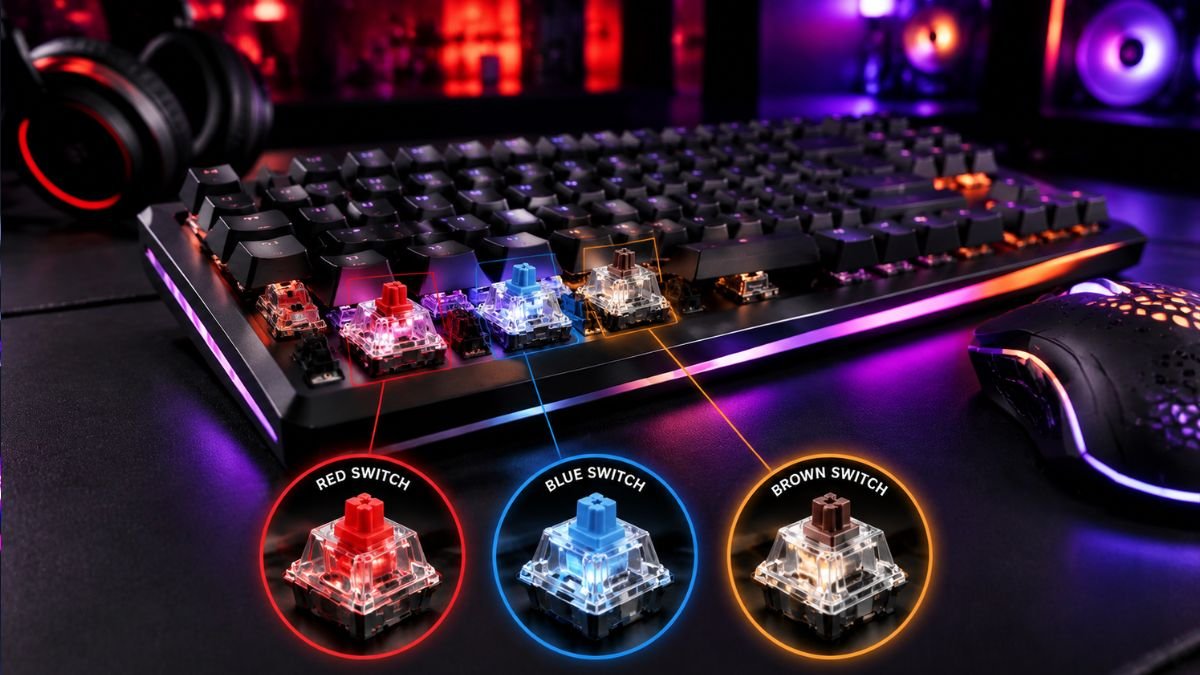
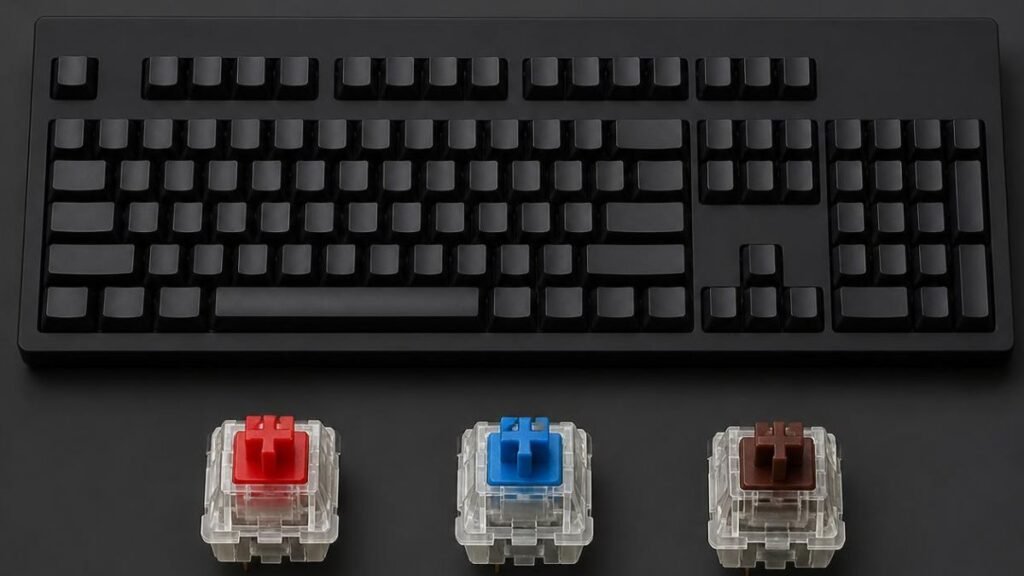
Mechanical keyboard switches determine how a keyboard feels, sounds, and responds. Red switches are smooth and fast, Blue switches offer tactile feedback with a click sound, and Brown switches provide a balanced typing experience.
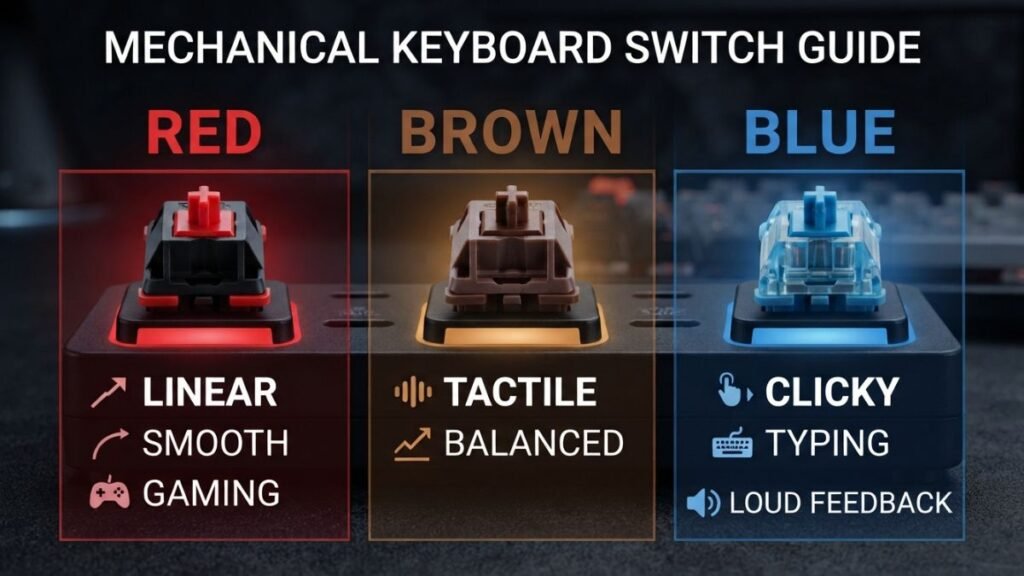
Red switches are smooth and linear, Blue switches provide a loud clicking response, and Brown switches offer tactile feedback without the same level of noise. Each type is designed for different typing and gaming preferences.
Choosing a mechanical keyboard can feel confusing, especially when manufacturers advertise dozens of switch options with technical descriptions like linear, tactile, actuation force, and travel distance.
For many beginners, the keyboard itself looks almost identical from the outside. The major difference is hidden underneath each keycap: the mechanical switch.
Unlike traditional membrane keyboards, mechanical keyboards use individual switches under each key. These switches determine the amount of pressure required, the feeling during a key press, the sound produced, and how quickly a key registers an input.
According to information from Cherry MX official website, mechanical switches are designed with different characteristics such as actuation force, operating position, and tactile feedback to create different typing experiences.
For gamers, a switch can influence how responsive a keyboard feels during fast movements. For writers and programmers, the switch can affect comfort during long typing sessions.
The most commonly discussed mechanical keyboard switches are Red, Blue, and Brown switches. Understanding their differences makes it easier to choose a keyboard based on how you actually use your computer rather than relying only on marketing terms.
How Mechanical Keyboard Switches Work
A mechanical keyboard switch is the component located underneath each keycap that registers a key press. Instead of using a single rubber membrane layer like many standard keyboards, mechanical keyboards use individual mechanisms for each key.
When a user presses a key, several parts inside the switch work together:
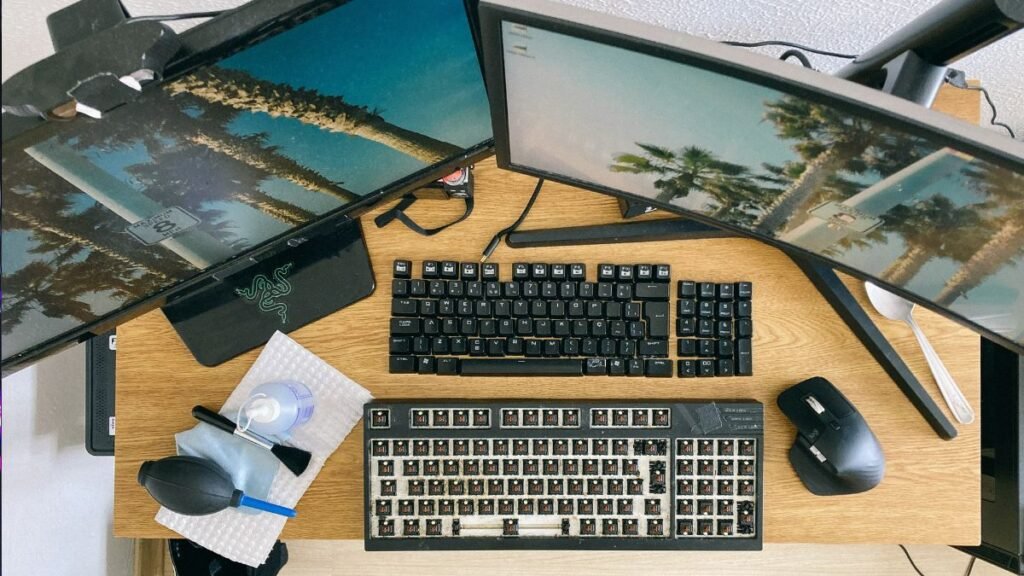
- Stem: The moving plastic component that determines the switch shape and key feel.
- Spring: Controls the resistance and how much force is needed to press the key.
- Housing: The outer structure that keeps the internal components aligned.
- Metal contacts: The electrical components that register the keystroke.
The combination of these parts creates the personality of a keyboard.
Two keyboards can look almost identical but feel completely different because they use different switches.
For example:
- One keyboard may feel extremely smooth and fast.
- Another may have a noticeable bump before the key activates.
- Another may create a satisfying click sound with every press.
These differences come from switch design, not from the keycaps or the keyboard frame alone.
The Three Main Mechanical Keyboard Switch Categories
Most mechanical switches fall into three main categories:
Understanding switch types is only one part of choosing the right keyboard. Learn more about important keyboard features in our guide to Gaming Keyboard Features Explained for Beginners.
Linear Switches
Linear switches provide a smooth keystroke from the top of the press to the bottom.
There is:
- No tactile bump.
- No clicking sound.
- Consistent movement throughout the key travel.
The main advantage is speed and smoothness.
Many gamers prefer linear switches because rapid key presses feel predictable. For games requiring quick reactions, such as first-person shooters, the uninterrupted movement can feel natural.
However, some users dislike linear switches because they do not provide physical feedback telling them when the key has activated.
Tactile Switches
Tactile switches include a noticeable bump during the key press.
This bump tells the user that the switch has reached the activation point.
Advantages:
- Better typing feedback.
- Less dependence on pressing keys completely downward.
- More satisfying for many writers.
Tactile switches are popular among people who use their keyboards for a mixture of:
- Gaming.
- Writing.
- Programming.
- General computer work.
Clicky Switches
Clicky switches combine tactile feedback with an audible clicking sound.
The user feels a bump and hears a click during activation.
Many people enjoy clicky switches because they create a traditional mechanical typing experience.
However, the additional sound can become a disadvantage in:
- Shared offices.
- Libraries.
- Streaming environments.
- Homes with sleeping family members nearby.
Mechanical Keyboard Switches Explained: Red vs Blue vs Brown
The most common comparison beginners search for is Red vs Blue vs Brown switches.
Although these three switches are often grouped together, they provide very different experiences.
| Switch | Type | Feel | Sound | Best For |
|---|---|---|---|---|
| Red | Linear | Smooth and consistent | Quiet | Gaming and fast typing |
| Brown | Tactile | Noticeable feedback bump | Moderate | Gaming, typing and programming |
| Blue | Clicky | Tactile bump with click | Loud | Typing enthusiasts |
Red Switches Explained
What Are Red Mechanical Keyboard Switches?
Red switches are linear mechanical switches designed for smooth and uninterrupted key movement.
They usually require relatively low force compared with heavier switches, making them popular among gaming keyboard users.
The experience feels like:
Press the key → smooth movement → instant activation.
There is no bump or click during the press.
Advantages of Red Switches
Fast and Smooth Key Presses
Because there is no tactile interruption, many gamers find Red switches comfortable for repeated actions.
Examples:
- Rapid movement in FPS games.
- Multiple key combinations in competitive gaming.
- Fast-paced gameplay.
Lower Noise Compared With Other Mechanical Switches
Red switches are generally quieter than Blue switches because they do not include a click mechanism.
However, the bottoming-out sound when the key reaches the keyboard base can still be noticeable depending on:
- Keyboard design.
- Keycap material.
- Desk surface.
- Typing style.
Comfortable for Long Sessions
The lighter resistance can reduce finger fatigue for some users during extended gaming or typing sessions.
However, preference varies. Some users prefer heavier switches because they provide more resistance and control.
Limitations of Red Switches
Red switches are not perfect for everyone.
Some users find:
- The lack of feedback makes typing less satisfying.
- Accidental key presses may happen more easily.
- Beginners may press keys harder than necessary because there is no tactile signal.
Blue Switches Explained
What Are Blue Mechanical Keyboard Switches?
Blue switches are clicky mechanical switches designed to provide both tactile feedback and an audible click.
They are often associated with the classic mechanical keyboard experience.
The feeling is:
Press the key → feel a bump → hear a click → activation happens.
Advantages of Blue Switches
Strong Typing Feedback
The tactile bump helps users understand when a key activates.
This can make typing feel more deliberate and enjoyable.
Blue switches are often preferred by:
- Writers.
- Students.
- People who enjoy traditional keyboards.
Satisfying Sound
Many enthusiasts enjoy the audible confirmation of every keystroke.
The sound can create a more engaging typing experience.
Limitations of Blue Switches
The biggest disadvantage is noise.
A Blue switch keyboard can become distracting in quiet environments.
Potential issues:
- Office coworkers may find the sound disruptive.
- Microphones can pick up keyboard clicks during meetings or streaming.
- Shared living spaces may not be ideal.
Brown Switches Explained
What Are Brown Mechanical Keyboard Switches?
Brown switches are tactile switches designed to provide feedback without the loud click of Blue switches.
They sit between Red and Blue switches.
The experience:
Smooth movement → noticeable bump → activation.
Advantages of Brown Switches
Balanced Experience
Brown switches are popular because they work well for many different activities:
- Gaming.
- Typing.
- Coding.
- Schoolwork.
- General productivity.
Feedback Without Excessive Noise
The tactile bump gives users confirmation without creating the loud clicking sound associated with Blue switches.
This makes Brown switches suitable for people who share workspaces.
Limitations of Brown Switches
Some enthusiasts consider Brown switches less distinctive.
Compared with Red switches:
- They feel less smooth.
Compared with Blue switches:
- They provide less dramatic feedback.
For some users, Brown switches feel like a compromise rather than a specialized choice.
Quick Switch Decision Guide
Red, Blue, and Brown mechanical keyboard switches are designed for different experiences. Red switches prioritize smooth speed, Blue switches prioritize audible feedback, and Brown switches balance typing feedback with moderate noise.
Which Mechanical Keyboard Switch Is Best for Gaming?
There is no universal “best” switch for gaming because different games require different preferences.
Many competitive gamers prefer linear switches because they provide:
- Smooth movement.
- Consistent activation.
- Fast repeated presses.
Games where linear switches are commonly preferred:
- First-person shooters.
- Racing games.
- Action games.
Examples:
- Valorant
- Counter-Strike
- Apex Legends
However, some gamers prefer tactile switches because the feedback helps them recognize key presses.
A player who also types, streams, or works on the same computer may prefer Brown switches.
Which Switch Is Best for Typing?
For typing, many users prefer tactile switches because the bump provides confirmation during each keystroke.
Benefits include:
- More awareness of key activation.
- A more traditional typing feeling.
- Reduced need to press keys completely down.
However, typing preference is highly personal.
Some professional writers enjoy smooth linear switches because they prefer uninterrupted movement.
Which Switch Is Best for Programming?
Programmers often spend several hours daily typing code, documentation, and commands.
A good switch choice depends on personal style:
Linear Switches
Good for:
- Fast typing.
- Quiet environments.
- Users who prefer smooth movement.
Tactile Switches
Good for:
- Users who want feedback.
- Long coding sessions.
- People transitioning from traditional keyboards.
Clicky Switches
Good for:
- Users working alone.
- People who enjoy audible feedback.
Less suitable for shared offices.
Common Mechanical Keyboard Switch Myths
Mechanical keyboards have become extremely popular among gamers, programmers, and technology enthusiasts. However, many beginners encounter misleading information when researching switches.
Understanding what is true and what is exaggerated helps users make better decisions.
Myth 1: Red Switches Are Always Better for Gaming
Red switches are often marketed as gaming switches because of their smooth movement and low resistance.
However, a switch alone does not determine gaming performance.
Gaming performance depends on multiple factors:
- Player skill.
- Keyboard latency.
- Software settings.
- Game type.
- Personal preference.
A competitive player may prefer Red switches, but another player may perform equally well with Brown or even Blue switches.
The most important factor is whether the switch feels natural during gameplay.
Myth 2: Blue Switches Are Better Because They Feel More Premium
The loud click of Blue switches creates a satisfying mechanical experience, but sound does not automatically mean higher quality.
A clicky switch is simply designed differently.
The clicking mechanism provides:
- Audible confirmation.
- Strong feedback.
- A unique typing experience.
It does not necessarily provide:
- Faster response.
- Better gaming performance.
- Higher durability.
Myth 3: Mechanical Keyboards Are Always Noisy
Many people associate mechanical keyboards with loud typing.
This is only partly true.
Noise depends on:
- Switch type.
- Keyboard case design.
- Keycap material.
- Desk surface.
- Typing force.
Blue switches are typically louder because of their click mechanism, while many Red and Brown switches can be relatively quiet.
Users who need a quieter keyboard can also consider:
- Silent mechanical switches.
- O-rings.
- Sound-dampening keyboard materials.
What Are Hot-Swappable Mechanical Keyboard Switches?
A hot-swappable keyboard allows users to replace switches without soldering.
Traditional mechanical keyboards require soldering equipment to remove and replace switches.
Hot-swappable keyboards make customization easier because users can:
- Change switch types.
- Experiment with different feels.
- Replace damaged switches.
For example, someone could start with Brown switches and later install Linear switches if they prefer a smoother experience.
According to Logitech G mechanical keyboard technology, modern gaming keyboards increasingly focus on customization options, including different switch technologies designed around user preferences.
Understanding Actuation Force and Travel Distance
When comparing mechanical keyboard switches, two technical specifications frequently appear:
Actuation Force
Actuation force refers to the amount of pressure needed to activate a key.
A lighter switch:
- Requires less force.
- May feel faster.
- Can reduce finger effort.
A heavier switch:
- Requires more pressure.
- May reduce accidental presses.
- Can feel more controlled.
Travel Distance
Travel distance refers to how far a key moves before reaching the bottom.
A typical mechanical switch includes:
- Total travel distance.
- Actuation point.
- Reset point.
These measurements affect how a keyboard feels during repeated typing or gaming.
Are Mechanical Keyboard Switches Important?
Mechanical keyboard switches are important because they determine the feeling, sound, and responsiveness of every key press. The switch type affects gaming comfort, typing feedback, noise level, and overall keyboard experience more than features like RGB lighting or appearance.
How to Choose Between Red, Blue, and Brown Switches
Instead of choosing based only on popularity, consider your environment and daily activities.
| Your Main Use | Recommended Switch Type | Reason |
|---|---|---|
| Competitive gaming | Red / Linear | Smooth and consistent presses |
| Writing and typing | Brown / Tactile | Feedback without excessive noise |
| Office environment | Brown or Silent Linear | Balanced sound level |
| Gaming alone at home | Red or Blue | Depends on preference |
| Programming | Brown or Linear | Comfortable for long sessions |
Can You Change Mechanical Keyboard Switches Later?
Yes, but it depends on the keyboard design.
There are two main situations:
Hot-Swappable Keyboards
These allow users to replace switches easily.
Benefits:
- No technical tools required.
- Easy experimentation.
- Simple customization.
Soldered Keyboards
These require removing solder connections to replace switches.
Benefits:
- Often found in enthusiast keyboards.
- Strong long-term reliability.
Limitations:
- More difficult to customize.
For beginners interested in exploring different switch types, hot-swappable keyboards provide the easiest entry point.
Mechanical Keyboard Switches Are About Experience, Not Specifications Alone
Technical specifications are useful, but they cannot fully describe how a keyboard feels.
Two switches with similar specifications may feel different because of:
- Spring design.
- Housing materials.
- Lubrication.
- Manufacturing quality.
- Keyboard construction.
This is why many keyboard enthusiasts experiment with different switches before deciding on their preferred setup.
A Red switch user may enjoy speed and smoothness, while another person may prefer the feedback of a Brown switch.
Neither choice is universally correct.
Choosing the Right Mechanical Keyboard Switch for Your Needs
Best Switch for Gaming
Many gamers prefer linear switches because they provide smooth and consistent key presses during fast-paced gameplay. Red switches are commonly chosen by competitive gamers because they offer a consistent feel without a tactile bump or click sound. If you are choosing a gaming keyboard, understanding switch types is only the first step. Explore our guide to Mechanical Gaming Keyboards Explained: Types, Switches and Features to compare keyboard types, features, and important specifications.
Best Switch for Typing and Programming
Brown switches are popular among users who want feedback while typing, making them a common choice for writers and programmers. They provide a balanced experience between gaming and productivity. If you are building a complete keyboard setup, our Gaming Keyboard Buying Guide: How to Choose the Right Keyboard in 2026 explains other important factors to consider before choosing a keyboard.
Best Quiet Mechanical Keyboard Option
Users who work in shared spaces may prefer quieter switches and keyboard designs. Silent linear switches are often a better choice for people who want a mechanical keyboard experience with reduced noise.
Conclusion
Mechanical keyboard switches explained simply: Red, Blue, and Brown switches create different typing experiences based on how they feel, sound, and respond.
Red switches provide smooth linear movement that many gamers enjoy. Blue switches offer strong tactile feedback with an audible click that appeals to many typists. Brown switches provide a middle ground with tactile feedback and moderate noise.
The right choice depends on how you use your keyboard, where you use it, and what type of feedback feels comfortable.
Understanding switches before buying a mechanical keyboard helps avoid choosing based only on marketing. A keyboard is a daily-use device, and the switch underneath every key plays one of the biggest roles in the overall experience.
FAQ — Mechanical Keyboard Switches Explained
What are mechanical keyboard switches explained in simple terms?
Mechanical keyboard switches are individual mechanisms underneath each key that register presses and control how a keyboard feels. Different switch designs change the sound, resistance, and feedback users experience while typing or gaming.
Are Red, Blue, and Brown mechanical keyboard switches different?
Yes. Red switches are linear and smooth, Blue switches are tactile with an audible click, and Brown switches are tactile without the loud clicking sound. Each design provides a different typing and gaming experience.
Are Red switches better than Brown switches for gaming?
Red switches are often preferred by gamers who like smooth and fast key presses, but Brown switches can also work well, especially for users who type and game on the same keyboard. Personal preference matters more than the switch category alone.
Are Blue mechanical keyboard switches too loud?
Blue switches are louder than Red or Brown switches because they include a click mechanism. They are enjoyable for many users but may not be suitable for shared offices, quiet rooms, or environments where keyboard noise is a concern.
Which mechanical keyboard switches are best for typing?
Many people prefer tactile switches such as Brown switches because they provide physical feedback during typing. However, some users prefer linear switches because they enjoy a smoother and faster typing motion.
Can mechanical keyboard switches be replaced?
Yes, if the keyboard supports hot-swappable switches. These keyboards allow users to remove and replace switches without soldering, making it easier to customize the typing experience.
Do mechanical keyboard switches improve gaming performance?
Mechanical switches can improve comfort and responsiveness, but they do not automatically make someone a better gamer. Performance depends on skill, hardware setup, and personal preference.