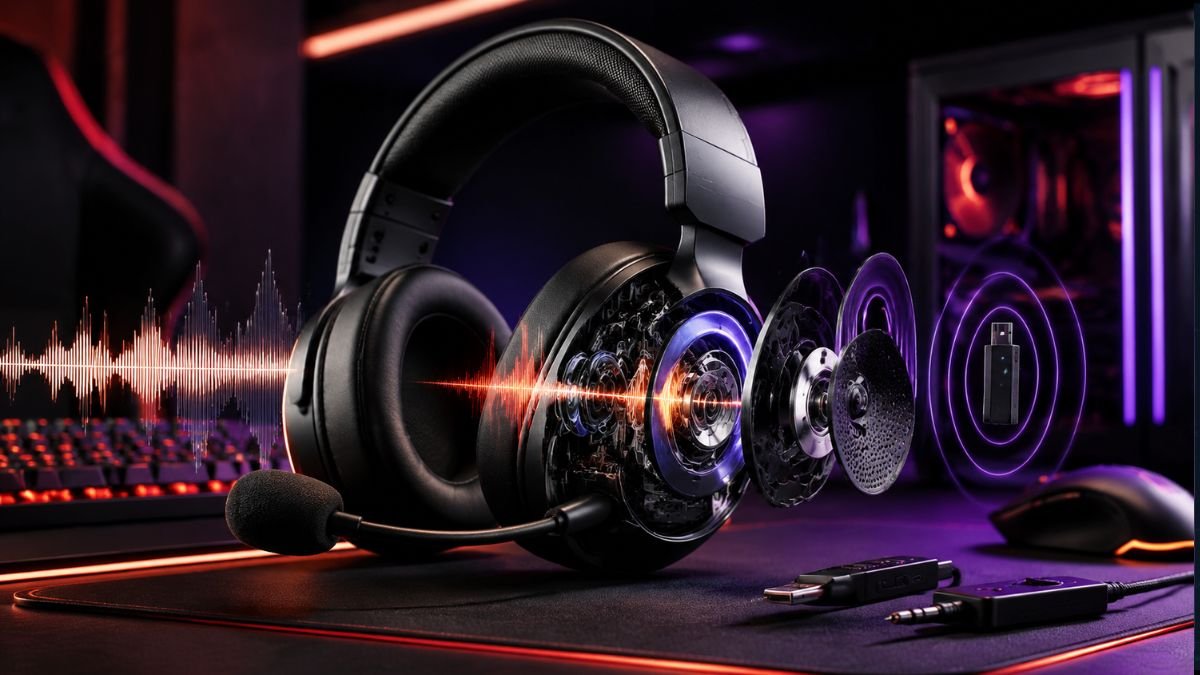
Gaming headsets combine several technologies that influence sound quality, communication, comfort, and overall gaming performance.
Their differences come from components such as audio drivers, microphone systems, spatial audio processing, connectivity methods, and compatibility features. Understanding these technologies helps gamers choose features based on real needs rather than marketing terms.
A gaming headset is more than a pair of headphones with a microphone attached. Modern gaming headsets combine audio engineering, wireless communication technology, digital processing, and ergonomic design to create a more immersive gaming experience.
For competitive players, small differences in audio positioning and microphone clarity can affect communication and awareness during gameplay. A player trying to identify footsteps in a multiplayer match has different needs from someone enjoying a single-player adventure game with cinematic sound.
The growing popularity of gaming platforms has also increased demand for specialized audio equipment. Players increasingly look beyond basic sound output and consider factors such as microphone quality, wireless performance, comfort, and compatibility.
However, choosing a gaming headset can be confusing. Specifications such as driver size, frequency response, surround sound, wireless latency, and microphone sensitivity often appear in product descriptions, but many users do not understand how these technologies affect real gaming situations.
Audio is one important part of a larger gaming environment that includes input devices, displays, comfort, and organization.
Understanding the technology behind gaming headsets provides a clearer way to evaluate features.
Instead of focusing only on brand names or advertising claims, consumers can identify which technologies actually improve comfort, sound quality, and communication.
How Gaming Headset Audio Technology Works
A gaming headset’s audio performance begins with the components responsible for creating and delivering sound. While many users focus on brand names or advertised features, the actual experience depends on how different technologies work together.
A headset is also only one part of a complete gaming audio setup, which can include speakers, microphones, connection methods, system audio settings, and additional processing depending on how the gaming system is configured.
Modern gaming headsets include advanced audio technologies designed to improve immersion and sound positioning. Features such as surround sound gaming headsets can create a wider audio experience through software-based processing.
The main elements that influence gaming headset audio include:
- Audio drivers
- Acoustic design
- Frequency response
- Sound tuning
- Digital processing
- Connection technology
Understanding these elements makes it easier to identify which features provide real value.
Understanding Gaming Headset Drivers
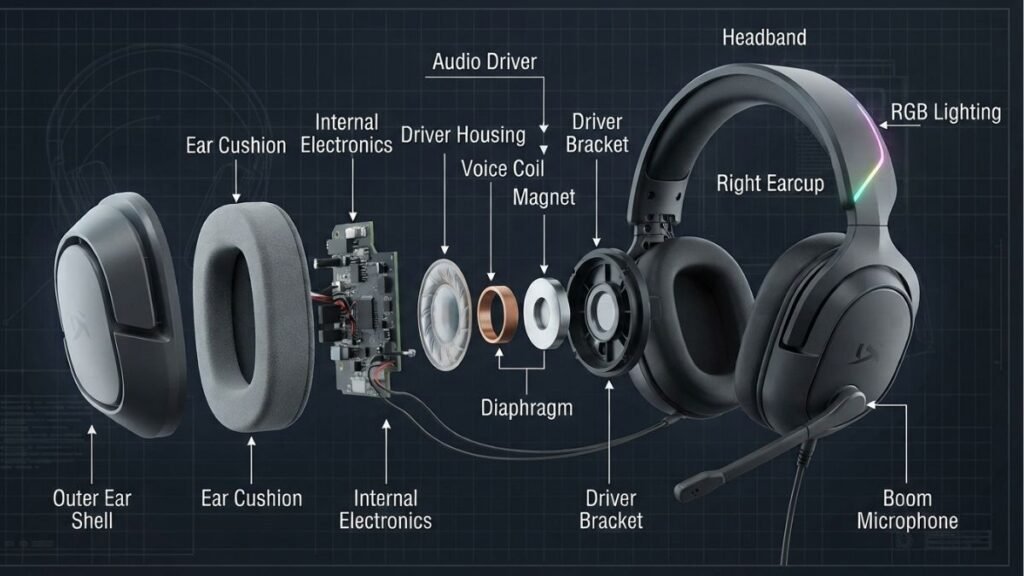
The audio driver is the component that converts electrical signals into sound waves.
Understanding individual gaming headset features helps users compare audio technologies, microphone systems, connectivity options, and comfort designs before choosing the right headset.
Most gaming headsets use dynamic drivers because they provide a practical balance between:
- Sound output
- Durability
- Energy efficiency
- Manufacturing cost
Some premium gaming headsets may also use planar magnetic drivers, which are known for detailed sound reproduction and fast response. However, they are less common due to their higher cost and more complex design requirements.
Driver size is one of the most commonly advertised specifications, but it should not be viewed as the only indicator of audio quality.
For example, a larger driver may produce stronger bass, but sound quality also depends on:
- Driver materials
- Internal acoustic design
- Headset tuning
- Software processing
A smaller driver with better engineering can sometimes produce clearer and more balanced audio than a larger driver with poor tuning.
Understanding Frequency Response in Gaming Headsets
Frequency response describes the range of frequencies a headset can reproduce.
Human hearing generally covers frequencies from approximately 20Hz to 20kHz, although hearing ability changes between individuals.
Gaming audio can be divided into three main frequency areas:
| Frequency Range | Common Sounds | Gaming Importance |
|---|---|---|
| Low frequencies | Explosions, vehicles, environmental effects | Adds impact and immersion |
| Mid frequencies | Dialogue, voices, weapon sounds | Improves clarity |
| High frequencies | Footsteps, movement details, environmental cues | Helps detect subtle sounds |
A balanced headset does not simply maximize one frequency range. It creates a sound profile that matches the user’s gaming needs.
Why Audio Tuning Matters
Two gaming headsets can have similar specifications but produce completely different experiences.
This happens because manufacturers adjust:
- Frequency balance
- Bass response
- Sound separation
- Audio processing
- Acoustic chamber design
A headset designed for competitive gaming may reduce excessive bass to improve sound detail, while a headset designed for cinematic games may emphasize richer low frequencies.
Gaming Audio for Different Types of Games
Different gaming genres benefit from different audio characteristics.
Competitive Shooter Games
Players often need:
- Accurate directional sounds
- Clear footsteps
- Fast audio recognition
In these situations, sound accuracy is usually more valuable than exaggerated effects.
Story-Based Games
Players may prefer:
- Rich environmental sounds
- Strong cinematic effects
- Detailed music reproduction
A wider and more immersive sound profile can improve the overall experience.
Multiplayer Team Games
Communication is essential.
Important audio characteristics include:
- Clear voice reproduction
- Balanced volume levels
- Separation between game audio and communication channels
Soundstage and Imaging Explained
Two important concepts in gaming audio are soundstage and imaging.
Although they are often discussed together, they represent different aspects of audio performance.
What Is Soundstage?
Soundstage describes the perceived size and space of an audio environment.
A wider soundstage can make sounds feel more open and natural.
This can improve immersion in games where environmental awareness matters.
Examples:
- Hearing a vehicle approaching from a distance
- Feeling surrounded by environmental effects
- Experiencing larger virtual spaces
What Is Imaging?
Imaging refers to how accurately a headset represents the location of sounds.
Good imaging helps players identify:
- Where a sound originates
- The direction it is moving
- The approximate distance
For competitive gaming, accurate imaging is often more important than simply creating a wide soundstage.
The Role of Digital Signal Processing (DSP)
Digital Signal Processing, commonly called DSP, allows software and hardware systems to modify audio signals before they reach the listener.
Gaming headsets may use DSP for:
- Equalizer adjustments
- Virtual surround effects
- Voice enhancement
- Noise reduction
- Volume balancing
Many gaming headsets include companion applications that allow users to customize these settings.
For example, a player may create different profiles for:
- First-person shooters
- Role-playing games
- Movies
- Music
Modern gaming audio platforms use advanced processing technologies to improve immersion and control. Microsoft provides spatial audio solutions such as Windows Sonic for Headphones that enhance directional sound experiences on compatible devices.
Key Factors That Affect Gaming Headset Audio Quality
Gaming headset audio quality depends on the combination of drivers, sound tuning, acoustic design, digital processing, and connection technology. Individual specifications such as driver size or frequency range do not determine performance by themselves.
Wired and Wireless Audio Quality Differences
Modern wireless gaming headsets have improved significantly, but connection technology still influences audio performance.
Important factors include:
- Wireless protocol
- Signal stability
- Codec technology
- Distance from receiver
- Software optimization
Dedicated gaming wireless technologies are designed to reduce latency and maintain consistent performance.
However, wired headsets still provide advantages:
- No battery limitations
- Direct connection
- Consistent signal transmission
The difference between wired and wireless performance has become smaller as wireless technology continues improving.
Surround Sound and Spatial Audio Technologies in Gaming Headsets
One of the most recognized features in modern gaming headsets is surround sound and spatial audio technology.
These technologies aim to improve immersion by helping players understand where sounds are coming from inside a virtual environment.
For competitive gamers, accurate audio positioning can provide useful information. For casual players, spatial audio can make games feel more realistic and engaging.
However, understanding how these systems work is important because not every surround sound feature provides the same experience.
Stereo Audio vs Spatial Audio
Traditional stereo audio uses two channels:
- Left
- Right
This approach works well for many gaming situations, but it has limitations when players need to identify sounds from different directions.
Spatial audio technologies attempt to simulate a three-dimensional sound environment by processing audio signals.
They can create the perception of:
- Front and rear positioning
- Vertical sound movement
- Distance changes
- Environmental reflections
What Is Spatial Audio?
Spatial audio is a technology that processes sound to create a more realistic perception of location and movement.
Instead of simply playing audio through left and right channels, spatial audio systems analyze how humans naturally perceive sound.
The brain uses several signals to determine where a sound originates:
- Differences between each ear
- Timing differences
- Volume changes
- Environmental reflections
Gaming audio technologies attempt to recreate these effects digitally.
Virtual Surround Sound vs True Surround Sound
Many gaming headsets advertise surround sound features, but the technology behind them can vary.
| Technology | How It Works | Common Usage |
|---|---|---|
| Stereo Audio | Uses two audio channels | General gaming and entertainment |
| Virtual Surround Sound | Uses software processing to simulate direction | Most gaming headsets |
| True Multichannel Audio | Uses multiple physical speakers | Rare headset designs |
| Spatial Audio | Uses advanced processing for 3D positioning | Modern gaming platforms |
Most gaming headsets use virtual processing rather than multiple physical speakers.
Why Spatial Audio Helps Competitive Gaming
In competitive games, sound can provide important information before visual confirmation.
Examples include:
- Enemy footsteps
- Reload sounds
- Vehicle movement
- Environmental changes
- Nearby player actions
A player who can accurately identify sound direction may react faster in situations where visibility is limited.
However, spatial audio is only one part of gaming performance. It depends on:
- Game audio design
- Headset accuracy
- Software implementation
- User settings
Platform-Based Spatial Audio Technologies
Different gaming platforms use their own audio processing systems.
For example:
- PC platforms may use operating system-based spatial audio solutions.
- Consoles may provide their own 3D audio technologies.
Microsoft provides Windows Sonic for Headphones, a spatial sound feature designed to create a more immersive audio experience with compatible headphones.
Sony also develops dedicated audio technologies for PlayStation systems, including Tempest 3D AudioTech designed to improve immersive sound experiences.
Does Every Gamer Need Surround Sound?
No.
The usefulness of surround sound depends on how someone plays.
Competitive Players
May benefit from:
- Accurate directional audio
- Better positional awareness
- Clear sound separation
Casual Players
May prefer:
- Natural stereo sound
- Comfort
- Balanced audio
Story-Focused Players
May prioritize:
- Immersive environmental effects
- Cinematic sound
- Rich audio detail
How Gaming Headset Microphones Work
A gaming headset is also a communication device.
For multiplayer gaming, microphone performance can be just as important as speaker quality.
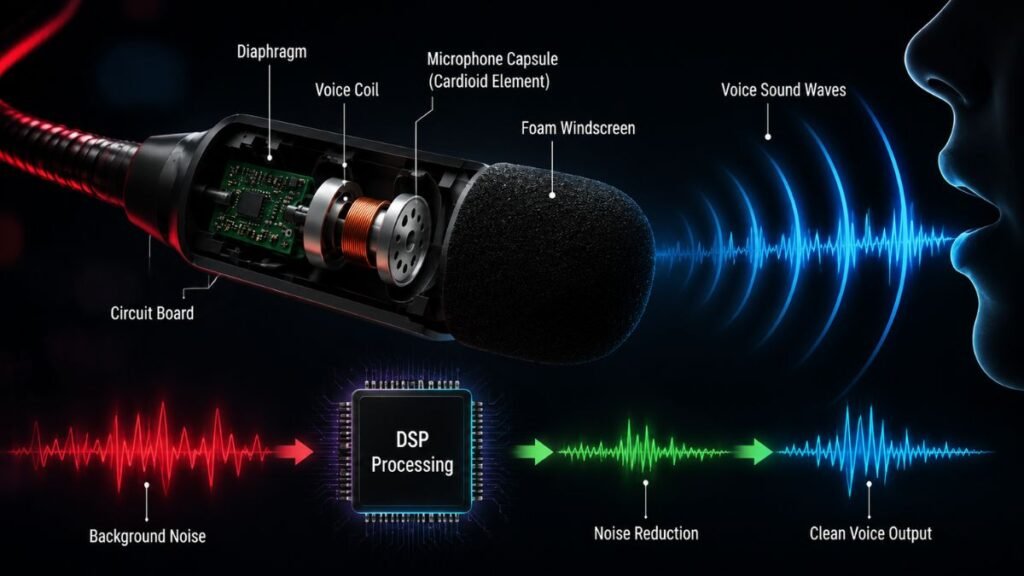
A good microphone should capture the player’s voice clearly while reducing unwanted sounds.
Common challenges include:
- Keyboard noise
- Background conversations
- Computer fans
- Room sounds
How Gaming Headset Microphones Capture Voice
Most gaming headset microphones use compact condenser microphone designs.
They are optimized for:
- Voice communication
- Convenience
- Compact size
- Consistent performance
Unlike studio microphones, gaming headset microphones are designed specifically for close-range speech capture.
Common Gaming Headset Microphone Designs
| Microphone Type | Description | Best Use |
|---|---|---|
| Boom Microphone | Adjustable microphone close to the mouth | Multiplayer gaming |
| Retractable Microphone | Slides into headset body | Flexible everyday use |
| Detachable Microphone | Removable microphone module | Users who want customization |
| Integrated Microphone | Built into headset design | Casual communication |
Why Boom Microphones Are Common
Boom microphones are popular because positioning directly near the mouth improves voice capture.
Advantages include:
- Better speech clarity
- Reduced background noise
- More consistent volume
- Better communication quality
The closer the microphone is to the speaker, the less processing is required to make the voice understandable.
Understanding Microphone Pickup Patterns
Pickup patterns determine which directions a microphone captures.
Most gaming headsets use a cardioid pattern.
A cardioid microphone mainly captures sound from the front while reducing sounds from other directions.
This is useful for gaming environments where unwanted sounds may come from:
- Keyboards
- Desk fans
- Other people
- Room activity
Noise Cancellation and AI Microphone Processing
Modern gaming headsets increasingly use software-based processing to improve microphone quality.
Technologies may reduce:
- Background noise
- Keyboard sounds
- Environmental distractions
AI-based solutions analyze incoming audio signals and attempt to separate speech from unwanted sounds.
For example, NVIDIA Broadcast uses AI-powered effects designed to improve microphone clarity by reducing background noise.
For a deeper look at microphone types, pickup patterns, and voice quality factors, explore our guide on gaming headset microphones.
Key Factors That Affect Gaming Headset Microphone Quality
A quality gaming microphone should provide:
- Clear voice reproduction
- Stable volume levels
- Low distortion
- Effective background noise reduction
- Comfortable positioning
The best microphone performance comes from the combination of:
Hardware + placement + software processing + environment
Wired vs Wireless Gaming Headsets: Connectivity, Latency and Performance Differences
The choice between wired and wireless gaming headsets has changed significantly over the years.
Previously, wired headsets were considered the clear choice for serious gaming because they offered reliable connections and minimal delay. Today, modern wireless gaming headsets have improved considerably, especially with dedicated low-latency technologies designed specifically for gaming.
Users comparing gaming headsets with traditional headphones can also learn more about the key differences between both options.
The decision is no longer simply about sound quality. Users should consider:
- Connection stability
- Latency
- Compatibility
- Battery life
- Convenience
- Device ecosystem
How Wired Gaming Headsets Work
Wired gaming headsets transmit audio through a physical cable connected directly to a device.
Common connection types include:
- 3.5mm audio jack
- USB connection
- USB-C connection
Because audio travels through a physical connection, wired headsets do not require batteries for normal operation.
Advantages of Wired Gaming Headsets
No Battery Limitations
One of the biggest advantages of wired headsets is reliability.
Users do not need to worry about:
- Charging schedules
- Battery degradation
- Unexpected shutdowns during gameplay
This makes wired models convenient for players who spend long sessions at a fixed gaming setup.
Consistent Connection Performance
A direct cable connection reduces potential wireless problems such as:
- Signal interference
- Connection interruptions
- Pairing issues
For competitive players who prioritize predictable performance, this remains a significant advantage.
Broad Device Support
Many wired headsets can work across different devices.
Examples include:
- Gaming PCs
- Laptops
- Controllers
- Some mobile devices
- Consoles with compatible ports
However, advanced features may depend on the connection method and software support.
Limitations of Wired Gaming Headsets
Cable Management
The main disadvantage is physical restriction.
Users may experience:
- Cable clutter
- Limited movement
- Tangled wires
For desk-based gaming, this may not be a major problem. For users who move frequently, it can become inconvenient.
Port Availability
Modern devices increasingly use fewer physical ports.
Some laptops and mobile devices may require:
- USB adapters
- USB-C connections
- Additional accessories
Users should check available ports before choosing a wired headset.
How Wireless Gaming Headsets Work
Wireless gaming headsets transmit audio through wireless communication technologies.
The main wireless options include:
- 2.4GHz wireless
- Bluetooth
- Proprietary wireless systems
Each technology has different strengths.
Understanding 2.4GHz Wireless Gaming Technology
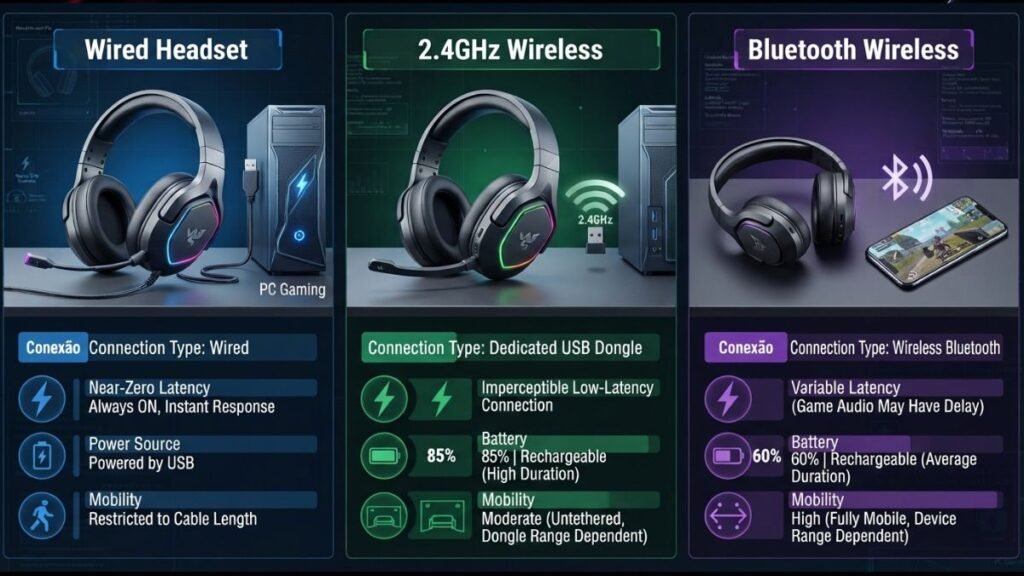
Many gaming-focused wireless headsets use 2.4GHz connections because they are designed for low-latency performance.
These systems typically use:
- USB wireless receivers
- Dedicated communication channels
- Gaming-optimized protocols
Compared with standard Bluetooth, 2.4GHz wireless technology generally focuses more on reducing delay.
Dedicated wireless technologies are designed to provide responsive connections with lower latency for gaming peripherals.
Bluetooth Gaming Headsets
Bluetooth is one of the most common wireless standards because it works across many consumer devices.
Advantages include:
- Smartphone compatibility
- Simple pairing
- Lower power consumption
- Broad device support
However, Bluetooth was designed as a general wireless communication technology rather than specifically for competitive gaming.
Potential limitations include:
- Higher latency
- Audio compression
- Reduced microphone performance in some situations
Bluetooth is often useful for casual gaming and everyday listening, but competitive players may prefer dedicated gaming wireless solutions.
Wireless Latency Explained
Latency refers to the delay between an action happening in a game and the sound reaching the player’s ears.
Even small delays can matter in competitive situations.
Examples:
- Hearing footsteps slightly late
- Delayed reaction to environmental sounds
- Reduced timing accuracy
Modern gaming wireless systems attempt to minimize this delay through optimized transmission methods.
Wired vs 2.4GHz Wireless vs Bluetooth Comparison
| Feature | Wired | 2.4GHz Wireless | Bluetooth |
|---|---|---|---|
| Connection | Physical cable | USB receiver | Wireless pairing |
| Latency | Very low | Low | Usually higher |
| Battery Required | No | Yes | Yes |
| Mobility | Limited | High | High |
| Competitive Gaming | Excellent | Excellent | Good for casual use |
| Setup | Simple | Requires receiver | Easy pairing |
Battery Technology in Wireless Gaming Headsets
Battery life has become a major consideration as wireless headsets add more features.
Factors affecting battery usage include:
- Wireless technology
- RGB lighting
- Volume level
- Microphone processing
- Software features
Modern wireless headsets often include:
- USB-C charging
- Battery indicators
- Power-saving modes
- Fast charging options
A longer battery life improves convenience, but users should also consider charging habits.
Wired vs Wireless: Which One Is Better?
There is no universal answer.
The better choice depends on the user’s priorities.
Wired Gaming Headsets Are Better For:
- Competitive players seeking maximum consistency
- Users who do not want battery management
- Fixed gaming stations
- Simple plug-and-play setups
Wireless Gaming Headsets Are Better For:
- Players who prefer freedom of movement
- Cleaner desk setups
- Console gaming from a distance
- Multi-device users
Compatibility: PC, PlayStation, Xbox and Mobile Support
A gaming headset should match the devices it will be used with.
A headset with advanced features may still provide limited functionality if it is not fully compatible with the user’s platform.
Compatibility depends on:
- Connection type
- Platform support
- Software availability
- Feature limitations
PC Gaming Headset Compatibility
PC users usually receive the widest range of features.
Many PC gaming headsets support:
- Equalizer customization
- Firmware updates
- Microphone controls
- Surround audio settings
- Companion software
The PC ecosystem allows manufacturers to provide more advanced customization options.
PlayStation Compatibility
PlayStation users should verify:
- Wireless support
- USB compatibility
- Microphone functionality
- Audio feature availability
Some headsets may connect successfully but not support every feature.
Sony provides platform-specific audio technologies such as PlayStation 3D Audio designed to improve immersive gaming experiences.
Xbox Compatibility
Xbox users should consider:
- Xbox Wireless support
- Controller compatibility
- Chat functionality
- Software limitations
Some headsets designed primarily for PC may not provide complete functionality on Xbox consoles.
Multi-Platform Gaming Headsets
Many gamers use multiple devices:
- Gaming PC
- Console
- Laptop
- Smartphone
Multi-platform headsets can simplify this setup through:
- Multiple connection methods
- Wireless switching
- Bluetooth support
- Cross-device compatibility
Compatibility Checklist
Before choosing a gaming headset, check:
- Does it support your gaming platform?
- Does it use the required connection type?
- Does the microphone work correctly?
- Are software features available?
- Are adapters required?
Wireless Gaming Headset Performance and Latency
Modern wireless gaming headsets can deliver excellent performance when they use low-latency technologies such as dedicated 2.4GHz connections. The main differences compared with wired headsets are battery requirements, connection methods, and flexibility.
Modern wireless gaming headsets have improved significantly, offering better latency, audio quality, and compatibility across different gaming platforms.
Many gaming brands use dedicated wireless systems designed specifically for gaming performance, focusing on responsive connections and reduced latency.
Gaming Headset Comfort, Design and Features That Actually Matter
Audio quality is one of the most important parts of a gaming headset, but comfort often determines whether a headset remains enjoyable during real-world use.
A headset can deliver impressive sound but still create a poor experience if it becomes uncomfortable after extended gaming sessions.
Because many players wear gaming headsets for several hours at a time, design decisions involving weight, materials, ear cups, and adjustment systems have a direct impact on daily usability.
Why Comfort Matters in Gaming Headsets
Gaming sessions can last much longer than typical headphone listening sessions.
During extended use, small design issues can become noticeable:
- Pressure around the ears
- Heavy construction
- Heat buildup
- Poor headband adjustment
- Uncomfortable ear cushions
A comfortable headset allows players to focus on gameplay instead of constantly adjusting their equipment.
Headset Weight and Long-Term Comfort
Weight is an important factor because every additional component adds pressure.
Gaming headsets may become heavier because of:
- Larger batteries
- Wireless components
- Additional materials
- Larger drivers
- Extra controls
A lightweight headset may provide advantages such as:
- Reduced neck strain
- Better comfort during long sessions
- Easier movement
However, extremely lightweight designs must still maintain durability and structural stability.
The ideal balance depends on the user’s priorities.
Ear Cup Design and Materials
Ear cushions affect both comfort and sound isolation.
Common materials include:
| Material | Benefits | Limitations |
|---|---|---|
| Memory foam | Adapts to head shape and improves comfort | Can retain heat |
| Leatherette | Good isolation and easy cleaning | May feel warmer |
| Fabric mesh | Better airflow and breathability | Less sound isolation |
| Hybrid materials | Balance between comfort and isolation | Often more expensive |
Closed-Back vs Open-Back Gaming Headsets
Most gaming headsets use a closed-back design because it provides isolation and reduces sound leakage.
Closed-Back Headsets
Advantages:
- Blocks more outside noise
- Provides stronger bass response
- Works well in shared environments
Limitations:
- Less airflow
- Can become warmer during long sessions
Open-Back Headsets
Advantages:
- More natural sound presentation
- Wider perceived sound environment
- Better airflow
Limitations:
- Sound leaks outward
- Less suitable for noisy rooms
Open-back designs are more common among audio enthusiasts, while closed-back designs dominate mainstream gaming headsets.
Headband Design and Adjustment
A headset’s headband distributes pressure across the top of the head.
Important design features include:
- Adjustable sizing
- Flexible materials
- Comfortable padding
- Balanced weight distribution
Poor headband design can create pressure points that become uncomfortable after extended use.
Features That Actually Improve Gaming Experience
Modern gaming headsets include many additional features.
However, not every feature provides meaningful improvements.
The most valuable features are usually those that solve real problems.
Flip-to-Mute Microphones
A flip-to-mute microphone automatically disables audio input when raised.
Benefits:
- Faster control
- Easier privacy management
- Convenient multiplayer communication
Physical Volume Controls
Dedicated controls allow players to adjust audio quickly.
Useful during:
- Competitive matches
- Voice communication
- Console gaming
Multi-Device Connectivity
Some gaming headsets support multiple connection methods.
Examples:
- USB wireless connection
- Bluetooth
- Wired connection
This allows users to switch between:
- Gaming PC
- Console
- Smartphone
Custom Software Support
Companion software can provide:
- Equalizer adjustments
- Microphone controls
- Firmware updates
- Audio profiles
Gaming ecosystems from companies such as Razer and SteelSeries provide software platforms for managing gaming peripherals and customization.
Features That Are Often More Marketing Than Performance
Some features sound impressive but may provide limited practical benefits.
RGB Lighting
RGB lighting can improve appearance and personalization.
However, it usually does not improve:
- Sound quality
- Microphone performance
- Comfort
It is mainly an aesthetic feature.
Large Driver Numbers
A larger driver does not automatically create better sound.
Audio performance depends on:
- Driver quality
- Tuning
- Acoustic design
- Processing
Excessive Surround Sound Claims
Marketing terms such as:
- Advanced 3D audio
- Ultimate immersive sound
- Next-generation surround
should always be evaluated based on real performance.
A well-tuned stereo headset can sometimes outperform a poorly implemented surround system.
Choosing Features Based on Different Users
| User Type | Important Features |
|---|---|
| Competitive gamer | Low latency, accurate audio, clear microphone |
| Casual gamer | Comfort, simple setup, balanced sound |
| Streamer | Microphone quality, customization, software |
| Console player | Compatibility, wireless support |
| Multi-device user | Multiple connection options |
The Future of Gaming Headset Technology
Gaming headset development is moving beyond basic improvements in sound and microphone quality.
Future technologies are expected to focus on:
- Artificial intelligence audio processing
- Adaptive sound profiles
- Better wireless connections
- Personalized hearing calibration
- Smarter device integration
AI-Powered Gaming Audio
Artificial intelligence is already influencing gaming audio technology.
Possible improvements include:
- Automatic microphone noise reduction
- Real-time voice enhancement
- Adaptive equalizer adjustments
- Personalized audio profiles
AI systems may allow headsets to automatically adjust settings based on the user’s environment and gaming situation.
Adaptive Audio Experiences
Future gaming headsets may analyze:
- Game genre
- Player preferences
- Environment
- Listening conditions
A competitive game profile could emphasize:
- Footstep clarity
- Directional accuracy
- Communication
A cinematic game profile could prioritize:
- Environmental effects
- Dialogue
- Immersion
Better Wireless Ecosystems
Wireless gaming technology continues improving through:
- Lower latency
- Longer battery life
- Multi-device switching
- Improved stability
Future headsets may allow users to move between devices more seamlessly.
Personalized Audio Calibration
Human hearing differs between individuals.
Future gaming headsets may use:
- Hearing profiles
- Calibration tools
- Software adjustments
to create more personalized listening experiences.
The Balance Between Innovation and Practical Value
New technology should solve real user problems.
A useful gaming headset improvement should enhance:
- Comfort
- Communication
- Audio accuracy
- Convenience
- Compatibility
More features do not always create a better experience.
The best technology is the technology that improves the way users actually play.
Conclusion: Understanding Gaming Headset Technology Before Choosing a Device
Gaming headsets have transformed from simple audio accessories into advanced technology devices combining sound engineering, communication systems, wireless technology, and software processing.
Understanding how these technologies work helps users make better decisions and avoid choosing based only on marketing claims.
The most important factors remain:
- Accurate audio
- Clear communication
- Comfortable design
- Reliable connectivity
- Useful features
Competitive players may prioritize low latency and precise audio positioning. Casual gamers may value comfort and simplicity. Streamers may focus on microphone quality and customization.
As gaming audio continues evolving with AI processing, adaptive sound, and smarter wireless technology, informed decisions become increasingly important.
The best gaming headset is not necessarily the one with the largest feature list. It is the one that provides the right combination of performance, comfort, and technology for the player’s specific needs.
FAQ: Best Gaming Headsets and Gaming Headset Technology
What makes the best gaming headsets different from regular headphones?
The best gaming headsets are designed specifically for interactive gaming experiences. They usually include integrated microphones, gaming-focused connectivity options, spatial audio support, and software customization features that regular headphones may not provide.
Are wireless gaming headsets good for competitive gaming?
Modern wireless gaming headsets can perform well for competitive gaming when they use low-latency technologies such as dedicated 2.4GHz connections. The main differences compared with wired headsets are battery requirements and connection flexibility.
What matters most for gaming headset audio quality?
The most important factors are accurate sound positioning, balanced audio tuning, clear details, and reliable processing. Specifications such as driver size alone cannot determine whether a headset will provide good gaming performance.
Do gaming headsets need surround sound?
Gaming headsets do not always require surround sound. Spatial audio can improve immersion and directional awareness, but a high-quality stereo headset can also deliver excellent results depending on the game and user preference.
What should I look for in a gaming headset microphone?
A good gaming headset microphone should provide clear voice communication, effective background noise reduction, and comfortable positioning. Boom microphones are commonly preferred because they place the microphone closer to the user’s voice.
Are expensive gaming headsets worth buying?
Expensive gaming headsets may include better materials, advanced wireless technology, and additional customization features. However, price alone does not guarantee better performance. Users should prioritize features that match their gaming habits.
How do I choose the right gaming headset for PC, PS5, or Xbox?
The right gaming headset depends on platform compatibility, connection type, available features, and personal requirements. PC users often benefit from more customization, while console users should verify compatibility before purchasing.