


RGB gaming keyboards use customizable red, green, and blue LED lighting to create different colors, illuminate individual keys, and produce visual effects. Depending on their design, they may support per-key customization, zone-based lighting, animated effects, and software-controlled profiles.
Understanding these features helps users distinguish basic keyboard illumination from more advanced RGB technology.
Gaming keyboards have evolved beyond simple input devices. Modern models can include mechanical switches, programmable keys, dedicated media controls, advanced connectivity, and customizable lighting systems.
Among these features, RGB lighting has become one of the most recognizable elements of gaming peripherals.
RGB technology allows users to personalize their keyboards with different colors, brightness levels, and lighting patterns. Some models illuminate every key independently, while others divide the keyboard into predefined lighting zones.
However, an RGB label does not guarantee the same customization capabilities across all keyboards. Hardware design, LED placement, firmware, and compatible software determine which features are available.
Whether someone uses a keyboard for gaming, programming, studying, or everyday typing, understanding RGB technology makes it easier to identify useful features and avoid paying for lighting options they may never use.
1. What Are RGB Gaming Keyboards?
RGB gaming keyboards are computer keyboards equipped with lighting systems that use red, green, and blue LED channels to produce different colors. These systems illuminate the keys or other parts of the keyboard and can support customizable colors, brightness settings, and animated effects.
Unlike traditional single-color backlighting, RGB lighting can produce a wide range of color combinations. Depending on the keyboard, users may also be able to assign different colors to individual keys or separate lighting zones.
The level of customization depends on the keyboard’s hardware and control system. An entry-level model may offer several preset colors, while an advanced model may provide independent lighting control for every key.
RGB lighting is a visual feature, not a specific switch technology. A keyboard can combine RGB illumination with mechanical switches, membrane switches, or other key mechanisms. The lighting system and the technology responsible for registering keystrokes perform different functions.
This distinction also applies to keyboards with different switch designs, including those found in mechanical gaming keyboards.
What Does RGB Mean in Keyboard Technology?
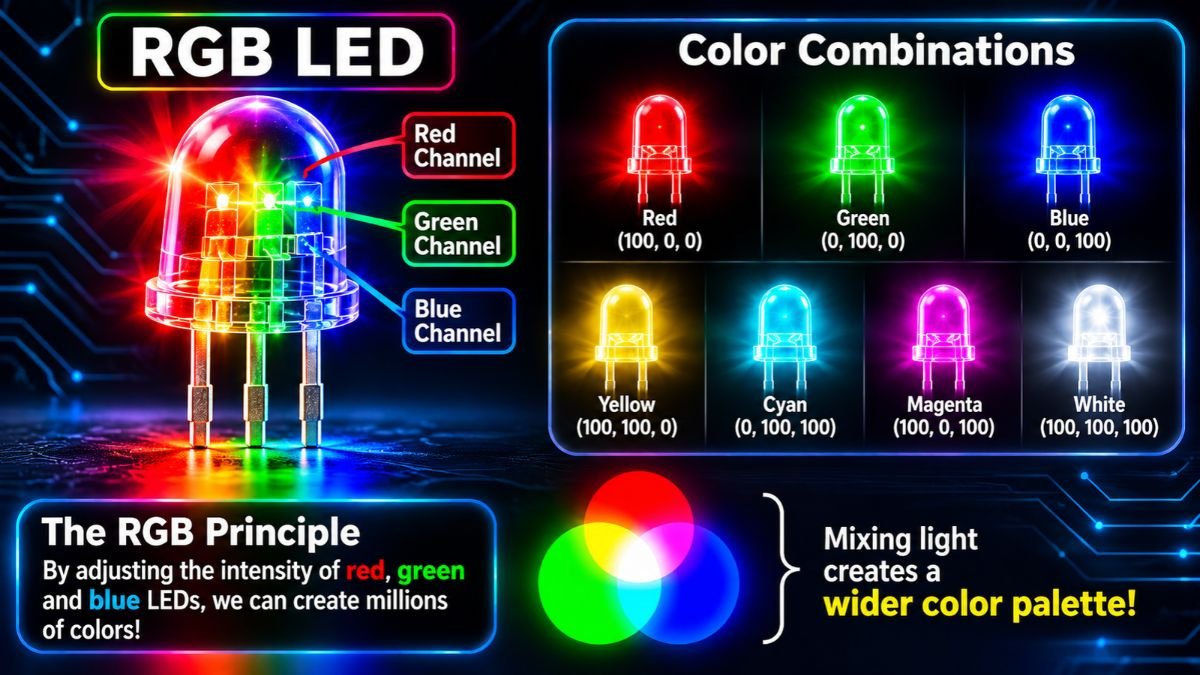
RGB stands for Red, Green, and Blue. These three colors form the foundation of an additive color system used in electronic displays and LED lighting.
An RGB LED combines different intensities of red, green, and blue light to produce a range of colors.
For example:
- Red light produces red.
- Green light produces green.
- Blue light produces blue.
- Red and green combine to create yellow.
- Green and blue combine to create cyan.
- Red and blue combine to create magenta.
- All three channels can combine to produce white.
The intensity of each channel determines the resulting color and shade.
A common digital RGB system uses values between 0 and 255 for each color channel. This creates 16,777,216 theoretical color combinations:
\[ 256 \times 256 \times 256 = 16,777,216 \]
However, the theoretical number of combinations does not guarantee that every keyboard can reproduce every color accurately. Actual output depends on LED quality, brightness control, calibration, and the materials used around the lighting components.
This explains why two different RGB keyboards may display slightly different shades even when users select identical RGB values.
RGB Lighting vs. Standard Keyboard Backlighting
Not every illuminated keyboard is an RGB keyboard.
Some keyboards use a single backlight color, such as white, red, or blue. This illumination helps users identify key legends in darker environments but does not necessarily provide multiple color options.
RGB keyboards offer greater color flexibility because their lighting systems combine different color channels.
| Feature | Single-Color Backlighting | RGB Backlighting |
|---|---|---|
| Available colors | Usually one | Multiple |
| Brightness adjustment | Common | Common |
| Custom color selection | Usually unavailable | Available on supported models |
| Animated effects | Limited | Available on supported models |
| Individual key colors | Generally unavailable | Available on per-key models |
| Lighting profiles | Limited | Available on selected models |
A single-color keyboard may be sufficient for someone who simply wants illuminated keys. RGB lighting is more suitable for users who want greater control over colors and visual effects.
Why RGB Lighting Became Popular in Gaming Keyboards
RGB lighting became popular as gaming peripherals developed more advanced customization features.
Manufacturers began introducing individually controlled LEDs, programmable lighting effects, and software platforms that allowed users to coordinate their keyboards with other illuminated devices.
Today, RGB lighting can provide several advantages:
- Personalizing keyboard colors to match a gaming environment.
- Highlighting frequently used gaming controls.
- Creating visual effects that respond to key presses.
- Synchronizing compatible gaming peripherals.
- Saving different lighting configurations for different activities.
However, RGB lighting is not exclusive to gamers. Office workers, programmers, students, and everyday computer users can also benefit from illuminated keys and customizable profiles.
The main difference is how users choose to configure the lighting.
2. How RGB Lighting Works in Gaming Keyboards
RGB lighting relies on electronic components that work together to produce and control illumination. These components include RGB LEDs, electrical circuits, lighting controllers, and firmware or software.
When users select a color or activate an effect, the keyboard processes that instruction and sends the appropriate control signals to its lighting hardware.
The LEDs then produce the requested colors at specific positions.
How RGB LEDs Produce Different Colors
An RGB LED uses three color channels: red, green, and blue. Each channel produces light at a different intensity, allowing the system to create various color combinations.
For example, selecting purple does not require a separate purple LED. The lighting system combines red and blue light at suitable intensities.
The same principle applies to other colors.
| RGB Values | Approximate Color |
|---|---|
| (255, 0, 0) | Red |
| (0, 255, 0) | Green |
| (0, 0, 255) | Blue |
| (255, 255, 0) | Yellow |
| (128, 0, 255) | Purple |
| (255, 128, 0) | Orange |
| (255, 255, 255) | White |
These values use the common 8-bit RGB color representation.
The actual appearance depends on the LED package, electrical control, and surrounding materials.
How LED Controllers Manage Keyboard Lighting
An LED controller determines which lighting components should illuminate, which colors they should display, and when their output should change.
A simplified RGB control process involves four stages:
- User input: The user selects a color, brightness level, or lighting effect.
- Firmware or software: The keyboard processes the selected configuration.
- LED controller: The control hardware manages signals sent to the lighting components.
- RGB LEDs: The LEDs produce the selected colors and effects.
Not every keyboard uses the same architecture. Some designs integrate lighting control into the keyboard’s main microcontroller, while others use dedicated LED driver components.
The QMK RGB Matrix documentation provides a technical example of how keyboard firmware manages LED drivers, LED positions, lighting effects, and key-associated lighting.
This also explains why different RGB keyboards offer different levels of customization. The available features depend partly on the controller and the number of independently addressable lighting positions.
How Per-Key RGB Lighting Works
Per-key RGB lighting allows individual keys to display different colors.
For example, a gamer could configure the WASD keys in blue, selected shortcut keys in green, and the remaining keyboard in white.
Each supported key has its own controllable RGB lighting position. The controller applies the appropriate color settings to those positions.
Depending on the implementation, keyboards may use dedicated RGB LEDs near individual switches or addressable LED arrangements that allow separate control.
This configuration supports:
- Individual key colors.
- Color-coded gaming controls.
- Reactive lighting.
- Custom gradients.
- Animated effects across the keyboard.
Per-key RGB provides more detailed control than zone-based illumination, but it does not automatically improve typing speed or gaming responsiveness.
Although RGB lighting controls the visual appearance of individual keys, the typing experience depends on the switch mechanism.
Understanding mechanical keyboard switches helps explain the difference between lighting technology and keystroke registration.

How Keyboard Circuits Control RGB Effects
The printed circuit board (PCB) provides the electrical connections required by the keyboard’s switches, controller, and lighting components.
Two common approaches are dedicated LED driver control and addressable RGB control.
Dedicated LED drivers manage multiple lighting channels through specialized control circuits. Addressable LEDs contain integrated control electronics that allow individual components to receive specific lighting instructions.
In some addressable systems, LEDs are connected in a chain. Each component reads the data intended for it and passes the remaining information to the next LED.
The QMK RGB Lighting documentation explains how supported addressable LED types use this approach to control individual lighting components.
The exact implementation varies between keyboard designs, so users should not assume every RGB keyboard uses the same circuit arrangement.
3. Different Types of RGB Keyboard Lighting
RGB gaming keyboards can use different lighting configurations depending on how their LEDs are positioned and controlled.
Some models allow individual key customization, while others illuminate groups of keys together. Additional lighting may also be positioned beneath the keyboard frame.
Understanding these differences is important because an RGB label does not necessarily mean that every key can display a separate color.
Per-Key RGB Lighting
Per-key RGB lighting provides individual color control for supported keys.
Users can assign different colors to selected keys, create custom layouts, and configure lighting effects that respond to key presses.
For example, a first-person shooter player may highlight movement controls in blue and frequently used shortcuts in another color.
This configuration offers extensive personalization and is particularly useful for users who want detailed control over their keyboard illumination.
According to CORSAIR’s explanation of RGB lighting types, per-key RGB keyboards have a dedicated controllable RGB LED for each individual key switch.
Zone-Based RGB Lighting
Zone-based RGB divides a keyboard into predefined lighting areas.
Instead of controlling every key separately, the system illuminates groups of keys together.
For example, a keyboard might have separate lighting zones for the main typing area, navigation keys, and number pad.
Users can select different colors or effects for supported zones, but keys within the same zone generally share their lighting configuration.
This approach provides more flexibility than single-zone illumination without requiring independent control for every key.
CORSAIR identifies zone-based lighting as a configuration used in some of its more entry-level keyboard models.
Single-Zone RGB Lighting
Single-zone RGB uses one lighting configuration across the entire keyboard.
When users select blue, for example, the whole keyboard displays blue illumination. Changing the color changes the lighting across the entire device.
Some models still support preset animations, including breathing and color cycling.
However, users cannot independently assign different colors to separate sections unless the keyboard provides additional zone controls.
Single-zone RGB is a simpler option for people who want customizable colors without detailed key-by-key configuration.
RGB Underglow Lighting
RGB underglow illuminates the underside or outer edges of a keyboard.
Instead of focusing on the key legends, underglow creates light around the keyboard frame, often producing a diffused effect on the desk surface.
It can support static colors, color transitions, and animated lighting patterns, depending on the hardware and firmware.
The QMK RGB Lighting documentation describes underglow systems that use addressable LEDs mounted beneath the keyboard.
Underglow should not be confused with per-key backlighting. One illuminates the area around the keyboard, while the other focuses on individual keys.
Some keyboards combine both configurations.

4. RGB Keyboard Effects and Customization
RGB lighting can produce different visual effects by changing LED colors, brightness, timing, and illumination patterns.
These effects are controlled through keyboard firmware, dedicated hardware controls, or compatible customization software.
The available options depend on the keyboard’s controller and lighting architecture. Some models offer only preset animations, while others provide detailed control over individual LEDs.
Static RGB Lighting
Static RGB lighting maintains a selected color without continuously changing the illumination.
Users can configure the entire keyboard to display blue, purple, white, or another supported color. On per-key RGB models, different keys can maintain different colors simultaneously.
Static lighting is useful for:
- Creating a consistent keyboard appearance.
- Highlighting important gaming controls.
- Reducing visual distractions.
- Using softer illumination during work or study.
It is also a practical starting point for users learning how to customize RGB settings.
Breathing and Pulsing Effects
Breathing lighting gradually increases and decreases LED brightness, creating a repeating animation.
For example, blue lighting may slowly become brighter before fading back to a dimmer shade.
Pulsing effects use similar brightness changes but may create shorter or more noticeable transitions.
These effects are primarily decorative and can make a keyboard look more dynamic without constantly changing its main color.
Rainbow Wave Effects
Rainbow wave lighting moves different colors across the keyboard.
A typical effect may display red, orange, yellow, green, blue, and purple in a continuous sequence.
Depending on the software, users may be able to change the animation direction, speed, and color arrangement.
Common variations include:
- Left-to-right color waves.
- Right-to-left color waves.
- Center-out lighting transitions.
- Moving rainbow gradients.
- Rotating or spiral effects.
The QMK RGB Matrix documentation lists several programmable effects, including color cycling, gradient movement, breathing, and animated patterns.
Reactive Key Lighting
Reactive lighting changes illumination when a user presses a key.
For example, pressing the W key may briefly activate a brighter color before the lighting returns to its previous state.
Some systems create expanding patterns around the activated key, while others illuminate multiple nearby keys.
Reactive lighting can provide visual feedback during typing or gaming, particularly on keyboards with independently controlled LEDs.
The effect depends on the keyboard’s hardware and firmware. Zone-based models may illuminate an entire section rather than responding to each key individually.
Ripple and Rain Effects
Ripple effects create an expanding lighting pattern that spreads from a pressed key toward surrounding keys.
Rain effects generally create moving or randomly changing light patterns across the keyboard.
Both are animated lighting options, but their behavior differs:
- Ripple: Usually begins with a keypress and spreads outward.
- Rain: Creates moving or randomly distributed illumination.
The appearance depends on the manufacturer’s implementation and available lighting controls.
Game-Synchronized Lighting Effects
Game-synchronized RGB lighting connects the keyboard’s illumination to compatible games or applications.
Instead of displaying only a preset animation, the lighting system may respond to gameplay events or information supplied by supported software.
For example, a compatible game integration may change lighting colors during specific events.
Logitech G LIGHTSYNC provides examples of synchronized lighting across compatible devices and supported applications.
However, synchronization is not universal. A keyboard may support RGB lighting without supporting automatic effects in every game.
Users should check the manufacturer’s compatibility information before expecting a particular game or application to control their keyboard lighting.
Custom RGB Animation Effects
Custom RGB animations allow users to create lighting patterns instead of relying exclusively on preset effects.
Depending on the software, users may be able to select individual keys, assign colors, change animation speed, and combine different lighting layers.
For example, someone could create a profile with blue movement keys, green shortcuts, and a purple gradient across the remaining keyboard.
Advanced customization is particularly useful on per-key RGB models because they provide more independent lighting control.
However, software cannot create hardware capabilities that the keyboard does not support. A zone-based keyboard cannot necessarily reproduce every effect available on an individually controlled RGB model.
5. RGB Software, Compatibility and Battery Consumption
RGB customization often involves dedicated software that communicates with the keyboard’s lighting controller or firmware.
These applications allow users to adjust colors, brightness, animation effects, and saved profiles. Some also support synchronization across compatible gaming peripherals.
However, software compatibility varies by manufacturer, keyboard model, operating system, and application version.
How RGB Keyboard Software Works
RGB software provides an interface for controlling supported keyboard lighting features.
Users can select a connected keyboard, choose an effect, adjust colors, and apply the configuration.
Some applications also support individual key customization and saved lighting profiles.
Common manufacturer platforms include:
| Software | Manufacturer | Main purpose |
|---|---|---|
| iCUE | CORSAIR | Lighting, profiles, and device management |
| G HUB | Logitech G | Gaming peripheral customization |
| Synapse | Razer | Device configuration and Chroma lighting |
| SteelSeries GG | SteelSeries | Peripheral settings and supported RGB customization |
| Armoury Crate | ASUS | Compatible device management and Aura lighting |
The exact features depend on the supported keyboard model.
For example, CORSAIR iCUE provides lighting configuration and device management for compatible products. Logitech G HUB allows users to customize supported Logitech G gaming peripherals, including keyboard lighting, device settings, and LIGHTSYNC RGB effects.
Installing RGB software does not automatically unlock every lighting feature. The keyboard must have the necessary hardware support.
Customizing Individual Key Colors
On compatible keyboards, users can assign different colors to individual keys.
A typical configuration process involves:
- Opening the manufacturer’s RGB application.
- Selecting the connected keyboard.
- Opening its lighting settings.
- Choosing the keys to customize.
- Assigning colors or effects.
- Applying and saving the configuration.
Some applications provide a visual keyboard layout where users can select individual keys directly.
Others offer predefined lighting zones and preset effects.
The available controls depend on the keyboard’s hardware and software support.
Creating and Managing RGB Lighting Profiles
A lighting profile is a saved configuration that determines how the keyboard illuminates.
Users can create separate profiles for gaming, productivity, and everyday use.
| Profile | Example configuration | Intended use |
|---|---|---|
| Gaming | Highlighted movement and shortcut keys | Gaming sessions |
| Productivity | Static white or soft blue | Office work |
| Night Mode | Reduced brightness | Evening computer use |
| Custom | Personalized colors and animations | Individual preference |
Some applications support automatic profile switching when a particular game or application becomes active.
However, this feature depends on software compatibility and device support.
Some keyboards also include onboard memory, which can retain selected configurations without requiring the original software to run continuously.
Users should check the manufacturer’s specifications to understand which settings can be stored directly on the device.
Hardware Controls vs. Software Controls
RGB keyboards may provide physical controls through function-key combinations, dedicated buttons, or software applications.
Hardware controls are convenient for changing basic settings without opening an application. They may allow users to switch preset effects, adjust brightness, or disable illumination.
Software controls generally offer more detailed customization.
| Feature | Hardware Controls | Software Controls |
|---|---|---|
| Switch preset colors | Common | Common |
| Adjust brightness | Often available | Usually available |
| Individual key colors | Model-dependent | Available on supported models |
| Custom profiles | Limited on some models | More extensive |
| Game integrations | Uncommon | Available on supported platforms |
| Requires an application | No | Usually for advanced controls |
Some keyboards combine both approaches, providing quick physical controls alongside advanced software customization.
Synchronizing RGB Across Gaming Peripherals
RGB synchronization allows compatible devices to display coordinated lighting effects.
For example, users may coordinate their keyboard, mouse, and headset using the same color theme.
Some software platforms also support game-driven lighting and animations that move between connected devices.
However, synchronization depends on compatible hardware and software.
Different manufacturers may use separate RGB ecosystems. A keyboard, mouse, and motherboard can all advertise RGB lighting without automatically supporting the same control platform.
Before purchasing multiple illuminated peripherals, users should check their compatibility with the intended lighting ecosystem.
Users who want to coordinate keyboard illumination with the rest of their gaming environment can explore different RGB gaming setup ideas and lighting configurations.
RGB Compatibility with Windows, macOS, and Linux
Basic keyboard operation and advanced RGB customization are two different things.
A keyboard may work normally for typing while its manufacturer’s lighting software offers limited support on a particular operating system.
Windows
Windows generally has broad support for gaming peripheral applications.
For example, CORSAIR’s published iCUE compatibility requirements specify Windows 10 64-bit or newer for the documented software requirements.
macOS
Selected manufacturers provide macOS versions of their RGB applications. However, supported features may differ from their Windows versions.
CORSAIR’s documentation specifies macOS 12.7 or newer for its published iCUE requirements.
Linux
Official manufacturer support can be more limited.
CORSAIR states that iCUE is not supported on Linux. Some Linux users rely on community-developed projects such as OpenRGB or device-specific tools, but compatibility varies.
The important point is to check the exact keyboard model and current software requirements rather than assuming every RGB feature works on every operating system.
How RGB Lighting Affects Wireless Battery Life
RGB LEDs require electrical power. On a wireless keyboard, that power comes from the internal battery when the device operates without a charging cable.
The impact depends on:
- LED brightness.
- Number of illuminated LEDs.
- Lighting configuration.
- Battery capacity.
- Wireless power-management features.
Higher brightness generally requires more power. Some wireless keyboards also reduce available lighting effects when operating in wireless mode.
CORSAIR specifically documents this limitation for some of its wireless RGB peripherals in its RGB lighting types guide.
Users can help conserve battery power by reducing brightness, disabling unnecessary lighting, using automatic lighting timeouts, and enabling supported power-saving settings.
There is no universal battery-life estimate for RGB keyboards. Actual operating time depends on the specific model and the conditions under which it is used.
Users comparing wireless connectivity options and keyboard features can also explore our guide to wireless gaming keyboards.
6. Benefits and Limitations of RGB Gaming Keyboards
RGB lighting offers practical and visual benefits, but its value depends on how users configure and use their keyboards.
For some people, it improves key visibility and makes frequently used controls easier to identify. Others primarily enjoy customizing their gaming environment.
Understanding both advantages and limitations helps separate useful RGB features from purely decorative additions.
Practical Benefits of RGB Lighting
RGB lighting provides several customization possibilities.
Better key visibility: Illuminated legends can make keys easier to identify in dim environments. The actual visibility depends on LED placement, keycap construction, and brightness.
Color-coded controls: Per-key RGB allows users to highlight important gaming controls and shortcuts with different colors.
Personalized appearance: Users can coordinate keyboard lighting with their preferred desktop theme and compatible gaming accessories.
Custom profiles: Supported software can save different lighting configurations for gaming, work, and everyday use.
Visual feedback: Reactive effects can make individual keys illuminate when pressed, while compatible game integrations can provide additional visual responses.
These features improve customization and can make a keyboard more convenient for certain users, but they do not automatically improve its core input performance.
RGB Lighting for Gaming Visibility
Keyboard visibility can be important when playing games in rooms with limited ambient lighting.
Backlit legends can help users identify movement controls, shortcuts, function keys, and other commands.
However, RGB lighting does not guarantee better visibility.
Three physical characteristics are particularly important:
- Keycap transparency: Translucent legends allow light to pass through printed characters.
- LED positioning: LED placement affects how evenly the key is illuminated.
- Brightness and contrast: Appropriate brightness and color contrast can make legends easier to recognize.
A brightly illuminated keyboard with poorly designed keycaps may provide less useful legend visibility than a simpler keyboard with well-designed backlighting.
RGB Lighting and Gaming Immersion
RGB lighting can contribute to a more visually engaging gaming environment.
Some systems synchronize lighting with supported games, audio, or other peripherals. These features can make the keyboard feel more connected to the activity taking place on the computer.
However, immersion is subjective. Some users prefer animated lighting, while others find it distracting.
A simple static profile may be more suitable for someone who wants minimal visual distractions during competitive gaming.
RGB Keyboards for Work and Everyday Use
RGB keyboards can also be used for typing, studying, programming, and office work.
For example, users may choose:
- Soft white lighting for regular typing.
- Reduced brightness for nighttime use.
- Different colors for selected shortcuts.
- Static illumination for a cleaner workspace.
However, typing comfort depends more directly on keyboard layout, switch characteristics, key spacing, and ergonomics than on RGB lighting.
Beyond lighting customization, users should also evaluate other gaming keyboard features that influence comfort, usability, and everyday performance.
Our guide to gaming keyboard features explains other characteristics that influence everyday keyboard use.
Does RGB Lighting Improve Gaming Performance?
RGB lighting does not directly improve switch responsiveness, increase polling rate, or reduce input latency.
These characteristics depend on other aspects of keyboard hardware and software.
However, lighting can provide indirect convenience by making selected controls easier to identify or improving visibility in darker environments.
A 2024 study published in Electronics, titled Effect of Mechanical Keyboard Switch and Backlight Status on Typing Performance and User Experience, investigated how mechanical keyboard switch characteristics and backlighting influence typing performance and user experience.
The experiment involved 33 participants who completed typing tasks using mechanical keyboards with different switch types and backlight settings. The researchers found that turning on the keyboard backlight significantly improved typing speed, refreshing feelings, and pleasure. However, it did not produce a statistically significant improvement in typing accuracy or satisfaction.
It is important to understand that this research examined keyboard backlighting rather than RGB lighting specifically. Therefore, its findings support the potential benefits of keyboard illumination for typing experience, but do not demonstrate that RGB lighting improves gaming performance or competitive responsiveness.
The researchers reported improvements in typing speed and some subjective experience measures when backlighting was enabled. However, the study did not establish that RGB lighting improves gaming performance or competitive responsiveness.
This distinction is important because keyboard backlighting can influence visibility and typing experience without directly improving gaming performance.
This distinction is important: backlighting may influence the user experience, but it should not be presented as a direct competitive advantage.
Limitations and Common Misconceptions
Despite its advantages, RGB lighting has several limitations.
Not every RGB keyboard supports per-key customization. Some models use single-zone or zone-based illumination.
RGB software may require additional system resources. Advanced customization applications can run background processes and use computer resources.
Compatibility is not universal. Different manufacturers may use separate lighting ecosystems.
Wireless RGB can reduce battery life. Illuminated LEDs require power from the internal battery.
Animated effects can become distracting. Excessive brightness or constant color movement may not suit every user.
RGB does not determine switch quality. A keyboard can have attractive lighting but switches that do not match someone’s typing preferences.
The most important principle is that RGB lighting is one component of keyboard design, not a measurement of overall keyboard quality.
7. How to Customize RGB Gaming Keyboard Settings
Customizing RGB gaming keyboard settings allows users to control colors, brightness, animations, and lighting profiles.
Most manufacturers provide software or built-in controls to simplify the process. The available options depend on the keyboard’s hardware and customization platform.
Choosing RGB Colors and Brightness
Users can select preset colors or create custom combinations using RGB values.
Blue, red, purple, green, and white are common choices, although the actual appearance depends on the keyboard’s LED and keycap design.
Brightness should be adjusted according to the surrounding environment.
A moderate setting can provide useful illumination without creating excessive glare. Wireless users may also benefit from reducing brightness to conserve battery power.
Configuring RGB Lighting Effects
After selecting colors, users can choose an available lighting effect.
For a simple appearance, static lighting is a practical option. Users who prefer animation may choose breathing, rainbow waves, or reactive lighting.
Three settings are particularly useful:
- Animation speed: Controls how quickly an effect changes.
- Brightness: Determines lighting intensity.
- Color sequence: Controls the colors displayed by supported animations.
Not every keyboard provides all three options.
Creating Gaming and Productivity Profiles
Users can create separate profiles for different activities.
For example, a gaming profile can highlight selected controls, while a productivity profile can use a consistent white color.
If supported, application-specific profile switching can automatically change lighting when a selected game or application becomes active.
Saving and Managing RGB Settings
Some RGB applications store profiles on the computer, while selected keyboards offer onboard memory.
Software-based profiles provide detailed configuration options, whereas onboard memory can help retain supported settings when a keyboard is connected to another computer.
Users should check the manufacturer’s documentation to understand which lighting configurations are saved directly on the device.
Troubleshooting Common RGB Lighting Problems
RGB lighting may occasionally behave unexpectedly.
Common problems include:
- Lighting does not turn on.
- Selected colors appear incorrectly.
- Individual keys fail to illuminate.
- RGB effects stop working.
- Lighting changes automatically.
- The keyboard is not detected by its customization software.
Start with these troubleshooting steps:
- Check whether keyboard lighting has been disabled.
- Confirm that brightness is not set to zero.
- Verify that the installed software supports the keyboard model.
- Update the RGB application if necessary.
- Check for conflicts with other lighting applications.
- Reconnect the keyboard and test another USB port.
- Follow the manufacturer’s firmware and troubleshooting instructions.
If individual LEDs continue to malfunction across different lighting profiles, the problem may involve the keyboard’s hardware rather than its software.
Avoid installing unofficial firmware unless the manufacturer or keyboard developer provides appropriate instructions.
Conclusion: Understanding RGB Gaming Keyboards
RGB gaming keyboards combine customizable LED illumination with the functionality of modern computer keyboards. Their lighting systems use red, green, and blue channels to produce different colors, while controllers and firmware manage how individual LEDs behave.
However, not every RGB keyboard provides the same customization capabilities. Per-key RGB offers individual color control, while zone-based and single-zone configurations provide different levels of lighting flexibility.
Additional features such as reactive lighting, rainbow effects, and game synchronization depend on the keyboard’s hardware and compatible software.
Understanding these differences helps users evaluate RGB features more accurately. Practical considerations include brightness, keycap visibility, software compatibility, wireless battery consumption, and onboard profile storage.
RGB lighting can improve key visibility in certain environments, support personalized layouts, and create a more coordinated gaming setup. Nevertheless, it should not be confused with improvements in switch responsiveness, input latency, or typing accuracy.
Ultimately, the value of RGB gaming keyboards depends on how users intend to use their lighting features. A simple static configuration may be sufficient for everyday typing, while gamers who enjoy detailed customization may benefit from per-key RGB control and advanced lighting profiles.
Understanding the technology behind these systems makes it easier to distinguish useful capabilities from decorative features and choose a keyboard that matches individual preferences.
8. Frequently Asked Questions About RGB Gaming Keyboards
What Are RGB Gaming Keyboards?
RGB gaming keyboards use red, green, and blue LED lighting to produce customizable colors and visual effects. Depending on their design, they may support individual key colors, lighting zones, animated effects, and software-controlled profiles.
Do RGB Gaming Keyboards Improve Gaming Performance?
RGB lighting does not directly improve gaming performance, switch response time, or input latency. However, customized key illumination can help users identify important controls and improve visibility in dim environments.
What Is the Difference Between Per-Key RGB and Zone RGB?
Per-key RGB allows users to customize individual key colors. Zone RGB divides the keyboard into predefined lighting areas, where multiple keys share the same lighting configuration. Per-key RGB generally offers more customization.
Do RGB Gaming Keyboards Consume More Electricity?
Yes. RGB LEDs require electrical power, so lighting contributes to a keyboard’s total energy consumption. The amount depends on brightness, LED configuration, and hardware design. Wireless models may experience reduced battery life when lighting is enabled.
Can RGB Keyboard Colors Be Customized?
Yes, if the keyboard supports color customization. Compatible software or built-in controls can allow users to select colors, adjust brightness, and configure lighting effects. Advanced models may also support individual key colors.
Do RGB Gaming Keyboards Require Software?
No. Many keyboards provide built-in controls for basic lighting settings. However, advanced customization, individual key colors, and application-specific profiles may require manufacturer software.
Are All RGB Gaming Keyboards Per-Key RGB?
No. Some keyboards use single-zone or zone-based RGB lighting. Users should check the manufacturer’s specifications to confirm whether individual key customization is supported.
Can RGB Lighting Be Turned Off?
Yes. Most RGB gaming keyboards allow users to disable lighting through physical controls or customization software. Some models also provide brightness adjustment and lighting profiles without illumination.
Are RGB Gaming Keyboards Suitable for Everyday Typing?
Yes. They can be used for office work, studying, programming, and regular typing. However, typing comfort depends more on switch characteristics, layout, keycaps, and ergonomics than on RGB lighting.

I’m a Technology Editor at SmartGadgetWave with a passion for innovation, AI, and consumer technology. I enjoy exploring the latest gadgets, smart home devices, and wearable tech. My goal is to make technology easy to understand by sharing practical insights, honest perspectives, and helpful product comparisons so readers can make smarter tech decisions.


