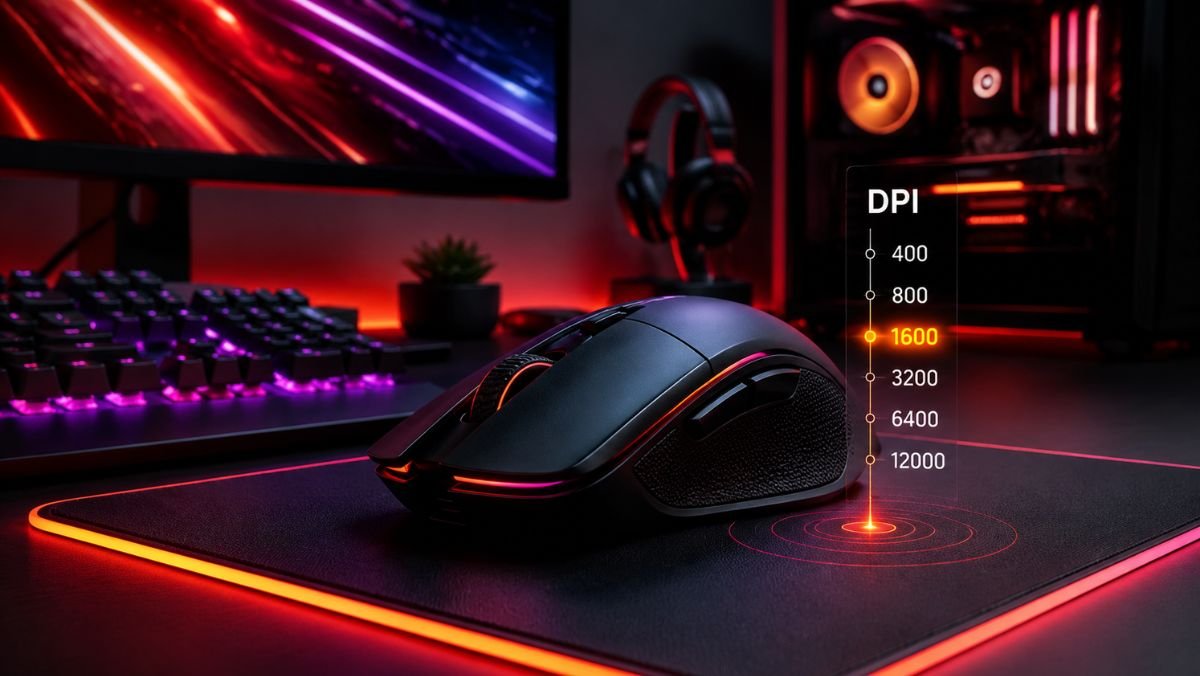
Gaming mouse DPI explained means understanding how DPI (dots per inch) controls how far your cursor moves when you physically move your mouse.
A higher DPI makes the cursor move farther with less hand movement, while a lower DPI provides slower but often more controlled movement. The ideal setting depends on your game, sensitivity preferences, and play style.
Choosing the right mouse settings can significantly change how a gaming mouse feels during everyday use and competitive gameplay. Many gamers adjust their DPI settings without fully understanding what the number actually changes or how it affects accuracy.
A modern gaming mouse may advertise extremely high DPI values, sometimes reaching 20,000 DPI or more.
However, using the highest available setting does not automatically improve gaming performance. In many situations, professional and competitive players prefer moderate DPI values because they provide better control and consistency.
According to Razer’s gaming mouse technology information, DPI is one of several factors that influence mouse performance, alongside sensor quality, tracking capability, and customization options.
Understanding how gaming mouse DPI works helps you make better decisions instead of simply copying settings from professional players or choosing the largest number shown in your mouse software.
DPI works together with other settings, including in-game sensitivity, polling rate, and operating system configuration. Learning how these elements interact allows gamers to create a setup that feels natural for their preferred games.
Understanding How Gaming Mouse DPI Works
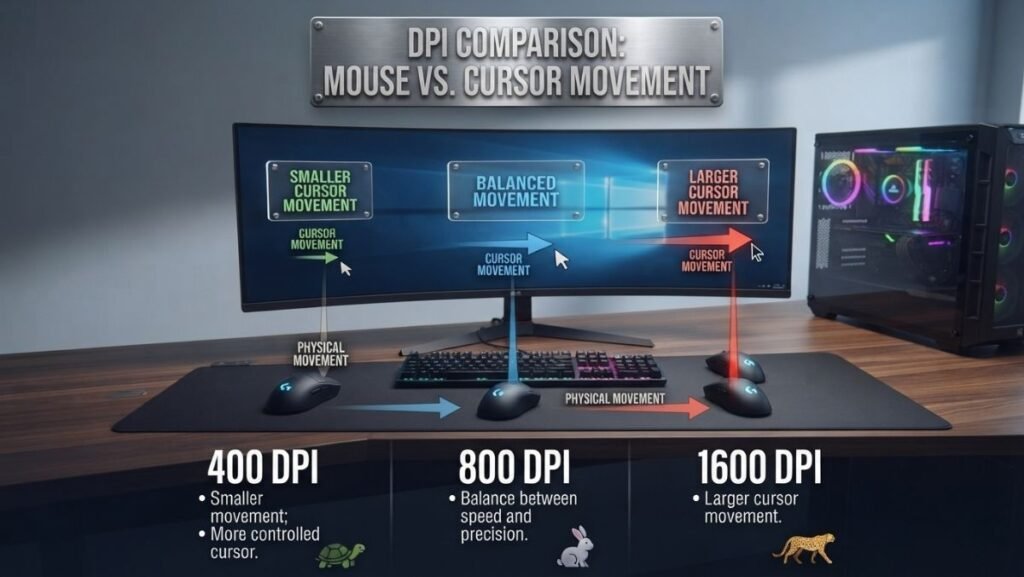
DPI stands for dots per inch and describes how sensitive a mouse sensor is to physical movement. In simple terms, it measures how many pixels your cursor can move across the screen when the mouse moves one inch.
For example:
- At 400 DPI, moving the mouse one inch moves the cursor approximately 400 pixels.
- At 1600 DPI, the same physical movement results in approximately 1600 pixels of cursor movement.
A higher DPI setting increases cursor movement speed, while a lower DPI setting reduces movement speed.
However, DPI does not directly improve the accuracy of a mouse sensor. Accuracy depends on several other factors, including sensor design, tracking technology, surface quality, and software settings.
DPI vs Mouse Sensitivity: What Is the Difference?
Many beginners confuse DPI with sensitivity because both affect how quickly the cursor moves.
They are related but not identical.
| Setting | What It Controls | Where It Is Adjusted |
|---|---|---|
| DPI | Physical mouse movement converted into cursor movement | Mouse software or hardware button |
| In-game sensitivity | How the game interprets mouse movement | Game settings menu |
| Windows sensitivity | Desktop cursor speed | Operating system settings |
A useful way to understand the difference:
DPI is the input speed from the mouse sensor. Sensitivity is the software multiplier applied afterward.
For example, two players may use the same final cursor speed but achieve it differently:
- Player A uses 800 DPI with higher in-game sensitivity.
- Player B uses 1600 DPI with lower in-game sensitivity.
Both setups may feel similar, but the physical movement and control characteristics can differ.
Why Higher DPI Does Not Always Mean Better Gaming Performance
A common misconception is that a higher DPI mouse automatically provides better results.
This is not always true.
Modern gaming mice can reach very high DPI levels, but most players do not need extreme settings. Very high DPI can make small hand movements create large cursor changes, which may reduce control in precision-based games.
For competitive FPS games, many players prefer lower DPI settings because they allow:
- smoother aiming adjustments;
- easier tracking;
- more consistent muscle memory;
- better control during small movements.
The best DPI depends on the player’s preference, monitor resolution, game type, and available mouse space.
Common Gaming Mouse DPI Settings Explained
Different DPI ranges create different experiences. There is no universal perfect value, but some ranges are commonly used.
| DPI Range | Typical Use Case | Experience |
|---|---|---|
| 400–800 DPI | Competitive FPS gaming | More control and precise aiming |
| 800–1600 DPI | General gaming and everyday use | Balanced speed and accuracy |
| 1600–3200 DPI | High-resolution displays and faster movement | Faster cursor response |
| 3200+ DPI | Specialized workflows and personal preference | Extremely sensitive movement |
400 DPI: Maximum Control
Many competitive FPS players historically use 400 DPI because it provides slower, controlled movement.
This setting can be useful for:
- tactical shooters;
- players using large mouse movements;
- low sensitivity aiming styles.
The disadvantage is that larger physical movements may be required.
800 DPI: A Popular Balanced Setting
800 DPI is one of the most common settings among gamers because it provides a balance between speed and precision.
It works well for:
- FPS games;
- strategy games;
- general desktop use.
Many users find this setting comfortable because it does not feel too slow or overly sensitive.
1600 DPI and Above: Faster Cursor Movement
Higher DPI settings are useful for users who prefer quick cursor movement or have limited desk space.
They can benefit:
- high-resolution monitors;
- productivity tasks;
- users who prefer minimal hand movement.
However, higher DPI requires better control because small physical movements create larger cursor changes.
How DPI Affects Different Types of Games
The ideal gaming mouse DPI setting depends heavily on the type of game being played. Different genres require different levels of movement speed, precision, and control.
A setting that works well for a fast-paced shooter may feel uncomfortable in a strategy game or a massive multiplayer online game.
Understanding how DPI affects different gaming scenarios helps users create settings that match their actual needs instead of following a single recommended number.
DPI Settings for First-Person Shooter Games (FPS)
First-person shooter games often require precise aiming, quick reactions, and consistent muscle memory.
Games such as competitive shooters reward players who can make small, controlled movements while maintaining accuracy.
For this reason, many FPS players prefer lower DPI settings combined with carefully adjusted in-game sensitivity.
Common FPS configurations:
| DPI | Typical Sensitivity Style | Suitable For |
|---|---|---|
| 400 DPI | Very low sensitivity | Players who use large arm movements |
| 800 DPI | Balanced sensitivity | Most competitive FPS players |
| 1600 DPI | Faster sensitivity | Players who prefer smaller movements |
A lower DPI does not make the mouse less accurate. Instead, it changes how much physical movement is required to move the cursor or crosshair.
Players with larger mouse pads often prefer lower DPI because they have more room for controlled movements.
DPI Settings for MMO and Strategy Games
Massively multiplayer online games and strategy titles usually require frequent cursor movement rather than pixel-perfect aiming.
Players may benefit from higher DPI settings because:
- many interface elements require quick navigation;
- users often move between different parts of the screen;
- precision aiming is usually less important.
For these types of games, settings between 1200 and 2400 DPI can provide a comfortable balance.
However, personal preference remains the deciding factor.
A player managing multiple abilities, menus, or maps may prefer faster cursor movement, while another player may value slower and more deliberate control.
DPI Settings for Everyday Computer Use
A gaming mouse is also commonly used for regular tasks such as:
- browsing the internet;
- editing documents;
- working with creative software;
- managing multiple monitors.
For everyday use, many users prefer medium-to-high DPI settings because they reduce the amount of physical movement needed.
Users with:
- large monitors;
- ultrawide displays;
- multiple screens;
may find higher DPI more comfortable.
How to Choose the Right Gaming Mouse DPI Setting
There is no universal DPI number that works for every gamer. The correct setting depends on several practical factors.
Consider Your Mouse Space
The amount of available desk space affects your ideal DPI.
Players with a large mouse pad often prefer lower DPI because they can move the mouse farther physically.
Players with limited desk space may prefer higher DPI because smaller movements cover more screen distance.
Consider Your Gaming Style
Your preferred movement style also influences DPI choice.
Low DPI users often prefer:
- slower controlled aiming;
- arm movements;
- precision-focused gameplay.
High DPI users often prefer:
- quick cursor movement;
- wrist-based movement;
- limited physical mouse travel.
Neither approach is automatically better. The goal is creating a setting that feels consistent and comfortable.
Avoid Changing DPI Too Frequently
A common mistake among new gamers is constantly changing DPI settings.
Every DPI change alters how your movements feel and can make it harder to develop consistent control.
Muscle memory develops through repetition. Once you find a comfortable setting, keeping it consistent usually helps improve familiarity.
Understanding Razer Mouse Color DPI Meaning
Many gaming mice, especially models from Razer, use RGB lighting indicators to show different DPI profiles.
The colors themselves do not represent a universal DPI standard across all gaming mice. Instead, manufacturers assign colors based on their own software profiles.
For example, Razer users can customize DPI stages through Razer Synapse, the company’s official configuration software.
According to Razer Synapse features, users can adjust mouse settings, create profiles, and customize performance options depending on their preferences.
Why DPI Colors Can Be Confusing
A common misunderstanding is that every color represents the same DPI level.
This is incorrect.
A green light on one mouse may represent 800 DPI, while another profile or device may use a completely different value.
The color is simply an indicator assigned to a specific DPI stage.
The actual DPI value should always be checked through:
- manufacturer software;
- device settings;
- saved hardware profiles.
DPI, Polling Rate, and Sensor Technology: How They Work Together
DPI is only one part of gaming mouse performance.
A high DPI setting does not guarantee better tracking if other hardware limitations exist.
Three major factors influence gaming mouse performance:
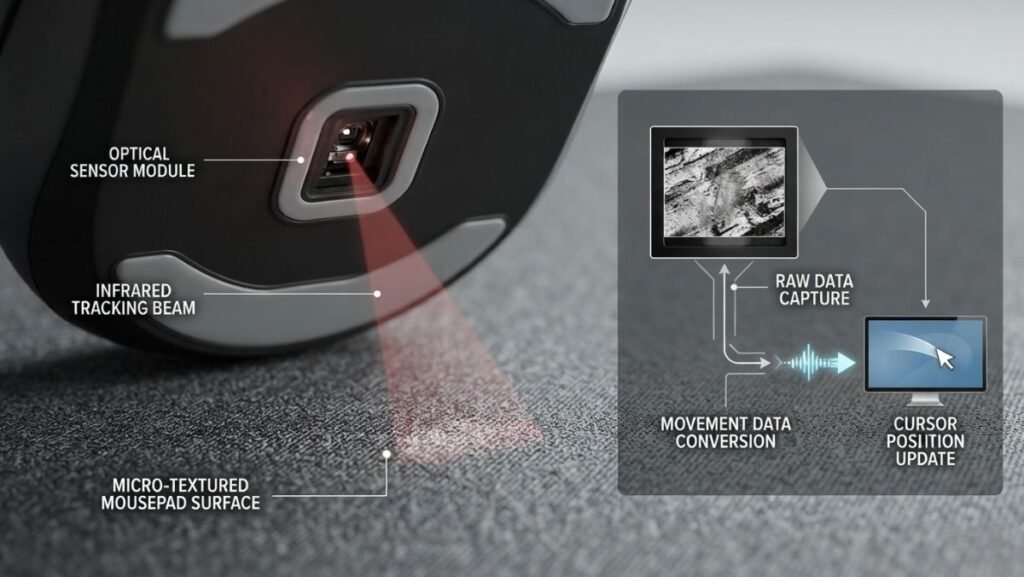
| Feature | Function |
|---|---|
| DPI | Controls cursor movement speed |
| Polling Rate | Determines how often the mouse reports movement to the computer |
| Sensor Technology | Controls tracking accuracy and consistency |
A mouse with a quality sensor and appropriate DPI settings will usually provide a better experience than a mouse with extremely high DPI numbers but weaker tracking.
For a broader look at how DPI, sensors, polling rate, and tracking work together, see our guide to gaming mouse technology.
Practical DPI Recommendations Based on User Type
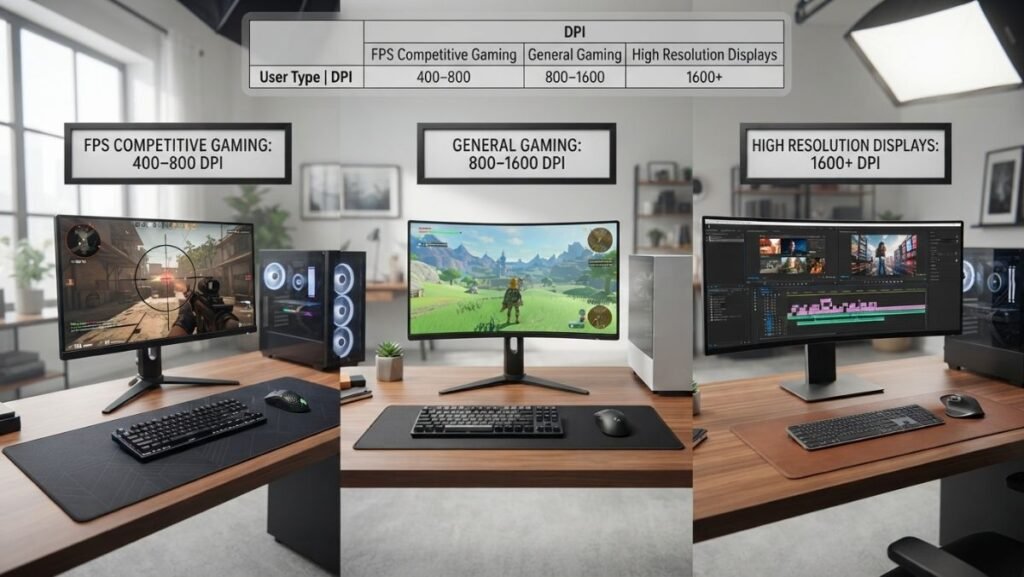
| User Type | Suggested DPI Range | Reason |
|---|---|---|
| Competitive FPS player | 400–800 DPI | Better control and precision |
| Casual gamer | 800–1600 DPI | Balanced experience |
| MMO player | 1200–2400 DPI | Faster navigation |
| High-resolution monitor user | 1600+ DPI | Less physical movement |
| General computer user | 800–1600 DPI | Comfortable daily use |
These values are starting points, not strict rules. The best configuration is the one that allows accurate movement without unnecessary effort.
Common Gaming Mouse DPI Mistakes Beginners Make
Many users adjust DPI settings without understanding how those changes affect their overall gaming experience. While DPI is an important part of mouse configuration, incorrect adjustments can create inconsistent movement and make gameplay feel less comfortable.
Avoiding common mistakes helps users build a more reliable setup.
Using the Highest DPI Setting Available
One of the most common mistakes is assuming that the highest DPI number means the best performance.
A mouse advertised with 20,000 DPI or higher does not mean every gamer should use that setting.
Extremely high DPI values can make small hand movements produce large cursor changes, making precise control more difficult.
High DPI settings can be useful in specific situations, but most users benefit from choosing a setting that matches their play style rather than choosing the maximum available option.
Copying Professional Gamer Settings Without Adjusting Them
Many beginners search for the DPI settings used by professional players and immediately copy them.
While professional settings can provide useful examples, they are not universal recommendations.
A professional player’s setup depends on:
- monitor size;
- mouse pad area;
- grip style;
- game sensitivity;
- personal muscle memory.
A configuration designed for one player may feel uncomfortable for another.
Changing DPI Settings Too Often
Frequent DPI changes can prevent users from developing consistent control.
When DPI changes constantly, the relationship between physical mouse movement and on-screen movement also changes.
This can make it harder to build familiarity, especially in games that require precise aiming.
A better approach is:
- Choose a comfortable DPI range.
- Test it for several gaming sessions.
- Adjust gradually if needed.
Ignoring In-Game Sensitivity Settings
DPI and sensitivity work together.
Changing only DPI without considering in-game sensitivity may create unexpected results.
For example:
- Increasing DPI while keeping the same game sensitivity increases overall cursor speed.
- Lowering DPI without adjusting sensitivity may make movement feel slower.
Understanding both settings allows players to create a balanced configuration.
How to Find Your Ideal Gaming Mouse DPI
Finding the right DPI requires testing rather than following a single recommended number.
A practical approach:
Start With a Common Setting
Many users can begin with:
- 800 DPI for balanced performance.
- 400 DPI for precision-focused FPS gameplay.
- 1600 DPI for faster movement.
These values provide a reasonable starting point for experimentation.
Test Movement Comfort
Pay attention to how the mouse feels.
Ask:
- Can you aim accurately?
- Do you need excessive arm movement?
- Does the cursor move too quickly?
- Do small adjustments feel difficult?
The correct DPI should feel natural rather than requiring constant correction.
Adjust Gradually
Small changes usually work better than large jumps.
For example:
- Move from 800 DPI to 1000 DPI.
- Test the change.
- Decide whether additional adjustment is necessary.
Large changes can make it difficult to understand what actually improved or reduced comfort.
Final Thoughts on Gaming Mouse DPI Settings
Understanding how gaming mouse DPI works helps you make smarter decisions about mouse configuration. DPI affects how quickly the cursor responds to physical movement, but it is only one part of overall gaming performance.
The best DPI setting is not the highest number available. It is the setting that provides a comfortable balance between speed, control, and consistency.
For many gamers, a moderate DPI range between 400 and 1600 offers a practical starting point. From there, adjustments should be based on personal preference, game type, and available workspace.
A well-configured gaming mouse combines the right DPI with suitable sensitivity, reliable sensor technology, and consistent practice.
Mouse technology is only one element of a gaming setup designed around performance, comfort, and user preferences.
FAQ — Gaming Mouse DPI Explained
What is DPI on a gaming mouse?
DPI on a gaming mouse measures how far the cursor moves when the mouse is physically moved. A higher DPI setting increases cursor movement speed, while a lower DPI setting provides slower and more controlled movement.
What DPI should I use for FPS games?
Many FPS players use between 400 and 800 DPI because these settings provide better control for precise aiming. However, the ideal DPI depends on personal preference, sensitivity settings, and play style.
Is higher DPI better for gaming?
Higher DPI is not automatically better for gaming. Extremely high DPI settings can make precise movements harder, while moderate DPI values often provide better control for many players.
What is the difference between DPI and sensitivity?
DPI controls how much movement the mouse sensor translates into cursor movement. Sensitivity is a software setting inside the operating system or game that adjusts how that input is interpreted.
What does Razer mouse color DPI mean?
Razer mouse DPI colors indicate different DPI profiles configured through Razer software. The colors do not represent universal DPI values, so users should check their saved profiles in Razer Synapse.
Does changing DPI improve mouse accuracy?
Changing DPI does not directly improve sensor accuracy. Accuracy depends on factors such as sensor quality, tracking technology, surface conditions, and user control.
Should I use the same DPI for every game?
Not necessarily. Different games require different movement styles. FPS games may benefit from lower DPI settings, while strategy and MMO games may feel more comfortable with higher DPI values.