Gaming mouse features determine how a mouse performs during gameplay by affecting accuracy, speed, comfort, and control. The most important features include sensor technology, DPI adjustment, polling rate, ergonomic design, weight, programmable buttons, and customization software.
Understanding these features helps users separate meaningful performance improvements from specifications that mainly serve as marketing numbers.
In practice, the best gaming mouse is not always the one with the highest specifications, but the one that matches the player’s game style, grip preference, and comfort needs.
A gaming mouse is no longer just a standard pointing device with extra buttons. Modern gaming mice combine specialized sensors, customizable controls, ergonomic designs, and software features designed to improve interaction between the player and the computer.
These elements are part of the broader gaming mouse technology that influences modern gaming peripherals.
For beginners, choosing a gaming mouse can feel confusing because manufacturers often highlight large DPI numbers, RGB lighting, and advanced specifications without explaining how these features affect everyday use.
Understanding gaming mouse features helps users identify which technologies actually improve gameplay. A competitive FPS player may prioritize sensor accuracy and lightweight construction, while an MMO player may benefit more from additional programmable buttons.
According to information from manufacturers such as Logitech G, modern gaming mice are designed around factors such as tracking precision, responsiveness, customization, and user comfort.
The goal is not to find a mouse with the highest numbers on a specification sheet. Instead, users should understand how each feature works and how it matches their personal gaming style, hand position, and preferred types of games.
What Are the Most Important Gaming Mouse Features?
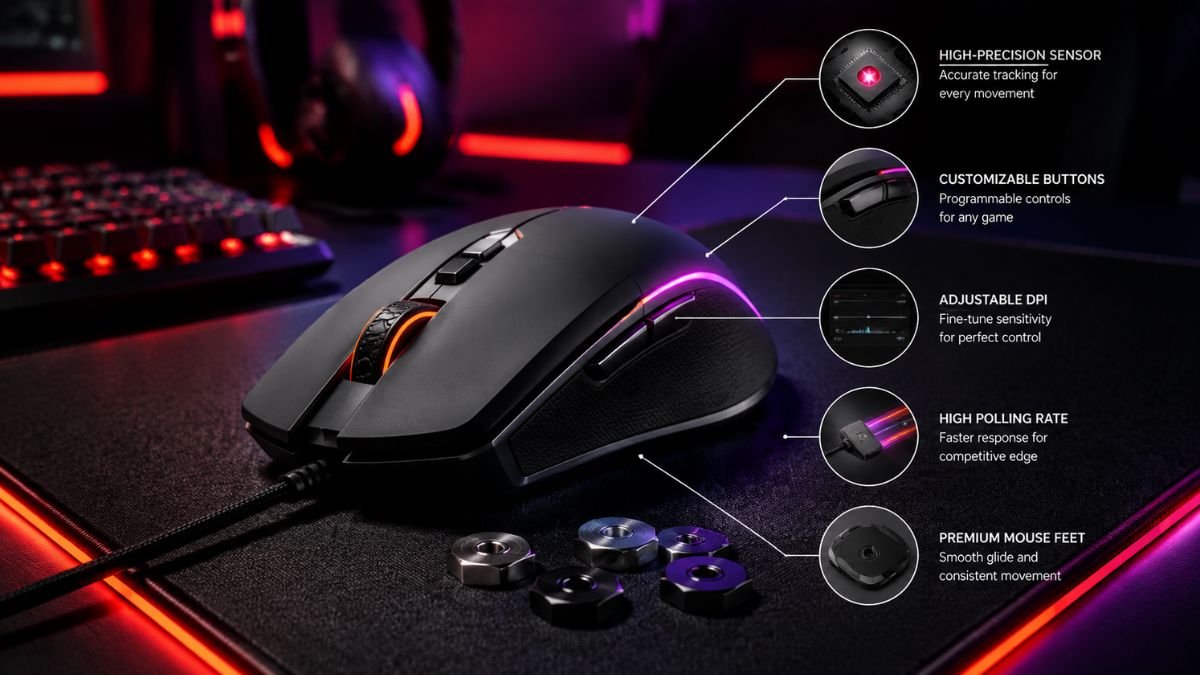
A gaming mouse contains several components that influence performance. Some features directly affect gameplay accuracy, while others improve comfort and customization.
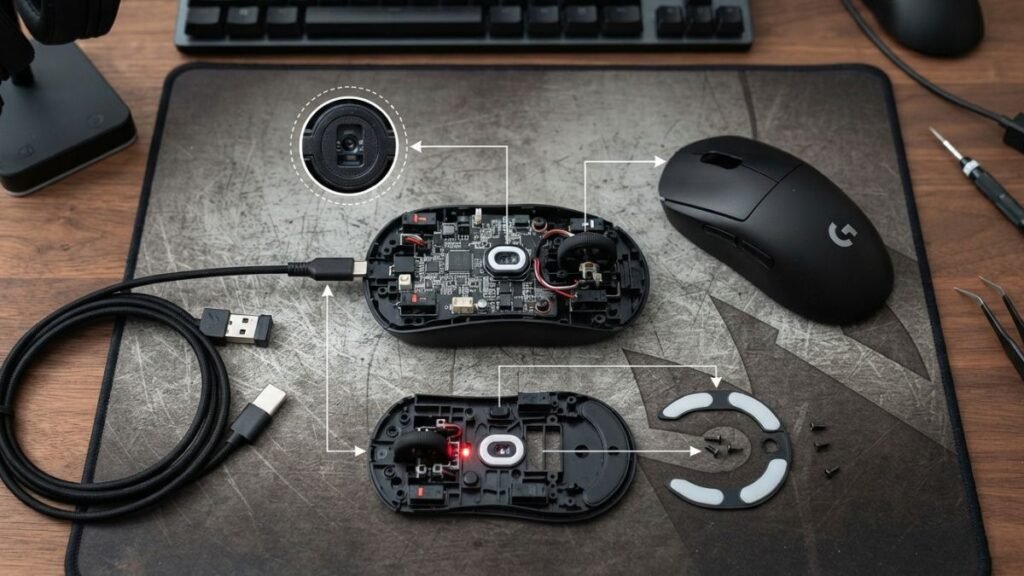
The most important gaming mouse features include:
| Feature | What It Affects |
|---|---|
| Sensor technology | Tracking accuracy and movement consistency |
| DPI settings | Cursor sensitivity and movement speed |
| Polling rate | Communication speed between mouse and computer |
| Weight | Movement control and fatigue |
| Shape and grip | Comfort and handling style |
| Buttons | Shortcuts and gameplay controls |
| Software | Customization and profiles |
Each feature has a different purpose, and the best configuration depends on how the mouse will be used.
Gaming Mouse Sensor Technology and Tracking Accuracy
The sensor is one of the most important components in a gaming mouse because it determines how accurately physical movement is translated into cursor movement.
Modern gaming mice generally use optical sensors that track surface movement through images captured thousands of times per second.
Sensor quality is not measured only by maximum DPI numbers. Consistent tracking, low acceleration issues, and predictable movement are usually more important factors for gaming performance.
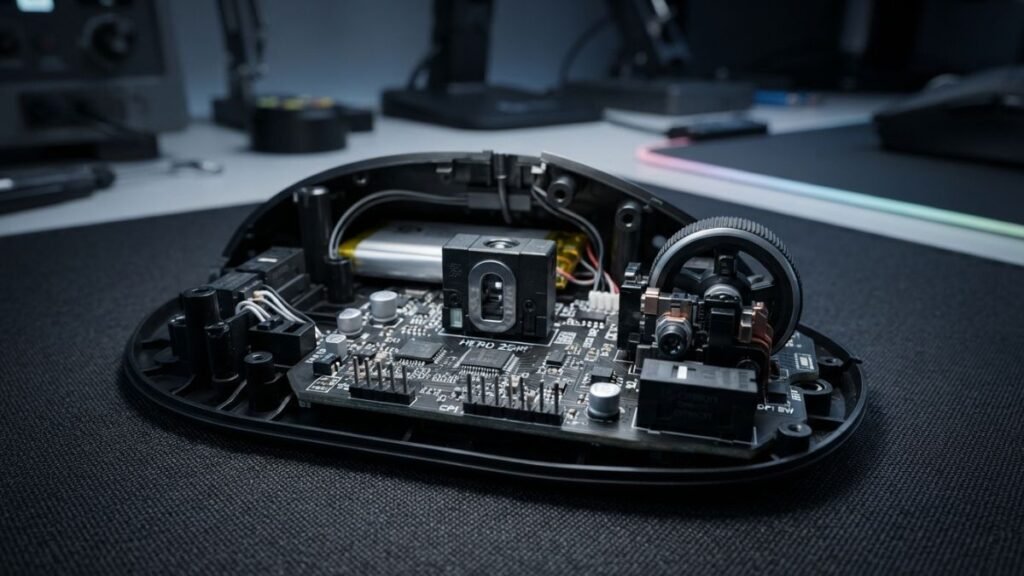
Companies such as PixArt Imaging develop gaming sensors designed to provide accurate tracking and responsive performance. Higher-quality sensors provide consistent tracking, especially during fast movements common in competitive games.
A good sensor should provide:
- Accurate movement detection
- Minimal unwanted acceleration
- Consistent tracking at different speeds
- Reliable performance during quick directional changes
For FPS gaming, sensor consistency is often more valuable than extremely high sensitivity settings.
Players interested in deeper technical details can learn more about how sensors affect precision in this guide about gaming mouse sensors.
DPI Settings and Cursor Sensitivity
DPI, or dots per inch, describes how much the cursor moves relative to physical mouse movement.
A higher DPI setting means the cursor moves farther with less hand movement. However, a higher DPI number does not automatically mean better performance.
In competitive games, many players combine DPI settings with in-game sensitivity adjustments to create a balance between speed and control.
Many experienced players use moderate DPI settings combined with customized in-game sensitivity because this provides more predictable control.
For example:
- High DPI can help users who prefer fast cursor movement.
- Lower DPI can provide more control for precise aiming.
- Adjustable DPI allows users to switch between different tasks.
Understanding DPI is important because it is one of the most commonly misunderstood gaming mouse features.
Users who want more details about sensitivity settings can explore this explanation of gaming mouse DPI.
Polling Rate and Response Speed
Polling rate describes how frequently the mouse reports its position to the computer.
It is measured in Hertz (Hz).
Common polling rates include:
| Polling Rate | Meaning |
|---|---|
| 125Hz | Reports position 125 times per second |
| 500Hz | Faster communication for gaming |
| 1000Hz | Common high-performance setting |
While higher polling rates can reduce communication delay, the practical benefit depends on the game, hardware, and whether the player can notice the difference.
A higher polling rate can reduce input delay, although the difference may be more noticeable for competitive players than casual users.
The benefit depends on the entire system, including the computer hardware, game settings, and player’s sensitivity preferences.
Gaming Mouse Design Features That Affect Comfort
Performance is not determined only by internal hardware. The physical design of a gaming mouse strongly influences how comfortable and controlled it feels during long gaming sessions.
Two mice can have similar sensors and specifications but provide completely different experiences because of differences in shape, weight distribution, and button placement.
Ergonomics becomes especially important for users who spend several hours gaming, designing, editing videos, or working with detailed applications.
Shape and Grip Compatibility
The shape of a gaming mouse determines how naturally the user’s hand interacts with the device.
Different grip styles require different designs:
| Grip Style | Hand Position | Common Preference |
|---|---|---|
| Palm grip | Entire hand rests on the mouse | Larger ergonomic mice |
| Claw grip | Fingers are curved while the palm partially touches | Medium-sized designs |
| Fingertip grip | Only fingertips control movement | Lightweight compact mice |
A mouse designed for palm grip may feel uncomfortable for someone who prefers fingertip control. This is why shape should be evaluated based on hand size and personal preference rather than popularity alone.
The relationship between hand position and control is explored further in this guide about gaming mouse grip styles.
Comfort is not simply about having a larger or smaller mouse. It is about whether the design supports natural movement without creating unnecessary strain.
Weight and Movement Control
Weight is another important gaming mouse feature because it changes how quickly and easily users can move the device.
Competitive FPS players often prefer lighter mice because quick movements and repeated adjustments require less physical effort.
However, lightweight does not automatically mean better.
A heavier mouse can provide:
- More stability during slow movements
- A stronger physical presence
- A preference for users who dislike very fast movement
A lightweight gaming mouse may benefit users who prioritize speed and fast reactions, especially in games requiring frequent aiming adjustments.
Users interested in how weight affects performance can explore more about ightweight gaming mouse design.
Gaming Mouse Feet and Surface Movement
The small pads located underneath a mouse are often overlooked, but gaming mouse feet influence how smoothly the device moves across a surface.
Mouse feet, also called skates, affect:
- Glide speed
- Friction level
- Movement consistency
- Overall control feeling
Different materials and designs create different levels of resistance.
For example, smoother mouse feet can help with fast movements, while users who prefer more stopping control may prefer slightly more friction.
The mouse pad surface also affects performance because the interaction between the feet and the pad determines how movement feels during use.
For the best results, mouse feet should also be considered together with the mouse pad surface, as both directly influence glide and control.
A high-quality sensor combined with poor movement conditions may not deliver the expected experience, showing why gaming mouse features work together rather than independently.
Additional Gaming Mouse Features Explained
Beyond sensors, DPI, and physical design, modern gaming mice include additional features that improve customization and usability.
These features are not equally important for every user. Their value depends on gaming habits, software requirements, and personal preferences.
Programmable Buttons and Custom Controls
Programmable buttons allow users to assign shortcuts, commands, or macros to specific mouse controls.
The usefulness of extra buttons depends heavily on the type of game.
Examples:
FPS games:
- Side buttons may be used for equipment switching or quick actions.
MMO games:
- Additional buttons can provide access to multiple abilities.
Creative applications:
- Buttons can control shortcuts in editing software.
A mouse with many buttons is not automatically better. Extra controls only provide value when they improve workflow or reduce unnecessary keyboard movement.
Software customization is also important because it allows users to create profiles for different games and applications.
RGB Lighting and Customization Software
RGB lighting is one of the most visible gaming mouse features, but its practical importance depends on user preference.
Lighting can improve:
- Setup aesthetics
- Visual consistency with other peripherals
- Personal customization
However, RGB lighting does not directly improve:
- Accuracy
- Response time
- Tracking performance
More important is the accompanying software, which may control:
- Button assignments
- DPI profiles
- Lighting settings
- Device memory options
Wireless Gaming Mouse Features and Battery Performance
Wireless gaming mice have improved significantly compared with older wireless peripherals.
Modern wireless models commonly focus on reducing latency while maintaining battery efficiency.
Important wireless considerations include:
- Connection stability
- Battery life
- Charging options
- Compatibility with devices
Some users still prefer wired mice because they avoid charging requirements, while others prefer wireless designs because they reduce cable movement.
Users comparing these connection options can learn more about the differences between wireless and wired gaming mice.
The choice between wired and wireless depends on personal preference and usage environment rather than one option being universally better.
Which Gaming Mouse Features Matter for Different Users?
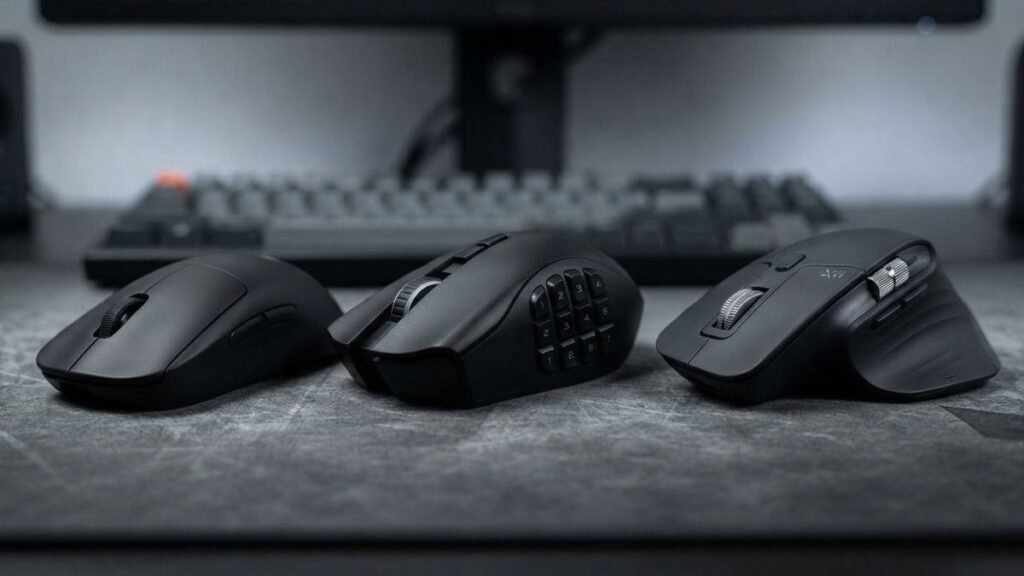
Different users need different combinations of gaming mouse features. The right choice depends on gaming habits, work requirements, preferred control style, and how the mouse will be used daily.
The right gaming mouse features depend less on having the most advanced specifications and more on matching the mouse with the user’s primary activities.
| User Type | Important Gaming Mouse Features |
|---|---|
| FPS players | Sensor accuracy, low weight, grip comfort |
| MMO players | Programmable buttons, software profiles |
| Designers | Precision, ergonomics, adjustable sensitivity |
| Casual gamers | Comfort, reliability, basic customization |
Understanding your usage pattern helps you focus on features that provide real value instead of choosing specifications that may not improve your experience.
Gaming Mouse Features for FPS Players
FPS players usually prioritize control and accuracy because fast reactions and precise movements directly influence gameplay performance. Understanding gaming mouse grip styles can also help users choose a design that matches their preferred hand position.
Important characteristics include:
- Reliable sensor tracking
- Comfortable grip
- Low or moderate weight
- Consistent movement
- Stable performance during fast movements
A high DPI specification alone does not guarantee better aim. Many players focus more on consistent control, predictable movement, and developing muscle memory.
Gaming Mouse Features for MMO Players
MMO players often benefit from additional controls because these games frequently require access to multiple abilities, commands, and shortcuts.
Useful features include:
- Programmable side buttons
- Custom software profiles
- Macro support
- Flexible button configuration
However, having more buttons does not automatically improve gameplay. The additional controls should match the player’s needs and provide faster access to frequently used actions.
Gaming Mouse Features for Designers and Productivity Users
Gaming mice are also used outside gaming because many models include accurate sensors and customizable controls that can improve creative workflows.
For designers and productivity users, useful features may include:
- Comfortable shape for long sessions
- Programmable buttons
- Adjustable sensitivity
- Smooth tracking
A gaming mouse can become a useful productivity tool when customization options are configured for editing software, shortcuts, or frequently used commands.
Gaming Mouse Features for Casual Gamers
Casual gamers usually benefit more from balanced performance than from advanced specifications.
Important factors include:
- Comfortable design
- Reliable tracking
- Simple customization
- Good durability
For this audience, ease of use and comfort often provide more value than extremely high DPI settings or complex customization features.
Gaming Mouse Features That Are Often Overrated
Not every gaming mouse feature provides the same level of practical benefit. Some specifications receive significant marketing attention but may not improve the experience for every user.
Understanding which features matter helps consumers focus on technology that supports their actual needs.
Extremely High DPI Numbers
High DPI values are commonly promoted as a sign of advanced gaming mouse performance. However, maximum DPI is not always an indicator of better control.
A very high DPI setting can make cursor movement extremely sensitive, which may be difficult to manage for many users.
In practice, many gamers prefer balanced DPI settings combined with customized in-game sensitivity.
The important factors are:
- Consistent tracking
- Predictable movement
- Comfortable control
- Personal preference
A sensor capable of extremely high DPI can be useful technology, but the maximum number itself does not determine overall quality.
Too Many Buttons Without a Purpose
Additional buttons can be useful, but more buttons do not automatically create a better gaming experience.
A gaming mouse with many programmable controls can benefit MMO players or users who work with complex applications.
However, FPS players may prefer simpler designs because unnecessary buttons can increase complexity or affect grip comfort.
The right number of buttons depends on:
- Game genre
- Workflow requirements
- Personal preference
- Hand positioning
A well-designed two-button gaming mouse can sometimes be more effective than a device with many unused controls.
Decorative Features That Do Not Improve Performance
Some gaming mouse features focus primarily on appearance rather than functionality.
Examples include:
- Excessive RGB effects
- Unusual visual designs
- Decorative elements
- Features unrelated to control
These features are not necessarily negative. Many users enjoy customization and visual personalization.
However, they should not replace important factors such as sensor quality, comfort, durability, and usability.
How to Evaluate Gaming Mouse Features Before Choosing One
Understanding specifications is useful, but users should connect features with their actual needs.
A practical evaluation process focuses on performance, comfort, and compatibility.
Match Features With Your Gaming Style
Different gaming genres require different priorities.
For example:
- FPS players usually benefit from accuracy and movement control.
- MMO players may value additional buttons.
- Strategy gamers may prefer comfort during long sessions.
- Creative users may benefit from customizable shortcuts.
There is no single configuration that works perfectly for everyone.
Consider Comfort Before Specifications
A technically advanced mouse can still feel uncomfortable if the shape does not match the user’s hand.
Before focusing on specifications, consider:
- Hand size
- Preferred grip style
- Session length
- Mouse movement preference
Comfort directly affects consistency because users interact with the mouse thousands of times during extended sessions.
Understand Which Features Actually Improve Control
The most valuable gaming mouse features are usually those that improve the connection between user movement and computer response.
These commonly include:
- Accurate sensors
- Comfortable design
- Reliable buttons
- Appropriate weight
- Customizable settings
Features should solve a real problem instead of simply increasing the number of specifications.
Gaming Mouse Features Checklist Before Buying
| Feature | Why It Matters |
|---|---|
| Sensor | Accuracy and tracking |
| DPI | Sensitivity control |
| Polling rate | Response speed |
| Weight | Movement control |
| Shape | Comfort |
| Buttons | Customization |
Conclusion
Gaming mouse features influence different parts of the user experience, from tracking accuracy and movement control to comfort and customization. Sensors, DPI settings, polling rate, weight, shape, buttons, and software all contribute to how a mouse performs in different situations.
The most important feature is not always the one with the largest number in the specifications. A balanced combination of accurate hardware, comfortable design, and useful customization usually creates a better experience.
Understanding gaming mouse features allows users to make more informed decisions and recognize which technologies actually improve gameplay, productivity, and everyday computer use.
Frequently Asked Questions About Gaming Mouse Features
What are the most important gaming mouse features?
The most important gaming mouse features include sensor accuracy, DPI adjustment, polling rate, ergonomic design, weight, and button customization. The importance of each feature depends on the user’s gaming style, preferred grip, and how the mouse will be used.
Do gaming mouse features like high DPI improve performance?
High DPI does not automatically improve gaming performance. DPI only controls sensitivity, while factors such as sensor accuracy, movement consistency, and personal settings usually have a larger impact on control.
Are lightweight gaming mouse features better for FPS games?
Lightweight gaming mouse designs can benefit FPS players because they require less effort for quick movements. However, the ideal weight depends on personal preference, grip style, and the level of control the user prefers.
Why are gaming mouse feet important?
Gaming mouse feet affect how smoothly the mouse moves across a surface. They influence friction, glide, and movement consistency, which can change how the mouse feels during gameplay.
Do programmable buttons matter on a gaming mouse?
Programmable buttons are useful when they provide faster access to commands or shortcuts. They are especially valuable for MMO games, productivity workflows, and users who customize their controls.
Are wireless gaming mouse features reliable today?
Modern wireless gaming mice can provide reliable performance with low latency and stable connections. The choice between wired and wireless depends on factors such as charging preferences, mobility, and personal setup requirements.
What gaming mouse features matter most for FPS games?
Sensor accuracy, comfortable grip, consistent tracking, and suitable weight are usually more important than extremely high DPI numbers.
What DPI should a gaming mouse have?
There is no single ideal DPI setting for every player. Many gamers prefer moderate DPI settings combined with in-game sensitivity adjustments because they provide better control and consistency.