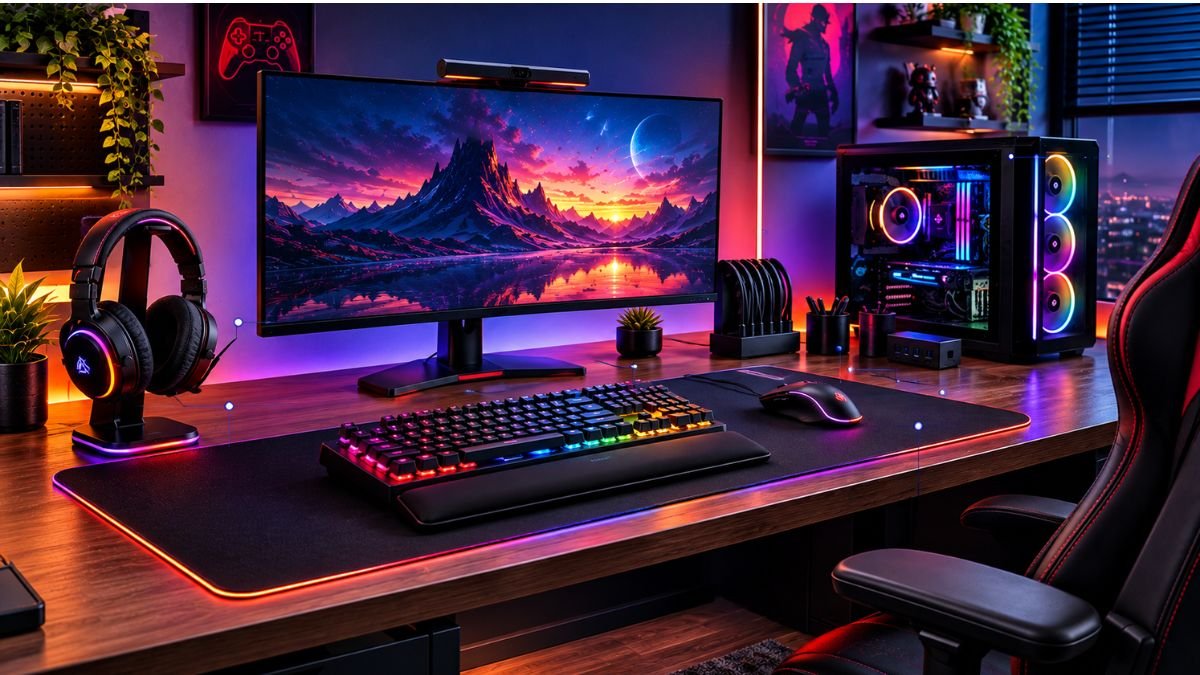
Gaming desk accessories are tools and additions designed to improve the organization, comfort, functionality, and appearance of a gaming workspace.
Unlike decorative items that only change the look of a desk, useful accessories solve practical problems such as cable clutter, poor ergonomics, limited space, and inefficient equipment placement.
A gaming setup is no longer just about choosing a powerful computer, a high-refresh-rate monitor, or a responsive keyboard and mouse.
The environment around those devices also influences how comfortable, organized, and enjoyable the experience becomes.
For many gamers, small workspace problems appear over time. Cables become difficult to manage, accessories take up valuable desk space, headphones have no dedicated place, and long sessions can become uncomfortable because of poor desk organization.
This is where gaming desk accessories become valuable.
The right accessories do not necessarily make a computer faster or increase FPS directly. Instead, they improve the interaction between the user and the entire setup.
A properly organized desk can make equipment easier to access, reduce distractions, and create a workspace that works better for both gaming and everyday tasks.
According to ergonomic research, workspace arrangement can influence comfort and productivity by improving posture, reducing unnecessary movement, and creating a more efficient environment.
Organizations such as Microsoft Ergonomics Resources highlight the importance of designing workspaces around human movement and comfort.
Understanding different categories of gaming desk accessories helps users focus on improvements that provide real value instead of simply adding more items to their desk.
Understanding the Role of Gaming Desk Accessories
Functional Accessories vs Decorative Accessories
Not every item placed on a gaming desk serves the same purpose.
Some accessories improve the way users interact with their setup, while others mainly change the visual appearance.
| Category | Main Purpose | Example |
|---|---|---|
| Functional accessories | Improve comfort, organization, or usability | Cable management clips, monitor arms, headset stands |
| Decorative accessories | Improve appearance and personal style | RGB lighting, figures, themed decorations |
| Hybrid accessories | Combine appearance and functionality | Desk mats, lighting systems, storage solutions |
A balanced gaming desk usually includes a combination of these categories. However, functional improvements generally create a more noticeable difference during daily use.
For example, a headset stand may appear like a simple addition, but it prevents headphones from being placed randomly on the desk or damaged by improper storage.
Essential Categories of Gaming Desk Accessories
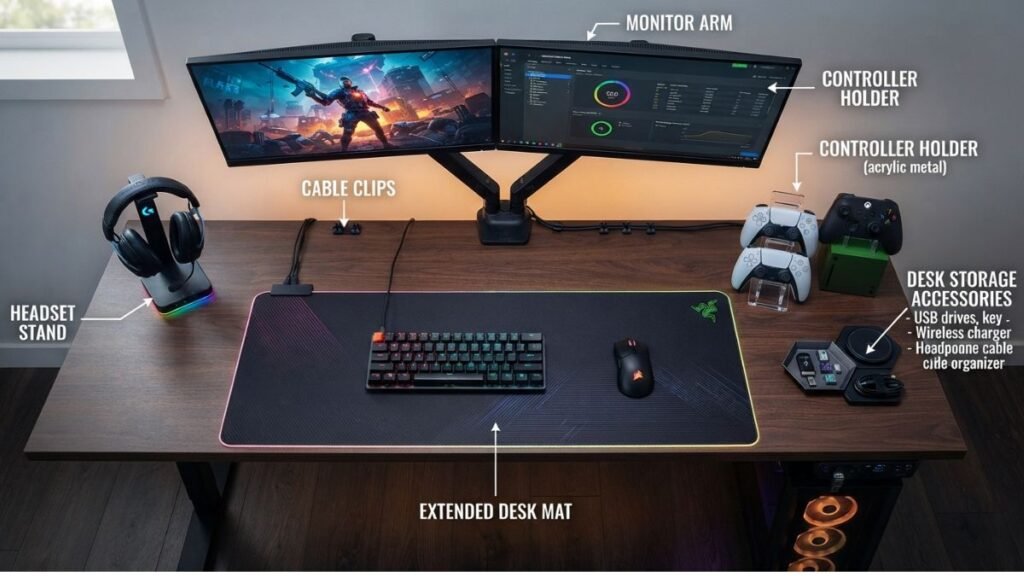
Desk Mats and Extended Mouse Pads
A desk mat is one of the most common additions to modern gaming setups because it creates a consistent surface for multiple devices.
Unlike traditional small mouse pads, extended desk mats can cover areas used by:
- Keyboard placement.
- Mouse movement.
- Wrist positioning.
- Workspace protection.
These accessories are part of a broader approach to creating an organized gaming environment. Understanding how different gaming setup accessories work together can help users build a workspace that balances comfort, accessibility, and functionality.
A quality desk mat can also reduce friction between devices and the desk surface while creating a more unified appearance.
For competitive gaming, consistent mouse movement is especially important because small changes in surface texture can affect how a mouse feels during movement.
Monitor Arms and Mounting Solutions
Monitor placement has a direct relationship with comfort and workspace efficiency.
A monitor arm can help users:
- Adjust screen height.
- Create more desk space.
- Improve viewing angles.
- Change monitor positions more easily.
A traditional monitor stand often occupies valuable desk space. Mounting solutions can free that area for keyboards, controllers, notebooks, or other accessories.
For multi-monitor setups, adjustable mounting systems can also make the workspace easier to customize.
Cable Management Accessories
Cable management is one of the most practical improvements for any gaming desk.
Gaming setups often include multiple connected devices, including computers, monitors, keyboards, mice, speakers, chargers, and controllers. As the number of devices increases, cable organization becomes more important for maintaining a cleaner and more efficient workspace.
Without organization, cables can create visual clutter and make maintenance more difficult.
Common cable management solutions include:
- Cable clips.
- Under-desk trays.
- Cable sleeves.
- Velcro straps.
- Routing channels.
The goal is not simply making cables invisible. Good cable management creates easier access when users need to replace or adjust equipment.
Modern gaming ecosystems often include multiple connected devices, from keyboards and mice to audio equipment. Manufacturers such as Logitech G design gaming peripherals that work together as part of a broader user setup.
Why Cable Organization Matters in Gaming Setups
A clean desk environment improves more than appearance.
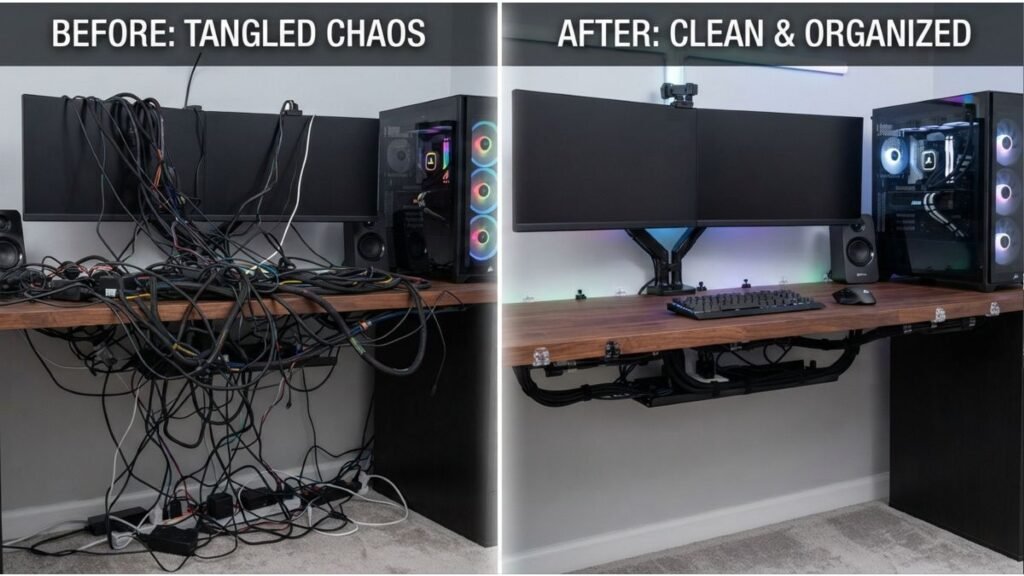
Organized cables can help users:
- Identify connections quickly.
- Prevent accidental cable pulling.
- Simplify upgrades.
- Maintain a cleaner workspace.
The right gaming desk accessories can improve comfort, organization, and the overall experience of your gaming workspace.
However, keeping these accessories organized is equally important. Proper gaming cable management helps control wires, reduce clutter, and create a cleaner desk environment.
Many professional workstation environments follow similar organization principles because equipment accessibility is an important part of efficient workspace design.
Gaming ecosystems from brands such as Logitech G include multiple peripherals designed to work together, showing why organization becomes increasingly important as gaming setups become more complex.
Headphone Stands and Audio Organization
Keeping Gaming Headsets Accessible
Headsets are one of the most frequently used gaming accessories, but they are often placed incorrectly when not in use.
A headphone stand provides:
- A dedicated storage location.
- Easier access between sessions.
- Protection from accidental damage.
- Better desk organization.
Beyond storage and organization, audio equipment also plays an important role in immersion. Understanding gaming headset technology helps users evaluate features related to sound quality, communication, and comfort.
Some models also include additional features such as USB charging or cable management.
However, the main benefit is simple: creating a consistent place for an important peripheral.
Controller Stands and Peripheral Storage
Gamers who use multiple devices often face storage challenges.
A desk may include:
- Controllers.
- Handheld devices.
- Charging cables.
- External drives.
- Gaming accessories.
Storage solutions help keep frequently used equipment accessible without creating unnecessary clutter.
The best organization approach depends on the user’s setup. A PC-focused gamer may prioritize keyboard and mouse accessories, while a console gamer may need more controller-focused storage.
Lighting and Visual Customization
The Purpose of Gaming Desk Lighting
Lighting is one of the most recognizable parts of gaming setups.
RGB lighting and ambient lighting can create a personalized environment, but its practical value depends on implementation.
Gaming hardware companies such as Razer have developed connected ecosystems where lighting, peripherals, and accessories can be customized to create a more immersive gaming environment.
Useful lighting can:
- Reduce harsh contrast between a bright monitor and dark surroundings.
- Improve workspace atmosphere.
- Highlight important areas of the desk.
Poorly positioned lighting, however, may create distractions or reflections.
The goal should be creating a comfortable environment rather than adding unnecessary visual effects.
Personalization Without Sacrificing Functionality
A gaming desk represents personal preferences.
Some users prefer:
- Minimal designs.
- RGB-focused setups.
- Streaming environments.
- Clean professional workspaces.
Accessories should support the user’s needs rather than simply filling available desk space.
A well-designed setup balances:
- Appearance.
- Comfort.
- Accessibility.
- Practical use.
Ergonomic Gaming Desk Accessories for Better Comfort
Monitor Stands and Desk Positioning Tools
One of the most overlooked parts of a gaming setup is the position of the equipment.
A powerful gaming PC and premium peripherals cannot compensate for a workspace that forces uncomfortable posture or unnecessary movement.
A well-positioned workspace can improve comfort during extended computer use. Principles of workplace ergonomics focus on designing environments that support natural movement, proper positioning, and reduced physical strain.
Monitor stands and adjustable monitor arms help users create a better viewing position by allowing adjustments such as:
- Screen height.
- Viewing distance.
- Monitor angle.
- Multiple display alignment.
A properly positioned monitor usually places the top portion of the screen close to eye level, helping reduce excessive neck movement during long sessions.
For users with dual-monitor setups, monitor arms can also improve desk organization by removing bulky factory stands and creating more usable surface area.
Wrist Rests and Comfort-Focused Accessories
Long gaming sessions often involve thousands of repeated movements with keyboards and mice.
Wrist rests are designed to provide additional support and maintain a more neutral wrist position while typing or gaming.
They can be useful for:
- Long gaming sessions.
- Daily computer work.
- Users who frequently switch between gaming and productivity tasks.
However, wrist rests are not a replacement for proper desk height or posture. They work best as part of a complete ergonomic approach.
Adjustable Desk Accessories
Modern gaming spaces often serve multiple purposes.
Many users combine:
- Gaming.
- Studying.
- Streaming.
- Remote work.
Adjustable accessories make it easier to transition between activities.
Examples include:
- Adjustable monitor arms.
- Keyboard trays.
- Flexible lighting systems.
- Movable microphone arms.
The advantage of adjustable equipment is flexibility. Instead of adapting your body to the desk, the workspace can be adapted to the user.
Creating an effective workspace requires looking at the entire environment, not only individual accessories. A complete gaming setup considers equipment placement, comfort, organization, and the way users interact with their devices.
Accessories for Different Types of Gaming Setups
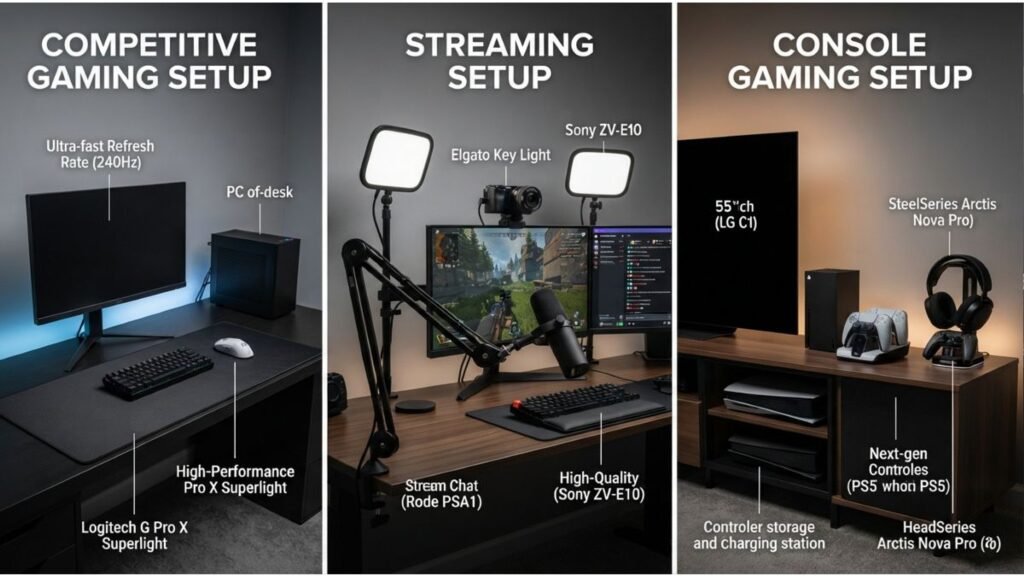
Competitive Gaming Setup
Competitive players usually prioritize speed, consistency, and minimal distractions.
Useful accessories may include:
- Large mouse surfaces.
- Cable management solutions.
- Monitor positioning tools.
- Headphone storage.
- Minimal desk organization systems.
The focus is creating an environment where every important tool is easily accessible.
Workspace organization is only one part of competitive performance. Factors such as accuracy and control also depend on understanding gaming mouse technology and how peripherals respond during gameplay.
For competitive gaming, even small improvements in workspace organization can make the overall experience more consistent.
Streaming and Content Creation Setup
Gaming creators often need a workspace that supports both gameplay and production.
A streaming-focused desk may require:
- Microphone arms.
- Camera mounts.
- Lighting equipment.
- Audio organization.
- Additional storage.
Unlike a standard gaming setup, creators need accessories that support communication and content production.
The desk becomes both a gaming environment and a recording workspace.
Console Gaming Desk Setup
Console users often have different accessory needs compared with PC gamers.
Common requirements include:
- Controller storage.
- Charging stations.
- Headset organization.
- Remote storage.
- Display arrangement.
A well-organized console setup reduces the time spent searching for accessories and keeps frequently used equipment ready.
How to Choose Gaming Desk Accessories Based on Your Needs
Start With Problems, Not Products
A common mistake is buying accessories because they look impressive rather than because they solve a problem.
A better approach is asking:
- What makes my current setup inconvenient?
- What creates frustration during use?
- What takes too much time to organize?
- What affects comfort?
Examples:
Problem:
Too many cables on the desk.
Solution:
Cable management accessories.
Problem:
Limited desk space.
Solution:
Monitor arm or vertical storage.
Problem:
Headset has no dedicated location.
Solution:
Headphone stand.
This approach creates a more efficient setup without unnecessary additions.
Essential Accessories vs Optional Additions
Not every gaming desk accessory provides the same level of value. Some additions solve everyday problems and improve how users interact with their workspace, while others mainly focus on appearance and personalization.
Essential accessories usually address practical needs such as organization, comfort, and usability. Examples include cable management solutions, desk mats, monitor positioning tools, and storage options for frequently used equipment.
Optional additions are often related to customization and aesthetics. RGB lighting, decorative items, and themed accessories can enhance the visual identity of a setup, but they are usually less important than improvements that make daily use easier.
A balanced gaming workspace usually starts with functional upgrades before adding decorative elements.
Prioritize Daily-Use Improvements
The most valuable gaming desk accessories are usually the ones used every day because they solve recurring problems related to comfort, organization, and workspace efficiency.
High-impact categories often include:
| Accessory Category | Main Benefit |
|---|---|
| Cable management | Cleaner and easier maintenance |
| Desk mat | Consistent surface and protection |
| Monitor arm | Better positioning and more space |
| Headset stand | Better organization |
| Storage accessories | Easier access to equipment |
A decorative accessory may improve appearance, but functional accessories usually create a stronger long-term impact.
Common Gaming Desk Accessory Mistakes
Adding Too Many Decorative Items
A gaming desk should support gaming first.
Too many decorations can:
- Reduce usable space.
- Make cleaning difficult.
- Create visual distractions.
A balanced setup uses decoration to complement functionality.
Ignoring Cable Management
Many users upgrade expensive equipment while leaving basic organization problems unresolved.
Poor cable management can make even high-end setups appear unfinished.
Building organization early makes future upgrades easier.
Choosing Accessories Without Measuring Space
Desk dimensions matter.
Before adding accessories, users should consider:
- Available surface area.
- Monitor size.
- Keyboard width.
- Mouse movement space.
- Storage requirements.
An accessory that works in a large gaming room may not fit a compact desk.
The Future of Gaming Desk Accessories
Smart and Connected Accessories
Gaming environments are becoming more connected.
Future desk accessories may include:
- Smart lighting integration.
- Automated workspace adjustments.
- Better device synchronization.
- More modular designs.
As gaming ecosystems expand, accessories will increasingly work together rather than operate as separate components.
Research organizations such as IEEE study advances in technology and human interaction, including how connected devices continue changing the way people interact with digital environments.
More Focus on Hybrid Workspaces
Many gaming desks now serve multiple purposes.
The same workspace may support:
- Gaming after work.
- Online meetings.
- Creative projects.
- Learning.
This shift is increasing demand for accessories that combine gaming aesthetics with professional functionality.
Final Thoughts
Gaming desk accessories are not simply decorative additions. The right accessories improve organization, comfort, and the way users interact with their entire setup.
A well-designed gaming workspace starts by identifying real problems and choosing solutions that improve daily use. Cable management, ergonomic positioning, storage solutions, and thoughtful customization often create a bigger impact than adding more equipment.
As gaming setups continue evolving, accessories will play an increasingly important role in creating flexible environments that support both entertainment and productivity.
FAQ: Gaming Desk Accessories
What are gaming desk accessories used for?
Gaming desk accessories are used to improve organization, comfort, and functionality in a gaming workspace. They can help manage cables, improve equipment placement, create better ergonomics, and personalize the overall setup.
Are gaming desk accessories necessary for a gaming setup?
Gaming desk accessories are not required to play games, but they can improve the overall experience. Accessories become more valuable when they solve specific problems such as limited space, poor organization, or discomfort.
What gaming desk accessories improve organization the most?
Cable management tools, headset stands, storage solutions, and monitor arms usually provide some of the biggest organization improvements because they reduce clutter and create more usable desk space.
Do gaming desk accessories improve gaming performance?
Most accessories do not directly increase hardware performance. However, accessories that improve comfort, organization, and accessibility can help create a more consistent gaming environment.
How should beginners choose gaming desk accessories?
Beginners should start by identifying problems with their current setup. Choosing accessories based on actual needs is usually more effective than purchasing items only because they are popular or visually appealing.
What gaming desk accessories should beginners get first?
Beginners should start with accessories that solve common workspace problems. Cable management tools, a quality desk mat, proper monitor positioning, and storage solutions are usually more useful than decorative additions. The best approach is to improve organization and comfort first, then add customization features based on personal preferences.
What are the most important gaming desk accessories for small desks?
For smaller desks, space-saving accessories are usually the most useful. Monitor arms, compact storage solutions, cable management tools, and multifunctional accessories can help maximize available space.